Free AI Coding Models: The OpenCode + OpenRouter + Kilo Code Combo

Use free quotas from OpenCode, OpenRouter, and Kilo Code to call AI coding models in VS Code for free.
The article introduces a free AI coding setup combining OpenCode, OpenRouter, and Kilo Code, pooling each platform's free model quota into a single IDE. You register on the two web platforms, filter free models, generate API Keys, and paste them into the Kilo Code extension in VS Code, then pick a model and code—no local client needed. Each platform's Key must go to its matching provider, or you'll get errors. The author used a chat model to rank the free models and picked Laguna S 2.1. It suits budget-conscious students and indie developers, but stability depends on each platform's policies.
Want to code with the latest AI models without paying for a subscription or hitting usage caps? A YouTube creator shared a free combo built on three platforms—OpenCode, OpenRouter, and Kilo Code—whose core idea is to pool the free model quotas each platform offers into a single IDE.
The Overall Approach
This isn't a single product but a workflow that chains together free resources from three independent platforms: first use the two web-based platforms, OpenCode and OpenRouter, to get free model access and API Keys, then paste those Keys into the Kilo Code extension in VS Code, and finally pick a model and start coding right inside the editor. The author stresses that you don't need to download OpenCode's terminal program or desktop app—avoiding local system resource usage—and that everything can be configured in the browser.

The Role of Each Platform
OpenCode: The First Gateway to Free Models
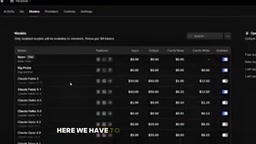
On the OpenCode website, sign up with an email or Google account and you're logged in within seconds. The author's approach is to filter the model list for free models, such as DeepSeekAd V4 and GLM 5.3, which he rates highly. He emphasizes using only free models and not needing to install any client locally.
What Are API Keys and "Providers"?
An API Key is a string generated by a platform that acts as an identity credential when a program calls a model service: the client sends it along with a request, and the server uses it to identify the caller, meter usage, and enforce quotas. A provider in Kilo Code, meanwhile, abstracts "a source of model service," with each provider corresponding to its own endpoint and authentication scheme. That's why a Key generated for one platform can only be entered under its matching provider entry—mixing them up sends requests to the wrong endpoint and fails authentication, which is the technical reason the article repeatedly stresses "each platform gets its own Key."
OpenRouter: The Source of NVIDIA Models
OpenRouter also requires an account first (Google, email, GitHub, and other login methods are supported). Once on the platform, switch the model page to table view and filter for free models; the Nemotron series appears at the top of the list, which the author says are NVIDIA's latest models. This platform is the second model source in the combo.
Kilo Code: The Unified Calling Layer Inside VS Code
The third piece isn't a standalone website but an extension installed in VS Code (or Anti-Gravity, which the author also mentions). Search for kilo in the extension marketplace to find and install it, and a chat-style panel appears in the sidebar. The author points out that Kilo Code itself also offers several free coding models (he saw four on the page)—in other words, each of the three platforms has its own pool of free quota.
What Are VS Code Extensions and Anti-Gravity?
VS Code is Microsoft's open-source code editor, and its extension mechanism lets third parties inject sidebar panels, commands, and language services as plugins; Kilo Code runs in exactly this way, which is why it can handle conversations and generation in the same window where you write code. Anti-Gravity is Google's AI-first editor, built on the same VS Code extension ecosystem—the article lists it alongside VS Code to show the extension isn't tied to a single editor. This "call from inside the editor" approach eliminates copying and pasting code back and forth between the web and the IDE, and it's also what makes it possible for the combo to pool quotas from multiple platforms in one place.
Key Steps for Configuring API Keys
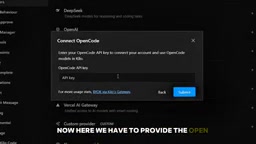
Configuration is where this whole process is most likely to go wrong. In Kilo Code's settings, go to providers, expand "show more providers," search for OpenCode first, paste in the API Key generated from your OpenCode account page, and submit. An "OpenCode connected" message means the connection succeeded.
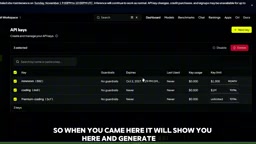
Next, add OpenRouter the same way: create a new API Key in the OpenRouter workspace, set a name and expiration (the author chose never to expire), copy the generated Key, and paste it back into Kilo Code. The author repeatedly reminds you of one rule: each platform only takes its own Key—an OpenCode Key can't be used for OpenRouter, and vice versa, or you'll get an error. This is also the main reason many people's setups fail.
How to Pick Models Suited to Coding
Together, the three platforms offer a considerable number of free models. The author's approach is to collect the names of the free models from each platform and hand them to a chat model (he used DeepSeek) to filter out the top five best suited to coding. His results: Laguna S 2.1 in first place, followed by Nemotron and Nemotron 3.5 Super VL, then DeepSeek V4 in fourth, and GLM 5.3 Flash in fifth. Back in VS Code, he actually chose Laguna, the top pick, citing its speed and suitability for coding.
It's worth noting that this ranking comes from a single source and is a subjective conclusion from the creator's own testing, not an authoritative benchmark; model names and availability also change with platform policies, so when actually using them, refer to each platform's current list.
The Reliability of Model Names and Rankings
The names in the article—Laguna, Nemotron, DeepSeek V4, GLM 5.3—mix naming systems from different vendors: Nemotron is NVIDIA's model family, while DeepSeek and GLM (Zhipu) come from Chinese teams, and the specific vendors and version information behind the other names aren't consistent. Models on free aggregation platforms often appear as aliases or resold access, and the actual weights behind the same name may be adjusted or taken offline at any time. So a Top 5 list like this is closer to "a list of currently available candidates" than a long-term citable performance conclusion; when actually choosing a model, rely on your own small-sample tests on your specific tasks.
Who This Combo Is For
Judging by the workflow, it suits students and individual developers on a tight budget who want to try out multiple AI coding models first—the author himself mentions using these tools to build websites, work on projects, or do coursework. The trade-off is a fairly involved setup process, and since free quotas and model availability depend entirely on each of the three platforms' own policies, stability and long-term sustainability aren't guaranteed. If you just want to get started quickly, calling Kilo Code's own built-in free models directly is the shortest path in this chain.
Related articles

AI SDK Workflow 2.0.95 Update: Stream Transform API Removed
AI SDK Workflow 2.0.95 removes the experimental_transform option from WorkflowAgent.stream() and the StreamTextTransform type export, as stream transforms cannot reliably cross workflow step boundaries. This article covers the reasons, migration points, and upgrade advice.

AI SDK Vue 4.0.163 Patch Released: Full Dependency Chain Update
AI SDK Vue releases patch 4.0.163, synchronously upgrading dependencies including ai@7.0.163 and @ai-sdk/provider-utils@5.0.75. This article analyzes the practical impact of this dependency chain update.

AI SDK Voyage 2.0.75 Patch Release: What the Dependency Chain Update Means
AI SDK's Voyage Provider releases patch version 2.0.75, syncing only @ai-sdk/provider and provider-utils deps. We analyze the impact and upgrade guidance.