Free and Offline! Run Large Models Locally with Ollama, One-Click Access to DeepSeek/Qwen

The 180k-star open-source project Ollama lets ordinary computers run large models for free offline, with a built-in graphical interface.
Ollama is an open-source project with 180k stars on GitHub. It is completely free under the MIT License, supports Windows, Mac, and Linux, and has a built-in graphical chat interface so no command line is needed. Users only need to select models such as Qwen, DeepSeek, or Gemma from the model list; first use triggers automatic download, after which they can chat, write copy, translate, summarize documents, and even write code like web-based AI, and can also drag documents into the chat box for direct processing. On the hardware side, 8GB of memory can run small models with 4B to 8B parameters, and a dedicated graphics card or Apple chip makes it faster. Its core value lies in fully local inference, no data upload, and offline usability, making it suitable for students, office users, programmers, and privacy-conscious people, though small models fall short of flagship cloud models in complex reasoning.
Why Running Models Locally Is Worth Attention
Cloud AI services are convenient, but conversations have to be uploaded to someone else's servers, which always poses a privacy risk. Ollama's approach is simple: download the model to your own computer, run inference entirely locally, and use it even without an internet connection. For users who need to handle sensitive documents or simply don't want to pay for API calls, this path is directly appealing.
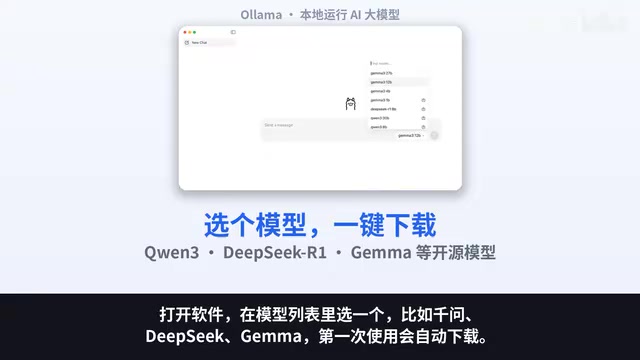
According to a demonstration by a Bilibili creator, Ollama now has a built-in graphical chat interface. After opening the software, just select a model from the list and start chatting; the first use will automatically download the model file. The whole interaction is almost no different from web-based AI—chatting, writing copy, translating, summarizing articles, answering questions, and even helping you write code.
What Are "Parameters" and Model Scale
The 4B, 8B, Qwen, DeepSeekAd, and Gemma mentioned repeatedly in the article all point to the concept of "parameters" in large models. Parameters are the number of learnable weights in a neural network, usually expressed in B (Billion): 4B means about 4 billion parameters, and 8B means about 8 billion. The more parameters, the "smarter" the model usually is and the more complex reasoning it can handle, but the higher the memory and compute requirements. As a rough estimate, the memory needed to run a model is about "number of parameters × bytes per parameter." After quantization and compression, each parameter may occupy only 0.5–1 byte, so an 8B model after quantization roughly needs 5–8GB of memory. This explains why 8GB of memory can only run small models of 4B–8B, and why Qwen, DeepSeek, and Gemma are all open-source model series from their respective vendors, covering different parameter scales so users can choose according to their hardware conditions.
How Simple Is the Getting-Started Process
The traditional process of deploying large models locally involves environment configuration, dependency installation, and command-line parameter tuning, which is not very friendly to non-technical users. Ollama wraps all of this up.
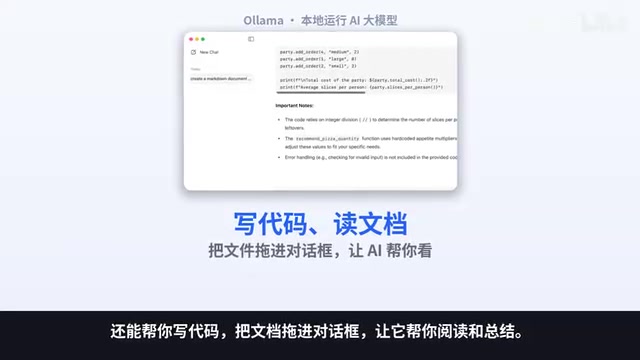
Open the software, select a model such as Qwen, DeepSeek, or Gemma from the model list, and it will automatically download on first use; afterward, you can chat just like using web-based AI. The creator specifically mentioned that you can drag documents directly into the chat box and let the model read and summarize them for you—this interaction design lowers the barrier to processing long documents.
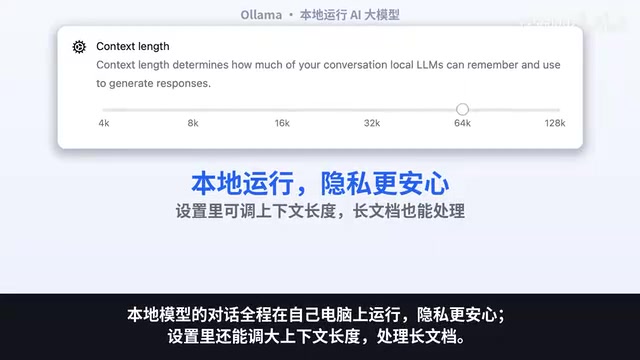
In the settings, you can also increase the context length to handle longer documents. This is a practical option for users who need to analyze reports and papers, though the larger the context, the more memory it consumes.
Is the Hardware Threshold Really High
This is the most realistic issue for local deployment. The creator's reference is: 8GB of memory can run small models with 4B to 8B parameters; if you have a dedicated graphics card or an Apple chip, it will be faster.
In other words, mainstream thin-and-light laptops and desktops can basically run it, with only differences in response speed. Small-parameter models are sufficient for tasks like writing copy, translation, and summarization, but when it comes to complex reasoning or long multi-turn conversations, their capability ceiling is noticeably lower than cloud-based large models. This needs to be expected in advance—the core value of running locally lies in privacy and zero cost, not in matching flagship cloud models.
Quantization and Context Length
The reason local models can run on ordinary computers lies in "quantization" technology. Quantization compresses model weights from high precision (such as 16-bit floating point) to low precision (such as 4-bit integers), thereby greatly reducing memory usage and computation, at the cost of slight performance loss. The models Ollama provides by default are mostly 4-bit quantized versions, which is also the prerequisite for running an 8B model with 8GB of memory. Another concept is context length, i.e., the number of tokens the model can "remember" at one time (a token is the basic unit after text is split, roughly equal to half to one Chinese character or word). The longer the context, the larger the documents it can handle, but the computation and memory usage of the attention mechanism increase with length, which is why the article mentions that "the larger the context, the more memory it consumes."
Who Is Suited to Use Ollama
Students, office workers, programmers, and privacy-conscious users are the groups the creator named. Specifically: programmers can use it for code completion and local debugging; office users can use it to process documents that are inconvenient to upload; and students can get AI assistance without a stable network or with a limited budget.
Official installers for Windows and Mac are ready, and the download links are in the video description and pinned comment.
Overall, Ollama's positioning is not to replace cloud AI, but to provide an offline, free, and privacy-controllable alternative path. For users who want to experience local AI without dealing with technical details, it lowers the barrier to a fairly low level.
Background Supplement
What the MIT License Means
The article mentions that Ollama is open-sourced under the MIT License, which is a very permissive software license: anyone can use, modify, and distribute the software for free, even for commercial purposes, as long as the copyright notice and license notice are retained. For ordinary users, this means downloading and installation are completely free, with no need to worry about trial periods or feature restrictions; for developers, they can confidently integrate Ollama into their own products. Note that the MIT License covers the Ollama software itself, not the individual models it downloads—different models have their own licenses (such as Apache 2.0, custom Gemma terms, etc.), and model authorization still needs to be confirmed separately before commercial use.
Related articles

GPT-Image 2.6 Dual Release: A Double Upgrade in Speed and Precision
OpenAI releases GPT-Image 2.6 with Flare for faster generation and Sunburst for complex prompts and dense infographics. API adds markup editing, SVG, and GIF support.

Robert Caro: How to Get Insiders to Talk and Uncover the Hidden Logic of Johnson's Money Politics
Pulitzer winner Robert Caro shares how he interviewed John Connally, revealing how pressing on Johnson's funding annotations got insiders to explain political money logic.
Showing This Video to Someone in 2014: The Stunning Evolution of AI Video
From the viral Reddit post "Show this AI video to someone from 2014," we look back at a decade of AI video generation's leap from academic research to indistinguishable reality, analyzing the cognitive impact and trust challenges amid the flood of synthetic content.