Free Tool Code Review Graph Saves Up to 49x Tokens for Claude Code

Code Review Graph uses a local code relationship graph to prune context for AI coding assistants, saving up to 49x tokens.
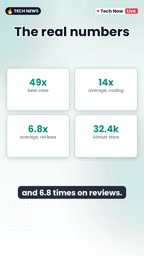
Code Review Graph is a free tool that tackles excessive token consumption by AI coding assistants like Claude Code and Cursor on large codebases. It statically analyzes dependencies among functions, classes, and imports to build a local code relationship graph. When assessing a change's impact, the model queries the graph first and reads only affected files, greatly compressing context. Self-tests show up to 49x savings, averaging 14x on coding tasks and 6.8x on code review. It offers limited help for small single-file changes and scales in value with codebase size. Installation is lightweight and it works with Claude Code, Codex, Cursor, and more—but savings data is from the project itself and should be verified on your own repository.
Running AI coding assistants on large codebases often comes with painfully high token consumption. A free tool called Code Review Graph claims it can reduce Claude Code's token usage to as little as 1/49 of the original. It doesn't rely on magic—instead, it draws a "relationship map" of the codebase so the model only reads the files it actually needs.
What Problem Does It Solve
Tools like Claude Code and Cursor often need to stuff a large amount of context into the prompt when handling coding tasks. The larger the codebase, the more likely the model is to indiscriminately pull in irrelevant files, and token usage naturally balloons. Code Review Graph's approach is straightforward: first figure out how functions, classes, and imports are connected, and store that connection graph locally. When Claude needs to assess the impact scope of a change, it queries this graph first, then decides which files to read.

This is essentially giving the model a local indexer instead of making it flip through the entire repository from scratch every time. For projects with hundreds or thousands of files, the context window you save is money and time saved.
Relationship Between Context Window and Tokens: The context window is the upper limit on text length that a large language model can hold in a single inference, typically measured in tokens. Tools like Claude Code concatenate code files, conversation history, system instructions, and more into a prompt sent to the model, so the more files read in, the more tokens are consumed. Once approaching the window limit, the model may be forced to truncate information or miss critical context; meanwhile, most APIs charge by token, so longer context means higher cost. Code Review Graph pre-filters files through the relationship graph, essentially keeping only high-information-density content within a limited window—controlling costs while improving answer quality.
Code Relationship Graph (Dependency Graph): A code relationship graph is a directed graph structure where nodes represent functions, classes, modules, or files, and edges represent dependencies such as calls, imports, and inheritance. Construction typically involves parsing syntax trees or import statements and persisting "who references whom" into a local index. When a developer modifies a function, the tool can quickly find all callers and affected files by traversing the graph's reverse edges without scanning the entire repository. This static analysis doesn't depend on model inference—it's fast and reusable, serving as the data foundation for context pruning.
Measured Data: Up to 49x, with Several-Fold Averages
According to the tool project's own tests, token usage drops to 1/49 of the original in the best case. That number is eye-catching, but the averages are more useful as a reference: 14x savings on coding tasks and 6.8x savings on code review tasks on average.

It should be noted that these figures come from the project's own testing, not an independent third-party benchmark. But even with some discount, an average two-digit compression ratio is enough to show that the "query the graph first, then read files" approach is effective. What it fundamentally does is context pruning, not changing the model's inherent capabilities.
Small Changes May Not Benefit
The tool isn't a panacea. For small changes involving only a single file, Code Review Graph may not help much—there are already few files, so reading the graph or not makes little difference.
This also makes intuitive sense: the value of a relationship graph scales with codebase size. If your project only has a few files, it's simpler to just let the model read everything. The real beneficiaries are repositories with many modules and deep dependencies—especially scenarios where changing one place affects many others.
Context Pruning: Context pruning refers to proactively removing text that is irrelevant or redundant to the current task before sending it to the model, keeping only the content most likely to affect the result. Common strategies include sorting by file relevance, truncating by dependency distance, deduplication, and summary compression. Code Review Graph falls under structured pruning based on static dependency relationships: first determine the impact scope of a change, then pull only files within that scope. Compared with simple keyword retrieval, dependency graphs can capture implicit cross-file associations, reducing the risk of missing critical code—but pruning effectiveness depends heavily on the accuracy and freshness of the graph itself.
Installation and Compatibility
Installation is lightweight: run code review graph install with pip, then execute build. It's not exclusive to Claude Code—according to the original introduction, it's also compatible with tools like Codex and Cursor.

This cross-tool compatibility means that if you switch between multiple AI coding assistants, you don't need to maintain a separate context strategy for each tool. The locally stored map can be reused, which also has potential value for team collaboration scenarios—though the original material doesn't elaborate on the specific mechanism for team sharing, so no excessive inference is made here.
pip and the build step: pip is Python's package management tool, and pip install is used to download and install third-party libraries or command-line tools from software sources. The installation command in the article should actually look like pip install code-review-graph, followed by code-review-graph install to complete tool registration, then running the build subcommand to scan the codebase, parse dependencies, and generate the local relationship graph. Build is typically an offline one-time indexing process; afterward, each task only needs to query the existing graph. After codebase changes, a rebuild or incremental update is needed—otherwise the graph becomes stale and the pruning basis becomes inaccurate.
A Calm Observation
Token savings are real benefits, but "up to 49x" is the best case and doesn't represent everyday typical levels. The averages of 14x and 6.8x are more worth using as expected references. Additionally, building and maintaining the relationship graph itself has costs—when the codebase changes frequently, the graph needs updating. This overhead isn't mentioned in the original text but is worth noting in practice.
For teams with large codebases, this free tool offers a low-cost way to experiment: install it, run build once, and compare token bills on real tasks—more reliable than any promotional number.
One-line Summary
Code Review Graph uses a local code relationship graph to help AI coding assistants prune context, saving up to 49x tokens.
Paragraph Summary
Code Review Graph is a free tool designed to address the problem of excessive token consumption by AI coding assistants like Claude Code and Cursor on large codebases. It uses static analysis of dependencies among functions, classes, and imports to build and store a code relationship graph locally. When the model needs to assess the impact of a change, it first queries this graph to determine affected files, then reads only those files, greatly compressing context. The project's own tests show that in the best case token usage drops to 1/49 of the original, with average savings of 14x on coding tasks and 6.8x on code review tasks. The tool offers limited help for small single-file changes, and its value increases with codebase size. Installation is lightweight, and it's compatible with Claude Code, Codex, Cursor, and other tools—but the savings data comes from the project's own testing, so actual results need to be verified against your own repository.
Related articles

DSH + Ollama Local LLM Deployment in Practice: Free Chat with Da Fei Yu
Bilibili creator tests DSH + Ollama local LLM deployment end to end: Ollama install, Xunlei-accelerated downloads, ModelScope GGUF model import, DSH custom API address setup, and a comparison of Qwen 3.5 4B, 8B, Gemma, and other models on 8GB VRAM, with advice on choosing local deployment vs. API calls.

Tested: A $899 Mac Mini vs. a $200/Month AI Subscription
Real-world test of whether an M4 Mac mini can replace a $200 AI subscription: 16GB can't fit large models, and both speed and quality fall short—but privacy, no caps, and near-zero running costs make it an ideal host for an always-on agent. Includes buying advice per configuration and money-saving strategies.

RSTGameTranslation: Real-Time OCR Localization + Offline Translation with Local LLMs
RSTGameTranslation is an open-source real-time Windows game translation tool: OCR for English, Japanese, and Korean with Chinese overlays in place, plus Ollama or LM Studio local LLM offline translation and Whisper speech transcription for games, manga, and visual novels.