From Command Line to MCP: Two Paths for Connecting Existing Scripts to AI Assistants

Using a read-only report inspector as an example, it compares command-line and MCP tool integration paths and distills reusable adapter design principles.
Using inspect_report, a read-only tool that checks CSV report structure, as a teaching case, the article explains that the key to letting an AI assistant call an existing script is not a thin wrapper but first fixing the input and result contracts and then designing an adapter to isolate integration differences. The command-line path separates parameters with an argv list, and the adapter translates exit status and stdout JSON into a unified local receipt; the MCP path discovers tools via tools/list, builds a server identity registry, and correlates results using dual IDs—local invocation ID and protocol request ID. The article further uses boundary tests such as empty files, unclosed quotes, nonexistent files, timeout cancellation, and late retries to emphasize that "getting a report" and "the report finding problems" must be judged separately. It concludes with a migration question and selection advice: the two paths can coexist, and the choice depends on integration and maintenance conditions.
When you've already written a script to inspect reports, how do you let an AI assistant call it directly? This isn't just a matter of wrapping it in a thin shell—you need to design an adapter layer so that differences in tool entry points don't affect the higher-level task logic. Based on a teaching case—a read-only tool for inspecting CSV reports (inspect_report)—this article compares command-line and MCP integration approaches and offers reusable design principles.
Fix the Result Contract First, Then Talk About Integration
Before comparing the two paths, you must clarify what the tool's output means. In the teaching case, the inspector returns three fields: headers (columns), record count (record_count), and parse errors (parse_errors). A normal quarterly report sample returns two column names, three paid records, and empty parse errors.
But this return sample can only answer questions about report structure: even if the file contains three different orders, it might still parse into two columns and three rows. Whether amounts retain two decimal places and whether order filtering is correct still require full task validation. Therefore, we name this read-only capability inspect_report, strictly limit its responsibility to "inspecting report structure," and stipulate that the input is the same controlled read-only snapshot (the host records the snapshot identity and file digest). Only then are the two integration paths comparing the same thing.
Command-Line Path: argv Separates Parameters, Adapter Translates Execution State
How a Request Becomes a Process Call
The model issues a tool request to inspect a specified CSV, the host generates a local invocation record, and hands it to the command-line adapter. The adapter confirms the path belongs to the approved snapshot and prepares to launch the fixed inspection program. The key design lies in parameter passing: put the program, input option, report path, and machine-output option into a list (argv) one by one. Even if the report is in a directory with spaces, the full path still occupies one position, and the program receives exactly that one filename. The model only needs to provide the path; it doesn't need to assemble a command string or handle quotes.
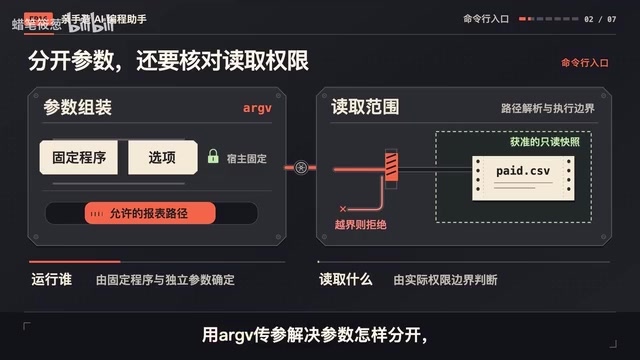
A fixed entry point makes the interface easy to check: the only variable is the allowed report path; the program and options are determined by the host. Parameter separation solves "how to pass," while path resolution and the actual execution boundary solve "is it authorized to read." Only when both are implemented can you know who actually runs and what is read on a given call.
argv is the array of arguments a process receives at startup, where element 0 is usually the program name and subsequent elements are the parameters in order. The operating system does not concatenate argv into a single string and re-split it, so each element remains independent even if it contains spaces. This is exactly why the article emphasizes "the full path occupies one position": if you concatenate the path into a command string and hand it to the shell for parsing, a directory with spaces would be incorrectly split into multiple arguments. In secure design, the host should launch the process directly with an argv list, avoiding the shell; otherwise, a path provided by the model could inject additional commands. The adapter in the article fixes the program and options, allowing only the path to vary, shrinking the attack surface to a single controlled parameter. Although there is no process argv in the MCP path, the input schema also fulfills the validation duty of "parameter separation," making the two equivalent at the contract level.
Output Contract and the First Translation
After the program runs, the convention is that standard output holds a JSON document and standard error holds diagnostic information. The adapter collects the exit status, parses the JSON, and then verifies the types and meanings of the three fields. Here the first translation happens: converting the execution state of a command-type program into the local tool receipt that the assistant always uses. If startup fails, an execution failure is recorded; if the output conforms to the contract, the data enters the receipt's data, and the invocation ID is returned accordingly, so the upper layer can hand it back to the original tool call.
A small change suitable for testing the interface: add a welcome message to the inspection program, printed before the JSON. It feels friendly when a human reads the terminal, but the adapter should detect a decoding failure—because the convention that standard output contains only one JSON document has been broken. The fix is to put the diagnostic text back into standard error and keep the machine result intact. This is an output interface problem; the report file is not broken.
MCP Path: Discovery, Invocation, and ID Mapping
Tool Discovery and the Registry
Switching to MCP, the task function and that three-field contract stay in place; only the MCP adapter is swapped in. The client obtains the tool list via tools/list, finds inspect_report, and reads its name, description, and input schema. The host builds a registry from this, specifying which server's which tool the local inspection entry maps to.
Why is a server registry needed? Suppose a second service is later integrated and it also has a tool with the same name; the original entry should still point to the selected inspector. By storing the server identity together with the original name, calls won't silently switch to another implementation due to list order changes. The local name the model sees can remain stable, while the mapping behind it can be verified.
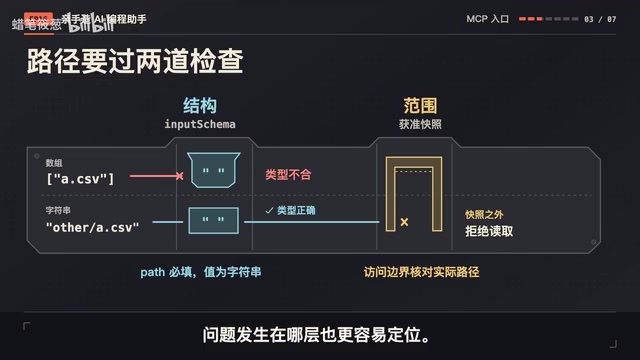
The input schema states that the path is a required string, which helps detect missing parameters or type errors. Two typical errors are handled at different layers: if the model writes the path as an array, it is caught at the schema validation layer; if the path looks like a normal string but points outside the snapshot, it goes to the access-check layer. Separating structural issues from scope issues makes later troubleshooting clearer.
MCP (Model Context Protocol) is an open protocol for AI assistants that unifies discovery and invocation interfaces between hosts and external tools/data sources. Its core primitives include tools/list (enumerate available tools with their name, description, inputSchema) and tools/call (invoke by name and arguments); the transport layer can be standard input/output or HTTP, etc. The protocol carries a version number, and both sides must negotiate a compatible version; otherwise, message formats and capabilities may be inconsistent. The article emphasizes registering "server identity + original name" together because MCP tool names are unique only within a single server; different servers can offer tools with the same name. Mapping by name alone would let list order or server additions/removals change the actual implementation invoked. Understanding this is key to seeing that the registry is not redundant bookkeeping but the layer that decouples "stable local entry" from "variable remote implementation."
Dual IDs and Result Return
After determining the input, the client submits the tool name and arguments via tools/call; protocol version declaration and capability handling are left to the client implementation for the corresponding version. During integration, fix the version both sides support so that tool discovery and invocation follow the same specification.
After the request is sent, which task should the result return to? The host has a local invocation ID, and the MCP message has a protocol request ID. The adapter stores the association between the two: upon receiving a response, it first finds the protocol request, then returns to the original local invocation. This is like putting two labels on a question—one circulates inside the assistant, the other pairs the client and server. The two IDs serve different purposes, and you cannot assume they are always equal.
The MCP server can provide Structured Content in the result, containing the agreed headers, record count, and parse errors. The adapter checks whether the protocol result is complete, whether it reports a tool execution error, and then validates the data; only after passing does it form the same local return value as the command-line path. The raw MCP response is kept separately and not thrown directly to the upper layer.
Structured Content is a field in MCP tool results that carries structured data, alongside model-facing text content, so the host can perform programmatic validation against a schema rather than extracting fields from natural language. The article uses it to carry the three-field contract of headers, record count, and parse errors, aligning the MCP path semantically with the command-line path's JSON standard output. The adapter should first check whether the protocol-layer result is complete and whether isError is set (indicating tool execution failure), then validate whether the structured data conforms to the contract, and only then convert it into a local receipt consistent with the command line. The raw response is stored separately rather than passed up directly so that upper-layer task logic does not depend on specific protocol fields; when the protocol is upgraded or the server is changed in the future, only the adapter needs modification, while the contract and task function remain unchanged.
Boundary Tests After the Two Paths Converge
The upper layer receives only the local invocation ID and data conforming to the shared contract. If the code needs to display headers, it reads headers; if it needs the record count, it reads the record count, and continues the same judgment flow. Underlying protocol fields and process exit statuses are interpreted by their respective adapters.
Test the contract with a few inputs: when there are only headers and no data rows, return those headers, a record count of 0, and empty parse errors; for a completely empty file, the headers are an empty list. Both can be read to the end, but the former preserves the empty-result header structure required by this quarter's task.
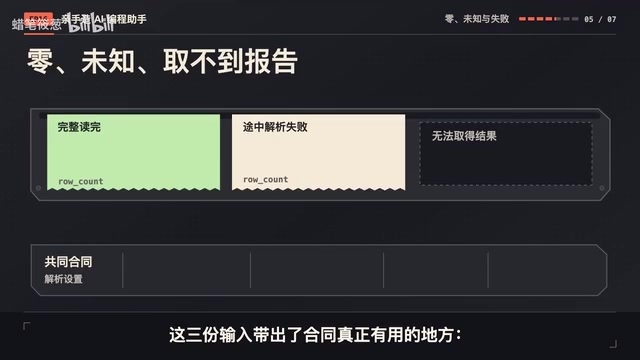
When the end of the file is changed to an unclosed quote, the strict parser reports an error. Two data rows have been read so far, but the complete record count should be written as "unknown," not 2. The headers already read are preserved, and parse problems go into the error list. The upper layer can display the problems found by inspection without mistaking partial progress for the count of the whole report. The three states—0 records, total count unknown, and result unavailable—must have consistent meanings across both paths. CSV dialect, UTF-8 and BOM handling, strict parsing, and input size limits are also fixed uniformly in the shared contract.
When the path points to a nonexistent file, the inspector has not obtained the report and should return a tool execution error. The command-line adapter classifies based on the execution result, while the MCP adapter reads the isError flag in the result. Both ultimately let the upper layer know that the path or file status needs to be checked, rather than modifying the CSV quote format.
If the tool name in an MCP request is changed to one that doesn't exist on the server, the protocol has not completed a valid tool invocation, and the registry mapping or request needs to be checked. This is a failure like the nonexistent file, but the next step differs. The local error retains the error category and original cause so the assistant can continue in the right direction. Conversely, a file with an unclosed quote has obtained a valid inspection report under this lesson's contract; the report just contains parse errors, so local OK is true while parse errors in data remain non-empty. The upper layer judges "did we get a report?" and "what did the report find?" separately, which explains what to do better than a single red/green light.
Cleanup Boundaries for Timeout, Cancellation, and Retry
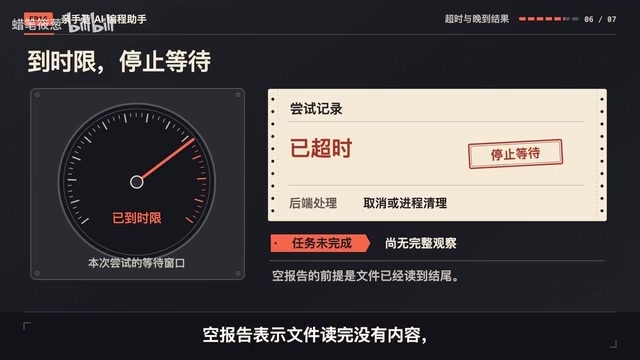
The set time limit is reached and the inspection still hasn't returned. The adapter counts this attempt as a timeout, stops waiting, and handles cancellation or process cleanup according to the backend. At this point the upper layer cannot obtain a complete observation and retains an incomplete state. An empty report means the file was read to the end with no content and must not be used to fill in a timeout.
On the command-line path, the host must reclaim the process and output it started; if the program created descendant processes, verify how far the cleanup extends. On the MCP path, cancellation is handled according to the actual protocol version and transport; on a shared standard input/output channel, it must point to a specific request. The cancellation signal being sent and the other side actually stopping are states that need to be recorded separately.
Suppose one read-only retry is allowed. The second request has been sent, but the first result arrives late. The adapter locates the first attempt by its ID, records it as a late result, and treats it as canceled status, without using it to overwrite the second. If the two requests read different versions of the file, also label their respective input identities. The tool is read-only, so retrying won't modify the report twice, but the number of attempts, timing, and still-running attempts must be managed. If the first attempt continues computing in the background and you then start new inspections indefinitely, resources can still be exhausted. Therefore, give retries an explicit budget and handle the previous state before deciding whether to initiate a new attempt.
Timeout and cancellation have different meanings in the two paths and need separate modeling. In the command-line path, after a timeout the host must terminate the process tree it started and reclaim the standard output/error pipes; if the program spawned descendants, killing only the parent may leave orphans, so the cleanup coverage must be verified. In the MCP path, cancellation is a protocol message that must point to a specific request ID according to version and transport; on a shared standard input/output channel, cancellation signals and responses may interleave, so "cancellation sent" and "counterparty stopped" should be recorded as two independent states. During retries, also maintain an attempt budget and input identity (file version digest); late old results are reassigned by ID and marked as canceled, and must not overwrite new attempts. Distinguishing these states prevents mistaking a timeout for an empty report and avoids exhausting resources with infinite restarts.
A Migration Question: When the Command-Line Inspector Returns an Extra Field
The command-line inspector has been upgraded and returns a warning list in addition to the original three fields, while the MCP server has not yet been upgraded. If you continue using the same upper-layer task function, where should you make changes?
First look at the meaning of the original fields, then decide where the extra field should go. This version of the shared contract does not accept extra fields, so first register the new external structure, have the command-line adapter validate it, then extract the three still-compatible fields, and place warnings into an additional diagnostic record. The upper-layer task function can remain unchanged. If the new version changes record_count to count only successfully read rows, even if the field name is the same, the semantics have changed; in that case, update the contract or reject the incompatible result.
Now switch capabilities: the inspector starts supporting automatic file repair. Today's read-only registration needs adjustment, and execution scope, side effects, and post-timeout verification all need to be redefined. The entry conversion approach can be reused, but the permitted actions must be reviewed anew for the new capability.
Selection Advice
Return to the original design: keep the input and result contracts first, then attach the two adapters separately. Both normal reports and failures return to the unified task logic. When you already have a stable local program, you can first evaluate the command-line approach; when you need to share discovery and invocation interfaces across MCP-supporting hosts, then evaluate MCP. The MCP server itself can also be launched by the host as a local subprocess—when using standard input/output transport, what is exchanged after startup is MCP messages, which is not mutually exclusive with a plain command-line entry point. A single tool project can provide both entry points. The choice depends on actual integration and maintenance conditions, not on an either-or decision. The key is that the meaning of the same report remains clear at all times.
Related articles
Oral Pancreatic Cancer Drug Hailed as Biggest Breakthrough in Decades
An oral pancreatic cancer drug is called the biggest breakthrough in decades, sparking Hacker News debate. We analyze the real weight of this claim and the distance to clinical availability.
DevWorkflow 5.0: From Idea to Launch with the AI Five-Step Method
DevWorkflow 5.0 is a Claude Code plugin that uses a five-step process to take AI-assisted development from idea to launch. It asks you before every decision, preventing AI from adding tables and fields on its own, keeping docs and code consistent, and stopping merges before tests are written. Supports multiple platforms and languages, for individual developers and small teams.

How Do Hermes Agent's .md Files Work? A Breakdown of the Core Mechanism
Explaining Hermes Agent's .hermes directory mechanism: user.md stores personal info, memory.md records details worth remembering, soul.md defines the Agent's personality. Learn how these pure Markdown files keep the Agent consistent across sessions.