From Principles to Practice: A Complete Guide to Understanding AI Agents and the ReAct Pattern

An Agent is essentially an LLM plus tools, buildable with a little code via the ReAct loop and a system prompt.
Starting from the limitation that LLMs cannot perceive or change the external environment, the article explains that an Agent is a combination of "LLM + tools," where tools give the model senses and limbs for reading/writing files and running commands. It then details the ReAct pattern—a four-step loop of Thought, Action, Observation, and Final Answer—and clarifies that the model outputs this format not because of training but because of the system prompt. Through a Qwen simulation and a real Agent project, it shows that prompts alone can make the model "act out" an Agent, but real usability requires code to execute tools and feed results back. Finally, it walks through the core code, noting that the main program centers on a while loop that calls the model, regex-parses actions, executes tools, and appends results to message history—emphasizing that the barrier to Agents lies in engineering, not the model itself.
Large language models can write code and solve logic puzzles, yet they cannot save that code to a file on their own, nor can they proactively inspect the projects already on your computer. This seemingly trivial limitation is precisely where the AI Agent was born. Based on a hands-on course by Bilibili creator "Haiwen," this article breaks down the essence of Agents, the ReAct operating pattern, and how to build a working Agent from scratch using a system prompt plus a small amount of code.
What Is an Agent: Giving LLMs Senses and Limbs
Large models (such as Qwen, DeepSeekAd) perform strongly at answering questions and generating text, but they cannot perceive or change the external environment. The creator gives an intuitive example: ask Qwen to write the code for a shoot-'em-up game, and it will generate the corresponding code—but writing that code into a file is still something you have to do manually. Conversely, if you want to add features to existing code, you must first manually copy the code to the model, or it simply cannot see it.
The solution is straightforward: install tools on the large model. Reading and writing files are tools, listing files is a tool, and running terminal commands is a tool. Tools are the LLM's "senses and limbs." With them, the model can look up existing files, write code, and run programs—all without human intervention. Assembling a large model and a set of tools into an intelligent program that can perceive and change the external environment—that is an Agent.
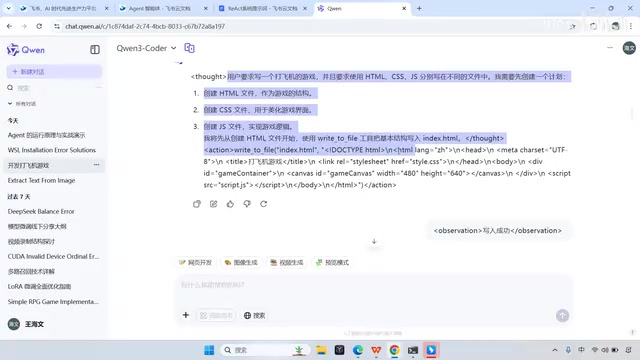
Agents come in many types. Coding agents (such as Cursor) are the most common, but there are also agents for making PPTs and for deep search. What they share is that behind each one is a "large model + tools" combination—only the toolset and the domain of expertise differ. The creator demonstrates Cursor executing a simple game-development task end to end: project structure creation, directory creation, and file generation are all done automatically; the user at most clicks a confirmation button, and finally just runs the index file to see the game.
There is an easily overlooked point here: the large model's inability to perceive the external environment is not a "defect" of the model that needs fixing—it is its operating boundary. The value of an Agent lies in using engineering means to push that boundary outward, moving the model from "answering questions" toward "completing tasks."
The ReAct Pattern: A Loop of Thinking, Acting, and Observing
Having understood what an Agent is, the next question is how it operates. The most widely used operating pattern today is ReAct—short for Reasoning and Acting. According to the creator, this pattern was first proposed in a paper from October 2022. Nearly three years on, it remains indispensable for understanding how Agents are implemented.
The ReAct flow can be summarized as a four-step loop:
- Thought: The Agent first analyzes the user's question and decides whether a tool needs to be called.
- Action: If needed, it calls the appropriate tool—for example, reading a file or writing a file.
- Observation: It examines the tool's execution result—for example, whether the file content was read successfully or the write completed.
- Loop or finish: Based on the observation, it continues thinking and judges whether another tool call is needed. Once the model decides it has enough information, it outputs the Final Answer directly and the process ends.
The creator specifically emphasizes memorizing the terms "Thought, Action, Observation, Final Answer," because when building an Agent later, the entire code logic revolves around these four steps.
One common misconception should be cleared up here: the model thinks before acting after receiving a question not because it was specifically trained to do so. Training has little to do with it—the secret lies mainly in the system prompt. The system prompt is sent to the model together with the user's question and specifies the model's role, operating rules, and environment information. For example, if you specify that the answer must contain two XML tags—one holding the user's question and one holding the answer—the model will follow that convention. To make the model respond in the ReAct pattern, the system prompt must be written more elaborately: describe responsibilities, provide the Thought/Action/Observation format, list available tools, and explain precautions.
The full title of the ReAct paper is ReAct: Synergizing Reasoning and Acting in Language Models, published by Shunyu Yao et al. in October 2022 and first presented at ICLR 2023. The paper's core insight is that when a large model does reasoning alone (such as Chain-of-Thought, CoT), it is prone to factual hallucination because the reasoning process is based entirely on the model's internal knowledge; whereas when it acts alone, it lacks planning toward the overall goal. ReAct interleaves the two, letting the model immediately obtain feedback by interacting with the external environment after each reasoning step, using real observations to correct the next step of reasoning. The paper validated the pattern on HotpotQA multi-hop question answering and on interactive decision-making tasks such as ALFWorld and WebShop, and it subsequently became the default paradigm for Agent frameworks such as LangChain and AutoGPT. Understanding the paper's starting point helps grasp why the "Observation" step in the ReAct loop cannot be omitted—it is precisely the engineering means of countering model hallucination.
A system prompt (System Prompt) is a special instruction passed separately from the user message (User Message) in a conversation API. It usually sits at the front of the message list; in OpenAI's Chat Completions interface it corresponds to the message with role "system." Unlike a user question, it has higher priority and global binding force, and the model is trained to prioritize the system prompt's settings when generating replies. A system prompt typically contains role definition, task boundaries, output format specifications, available tool descriptions, and safety constraints. In Agent scenarios, it is a lightweight way to "program" model behavior—without changing model weights, prompts alone can make the same model exhibit completely different behavior patterns. This is precisely the technical basis that makes "letting the model act out an Agent" in this article possible. Note that system prompts are not absolutely reliable; the model may forget instructions in long conversations, which is also why Agent engineering needs extra validation of output formats.
Hands-On Demo: Using a System Prompt to Make the Model "Act Out" an Agent
The creator runs a simulation with Qwen: copy a system prompt containing responsibility descriptions, format requirements, and a tool list to the model, then submit a request via a task tag. The model's answer changes immediately—it outputs Thought first, then Action. Because this is a simulated environment, the tools are not actually executed; the creator manually sends back the result "write succeeded," and the model continues to the next step of thinking, creating an HTML file, a CSS file, and a JS file, waiting for an observation result at each step, and finally outputting the Final Answer.
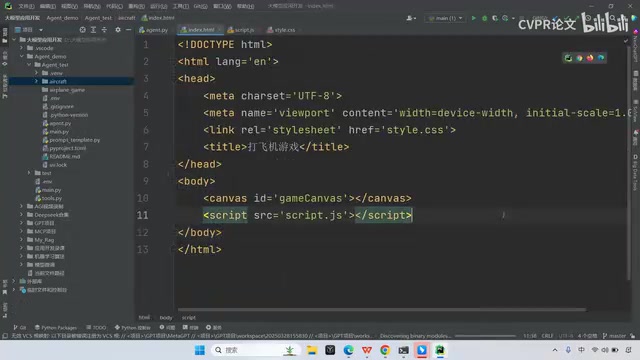
This demo shows that a system prompt alone can make the model exhibit the complete ReAct behavior pattern. But a simulation is ultimately not a real Agent, because the tool calls are done by hand. To make the Agent truly usable, supporting code is needed to actually execute tools and automatically feed execution results back to the model.
The creator then demonstrates a ReAct Agent project he wrote himself. The project structure includes a virtual environment, the agent code, a directory for storing target files, main.py, and a prompt template. It is run by starting the agent with uv run and specifying the target directory for file writes. After submitting the task "write a shoot-'em-up game," the Agent genuinely writes files, returns real execution results at each step, and finally outputs the Final Answer—and the three files (index, CSS, JS) do indeed appear under the project path.
Code Walkthrough: A Single while Loop Powers the Whole Agent
The core code lives in the ReactAgent class. The initialization part receives the tool list, the model, and the project path, and calls the large model through the OpenAI interface. The run method receives user input, first builds a message list containing the rendered system prompt and the user's question, then enters a while loop.
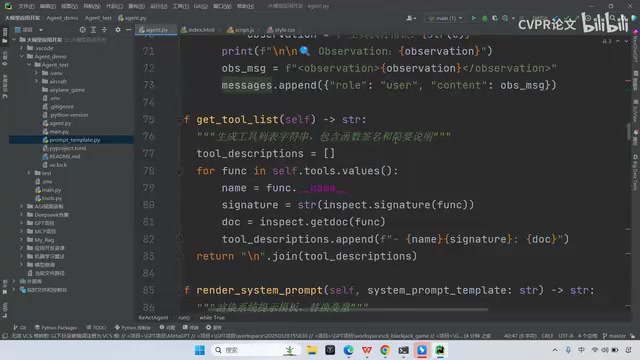
Inside the loop, several things happen: call the model; use a regular expression to detect whether the returned content is a Thought, an Action, or a Final Answer; if a Final Answer is detected, return directly and end the loop; otherwise extract the tool to call from the Action and execute it, append the execution result to the message list, and return to the top of the loop to request the model again. The creator draws this flow as a diagram involving four roles: the user, the Agent main program, the model, and the tools. The main program is responsible for wiring them together: call the model to get the thinking and action instructions, show them to the user, call the tool to get the observation result, feed it back into the message history, and repeat until the model outputs the Final Answer.
The key to this design is the accumulation of message history. Each tool execution result is appended to the message list, so on the next round when the model is requested, it can see all previous thoughts and observations and thus decide the next step. Much of the Agent's "intelligence" comes from this simple message-feedback mechanism.
An Agent calls a large model through an OpenAI-compatible interface, which essentially means sending an HTTP request to the /v1/chat/completions endpoint. The request body includes parameters such as model, messages, and temperature, and the response returns the model-generated content. Most domestic models mentioned in the article, such as Qwen and DeepSeek, provide OpenAI-compatible APIs, so the same Agent code only needs its base_url and api_key swapped to switch models. The messages list is the core carrier of conversation state: each request carries the complete history of messages (including roles such as system, user, assistant, and tool), and the model understands context accordingly. Tool execution results are usually appended as messages with a specific role; OpenAI's function calling mechanism uses messages with role "tool" accompanied by a tool_call_id, whereas the regex-based XML tag parsing adopted in this article is simpler and more direct—appending the observation result as an ordinary text message suffices. Understanding this interface convention makes clear why "accumulating message history" enables the Agent to exhibit coherent multi-step decision-making.
Final Thoughts: The Barrier to Agents Is Engineering, Not the Model
Looking back at the whole course, an Agent's composition can be condensed into one sentence: the large model provides reasoning ability, tools provide action ability, the system prompt specifies the collaboration format, and the main program's loop strings the three together. The reason ReAct became mainstream is that it makes the "think—act—observe" loop explicit, making the model's behavior traceable, intervenable, and debuggable.
For those who want to get started, the entry point is not high: first write a system prompt to make the model "act out" the ReAct format and understand each step's output; then add tool functions and loop logic to turn simulation into real execution. The creator provides the complete code in the video and mentions that viewers can leave a comment to request it. Rather than chasing new models and frameworks, thoroughly mastering this foundational ReAct pattern may be the more reliable way to get started.
Related articles

Using and Topping Up Claude in China: Three Methods Compared and a Guide to Avoiding Account Bans
A guide to using and topping up Claude in China: compare direct overseas credit card payment, US Apple ID and Android Google Play in-app purchases, and self-service website top-up by barriers, cost, and suspension risk, plus five habits to reduce the chance of a ban.

From ChatGPT Content Restrictions to Eval, Observability, and Guardrail in Practice
Through a hands-on e-commerce order Agent, this article explains the engineering logic behind ChatGPT content restrictions and how Eval, Observability, and Guardrail work together to prevent same-name user data leaks and prompt injection risks.

DeepSeek Open-Sources Super-Agent: An Architecture Deep Dive into the Router and Worker Design of an Always-On Coding Assistant
DeepSeek open-sources the always-on coding agent dsh-superagent, using a separated Router-Worker architecture that balances continuous operation and permission control. This article analyzes its design approach, what the code actually delivers, and the safety debate surrounding autonomous coding assistants, helping developers decide whether it is worth learning from.