GA4's Hidden AI Traffic: 429 Visits from ChatGPT — Did You Notice?

GA4's automatic detection of AI traffic is incomplete — site owners need custom regex channels to catch what's missed.
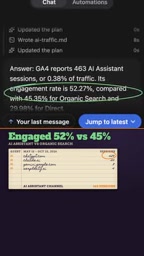
The article notes that although GA4 has grouped identifiable AI chatbot visits into an "AI assistant" channel since May, detection is incomplete. One content site owner found ChatGPT.com drove 429 sessions; after AI agent analysis, 463 AI assistant sessions were identified in total — 0.38% of all traffic — and these visitors had a 52% engagement rate, higher than organic search's 45%. The problem is that 45 visits from tools like Perplexity and Copilot weren't auto-tagged and blended into other channels, understating the AI channel's contribution. The author recommends using an AI agent to write a regex for creating a custom AI channel and regularly checking data to proactively monitor this emerging traffic entry point.
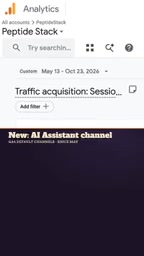
Since May, Google Analytics 4 (GA4) has grouped identifiable visits from AI chatbots into a brand-new "AI assistant" channel. But many site owners have yet to realize that a large volume of traffic from AI tools isn't being tagged correctly — it may be quietly slipping away into conventional channels.
While reviewing his GA4 data, one content site owner stumbled upon 429 sessions from ChatGPT.com spanning May 13 to October 23. And that was just the tip of the iceberg. He handed the raw export to an AI agent in Shifthands (running GPT 6.1 Sol on his ChatGPT plan) for analysis, which surfaced a total of 463 AI assistant sessions — 0.38% of all traffic.
The Value of AI Traffic Is Underestimated
Although the share is small, these AI visitors engage better than organic search visitors. The data shows AI assistant sessions have an engagement rate of 52%, versus just 45% for organic search. That suggests visitors arriving from AI tools may be more willing to engage or have clearer information needs.
The problem, however, is that GA4's automatic detection is incomplete. The analysis also found 45 visits from Perplexity, Copilot, and other AI tools that were not tagged with the "AI assistant" channel. These "escaped" visits blend into other traffic sources, leaving site owners unable to accurately assess the true contribution of the AI channel.

Engagement Rate is one of GA4's core metrics, defined as "engaged sessions ÷ total sessions." In GA4, a session counts as "engaged" if it meets any of the following: it lasts longer than 10 seconds, at least one conversion event occurs, or more than 1 page is viewed. It mirrors the old Universal Analytics "bounce rate" — engagement rate ≈ 1 − bounce rate. So the 52% vs. 45% gap means a lower proportion of visitors from AI sources "arrive and leave immediately." Note, however, that engagement rate is naturally higher for single-page, dwell-type content sites; when comparing across channels, combine it with average engagement time, pages per session, and conversion rate to avoid letting a single metric mislead your assessment of channel value.
Using Custom Regex to Capture Missed AI Traffic
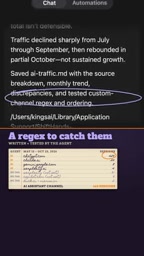
Faced with incomplete detection, this site owner used an AI agent to write and test a regular expression for creating a custom AI channel, capturing visits from AI tools that GA4 doesn't automatically tag. This approach unifies traffic from sources like Perplexity and Copilot into one category, enabling more comprehensive monitoring of the AI channel's performance.
Channel Groups and custom channels are the foundational mechanism of GA4 traffic attribution. GA4 automatically classifies traffic into default channel groups such as Organic Search, Direct, Referral, and Paid Social based on "session source/medium" rule matching. When a source can't be recognized by the default rules, it's often lumped into Referral or Unassigned. Admins can create custom channels under "Data settings → Channel groups," defining matching logic with conditions (e.g., "Session source contains chatgpt.com"), which take priority over default channel groups. A regular expression is used here because multiple AI domains need to be matched at once (e.g., .*(chatgpt|perplexity|copilot|claude)\.(com|ai).*), which is easier to maintain than adding conditions one by one and also covers subdomains and path variants.
Practical Takeaways: Proactively Monitor the AI Channel
As AI assistants become a major traffic entry point, relying on GA4's default settings may cause site owners to miss key insights. It's advisable to regularly check the data for the "AI assistant" channel and consider supplementing detection coverage through custom channel definitions. A complete GA4 tutorial has been published on the original video channel for further reference.
Incidentally, the video also mentions the Backlink Management tool, which can automatically build backlinks to help improve a site's SEO performance. For content creators, while paying attention to AI traffic, the value of traditional backlink building shouldn't be overlooked either.
(This article is based on content from a YouTube video; all data and methods come from the original video.)
The challenge of identifying AI assistant traffic lies in its redirect chain: when users click a cited link, most AI tools route them through their own redirect or interstitial page, which strips the HTTP Referer and records the source as Direct or generic Referral — so GA4's "AI assistant" auto-classification never triggers. GA4's automatic detection relies on its maintained list of known AI sources, and new tools or regional products are often added with a lag. So beyond custom regex channels, you can also use UTM parameters (consistently applied to landing page links you control), periodic comparisons in Looker Studio of raw session data where "source contains AI keywords," and monitoring of landing pages with unusually concentrated Direct traffic — forming a multi-layered check.
Related articles

Qwen 3.8 Beats Opus at Coding—But Can Your Mac Run It?
Open-source Qwen 3.8 beats Opus 4.6 at coding at just 18GB, but how much Mac memory do you need? 24GB crashes; 32GB is the sweet spot. Full config guide inside.

Claude Code + Agent: Building a Fully Automated AI Testing Loop
Bilibili course breakdown: how test developers can use Claude Code terminal-based Agents to build a fully automated AI testing loop. Compares permission boundaries of terminal vs. device Agents, explains why enterprise projects choose Claude Code over Open Claude-type tools, and outlines the Node.js environment setup and DeepSeek model integration path.

Working with AI Agents Requires Nerves of Steel
The more autonomous AI agents become, the heavier the user's psychological burden. Drawing from a Hacker News discussion, this article analyzes black-box anxiety, behavior drift, and monitoring fatigue in agent collaboration, and offers practical approaches like sandbox isolation, permission control, and task granularity management to reduce cognitive load.