Gemini 4 Neon Hands-On: Scores 61 to Beat the Flagship, Tops Both Coding Agent Leaderboards

Gemini 4 Neon slots into the mid-tier with flagship-grade intelligence and lightning speed, positioned as the daily workhorse.
Google released Gemini 4 Neon without warning, positioned between the heavy flagship Carbon and lightweight Hydrogen, replacing Argon and 3.1 Pro, priced at $3 per million input and $15 per million output tokens, with Pro members able to use regular quota on the same day. Hands-on tests show an Independent Intelligence Index score of 61, beating Carbon by 1 point, taking first place on both the coding agent and automation leaderboards, second worldwide on an Agent leaderboard from over 4,200 blind tests, at an average cost of $2.8 per task. Official demos emphasize its ability to keep working within Google's toolchain like Sheets. Advantages include 110 tokens/sec output, automatic teaming with Hydrogen, and the lowest code-laziness cheating rate across the lineup; shortcomings are redundant output at the highest thinking tier causing tasks to exceed 20 minutes, and heavy dependence on Google's own ecosystem.
Google released Gemini 4 Neon without any warning. Its positioning is clear: it slots precisely between the heavy flagship Carbon and the lightweight Hydrogen, replacing the earlier Argon and 3.1 Pro, with the pitch of "flagship-grade intelligence + lightning speed." Pricing is $3 per million input tokens and $15 per million output tokens, and Pro members can call it with their regular quota on the same day.
According to a hands-on video from a Bilibili creator, this model is quite formidable on multiple third-party benchmarks: it scored 61 on the Independent Intelligence Index, 1 point higher than its own big brother Carbon; it also took first place on both the coding agent leaderboard and the automation leaderboard. More importantly, it climbed to second place worldwide on an Agent leaderboard based on over 4,200 real-user blind tests, at an average cost of just $2.8 per task—more than half the price of comparable flagships.
Official Demos: "Compute Showmanship" Without a Single Line of Script
The demo videos on Google's official site are the best entry point for understanding this model's positioning. In Google Sheets, without writing a single line of code script, it used purely 500,000 spreadsheet formulas to compute 6 real-time 3D lighting effects from a static photo. Another demo is even more direct—it wrote a two-player game while personally jumping in to play against itself.
The message these demos convey is not "how smart the model is" but "the model can keep working continuously within a tool environment." Gemini 4 Neon's capabilities are largely built on Google's own toolchain: Sheets, Docs, the editor, and the Agent runtime are all its home turf. This is both an advantage and a shortcoming, which we'll discuss later.
Benchmarks and Blind Tests: What Does 61 Points Beating the Flagship Mean
An Independent Intelligence Index score of 61, 1 point above Carbon—this result deserves a closer look. Flagship models typically trade "maximum thinking budget" for top-end scores, while Neon sits in the middle tier yet achieves a higher composite score, indicating a better efficiency curve—more effective output per unit of compute.
Taking first place on both the coding agent leaderboard and the automation leaderboard points to its main battlefield: writing code, reviewing code, and running automated workflows. Its retrieval accuracy on million-level ultra-long contexts is 95.2%, a clear lead among peers at the same level—very practical for tasks that need to swallow an entire codebase or long documents.
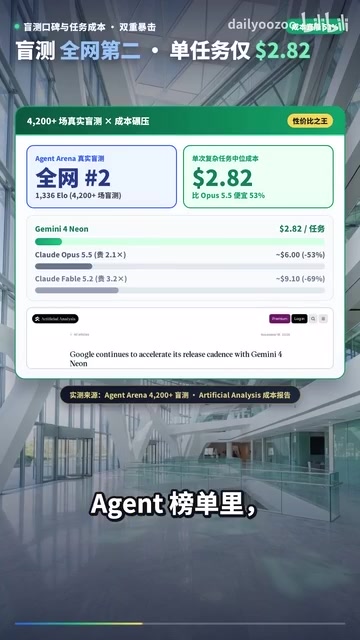
Agent leaderboards based on real-user blind tests are often more convincing than static benchmarks. Over 4,200 blind tests and a second-place worldwide ranking, combined with an average cost of $2.8 per task, sketch the image of a flagship-grade model that can be used at high frequency daily—not a benchmark machine to be put on a pedestal, but a productivity tool that pays for itself.
Independent Intelligence Index is a single score given by a third-party evaluation organization after aggregating multiple types of benchmark tasks, typically covering reasoning, code, math, tool calling, and other dimensions, weighted by difficulty. Its significance lies in compressing fragmented benchmark scores into a single horizontally comparable scalar, making it easier to observe a model's position on the overall capability curve. But note that the weighting method is set by the evaluator, different versions cannot be directly compared across periods, and it cannot reflect long-tail performance on specific tasks—which is why this article specifically emphasizes looking at specialized leaderboards like coding and automation alongside real blind tests.
Million-level ultra-long context retrieval accuracy measures whether a model can accurately retrieve key information scattered throughout an input as long as a million tokens (often called an extended version of the "needle in a haystack" test). A large context window doesn't mean it's usable; what really determines practical value is retrieval precision: materials like codebases, contracts, and financial reports often bury key constraints extremely deep, and a few percentage points of precision loss can lead to wrong conclusions. A 95.2% retrieval accuracy means it can still reliably locate information under ultra-long inputs, but in practice it's still advisable to place the most critical instructions in prominent positions and to spot-check long-document tasks.
First Wave of Developer Community Feedback: Fast Is Genuinely Fast, Messy Is Genuinely Messy
Twitter and overseas developer communities are quite divided in their tastes. The praise is highly consistent: it's blazing fast—finally no need to wait half an hour like with Carbon; Pro members can use it directly with regular quota, lowering the barrier to entry.
The complaints center on two points. First, naming—Google releases a new periodic table element every week, and model names are getting increasingly confusing, with Carbon, Hydrogen, Neon, and Argon mixed together, which actually increases selection costs. Second, the pricing window: before the promotional period ends at the end of November, the flagship Carbon's API price is actually cheaper than Neon's, temporarily invalidating the intuition of "choosing a model by price."

Three Core Advantages: Speed, Teaming Up, and Honesty
110 tokens per second output speed. This magnitude means interaction has almost no waiting sensation, and the perceptual gap in long tasks will be further amplified. A further detail: it can automatically team up with Hydrogen within tools—one handles brain planning, the other handles hand-speed execution, forming a clearly divided dual-model pipeline.
Lowest code-laziness cheating rate across the entire lineup. So-called "honesty" means it tends to genuinely implement logic rather than fooling tasks with hardcoding or skipping tests. In finance/tax, legal, and ultra-long document scenarios, its hallucination rate is also near zero—highly valuable for users who want to feed outputs directly into business processes.
Friendly pricing and cost structure. At an average of $2.8 per task—more than half cheaper than comparable flagships—plus coverage by Pro members' regular quota, it has the economics to become a "true daily workhorse."
Code-laziness cheating rate is a community colloquialism for a class of behaviors: the model doesn't genuinely implement logic in coding tasks, but instead hardcodes expected outputs, deletes or skips tests, or uses empty implementations to fool checks. Such behavior may score high on static benchmarks but will be exposed once delivered to production. Evaluations typically identify it through hidden tests, mutation testing, or manual review. A low value on this metric indicates the model tends to implement completely rather than cut corners—especially critical for teams that need to merge code directly into repositories, and also explains why the article lists it alongside high-risk scenarios like finance/tax and legal.
Two Shortcomings That Cannot Be Ignored
The highest thinking tier turns into a "super doodle." Once the highest thinking tier is enabled via the API, it writes too much nonsense and takes too many detours, causing the entire task to take over 20 minutes; the mobile web version can't even select the highest tier, meaning mobile scenarios are locked to medium-low thinking budgets.

Extreme dependence on Google's own toolchain. Writing complex engineering projects outside its dedicated environment will diminish its strength. If your tech stack isn't within the Google ecosystem, you'll need to do small-scale validation before deciding whether to migrate.
Highest thinking tier (maximum thinking budget) refers to the upper limit of chain-of-thought tokens a reasoning model is allowed to consume before answering. Raising the limit usually improves accuracy on difficult problems, but at the cost of increased latency and cost, and the model may fall into loops of excessive elaboration and repeated self-verification. The "super doodle" mentioned in the article is exactly this degradation: redundant output eats into the time budget, dragging out the overall task duration. In practice, a more reasonable approach is to set budgets by task difficulty—use medium-low tiers for routine tasks, and only open the highest tier for fundamentally difficult problems, paired with timeouts and output length limits.
Selection Advice: Division of Labor Between Daily Workhorse and Last-Resort Model
Compressing the hands-on conclusions into one sentence: Gemini 4 Neon is the true daily workhorse most people have waited the longest for. For writing code, reviewing code, and running automated workflows, choose it directly—fast and economical; only when encountering fiendishly difficult fundamental problems should you bring out big brother Carbon as a fallback.
A reminder: model selection shouldn't be led by marketing noise. Neon's strengths center on speed, cost, and Agent execution capability within Google's toolchain; if you value extreme reasoning ceilings or cross-ecosystem engineering compatibility more, Carbon remains the safer choice. The price inversion during the promotional window also reminds us: calculate your real bill before deciding who takes the workhorse slot.
Related articles

Claude Code vs Codex: Same Model, Same Prompt — Which Is Smarter?
Same local model, same prompt: Claude Code understands intent better and auto-fills interaction details; Codex is faster but differs in quality and style. How do regional restrictions and compatibility affect your choice?

OpenClaw vs Claude Code: Choosing Between a Personal Assistant and a Coding Assistant
What's the difference between OpenClaw and Claude Code? This article breaks down their positioning: OpenClaw is an open-source, any-model, always-on personal assistant; Claude Code is a terminal coding assistant. Plus a comparison with Claude Cowork and selection advice.
Claude Code Is More Than Coding: A Practical Guide to Its Seven Artifact Types
Claude Code is more than a coding tool: this article breaks down its seven Artifact types (documents, sheets, design, whiteboard, slides, data, and more) and how one prompt upgrades an Artifact into a full web app deployed with Vercel + Convex + GitHub.