Gemini CLI Advanced Guide: MCP Servers and Extensions Deep Dive

Upgrade Gemini CLI from a chat tool to a full development integration platform using MCP, extensions, and FastMCP.
This advanced Gemini CLI guide covers four key layers for building real integrations: connecting MCP servers via a single JSON block in settings.json with a layered config system (project takes highest priority); packaging MCP servers, context files, and slash commands into one-command-installable extensions for team distribution; using FastMCP's decorator to expose any Python function as a native Gemini-callable tool; and controlling tool access with includeTools/excludeTools whitelists while keeping secrets out of config files via runtime environment variable expansion. The article also previews headless mode and hook system integration for full CI/CD pipeline automation.
The real power of Gemini CLI lives inside its extension system. Yesterday's basic setup was only half the picture — when you combine MCP (Model Context Protocol) servers, extensions, and custom slash commands, Gemini transforms from a chat tool into a development powerhouse that can call your own code. This article walks you through the complete advanced workflow, with the goal of getting Gemini connected to three MCP servers before you finish reading.
Your First MCP Server in a Single JSON Block
Connecting an MCP server is simpler than you might expect. Your first server is defined right inside settings.json with a single JSON block — give it a name, point it to a startup command, and Gemini immediately gains a new tool. No restart required, no plugin marketplace needed.
The layered configuration system is the key to understanding this entire setup. Global Config sets system-wide defaults, while Project Config binds specific tools to a single repository. Multiple configuration layers stack in order — default, system, user, project — and project always takes the highest priority. This means you can define shared team defaults while overriding them with project-specific settings, without either conflicting with the other.
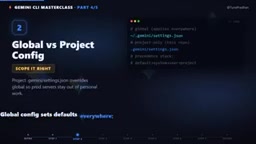
This layered design solves a real pain point in collaborative work: personal preferences, team standards, and project requirements can coexist instead of overwriting each other.
MCP (Model Context Protocol) is an open protocol introduced by Anthropic and now adopted by multiple AI tools. It defines a standard communication method between AI models and external tools or data sources. Think of it as the "USB port" of the AI world: as long as a server implements the MCP protocol, any compatible client — including Gemini CLI — can call it directly, with no need to build a custom adapter for each tool. An MCP server is essentially a local or remote process that exposes a set of "tools," each with a name, parameter descriptions, and execution logic. When Gemini receives a user request, it autonomously decides whether to invoke a tool, what arguments to pass, and then integrates the result into its response. This mechanism upgrades AI from "can only chat" to "can actually do things" — file I/O, code execution, and API calls can all be handled through MCP tools.
Extensions: Pull an Entire Capability Set with One Command
If a single MCP server is a component, then an Extension is the finished kit. Extensions bundle an MCP server, a Gemini.md context file, and slash commands together into a single package — one install command pulls the whole thing from GitHub, eliminating the need to manually wire up JSON configurations.
This is especially valuable for team distribution. Rather than having every team member configure things individually, you can package the entire capability set into an extension and publish it once, ensuring everyone works in a consistent environment.
Slash Commands: Write Once, Reuse Every Session
Slash commands are essentially TOML files. Write your prompt once, and every subsequent session can invoke it directly with a command like /deploy. Commit these commands to the .gemini/commands directory and sync via Git — the entire team instantly has access to the same command set.
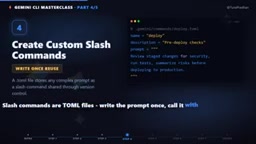
This is an efficient way to convert individual expertise into team assets — complex workflows get packaged into a single command, lowering the barrier to collaboration.
Turning Python Functions into Native Tools with FastMCP
For anyone who can write Python, this step has almost zero overhead. FastMCP converts any function into an MCP tool with a single decorator. Run fastmcp install gemini-cli, and Gemini can call your code just like a built-in feature.
This bridges the gap between "using existing tools" and "building custom integrations." You're no longer limited to capabilities others have built — you can expose your own business logic, internal APIs, and automation scripts directly to Gemini.
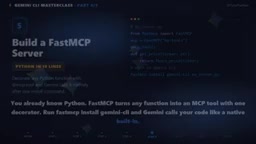
FastMCP is a Python library that provides a cleaner development experience on top of the standard MCP SDK. The core pattern is to annotate a regular function with the @mcp.tool() decorator. FastMCP automatically parses the function signature and docstring, generates a MCP-compliant tool description, and starts a local server process that exposes the tool. Once Gemini reads the tool description, it can call it automatically at the right moment. The fastmcp install gemini-cli command registers the server in Gemini CLI's configuration so it starts automatically at the beginning of each session. This approach is particularly well-suited for wrapping internal enterprise systems: a few dozen lines of Python can wrap an internal database query interface, letting Gemini drive data retrieval through natural language — without exposing database credentials or modifying any existing system.
Tool Permissions and Secret Management
A large MCP server might expose 50 tools at once, but you probably don't need all of them — and you likely don't want Gemini touching the dangerous ones. Gemini CLI offers fine-grained permission controls:
- includeTools: A whitelist mechanism that only permits the tools you explicitly need;
- excludeTools: Permanently blocks dangerous tools, keeping them completely out of reach.
The result is that the tool set Gemini sees is entirely under your control — not one tool more than you've allowed.
The same careful approach applies to secret management. You write an environment variable reference like $API_KEY in settings.json, and Gemini expands it at runtime — the real secret never lands in a config file. Additionally, Gemini prevents sensitive information on the host from leaking to third-party servers.
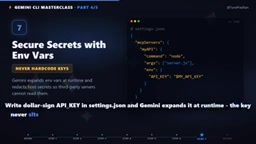
This is critical for enterprise scenarios: you need AI to call external services without exposing credentials to uncontrolled third parties.
From Configuration Consumer to Integration Builder
Having walked through these four steps, you're no longer just using Gemini CLI — you're building real integrations on top of it. Connecting MCP servers, packaging extensions for distribution, wrapping code with FastMCP, and managing permissions and secrets safely together form a scalable, collaborative, and auditable working system.
According to the series preview, the final advanced installment will enter expert territory — headless mode, the hook system, and integrating Gemini CLI into CI pipelines. This means AI capabilities will extend from interactive development all the way into every stage of automated deployment.
If you've just connected your first MCP server, start with a simple internal tool and experience what it feels like when Gemini calls your own code — that hands-on moment is often the most direct way to understand the entire system.
Headless mode refers to Gemini CLI running in a pure command-line fashion without an interactive terminal — it accepts standard input or arguments as prompts and writes results to standard output, with no human intervention required. This allows Gemini to be embedded directly in shell scripts or CI/CD pipelines. The hook system lets you trigger custom scripts on specific events (such as before or after a tool call, or at session start and end), enabling automated operations like logging, auditing, and secondary permission checks. Together, they mean AI assistance can expand from "developer manually asking questions" to fully automated scenarios like "code commit automatically triggers analysis" or "test failure automatically generates a fix suggestion" — AI capability truly woven into every stage of software delivery.
Related articles

From Photons to Production: An Open-Source Computer Vision Engineering Reading Path
Reddit user open-sources a computer vision engineering reading path with 16 chapters from image formation to production deployment, emphasizing primary sources, dependency order, and reproducible benchmarks to help engineers understand why models fail and build reliable vision systems.

Prompt Failures? The Truth About Why AI Agents Struggle in Production—and How to Fix It
A Reddit developer built Agents with Copilot and Gemini but faced unstable behavior. This article analyzes three gaps in prompt engineering for Agent scenarios and offers three practical paths to reliable Agent deployment, including structured prompts, workflow-first approaches, and building an evaluation loop.

Tesla Robotaxi to Open Private Vehicle Access Next Year: Promise or Pipe Dream?
At its Q3 earnings call, Tesla said owners can add their cars to the Robotaxi fleet next year. We analyze the technical basis, Musk's missed deadlines, business logic, and competition.