Gemini CLI Review: The Strengths and Limitations of an Open-Source Terminal Agent

Gemini CLI is a powerful open-source terminal AI coding agent, but it's held back by single-model support, tight quotas, and account policy changes.
Gemini CLI is Google's Apache-licensed open-source terminal AI coding agent with checkpoint rollback, extensions, and script mode, free to use with an AI Studio key. But it only supports Gemini models, has a tight free quota, blocks personal Google account logins (redirecting to the closed-source Anti-Gravity CLI), and sends usage stats by default. Verdict: recommended with reservations.
Introduction: Google's Terminal AI Coding Agent
Gemini CLI is Google's open-source AI coding agent that runs in the terminal and can edit and execute code. Built on the Gemini models, it supports checkpoint rollback, extension installation, and a script mode. This review is based on a Linux environment and testing with a free AI Studio key. Overall, it's a capable open-source tool, but Google appears to have shifted its focus elsewhere.
Core Features and Advantages
Open Source and Free
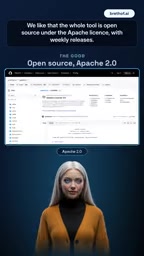
Gemini CLI is released under the Apache License and ships weekly updates. Users only need to set a single environment variable to run it for free with an API key—no subscription required. This openness lowers the barrier to entry, making it especially suitable for individual developers and small teams.
The Apache License is a permissive open-source license released by the Apache Software Foundation that allows users to freely use, modify, and distribute software, including for commercial purposes, without requiring derivative works to be released under the same license. Unlike copyleft licenses such as the GPL, the Apache 2.0 license explicitly grants patent rights and requires retention of copyright notices and change descriptions. For enterprise users, this license reduces legal risk, allowing Gemini CLI to be integrated into commercial products more safely. At the same time, a permissive license also means a lower barrier for community forks and secondary development, which benefits the tool's ecosystem expansion.
Checkpoints and Extensions
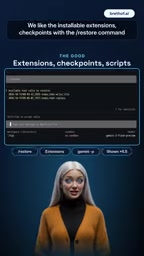
The tool supports a checkpoint feature; once enabled, changes can be rolled back via the sash restore command, providing a safety net for experimental coding. In addition, installable extensions add flexibility. According to the reviewer's demonstration, the checkpoint mechanism is very useful when mistakes occur.
Checkpoints in AI coding agents refer to a state snapshot mechanism used to record the complete state of the current workspace after the agent performs a series of file edits or commands, so that it can be quickly rolled back if the results don't match expectations. Unlike traditional version control (such as Git), checkpoints are usually created automatically by the agent, have finer granularity, and don't require manual commits by the user. They reduce the risk of experimental coding, letting developers confidently allow AI to make multi-step modifications. Gemini CLI implements rollback via the sash restore command, which may rely on filesystem snapshots or diff storage under the hood; the specific implementation isn't detailed in the article.
Script Mode
Gemini CLI supports a script mode (Gemini P), allowing AI coding capabilities to be embedded into automated workflows. For scenarios requiring batch processing or CI/CD integration, this feature is quite valuable.
CI/CD (Continuous Integration/Continuous Delivery) is a software development practice that involves frequently integrating code changes through automated pipelines and automatically building, testing, and deploying them. Embedding AI coding capabilities into CI/CD pipelines means AI agents can be introduced into code review, automated fixes, test case generation, and other stages. Gemini CLI's script mode (Gemini P) allows the model to be invoked non-interactively and to output structured results, thereby adapting to pipeline environments. However, note that CI/CD environments typically have strict constraints on network access, key management, and quota consumption; free quotas may struggle to support high-frequency automated tasks.
Key Limitations and Issues
Gemini Models Only
Gemini CLI can only use Gemini models, with no built-in way to connect to other providers or local models. For users who want flexibility in choosing models or who prioritize privacy, this is a clear shortcoming.

Tight Free Quota
The free daily quota is small. In testing, a single task exhausted the entire Flash quota. Heavy users may need to consider a paid plan or optimize their usage.
Account Policy Changes
As of June 18, 2026, personal Google accounts are denied login, and users are directed to the closed-source Anti-Gravity CLI. This change suggests Google may have reduced its support for individual users of Gemini CLI, shifting toward enterprise or closed-source products.
Anti-Gravity CLI is another closed-source AI coding tool from Google, whose name suggests a complementary or replacement relationship with Gemini CLI. Closed source means users cannot view or modify its source code, nor can they deploy it themselves or audit its data processing logic. Google directing personal users to a closed-source product may be due to business strategy, cost control, or security and compliance considerations. This shift also reflects a common challenge for open-source AI tools in terms of commercial sustainability: free and open access requires substantial computing resources to support, and once the user base grows, vendors often tend to steer advanced features or new users toward paid or closed-source products.
Usage Statistics Sent by Default
The tool sends usage statistics to Google by default; privacy-conscious users need to manually disable this feature.
Verdict: Recommended, With Caveats
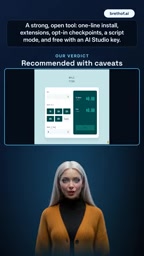
Gemini CLI is a powerful open-source tool with practical features like one-click installation, extensions, checkpoints, and script mode, and it can be used for free with an AI Studio key. However, limitations such as the inability to log in with personal accounts, limited free quota, and Gemini-only model support restrict its applicability. The overall rating is "recommended with reservations."
Conclusion
For developers who can accept its limitations, Gemini CLI is still a terminal AI coding agent worth trying. But if you need multi-model support or more generous quotas, you may need to look for alternatives. Google's strategic shift also reminds us that the long-term support of open-source tools carries uncertainty.
One-line Summary
Gemini CLI is a powerful open-source terminal AI coding agent, but it's constrained by single-model support, tight quotas, and account policy changes.
Paragraph Summary
Gemini CLI is Google's Apache-licensed open-source terminal AI coding agent that supports checkpoint rollback, extension installation, and script mode, and can be used for free with an AI Studio key. The review shows it's easy to install, its checkpoint mechanism is practical, and its script mode suits automation integration. However, the tool only supports Gemini models and can't connect to other providers or local models; the free daily quota is small, with a single task able to exhaust the Flash quota; as of June 18, 2026, personal Google accounts are denied login and users are directed to the closed-source Anti-Gravity CLI; and usage statistics are sent by default. The overall rating is "recommended with reservations"—suitable for developers who can accept the limitations, but worth watching for the long-term support uncertainty caused by Google's strategic shift.
Related articles

T3 Code: The Open-Source AI Coding Assistant's Comeback Story
T3 Code is an open-source AI coding assistant that unifies subscriptions like Codex and Claude, with powerful remote control and parallel task management.

Never Elected, Yet Ruled New York for 30 Years: The Ultimate Case Study in the Mechanics of Power
Robert Caro's biographies reveal how unelected Robert Moses ruled New York for 30 years through legal drafting and public authorities, and how Lyndon Johnson built leverage as a "powerless" Senate Majority Leader. Unpacking the underlying logic of accumulating and sustaining power.

The CPython 3.10 Recursion Trap and Synthetic Recovery in TokenGuard, an LLM Circuit Breaker
TokenGuard's author recounts a recursion crash caused by OrderedDict.pop in CPython 3.10 and introduces v0.3.0's Loop Nudge synthetic recovery, inline DLP scanning, and other new LLM agent circuit-breaker capabilities.