Generative UI Comes to Android: A2UI Lets Agents Build Native Interfaces in Real Time

Google open-sourced the A2UI protocol, letting Agents describe interfaces in declarative JSON rendered by native Compose.
A2UI is an open protocol from Google's Jetpack Compose team that lets AI Agents describe interactive interfaces in declarative JSON, rendered by the client using native Material 3 Compose components. Its model is simple: a Catalog defines the contract of components and functions available to the Agent, and a Surface is a UI area the Agent controls. The Agent returns only UI descriptions, not executable code, structurally avoiding code injection. Integration takes three steps: create a Catalog, configure a Message Processor, and render with the A2UI Surface composable. Native components bring performance, dark mode, theme inheritance, and accessibility out of the box; Compose snapshot state enables instant two-way binding, and schema validation with error isolation powers self-correction.
AI Agent replies are no longer a wall of text. The A2UI (Agent to UI) library, released by Google's Jetpack Compose team, lets Agents describe interfaces in declarative JSON, which the client renders using native Compose components. In a recent technical talk, product manager Nick Butcher and engineer Anton walked through the complete flow, from dependency integration to custom components.
Why Generative UI Is Needed
Most Agent backends today confine their responses to plain text. You ask an Agent to build a booking feature, and it may give you a pretty good answer—but you can't interact with it directly, and its styling clashes with the rest of your app. The idea behind generative UI is that the Agent generates a brand-new, interactive interface at runtime based on dynamic input.
Building this mechanism yourself is not impossible, but you'd need to define an entire protocol for exchanging formats with the backend, event streams, function calls, and more. A2UI standardizes this layer—it's an open JSON format that describes UI declaratively. The Agent returns only a JSON representation of the UI and no code that the client needs to execute, eliminating code-injection security risks at the source.
Two Core Concepts: Catalog and Surface
A2UI's conceptual model is minimal. A Catalog is a collection of components and functions, including basic components like text, button, row, and column, plus functions for formatting text, validating input, and opening URLs. The key point: a Catalog is a contract that defines what your app supports. The Agent can only build UI within this contract, and can never execute arbitrary code.
A Surface is a UI area controlled by the Agent. Through protocol messages such as create surface and update components, the Agent describes what this area looks like using components from the Catalog.
The A2UI specification defines a basic catalog, and the Jetpack Compose renderer implements it with Material 3 components. Most components work out of the box, but the three media components—image, video, and audio player—require you to wire in your own libraries, for example using Coil to load images.
Declarative vs. imperative UI: Declarative UI (such as Compose, SwiftUI, and React) describes "what the interface should look like," and the framework computes the minimal set of changes from the old state to the new state. Imperative UI (such as the traditional Android View system) requires developers to issue step-by-step instructions like "add a button" or "change the text." A2UI's choice of declarative JSON descriptions means the Agent only needs to output a target state rather than a sequence of operations. The client can decide how to render, animate, and reuse components—which is also the prerequisite for it to be hosted by native Compose components.
JSON Schema and contract validation: The reason a Catalog can serve as a "contract" fundamentally relies on structured validation mechanisms like JSON Schema—it specifies required fields, field types, and value ranges for each component type. Messages sent by the Agent are schema-validated before rendering, and content that violates the contract (such as unknown component names or attributes with mismatched types) is intercepted before it enters the UI tree. This is both a security boundary and the technical foundation that makes the self-correction loop work.
Three Steps to Integrate: Catalog, Message Processor, Rendering
The demo app in the talk shows the complete integration path. The system design has three layers: a Chat Session receives the Agent's streaming responses and extracts raw A2UI JSON messages; a Message Processor uses a Parser to convert JSON into a semantic representation, validates it against the Catalog, and maps it to Surface models; finally, an A2UI Surface composable renders it into native Compose UI.
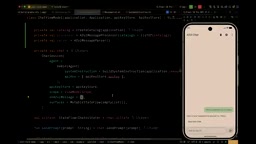
At the code level, the first step is to create a Catalog. Build an instance with the material-a2ui-basic-catalog factory function, insert your custom image-loading and video/audio rendering components, and provide the context required by standard functions such as opening a URI. The second step is to instantiate the Catalog and Message Processor in the ViewModel, pass each message that arrives in the Chat Session callback to processInput, and call process in a background coroutine within viewModelScope to consume the message queue. When the user clears the chat history, call clearSurfaces as well.
The third step is the most intuitive: iterate over active surfaces and pass each model to the A2UI Surface composable. The Agent may choose to display large amounts of content as a list, in which case you need to set a maximum height limit on the component.
The Natural Advantages of Native Components
The rendered interface uses real Material components—tabs, dialogs, date pickers, and sliders are all there. Because they are native Compose components, they deliver native performance, respond to dark mode, and automatically inherit the colors, shapes, and fonts customized by an outer MaterialTheme. Also because of their native semantics, accessibility features such as TalkBack, font scaling, and keyboard navigation work out of the box.
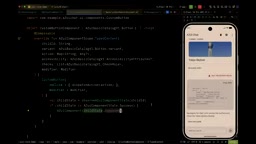
Latency issues are mitigated by progressive rendering: the root component starts displaying as soon as it arrives, container components show loading placeholders for child components that haven't arrived yet, and child components animate in with Material 3 motion schemes once they arrive.
Two-Way Data Binding and the Self-Correction Loop
The food-ordering scenario in the demo shows the value of data binding. When you drag a slider to adjust the number of people, a formatted string below that references the same data path updates in sync—all done locally without a round trip to the Agent. When the user instead asks in text to "change it to six people," the Agent sends only an update data model message to update the corresponding path, and the slider jumps in place without re-describing the entire UI. Mechanically, each Surface's data model is built on Compose snapshot state, and properties on the binding path are derived state. Updates from any source automatically trigger recomposition of the bound components.
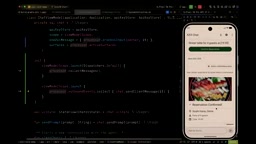
User actions are sent back through the outbound events flow exposed by the processor. In the demo, after the user taps the confirm button, the app sends an A2UI action message back to the Agent, with a context containing attribute values that the Agent declared in advance and that are resolved at click time from the data model. You can also connect your own backend here or navigate to other pages within the app.
AI makes mistakes, so every component message is validated against the Catalog schema before reaching the UI. In the demo, the Agent deliberately generates an unknown component type; that component is flagged as an error and isolated, while the rest of the UI displays normally. The renderer also sends a "component type unknown" error message to the Agent, which then sends a corrected message, and the interface is fixed in place. When building custom components, you can absolutely choose to keep showing a loading state while waiting for the fix, completely hiding the error from the user.
Compose Snapshot State and derivedStateOf: Compose's snapshot system is an observable state container—any composable that reads snapshot state is marked for recomposition when the state changes. derivedStateOf is used to derive a computed result from several states and cache that result—downstream recomposition is triggered only when the derived value actually changes, avoiding redundant rendering caused by unrelated updates. A2UI implements properties on the binding path as derived state, so whether the user drags a slider (a local write) or the Agent sends an update data model (a remote write), both go through the same recomposition path, and the UI naturally stays consistent.
Function calls and the semantics of outbound events: Functions declared by the Agent in the Catalog (such as opening a URL or validating input) are not executed by the Agent itself. Instead, they are sent back to the client as action messages, and the client decides how to handle them. This "declare intent, execute locally" pattern keeps side-effect execution on the app side. Combined with attribute values resolved at click time in the context, the Agent gets enough context to make its next decision, yet it can never directly manipulate the device or data by bypassing the client.
Customizing and Extending the Catalog
Every component parameter in the basic catalog has a default value. To replace a button with one from your own design system, you only need to implement a composable function for the corresponding interface, call dispatch action in onClick, and use observe component state to get the child content for rendering.

Adding a new component type requires implementing the more general A2UI Component interface: name and description are serialized into the Catalog schema sent to the backend and are the basis for the Agent to decide whether to use the component, so they must be written descriptively enough; properties define the data the component handles, distinguishing static properties (values inlined in the property) from dynamic properties (referencing a data model path, reading subscriptions via the bind API, and writing back via bind updater). The star-rating component in the demo is implemented exactly this way—first define the two properties value and max, then implement rendering and two-way binding.
Finally, define the new Catalog as three parts: an ID, a component collection, and a function collection. Use the add operator to merge custom components into the basic catalog components, and update the schema generation logic in the system instructions. After redeploying, the Agent can use this star-rating component it has never seen before.
Control always stays in the developer's hands: give the Agent the most basic text and buttons, and it can improvise freely; give it carefully designed, complex components, and it can only combine them within those building blocks. The Jetpack Compose A2UI renderer is currently in alpha, and documentation and samples are available on developer.android.com.
One-line Summary
Google open-sourced the A2UI protocol, letting Agents describe interfaces in declarative JSON that are rendered by native Compose.
Paragraph Summary
A2UI is an open protocol from Google's Jetpack Compose team that lets AI Agents describe interactive interfaces in declarative JSON, rendered by the client using native Material 3 Compose components. Its conceptual model involves just two things: a Catalog defines the contract of components and functions available to the Agent, and a Surface is a UI area controlled by the Agent. The Agent returns only UI descriptions, never executable code, structurally avoiding code-injection risks. Integration takes three steps: create a Catalog, configure a Message Processor to parse and validate messages, and render with the A2UI Surface composable. Because the output is native components, performance, dark mode, theme inheritance, and accessibility work out of the box; data binding is based on Compose snapshot state, so local interactions and Agent updates both recompose instantly without a backend round trip. Every component message is schema-validated before rendering, and erroneous components are isolated and reported back to the Agent to trigger self-correction. Developers can precisely define the Agent's capability boundaries by replacing base components or adding custom ones.
Related articles

AI Comic Drama with WorkBuddy from Scratch: A Step-by-Step Skill Pack Installation Guide
Learn how to create AI comic dramas with WorkBuddy from scratch. This guide covers installation, Skill pack import and invocation, plus a script generation demo with manual revision tips to get you through the first step from script to storyboard.

WorkBuddy Agent Runs the Entire GEO Database Mining Pipeline with a Single Prompt
WorkBuddy agent automates GEO database mining: from data search and curation to batch correction, differential analysis, co-expression networks, feature gene screening, and immune infiltration—a single prompt generates a complete bioinformatics report, greatly lowering the barrier to bioinformatics analysis.

PC Memory Wasted? Hacker News Debates Centralized Data Centers
Hacker News users argue that personal computer memory is wasted and should be centralized in data centers, sparking debate on centralized vs. distributed computing resource allocation. This article analyzes the logic behind the claim, the costs of centralization, and new tensions in memory resource allocation in the AI era.