Getting Gemini 4 and Claude Sonnet 5.5 for Free? A Hands-On Free.pi Tutorial
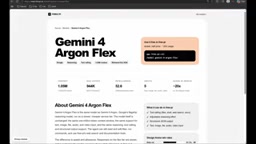
Free.pi CLI tested: GitHub login earns 15K daily credits for free access to Gemini 4 Argon and Claude Sonnet 5.5.
The article documents a full hands-on test of Free.pi following a YouTube video. The platform offers a web model library and a CLI tool for calling models like Gemini 4 Argon and Claude Sonnet 5.5 in local projects. Setup: run `npx free-pi-cli` to install and authorize, log in via `/login` with GitHub (15,000 credits/day vs. 600 initial), restart the terminal to sync credits, and switch models with `/model`. In testing, both models handled text chat, and Claude Sonnet 5.5 completed a 3D interior design website code-generation task. The article also cautions that credit policies may change, proxied model versions and limits are uncertain, and tests were shallow—production use needs careful evaluation of stability and compliance.
AI models are getting stronger, but API costs are giving many developers a headache. Recently, a YouTube creator tested a platform called Free.pi, which claims to let users call multiple models—including Gemini 4 Argon and Claude Sonnet 5.5—for free through its CLI tool. I followed along with the video and put together the key steps and the details worth paying attention to.
What Is Free.pi? Model List and Credit Mechanism
Free.pi offers a web-based model library; after browsing, users can call models in their local projects via the command-line tool. The video highlights two models: Gemini 4 Argon and Claude Sonnet 5.5. One detail: Gemini 4 Argon comes in two versions—one with a premium tag and one with a flex tag. After comparing them, the creator found that both have identical input/output token limits and context windows; the only difference is that the flex version runs on a slower, cheaper service tier. For tasks that don't require low latency, the flex version offers better value.
Before using any model, you should check its usage limit to avoid hitting restrictions mid-task. The platform grants new users initial credits—in the video, the creator received 600 credits as a starting allowance after logging in.
The token limits and context windows mentioned in the article are two key metrics for understanding model differences. Context window refers to the total number of tokens a model can "see" in a single request, including both the input prompt and the output content; once exceeded, earlier content is truncated or an error is returned. Input/output token limits separately constrain the length of the prompt and the generated result in a single request. If two model versions share these values, it means they have no difference in per-request capability—the difference lies in the service tier: low-cost tiers like flex typically cut costs through queuing, lower priority, or concurrency limits, which manifests as higher time-to-first-token and lower throughput, but has limited impact on batch, offline, or non-real-time tasks.
Setting Up from Scratch: CLI Installation and GitHub Login
The setup process isn't complicated. Open a command prompt in your target project folder and run npx free-pi-cli to start the installation. During installation, the system will request permissions—just authorize as prompted.
First-time use requires login, with support for GitHub or Gmail accounts. The creator highlighted a key point: logging in with a GitHub account grants 15,000 credits per day, far more than the initial 600. To do this, type /login in the CLI and select the GitHub account to complete authorization. After authorizing, restart the application—close the terminal and run npx free-pi-cli again—and the credits will sync to your account.
npx is a package execution tool that ships with the Node.js ecosystem, installed alongside npm (version 5.2 and above). Its purpose is to temporarily download and run an npm package's executable without needing a prior global npm install -g. So when you run npx free-pi-cli, npx first checks whether the package exists locally or in the remote registry, pulls the latest version into the cache directory, and then executes its entry script. This explains why the first run involves download waits and permission requests—the CLI needs to write to the cache, create configuration files, and may need to register a command alias. For developers who just want a quick trial without polluting their global environment, npx is a cleaner approach; however, after each upgrade or cache cleanup, it may need to re-download.
Hands-On: Both Models Respond Correctly
Once the credits arrive, type /model in the CLI to open the model selection list, where you'll see Gemini 4 Argon, Claude Sonnet 5.5, and many other models.
The creator first selected Gemini 4 Argon (non-flex version) and sent a test message, "hey how can you help me," receiving a quick reply. Then switching back to /model to select Claude Sonnet 5.5, they sent a text message and also got a smooth response. The conversational functionality of both models works properly.
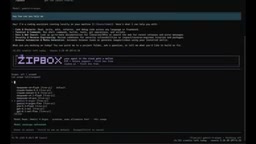
Code Task Test: Generating a 3D Interior Design Website with Claude Sonnet 5.5
To verify actual coding capability, the creator gave Claude Sonnet 5.5 a more complex instruction: build a 3D interior design website. The model began processing the task and eventually returned a result. The video didn't show the full quality of the generated code, but at least it demonstrates that the model can perform code-generation tasks through the free channel.
For users who want to test more models, the creator suggests switching through the /model list in the same way.
Some Things to Keep in Mind
Free-call platforms like this typically carry several uncertainties. First, credit policies may change at any time—there's no guarantee that the 15,000 credits/day promise will hold long-term. Second, whether the resold or proxied model versions are fully consistent with the official ones, and whether there are rate or context limits, needs to be observed in actual use. Third, the tests shown in the video are fairly shallow—text conversation and one code generation—without covering long context, complex reasoning, or high-concurrency scenarios.
If you just want to try new models at low cost and run small-scale experiments, tools like Free.pi do lower the barrier. But for production environments, you should still carefully evaluate stability and compliance.

Platforms like this typically play the role of an "API proxy/reseller": they hold a batch of upstream model vendors' keys or quotas themselves, then distribute them to users through a unified interface, using a credit system for quota control. This brings two technical observations. First, version consistency—the proxy layer may rewrite request parameters, truncate context, or inject system prompts, causing actual behavior to deviate from the official API. Second, rate and stability—shared quotas mean queuing or 429 rate limiting during peak times, and terms of service and data retention policies are often less transparent than official ones. During evaluation, pay attention to rate-limit information in response headers, whether long-context tasks are silently truncated, and whether the platform states its data usage.
Quick Start Steps Summary
- Visit the Free.pi website, browse the model list, and check usage limits.
- Run
npx free-pi-cliin your project directory and authorize the installation. - Use
/loginto log in with a GitHub account and earn daily credits. - Restart the terminal, rerun the CLI, and confirm the credits have arrived.
- Type
/modelto select your target model and start chatting or assigning coding tasks.
The most time-consuming part of the whole process is account authorization and credit syncing; model calls themselves respond reasonably quickly. For developers who want to try Gemini 4 Argon and Claude Sonnet 5.5 for free, this is a path worth attempting.
Related articles

zCAD AI: Generating Editable Parametric 3D Parts with Natural Language
zCAD AI tops Product Hunt with natural-language generation of editable parametric 3D parts and assemblies, browser CAD editing, and STEP export. We break down its boundaries and use cases.

myPip: Building Monetizable Games with AI Vibe Coding
myPip is an AI game creation tool that generates playable games from natural language descriptions, with built-in in-app purchases and ads for monetization. This article covers its features, use cases, and challenges.

AI Code Documentation Isn't Just Boring Text: The Practice of Visual Interactive Docs
AI-generated code is outpacing static docs. Learn how visual, dynamic, interactive documentation—with Linear/Jira integration and interactive PR review—keeps engineers in sync.