Getting Started with Claude Code: How an AI Agent Takes Action on Your Computer

Claude Code is an AI agent that autonomously edits files and runs commands on your computer via an Agent Loop.
This article explains the core difference between Claude Code and the web version of Claude: the web version only chats, while Claude Code acts as an AI agent that directly creates, modifies files, and executes commands locally. Its core mechanism is the Agent Loop — breaking user goals into repeated cycles of thinking, tool use, and observation until the task is complete. Four elements power this loop: the cloud-based model (brain), local execution tools (hands), a finite context window (memory), and tiered permission settings (keys). The article also flags hallucination risks and advises beginners to start with read-only tasks, use conservative permissions, and leverage CLAUDE.md for persistent rules.
How Claude Code Differs from the Web Version of Claude
Most people's first encounter with AI is through a web-based chat window — open a conversation, ask a question, copy and paste the answer. The web version of Claude is essentially a "chat box": it can answer questions and generate code, but it can't actually reach into your computer. After writing the code, you still have to copy, paste, and run it yourself — and when errors occur, you paste them back in and keep asking. This back-and-forth has been the standard AI collaboration model for the past few years.
Claude Code fundamentally changes that relationship. It's an AI assistant officially developed by Anthropic that can directly create, modify, and delete files on your computer, run commands, and search through entire projects. To put it in concrete terms: the web version of Claude is like a consultant giving you advice over the phone, while Claude Code is more like a colleague sitting right at your computer — digging through project files, editing code, and running commands.
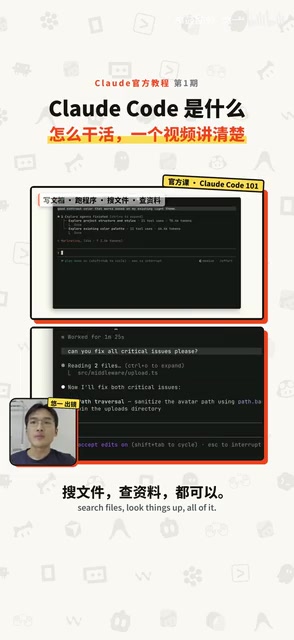
Despite having "code" in its name, Claude Code isn't limited to writing code. It can write documentation, run programs, search files, and look things up online. Its real strength is getting things done for you. By default, it operates within your current folder and its subfolders — accessing anything outside that scope requires your explicit approval.
What Is an AI Agent?
Software that can perceive its environment, take action, and work toward a goal step by step is known in the industry as an AI Agent. Claude Code is a classic example of an agent framework. Getting it running is straightforward: just type claude in your terminal.
The terminal is that text-only window with a black-on-white interface that can feel intimidating at first glance. But don't worry — once you type the claude command, you just communicate with it in plain language. It handles the rest.
Specifically, Claude Code can do four types of things:
- Read a project: Ask it "what does this project do?" and it will go through the files and explain it to you — in as much or as little detail as you want, or in plain, non-technical terms.
- Edit code: Tell it the outcome you want, like "make a cool-looking webpage," and it will treat that as a goal, find animation libraries online, locate local files, and make the changes.
- Run commands: Install or uninstall software, run programs, perform checks — it can execute all of these and return the results.
- Search the web: For tasks like building a news aggregator, it can periodically search for news, organize content, and create documents.
None of these tasks require you to guide it step by step. Just define the goal and execution order upfront, and it will take care of the rest.
The core idea behind AI Agents lies in combining autonomous decision-making with tool use. Traditional AI passively receives input and returns output. Agents, by contrast, have a complete loop: perceiving the environment, planning actions, and executing operations. Rather than simply predicting the next word, agents use the language model as a "thinking engine" and pair it with external tools — such as the file system, terminal, and browser — to accomplish real-world tasks. This paradigm is known as "tool use" or "function calling," and it has become a standard capability across major AI platforms. The reason Claude Code can run commands and modify files is that the Claude model can issue structured "instructions" during a conversation, which a local program then parses and executes. This also explains the phrase "brain in the cloud, hands on the ground" — the model itself has no file read/write permissions and must interact with your system indirectly through a controlled tool interface.
Agent Loop: How an Agent Completes Tasks Step by Step
The core mechanism behind Claude Code is a cycle called the Agent Loop. It takes your request (prompt) as a goal that must be completed, then works toward it through multiple rounds of thinking and action.
Here's an example: you tell it "the login page isn't responding when clicked — please fix it." Claude takes this as its goal, uses command-line tools to inspect the code files, locates the relevant login page code, reads the error messages, makes the fix, then runs a verification. If it's fixed, the goal is met. If not, it loops back to the first step and tries again — repeating until the task is complete.

These three steps aren't a rigid pipeline — they blend together. A simple problem might complete in half a loop, while a complex one may involve dozens of rounds of edits and command executions, with self-correction happening along the way.
One important detail: if you notice it going in the wrong direction or have a new idea, you can press ESC at any time to interrupt it. You can also inject new input mid-loop — type your message and press Enter, and once it finishes its current batch of tasks, it will read what you wrote and adjust accordingly. This ability to step in at any moment makes human-AI collaboration far more flexible.
The Four Elements Behind the Agent Loop
Four elements keep this loop running: a brain, hands, memory, and keys.
The brain is the Claude model, which runs in the cloud rather than locally. It understands your instructions, reads code, and decides what to do next — but it cannot execute commands on your local machine.
The hands are the tools, responsible for running commands and modifying local files. The tools don't decide what to do on their own; the brain tells them which commands to execute. The full flow works like this: your local code and prompt are sent to the cloud model → the model determines which files to examine → instructions are sent back locally for the tools to inspect the code → results are returned to the cloud → the brain decides what changes to make → the local tools execute the changes and run the code → results are sent back to the brain to confirm the task is complete.

Memory — formally called the context window — includes everything you've said in your prompts, the files it has read, and the output from commands. But the model's memory is finite. Once full, it automatically compresses or discards older content, which means details from early in a long session may be lost. Every new conversation starts with an empty memory, and different chat windows are completely independent. If you want Claude to follow certain rules every time, write them into a CLAUDE.md file — it reads this file at the start of every new session. (This file is important and will be covered in detail separately.)
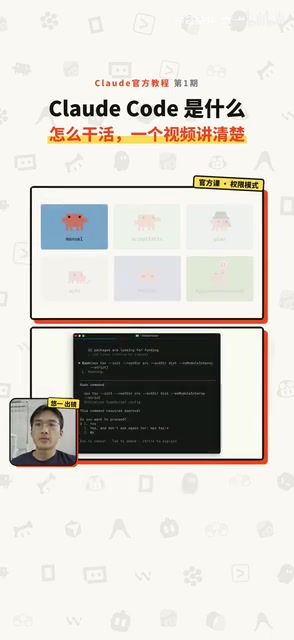
Keys represent permissions. When Claude Code modifies local files, you can configure what it's allowed or not allowed to change. There are several modes:
- Manual mode: Asks for your approval before editing any file
- Edit-accept mode: Performs common file operations within the project folder (editing, moving, deleting) without asking; still prompts for other commands
- Plan mode: Researches and proposes a plan only — doesn't touch your code
- Auto mode: Acts freely, with background safety checks to block dangerous deletion operations
- Full override: Disables all confirmation prompts (not recommended for beginners)
The context window is the key concept for understanding the model's memory limitations. It refers to the total amount of text the model can process in a single inference pass, typically measured in tokens (one token is roughly 0.75 English words or 1–2 Chinese characters). Current Claude models support context windows of hundreds of thousands of tokens, but this space gets consumed quickly as conversation turns accumulate and more code files are read. Once the limit is exceeded, the model must compress or discard earlier content — which is why it might "forget" instructions you gave at the very beginning of a long session. The CLAUDE.md file is designed precisely to work around this limitation. By actively injecting fixed rules at the start of each session, it effectively externalizes "long-term memory" to the file system rather than relying on the model's limited working memory.
Risk Warnings and Getting Started
Claude Code is powerful, but it has its weaknesses. At its core, it's a probabilistic model — it can hallucinate and make mistakes. While these issues are becoming less frequent as models improve, users still report cases on social media like "it deleted one of my files." So be careful with permission settings and avoid maxing them out.
As for how to start using it, there are several options: log in via terminal and use it directly; install a plugin in your code editor; use the desktop app; or access it through the web interface.
Two tips for newcomers: first, check the status bar when you start to confirm the current permission mode; second, begin with simple read-only questions like "what does this project do?" or "what does this concept mean?" — then gradually work up to having it make changes. Learn as you go. The more you use it, the more natural it becomes.
Related articles

Chain of Thought Isn't Just for AI: How Humans Can Use CoT to Improve Thinking Quality
Chain of Thought isn't just a prompt trick for large models. Starting from a Hacker News discussion, this article analyzes why CoT works for human thinking too, breaks down actionable ways to transfer it, and highlights the key differences between human CoT and machine CoT.
Cloudflare Teams Up with OpenAI: Closi…
Cloudflare Teams Up with OpenAI: Closing the Loop from Vulnerability Discovery to Defense with AI
Cloudflare uses OpenAI Daybreak to investigate security vulnerabilities and generate reviewable remediation plans, while developers use Codex to boost coding efficiency and quality.

Orca Multi-Agent Orchestration in Practice: A Guide to Parallel Collaboration with Claude and Codex
Orca is Stable AI's free open-source agent workbench supporting 34 agents like Claude Code and Codex in parallel. Learn its Git worktree isolation, multi-model orchestration, and mobile management.