Getting Started with DeepSeek Harness: A Deep Dive into the Everything-is-a-Plugin Agent Architecture

DeepSeek Harness is an everything-is-a-plugin agent framework with four flexible operating modes.
DeepSeek Harness is an agent runtime framework built on an "everything is a plugin" philosophy — every component, from LLMs and tools to session management and the UI, is abstracted into a pluggable module communicating via Service and Event mechanisms. It ships with 159 built-in plugins and supports four operating modes: Standard (full-featured for daily use), PTC (TypeScript-based multi-step workflow orchestration), Minimal (bare-bones Bash and file I/O for benchmarking), and Creative (proactive, divergent thinking for exploratory development). The four modes mirror the concept of model temperature — from low-temperature precision to high-temperature creativity.
What Is DeepSeek Harness?
DeepSeekAd Harness is rapidly becoming a core battlefield that AI developers can't afford to ignore. Whether you're preparing for interviews, handling day-to-day work, or shipping real projects, understanding its core architecture and usage patterns is quickly becoming a foundational skill for AI engineers. This article is based on a source-code walkthrough tutorial from a Bilibili creator, taking you from the framework's design philosophy all the way through its four operating modes — no prior experience required.
In short, Harness is an agent (Agent) runtime framework released by DeepSeek. It's not just a conversational tool — it's an extensible, pluggable system for orchestrating agent capabilities. If you want to use it effectively, especially for plugin-based development in real projects, you need to understand the design thinking behind it.
Core Design Philosophy: Everything is a Plugin
One look at the DeepSeek Harness official site makes its core design philosophy immediately clear: Everything is a Plugin.
Just How Far Does the Plugin Philosophy Go?
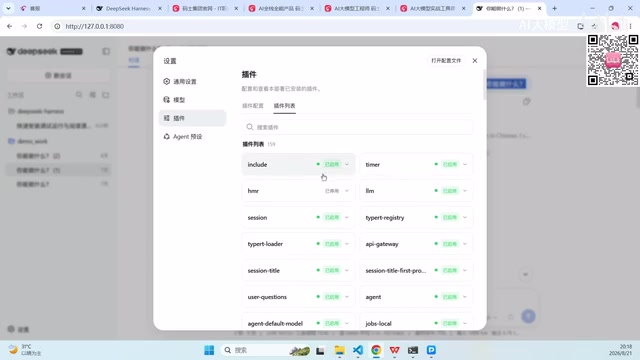
The word "everything" here is not an exaggeration. Every component involved in agent capabilities — LLMs, tools, Skills, rendering, refresh logic, storage, training loop scheduling, and even the UI itself — is abstracted into a plugin. Plugins communicate through a Service and Event mechanism, allowing them to be freely composed and recombined.
Open the settings panel and you'll find that the LLM is a plugin, the Timer is a plugin, and Session management is a plugin. Out of the box, Harness ships with 159 built-in plugins. Developers with custom needs can search, install, and configure additional plugins through the plugin management panel.
Why Go All-In on a Plugin Architecture?
This fully decoupled architecture delivers exceptional flexibility. You can assemble capabilities like building blocks — mixing and matching plugins to fit the task at hand, rather than being constrained by the framework's fixed feature set. The plugin configuration panel also lets you set the maximum number of Agent loop iterations, which is critical for controlling execution boundaries and preventing infinite loops.
This is precisely why Harness is seen as having the potential to become a new primary development platform: it standardizes and modularizes every agent capability, providing a unified foundation for building complex Agent applications.
The Four Operating Modes of Harness, Explained
Beyond standard conversation, Harness offers four distinct operating modes in the Agent preset section, each targeting different use cases. Understanding their differences is key to getting the most out of Harness.

Standard Mode: The Full-Featured Default for Everyday Use
Standard mode is the default choice for most users in everyday conversations. It offers the most complete set of coding agent capabilities, including file editing, executing Linux kernel server commands, web search (usable for crawling), Skills invocation, and task planning, goal management, sub-agents, and workflows.
For the vast majority of scenarios, Standard mode has everything you need. If you're ever unsure which mode to use, just go with Standard.
PTC Mode: Tackling Complex Workflows in One Shot
PTC mode includes all the capabilities of Standard mode, but goes further by using the Code Model SDK to present tools to the model and letting it use TypeScript programs to compose multi-step operations.
It's especially well-suited for tasks with vague goals but long execution paths. For example: if you want to understand the DeepSeek Harness source code but don't know where to start, you can use PTC mode to have it first analyze "what steps should I break down reading the main source flow into," and it will then use TypeScript composition to progressively plan out the task.
Think of it like a team lead mapping out a plan at a weekly meeting — rather than getting lost in every detail, they clarify "Step 1, Step 2, Step 3" at a high level and string the intermediate steps together, preventing the agent from going off-track during execution.
Minimal Mode: Built for Benchmarking and Performance Validation

Minimal mode does exactly what its name suggests: everything else is stripped away, leaving only a Bash command line and an STR Replace Editor (a file read/write tool).
This extreme simplicity makes it ideal for stress testing and end-to-end performance testing. When you need to measure metrics like file write throughput, concurrency levels, or I/O per second, Minimal mode shuts off all unrelated plugins to free up as many resources as possible.
This follows the same logic as standard performance testing practice: whether on a local machine or a Linux server, you close unrelated processes before running unit or stress tests to ensure clean, accurate results.
Creative Mode: Your Proactive Partner for Innovation

Creative mode's defining feature is that it actively thinks beyond your stated requirements, surfacing directions you might not have considered.
For instance, if you say "I want to build a Snake game," Creative mode will push back with questions: Should it be a mobile app or a web-based version? Can we incorporate some retro or cutting-edge creative touches instead of building the same version everyone already knows?
Beyond all the capabilities of Standard mode, Creative mode also provides runtime inspection, plugin experimentation, and creative guidance. It performs self-validation in memory on the fly, and can even assemble new modes from scratch. This makes it especially useful for exploratory tasks like plugin development, where you're not always sure what the next step should be.
Understanding the Four Modes Through the Lens of Model Temperature
If you want an intuitive analogy, the differences between these four modes are a lot like adjusting a model's temperature parameter.
Higher temperature means more creativity and divergence; lower temperature means more stable, focused outputs. Creative mode is like a high-temperature state — actively branching out and self-expanding. Minimal mode is like a low-temperature state — focused, stable, and predictable. The underlying mechanics are different, but the intuition maps cleanly.
To summarize each mode's sweet spot in one line:
- Standard Mode: The all-rounder for everyday development
- PTC Mode: Complex workflows, executed end-to-end in one shot
- Minimal Mode: Performance benchmarking and stress testing
- Creative Mode: Self-directed exploration and ecosystem innovation
Closing Thoughts: Why DeepSeek Harness Is Worth the Investment
DeepSeek Harness's "everything is a plugin" philosophy, combined with its flexible multi-mode runtime, makes it far more than a conversational tool — it's a deeply customizable agent development platform. For developers, mastering it means being able to connect MCP integrations, write custom tool plugins, and orchestrate complex workflows in real-world projects.
As agent-based applications continue to proliferate, frameworks like Harness will become unavoidable core skills — whether you're interviewing for a job or shipping production systems. From running your first conversation, to reading through the main source flow, to building your own plugins: this learning path is one every AI engineer should take seriously.
Related articles

64 Releases in 40 Days: How Strata Uses Release Velocity to Define Its AI Local Inference Roadmap
Strata shipped 64 releases in 40 days with 460k+ characters of notes. From 0.1.0 to 0.2.10, a three-step path: make it run, make it fast, make it trustworthy.
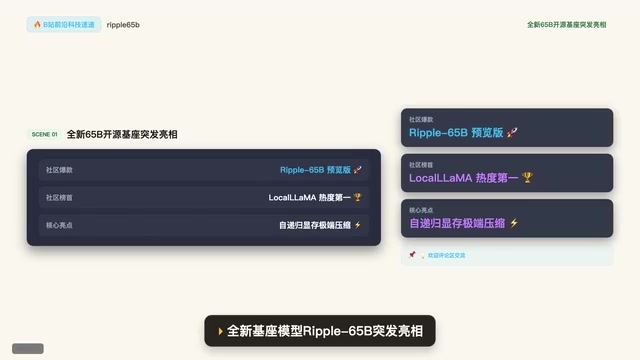
Ripple-65B Open-Source Model Tops Community Charts
Ripple-65B open-source LLM debuts atop community charts, using a self-recursive architecture to slash long-context KV cache for low-latency hundred-billion-scale inference on ordinary GPUs, with preview weights, quantized files, and one-click Olema & VLM deployment.

Deploy Open-Source Video Model MiniMax H3 Locally in 5 Minutes and Skip Cloud Generation Fees
Bilibili creator tests local deployment of open-source video model MiniMax H3: three-step ComfyUI install, 5-minute setup, no coding. Same prompt generates in 2 minutes locally vs 4 minutes online with queuing, saving about 30 RMB per 15-second 720P video. Includes VRAM requirements and RTX 5080 test results.