Getting Started with N8N Automation: The End of Manual Lead Management

N8N automates lead management through four concepts: Workflow, Node, Trigger, Action.
Using "Still Managing Leads Manually?" as its hook, the article introduces how N8N, a workflow automation platform, helps teams escape repetitive lead management chores. It breaks down N8N's four core concepts: a Workflow is an end-to-end automation process, a Node is a single task or App integration step, a Trigger is the event that starts the flow (like a form submission), and an Action is the operation actually executed after the trigger (like saving data or sending a notification). By chaining these four concepts together, the article outlines the complete automated path of a lead from form submission to the sales team receiving a notification, emphasizing that the entire process requires no manual intervention — ideal for teams handling daily lead entry, notification sending, and data syncing.
Why Are You Still Managing Leads Manually?
Every time a new lead comes in, you manually update the data and message the sales team — this repetitive work is draining your team's efficiency. A popular YouTube video poses the question directly: Still Managing Leads Manually? — and offers an answer: N8N.
N8N is a Workflow Automation Platform. Simply put, it connects different Apps and Services so that repetitive tasks run automatically. For high-frequency, rule-based scenarios like lead management, it's almost tailor-made.
A Workflow Automation Platform is a category of software that lets users visually connect multiple applications and services and execute tasks automatically according to preset rules. Compared with traditional scripting or RPA (Robotic Process Automation), these platforms typically use drag-and-drop node editing, lowering the barrier to entry for programming. Representative products include Zapier, Make (formerly Integromat), Microsoft Power Automate, and the N8N discussed in this article. Their core value lies in this: when an event occurs, the system can automatically complete a series of cross-application data transfers and operations, eliminating repetitive work like manual copy-pasting and manual notifications. N8N's differentiating features are that it's open-source and self-hostable — data stays on your own servers, making it a good fit for teams with high requirements around data privacy and customization.
Four Core Concepts to Understand How N8N Works
The video breaks down N8N's key concepts into four terms. Understanding them means understanding how automation works.
Workflow: The Complete Automation Process
A Workflow isn't some single operation you might imagine — it's an end-to-end complete process. For example, from a lead form submission all the way to the sales team receiving a notification — that entire process is what's called a Workflow. It defines the full picture "from start to finish."
End-to-End is a key descriptor in the automation world, emphasizing that a process covers the entire journey from the initial trigger to the final output, rather than an isolated step. In traditional workflows, handling a single lead is often fragmented across multiple tools and people: marketing checks the form backend, operations manually enters data into a spreadsheet, sales waits for a notification in the group chat. The point of end-to-end automation is to connect these breakpoints into a continuous chain, where any failed step can be traced and retried. To judge whether a Workflow is truly end-to-end, check whether it covers the complete loop of "event occurs → data processing → result delivery" and whether human intervention is still needed in between. This is also the essential difference between tools like N8N and single-purpose utilities.
Node: A Single Step in the Process
A Node is a specific task or App integration within a Workflow. For example, saving data to a Google Sheet is a Node. Each Node handles just one thing, and multiple Nodes chained together form a complete process.

Trigger: The Switch That Starts the Process
A Trigger is the event that kicks off a Workflow. For example, a new lead form submission on your website is a Trigger. Without a Trigger, the Workflow won't start on its own — it needs to be "woken up."
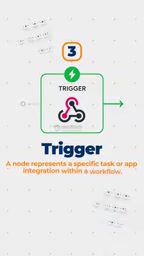
On automation platforms, Triggers generally fall into several categories: event triggers (such as receiving a new email, a form submission, or a new database record), time triggers (such as running on a daily schedule), and manual triggers (where a user clicks a button to execute). Event triggers rely on the Webhook mechanism — an external application sends an HTTP request to a URL provided by N8N when the event occurs, and N8N starts the corresponding Workflow upon receiving it. Understanding this helps with troubleshooting: if a Workflow isn't running automatically, first check whether the Webhook URL is configured correctly and whether the external application has permission to call it. Additionally, a Workflow usually has only one primary Trigger, but conditional branch nodes can handle different trigger scenarios.
Action: The Task Executed After the Trigger
An Action is the operation N8N actually performs after the Trigger fires. For example, saving lead details to a Google Sheet or sending an Email notification to the sales team — these are all Actions.
The Concrete Path of Lead Management Automation
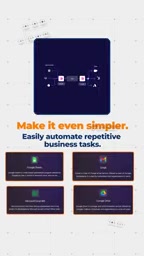
Stringing these four concepts together, the automated path for a single lead becomes clear:
- Event Trigger fires: The website's online form receives a new submission
- Nodes and Process execute in sequence: Data is written to Google Sheet, and the notification node is triggered simultaneously
- Action completes: The sales team receives an email reminder, and the lead information is archived
The entire process requires no manual intervention. The video emphasizes that N8N lets you easily connect different Apps and automate repetitive business tasks within a Workflow.
Remember All Four Concepts in One Sentence
The author distinguishes them in the simplest way possible:
- Workflow = Complete automation process
- Node = A single step
- Trigger = The event that starts the Workflow
- Action = The final task executed
The order is always: Event triggers → Node processes → Action executes.
Who Should Use N8N?
If your team deals with repetitive work like lead entry, notification sending, and data syncing every day, N8N offers an automation solution that doesn't require writing a lot of code. Its value isn't in replacing people — it's in freeing people from mechanical operations so they can focus on the things that truly require judgment.
To learn more about N8N, stay tuned for follow-up content from the original video.
Related articles

"Black October": Did AI Uncover 3% of All Critical Vulnerabilities Ever?
A Reddit post claims 3% of all critical software vulnerabilities ever were found in the past month, dubbed 'Black October.' We break down the statistical issues, how AI-assisted code auditing accelerates discovery, and how developers should respond.

Microsoft Project Gecko: Using AI to Bridge Language Gaps for African Farmers
Microsoft's Project Gecko launches PharmaChat, letting African farmers ask questions in their native language and get precise video clips and farming book chapters via AI. The project also releases three interactive manuals to advance inclusive AI.

Musk's Space Dominance: How Starlink Throttling Undermines Ukraine's Defense
SpaceX's Starshield throttling disabled Ukraine's high-speed interceptor drones, exposing how Musk's private control over low Earth orbit communications affects battlefield dynamics and national security, and highlighting the risks of commercial space militarization and space governance dilemmas.