Getting Started with n8n: Core Components for Building Your First AI Workflow

n8n connects AI Agents, Webhooks, and tools on a visual canvas to build intelligent automated workflows.
n8n is a visual automation platform where users drag and connect nodes on a canvas to build workflows without writing code. Its core is the AI Agent node: a system message (prompt) defines the agent's behavior, a connected chat model (like ChatGPT or LLMs via OpenRouter) provides reasoning, and optional memory modules plus hundreds of tools handle real actions like emailing or data storage. Webhooks serve as the most common trigger, acting as a real-time bridge between external systems and workflows, with separate test and production URL modes. The overall architecture cleanly separates into three layers — input/trigger, AI Agent core, and output/downstream nodes — forming a flexible and extensible AI automation framework.
What Is n8n: A Visual AI Automation Workbench
n8n is a visual automation tool that breaks down complex backend logic into modular building blocks you can drag, drop, and connect on a canvas. For those new to automation, the most intuitive way to understand it is this: every block you see in the main workspace is a node, and each node corresponds to a piece of code that executes a specific task.
Nodes come in different forms. Nodes with a distinctive shape indicator are typically trigger nodes — the starting point of any workflow. A trigger node determines under what conditions the workflow begins running: it might be scheduled, manually activated, or awakened by an incoming external event. Understanding this is the very first step to building any automated process.
AI Agent: The Brain of Your Workflow
Where n8n truly shines is its ability to embed AI directly into your workflows. When you place an AI Agent node on the canvas and double-click to open it, you'll see a system message field — this is the core prompt for your AI agent, defining exactly what the agent is supposed to do.
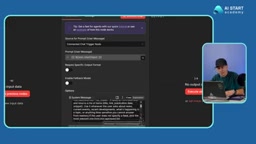
The logic behind an AI Agent is straightforward: it receives a user message as input data, which can come from a user, another node, an email, or any other source. Once it has that data, the agent analyzes it according to the system message and decides what to do next.
The key insight is that an AI Agent is purely a "decision-maker" — it works by calling tools to carry out real actions: sending emails, running searches, performing calculations, writing data to a database, and more. n8n offers hundreds of tools the agent can invoke on demand. The agent's entire behavior is governed by the system message, which means the clearer your prompt, the more reliably the agent performs.
Giving Your AI Agent the Ability to Think
An AI Agent node doesn't think on its own — it needs a chat model node connected to it as its brain. Only once a model is attached can the agent analyze information and reason through problems.
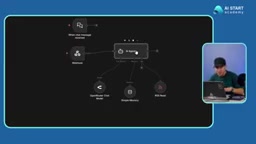
n8n is highly flexible when it comes to model selection. You can use a model from a specific platform directly, or use OpenRouter to access a wide variety of large language models (LLMs) through a single interface. If you don't have an OpenRouter account, you can simply enter an API key from ChatGPT or another platform — once configured and tested, your AI Agent can immediately start working with your chosen model.
Beyond the model itself, an AI Agent can also be equipped with a memory module to retain context across a conversation, as well as tools like an RSS Reader to feed live external data such as the latest news into the model. The model, memory, and tools together form a complete intelligent agent.
Webhook: The Gateway to the Outside World
Among trigger nodes, Webhooks are the most commonly used and arguably the most important. Double-clicking one reveals a Webhook URL with two modes: a test URL and a production URL.
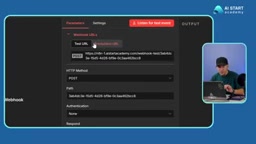
The distinction is straightforward: the test URL includes "test" in its path and is primarily used during development alongside the "Execute Workflow" button for debugging; the production URL is the publicly exposed endpoint once your system is complete, available 24/7 to handle incoming requests. The path portion of the URL can also be freely renamed to whatever you like.
The real value of a Webhook is that it acts as a bridge between external systems and your workflow. It sits and waits to be called — by a piece of software, a website, an app, or any online service.
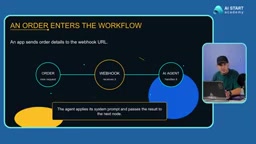
Here's a concrete example: imagine you run an e-commerce system. When a customer places a new order, the order details are sent to your Webhook URL. The Webhook receives that data and passes it to the AI Agent, which then processes it according to the system prompt and produces an output.
A Webhook is essentially an "event-driven HTTP callback" mechanism: when something happens in an external system, it proactively sends an HTTP request (typically a POST) to a pre-registered URL, rather than having the receiver repeatedly poll to check for new data. This stands in contrast to traditional "polling" — where requests are sent at fixed intervals to check for updates, which is less efficient and introduces latency. Webhooks follow a "notify only when something happens" model, making them more real-time and resource-efficient. Understanding this distinction helps you decide when to use a Webhook trigger (ideal for scenarios requiring real-time responses to external events) versus a scheduled trigger node (better suited for batch processing or periodic sync tasks).
The Complete Architecture: Input, Core, Output
Putting all these components together, the architecture of an n8n AI workflow is actually quite clean and can be broken down into three parts:
- Input / Trigger: A trigger node or Webhook receives external data and starts the workflow.
- AI Agent (Core): Sits at the center of the system — connected to a chat model for reasoning, equipped with memory to maintain context, and able to invoke various tools to take action.
- Output / Downstream Nodes: Once the AI Agent completes its task, it passes the result to downstream nodes — email, Telegram, phone notifications, or any other tool or service — continuing the chain from there.
This is the fundamental skeleton of an n8n AI workflow. In the editor view, you build and debug your logic; switching to the execution view lets you review the history of every run — once the workflow is live, these execution logs help you monitor whether things are running smoothly and troubleshoot any issues.
Once you understand triggers, AI Agents, models, tools, memory, and downstream nodes, you've grasped the most essential concepts in n8n automation. The next step is simply to start connecting them — and build your very first AI workflow.
Background Notes
OpenRouter is an aggregated LLM routing platform that lets developers call models from OpenAI, Anthropic, Google, Meta, and other providers through a single unified API — without needing to register and manage separate API keys for each. Its core value is twofold: it provides side-by-side cost and performance comparisons so you can switch models as needed, and it supports automatic fallback to a backup model if one provider goes down, improving overall availability. In n8n, using OpenRouter means entering just one API key and then freely switching between underlying models within your workflow — no need to constantly update node configurations. This is especially useful when you want to compare model outputs or keep API costs under control.
Related articles

Receipt Forgery Detection Near Random? Real-World Struggles and Solutions in Document Image Forensics
A receipt forgery detection project with ROC-AUC near random reveals the pitfalls of small-sample document forensics. Explores anomaly detection, self-supervised pre-training, and numerical consistency as viable alternatives.

From Workflows to Eval-Driven Development: A Paradigm Shift in How We Solve Problems with AI
AI problem-solving is shifting from deterministic workflows to "define evals + hillclimb." This piece explores how eval-driven development reshapes tasks, data vendors, human roles, and Agent UX.

Tesla Powerwall + Electric Vehicle: A Dual Backup Power Solution for Outages
Tesla Powerwall combined with EV bidirectional charging can provide multi-layer home backup power during outages. We break down runtime, V2H realities, and Supercharger loop feasibility.