Getting Started with Ollama: The Lowest-Barrier Tool for Running LLMs Locally

Ollama removes every barrier to running open-source LLMs locally with a three-command setup.
Ollama is an open-source local LLM management tool that packages environment setup, model format handling, and VRAM management into a single executable. Its core design is a layered "manager plus engine" architecture: users interact with a unified CLI and HTTP interface while llama.cpp handles inference on GGUF quantized models, making consumer hardware viable. Three commands — install, pull, chat — cover the entire getting-started flow. The local approach offers privacy, offline access, zero per-request cost, and full experimental freedom, at the cost of hardware-capped speed and inability to run the largest frontier models. The rule of thumb is simple: local for prototyping, privacy, and learning; cloud for high concurrency and flagship models.
What Problem Does Ollama Solve
When people try to run large language models on their own machines, they typically hit three walls. The first is the environment wall — inference frameworks require compilation, depend on a tangle of GPU drivers, and many give up halfway through setup. The second is the format wall — model weights can weigh tens of gigabytes, formats aren't interoperable, and conversion scripts are enough to turn away beginners. The third is the resource wall — figuring out which model fits in how much VRAM, plus doing quantization yourself, is a serious ask.
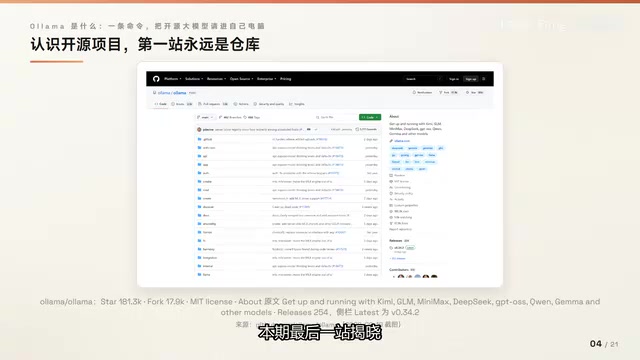
Ollama's answer is to hide all three of those problems behind a single command. It's an open-source project written in mainstream languages, compiled into a single executable binary, and released under the MIT license with zero commercial restrictions. It has accumulated over 180,000 stars on GitHub, making it the undisputed leader among local LLM tools. Install it, pull an official model with one command (roughly 7.2 GB), and start chatting with one more.
Mental Model: One Manager, One Engine
The simplest way to understand Ollama is to think of it as "one manager paired with one engine." You only ever talk to the manager: one command to pull a model, one command to start a conversation. The manager handles downloading models, loading them into VRAM on demand, and exposing a unified interface. The actual inference is done by the built-in llama.cpp engine, which reads GGUF quantized models.
This layered design has real practical benefits: engine upgrades are invisible to you, and swapping models costs nothing. A common analogy: Ollama is to local LLMs what Docker is to containers — the foundation is someone else's (llama.cpp is a community project), but the experience is carefully polished. Ollama does the engineering work: normalizing formats, loading on demand, managing VRAM, and providing a stable interface to the outside world. The model computation itself is almost entirely delegated to the engine.
llama.cpp is an open-source project started by Georgi Gerganov in 2023, implementing LLM inference in pure C/C++. Its core goal is to run LLaMA-family models on ordinary hardware without requiring a GPU. It supports CPU inference while also being able to call accelerated backends including Metal (Apple Silicon), CUDA (NVIDIA), and ROCm (AMD) — effectively "use the GPU if you have one, fall back to CPU if you don't." GGUF is the model storage format defined by llama.cpp (the successor to GGML), packing model weights, quantization parameters, and metadata into a single file for easy distribution and loading. Quantization refers to compressing model weights from their original 32-bit or 16-bit floating-point representation down to lower precision (such as 4-bit integers), which can reduce both file size and VRAM usage by several times and improve inference speed, at the cost of a slight loss in precision. Ollama adds a scheduling and interface layer on top of llama.cpp so users never need to think about any of this.
Why Bring Models Back to Local
Cloud APIs are always at your fingertips — so why go through the trouble of running models locally? The official documentation gives four reasons.
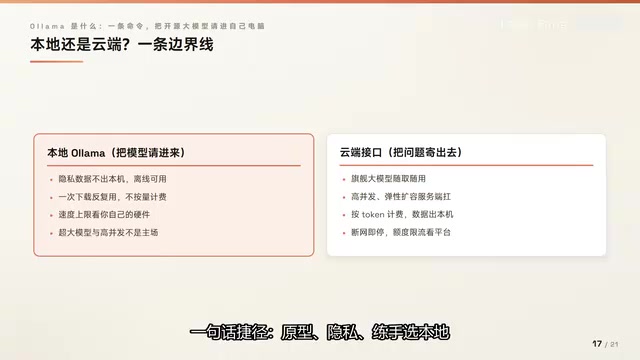
Privacy: The official FAQ explicitly states that prompts and data are not collected when running locally. Offline: The model lives on your machine and works without an internet connection. Cost: Local inference isn't billed per request — no surprise invoices. Freedom: You own the model files and can experiment however you like.
Of course, the local route has trade-offs — speed is capped by your hardware, and large-scale models or high-concurrency workloads are out of reach. The cloud route, by contrast, gives you flagship models on demand and lets the server handle concurrency, but you pay per usage and your data leaves your machine. The official documentation presents both paths with example calls and doesn't favor either one.
Three Commands to Run the Full Flow
From installation to conversation, the entire process takes just three commands.
Step 1 — Install: macOS and Linux use a single official shell command; Windows uses a single PowerShell command. A desktop installer and Docker image are also available. After installation, typing ollama and pressing Enter launches a first-time setup wizard where you can sign in to use cloud models or continue in local mode. No manual GPU driver configuration is required — the barrier has genuinely been removed.
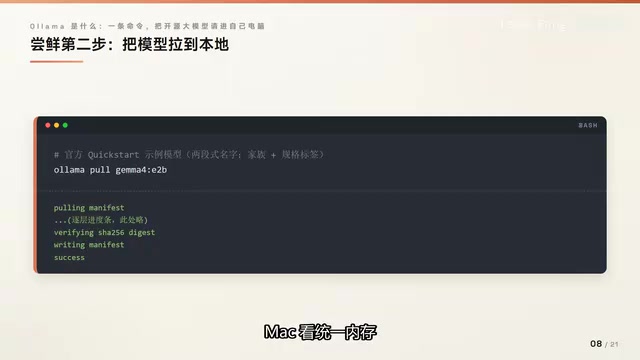
Step 2 — Pull a model: Model names use a two-segment format, such as gemma3, where the tag after the colon indicates parameter count. The official download is approximately 7.2 GB; at least 8 GB of available VRAM is recommended (on Mac, this refers to unified memory). After running the command, it first fetches a manifest, then displays layer-by-layer progress bars, and finally reports success.
Step 3 — Chat: If you run the chat command with a model that hasn't been pulled yet, it will automatically pull it first, then enter the chat interface where responses stream out token by token. Type a slash command to exit.
You can also use the list command to see your local models, which returns four columns: name, ID, size, and modification time. Model files are stored by default in the Ollama data directory under your home folder. To move them, just change one environment variable. Use a delete command to clean up models you no longer need so they don't waste disk space.
Key Numbers and Version Identification
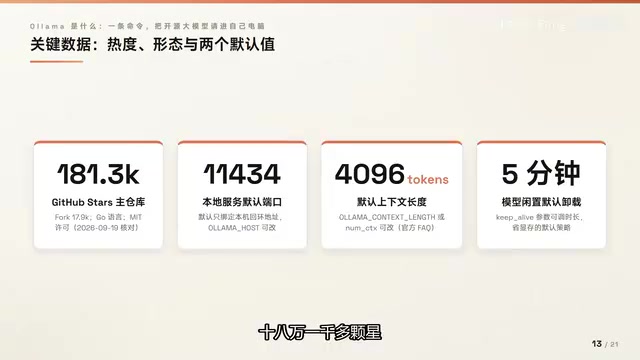
A few numbers from the official repository are worth keeping in mind. 11434 is the local server port, accessible only to the local machine by default. 4096 is the default context length — increase it via an environment variable if needed. 5 minutes is the default idle timeout before a model is unloaded from VRAM, a thoughtful design choice for constrained memory environments.
When reading open-source project releases, learn to distinguish version labels. The version pinned at the top with a "Pre-release" tag is not the recommended production choice — the actual latest stable release is labeled "Latest." Getting into the habit of using pre-releases for experimentation and stable releases for production is worth cultivating.
Where do models come from? The official model library brings together major open-source families: Meta's Llama series is the classic foundation model, available in 8B, 70B, and 405B tiers; DeepSeekAd's R1 reasoning family ranges from 1.5B to 671B, covering device-grade to data center-grade use cases; Alibaba's Qwen covers the widest range; Google's Gemma skews toward on-device use; OpenAI has released open-weight models; GLM, Kimi, MiniMax, and others are all represented. Each card lists scale, tags, and last updated time — spot what you want and pull it with one command.
Context length determines how much text a model can "remember" in a single conversation. 4096 tokens corresponds to roughly 3,000 English words or 2,000 Chinese characters — generally sufficient for everyday conversation and short document processing, but tight for long documents or extended multi-turn dialogues. Increasing context (e.g., to 8192 or 32768) lets the model handle longer inputs, but VRAM usage grows linearly or even quadratically, which is why the default is a compromise between general usability and resource consumption. In Ollama, you can adjust this ceiling via the OLLAMA_NUM_CTX environment variable or by setting the num_ctx parameter in a Modelfile. How high you can set it depends on your available VRAM.
Scope of Use: When Should You Use It
A tool works well when you understand its boundaries. Three scenarios are a natural fit for Ollama: local prototyping and offline environments, where models are available on demand; privacy-sensitive text processing, where data never leaves the machine; and providing a model API for applications during development — Ollama is compatible with the OpenAI and Anthropic client SDKs, so you just change one address to point to localhost (though the official docs note that compatibility only covers a subset of the API), and debugging costs nothing.
There are also two scenarios to avoid: high-concurrency production inference services, which belong to dedicated inference servers; and use cases that require frontier models too large to fit on consumer hardware.
In short: choose local for prototyping, privacy, and learning; choose cloud for high concurrency and flagship models. Ollama takes on the manager role for local LLMs — handling downloads, loading, and interfaces so you can focus on what you want to build. The actual inference goes to the engine, and the quantized format means consumer hardware can keep up. The "manager plus engine" mental model will carry through everything that follows. The next step is to run it yourself and receive the model's first reply.
The reason Ollama is compatible with the OpenAI client SDK is that it exposes endpoints with the same REST API paths as OpenAI (such as /v1/chat/completions) on http://localhost:11434. This means you only need to change base_url to the local address and set api_key to any string — existing code can switch to a local model without modification. The Anthropic compatibility layer works the same way. "Compatibility covers only a subset" means that some advanced parameters (such as specifics of OpenAI's function-calling format or streaming tool calls) may behave inconsistently, so targeted testing is required before using it in production. For development and debugging, however, the switch is nearly transparent.
Related articles

JobRunner MCP Server: AI Agents Can Now Fix Failed Java Jobs
JobRunner launches an open-source MCP server enabling AI agents to view cluster status, diagnose failures, and recover Java jobs—incident response from any cloud coding environment or existing agent.

MLAI Digital Launches 9 Security Agents: MCP Server Safeguards the Full Lifecycle of Agentic AI
MLAI Digital launches Security MCP Server with nine built-in specialized security agents covering vulnerability discovery, attack simulation, prompt injection detection, API and infrastructure assessment, and accelerated remediation—embedding security validation across the full Agentic AI lifecycle from development to production.

Running Isaac Lab on H100 GPUs: Exploring Better Approaches
Exploring optimization methods for running Isaac Lab on NVIDIA H100 GPUs, including MIG configuration, mixed precision, TensorRT acceleration, and community experience to improve robotics simulation and reinforcement learning efficiency.