Getting Started with Vibe Coding: A 3-Step Framework for AI-Assisted Programming

Master the 3-step Vibe Coding loop — Align, Request, Revise — to turn data into visualizations with AI, no coding required.
Vibe Coding is a programming paradigm where natural language drives AI to generate code, no traditional tech stack required. Using a beauty salon budget spreadsheet as an example, the tutorial distills a core methodology: have the AI read and confirm the data source (align), specify the output format clearly (request), then iterate on any shortcomings (revise). The key insight is that AI output quality depends almost entirely on input clarity — vague requirements let the AI fill gaps with its own assumptions, leading to off-target results. For beginners, learning to communicate clearly with AI is a more valuable first step than learning programming syntax.
What Is Vibe Coding
Vibe Coding isn't a specific tool or piece of software — it's an entirely new programming paradigm where AI replaces hand-written code. In the past, building a data visualization webpage required developers to be fluent in a whole tech stack: HTML, JavaScript, charting libraries, and more. With Vibe Coding, you simply describe what you want in plain language, and the AI translates your idea into working code.
This approach dramatically lowers the barrier to programming, allowing people without a coding background to participate in software creation. Its core value isn't about having AI fully replace humans — it's about freeing people from tedious syntax details so they can focus on what they want rather than how to write it.
The term "Vibe Coding" was first coined by OpenAI co-founder Andrej Karpathy in early 2025. He used it to describe a development experience of being "fully immersed in an AI-collaborative flow, barely writing any code by hand." Unlike traditional AI-assisted coding (such as GitHub Copilot providing autocomplete), Vibe Coding shifts the focus entirely to natural language — the developer acts more like a product manager or director, responsible for stating requirements, reviewing outputs, and making decisions, rather than writing logic line by line. The main tools supporting this workflow today include Cursor, Claude, Windsurf, and others — all capable of generating, modifying, and running complete code files directly within a conversation. This paradigm emerged on the back of a qualitative leap in large language models' code generation capabilities after 2023, with models like GPT-4 and Claude 3 now reliably producing hundreds of lines of functional code with minimal errors.
A Real-World Example: Visualizing a Beauty Salon Budget Spreadsheet
The tutorial uses a very relatable example to walk through the entire workflow. The raw material is a beauty salon's operating budget spreadsheet — a large dataset where it's hard to intuitively grasp the relationships between different metrics just by staring at the numbers. The goal is straightforward: use AI to turn this data into visual charts that are easier to read and compare.
The first step is importing the file into the project folder. There's an important security mechanism at play here — without explicit permission, the AI only has access to files within the designated workspace and won't touch other directories. This ensures data remains under control throughout the Vibe Coding process.
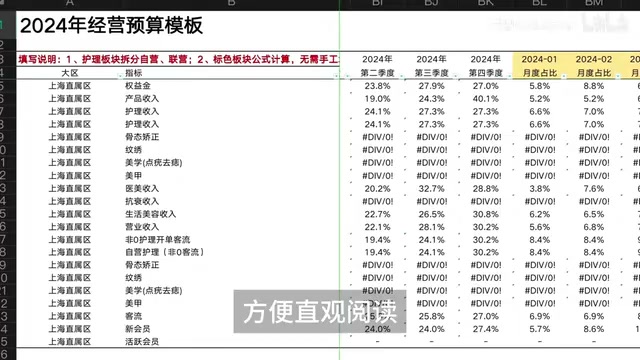
The Core Methodology: A 3-Step Loop of Align, Request, and Revise
The entire Vibe Coding process is essentially three steps repeated in a loop until the result is satisfactory. This methodology is the most valuable part of this tutorial.
Step 1: Align on Requirements
Many beginners jump straight in and throw a vague requirement at the AI. The AI then fills in a huge number of details on its own — details that often diverge significantly from what the user actually had in mind, leading to disappointing results.
The right approach is to first make sure the AI thoroughly understands your requirements. Before issuing a formal task, have the AI read and internalize the document, then verify it hasn't misread or missed anything. In the tutorial example, the author has the AI read only the spreadsheet data and confirm that the data is complete and accurate — establishing a reliable data foundation for all subsequent work.
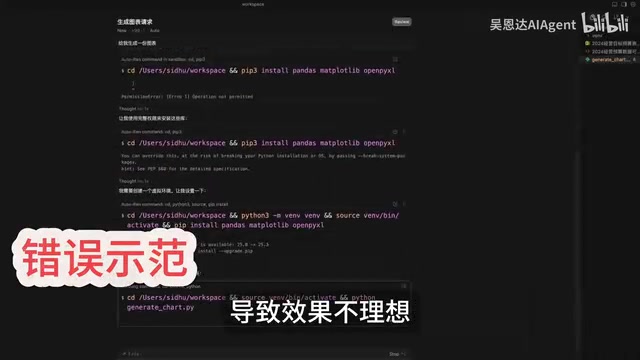
Step 2: State Your Requirements
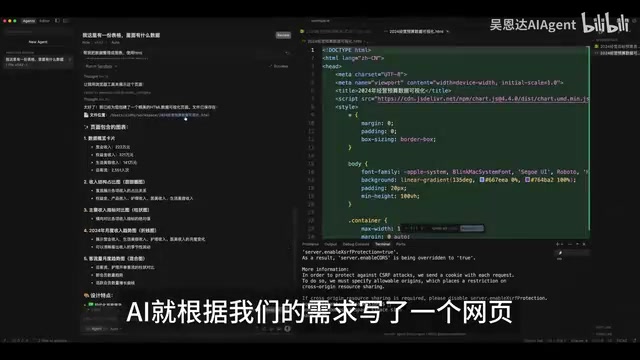
Once you've confirmed the AI has the correct data source, you can move on to specifying exactly what chart or visualization you want — and clearly define the output format, such as an HTML webpage. With a clear data foundation and explicit output requirements, the AI can quickly produce a working webpage.
The preview shows the page runs correctly without errors, and it looks quite good in full-screen browser view. The key insight in this step is specifying the solution format: the more precisely you define the expected output, the more controllable the AI's result will be.
Step 3: Revise and Refine
The first version is rarely perfect. In the tutorial, the author notices that some data from the original spreadsheet isn't reflected in the visualization, so the AI needs to update the code. Describe the new requirements clearly and send them to the AI — it will update the code based on the existing version. The page auto-refreshes, and the missing data comparisons are added.
During this revision phase, there are also some practical techniques worth knowing: how to guide the AI toward the correct implementation approach, and how to break the AI out of a loop of repeated mistakes. These small tricks often make the real difference in Vibe Coding efficiency.
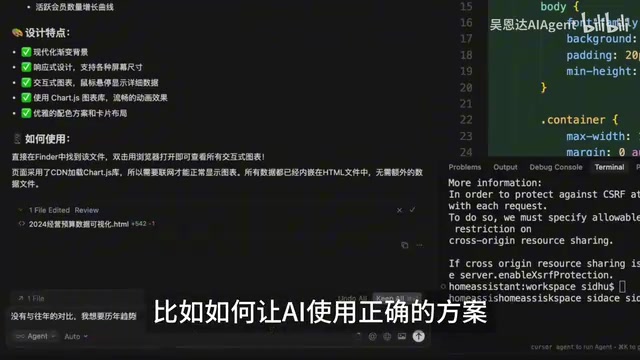
"Breaking the AI out of a repeated error loop" is one of the most common challenges in Vibe Coding practice. When the AI makes the same mistake two or three times in a row, it usually means it has fallen into a local reasoning trap — continuing to ask it to fix the same piece of code will likely just layer errors on top of errors. There are three common ways to break out of this: Reset the context — open a new conversation window and re-describe the problem from scratch, avoiding contamination from previous error messages; Specify the implementation approach — instead of just describing "what result you want," explicitly tell the AI "which method to use," such as a specific library or algorithm path; Narrow the problem scope — break complex requirements into smaller units and validate them incrementally, rather than submitting one large batch of changes at once. All three approaches share the same underlying principle: reduce the amount of information the AI needs to infer on its own, making the output more predictable and controllable.
Why This Workflow Is Worth Learning for Beginners
The essence of Vibe Coding lies in repeatedly iterating through the Align → Request → Revise loop. The biggest difference from traditional programming is that debugging code becomes a process of conversational collaboration with AI. For complete beginners, this means you don't need to work through a thick programming textbook before producing something useful.
But that doesn't mean you can be sloppy. The case study makes one thing very clear: the quality of AI output is almost entirely dependent on the clarity of the input. Vague requirements cause the AI to fill in gaps with its own assumptions; incorrect data sources cause everything that follows to go off track. Learning how to express requirements clearly and incrementally is, in fact, the real barrier to using AI programming tools effectively.
As large language models continue to improve, this style of programming will become increasingly widespread. Mastering the methodology matters more than mastering any specific tool — because tools will keep evolving, but the ability to collaborate effectively with AI will remain valuable for the long term.
Summary
From importing files and aligning on requirements, to stating needs and iterating on fixes, Vibe Coding uses a simple beauty salon budget spreadsheet example to demonstrate the minimal viable loop of AI-assisted programming. The barrier to entry is low and iteration is fast — but it places new demands on your ability to articulate requirements. For beginners looking to get into AI applications, the most solid path forward is to first get comfortable with this three-step loop, then gradually explore more complex scenarios.
Related articles

From Photons to Production: An Open-Source Computer Vision Engineering Reading Path
Reddit user open-sources a computer vision engineering reading path with 16 chapters from image formation to production deployment, emphasizing primary sources, dependency order, and reproducible benchmarks to help engineers understand why models fail and build reliable vision systems.

Prompt Failures? The Truth About Why AI Agents Struggle in Production—and How to Fix It
A Reddit developer built Agents with Copilot and Gemini but faced unstable behavior. This article analyzes three gaps in prompt engineering for Agent scenarios and offers three practical paths to reliable Agent deployment, including structured prompts, workflow-first approaches, and building an evaluation loop.

Tesla Robotaxi to Open Private Vehicle Access Next Year: Promise or Pipe Dream?
At its Q3 earnings call, Tesla said owners can add their cars to the Robotaxi fleet next year. We analyze the technical basis, Musk's missed deadlines, business logic, and competition.