Getting Started with WorkBuddy: Turning AI from a Chatbot into a Productive Desktop Employee

WorkBuddy is a desktop AI agent for everyday professionals — it executes real office tasks, not just answers questions.
WorkBuddy is a desktop AI agent that goes beyond chat: it directly operates your local computer to handle batch file management, document processing, and collaborative office tasks. Unlike Codex — which is powerful but requires programming know-how and favors Western tools — WorkBuddy is plug-and-play, deeply integrated with Feishu and DingTalk, and offers free daily credits. The article also clears up three common misconceptions and emphasizes that the real learning curve isn't the interface, but a mindset shift: from asking AI questions to managing AI like a digital employee.
If you've spent hours learning AI prompting techniques but seen zero salary bump, the problem might be your approach. Prompts are essentially just "suggestions" — and suggestions don't pay the bills. Execution does. That's precisely the core problem WorkBuddy, a desktop AI agent, aims to solve: transforming AI from a Q&A tool that only gives answers into a digital employee that can directly operate your computer and handle real office tasks.
This article is based on a comprehensive WorkBuddyAd tutorial from a Bilibili content creator, covering the tool's positioning, how it differs from Codex, and the most common misconceptions new users run into.
What Is WorkBuddy: From "AI Questioner" to "AI Manager"
Most people use AI by opening a chat window, typing a question, copying the response, and then manually carrying out the steps themselves. In this model, AI is just a pure Q&A tool with no access to your local files. You might feel like you're "using AI," but the actual execution still depends entirely on your own mouse and keyboard — a tedious process.
WorkBuddy is a fundamentally different proposition. It's a desktop AI Agent, not a chat interface. You simply give it tasks in plain language — just like delegating work to a real person — and it automatically handles the research, execution, and delivery. Its core value lies in directly operating your local computer to complete real office tasks, rather than just handing you advice or instructions.
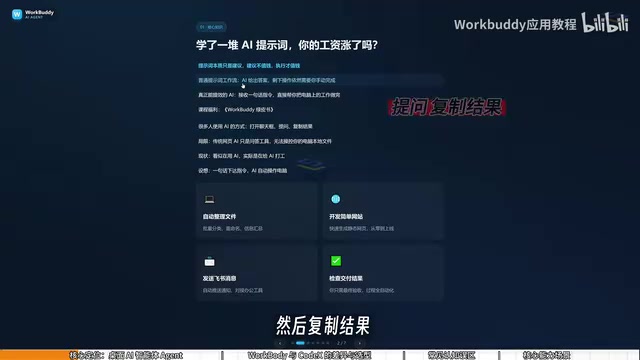
Think of it this way: WorkBuddy is your employee, your computer is your company, and you are the manager. Learning WorkBuddy isn't about memorizing which buttons are where — its interface is actually very similar to products like Doubao, Tongyi Qianwen, or GPT — it's about shifting your mindset from "asking AI questions" to "managing AI to get work done."
What sets AI Agents apart from regular AI chat tools is execution capability. Traditional large language models like ChatGPT and Claude are language models — their scope ends at generating text. They can offer advice, write code, and propose solutions, but they can't proactively call external systems or operate your local environment. AI Agents layer "tool calling" and "task planning" on top of language models: they can break down goals, sequence steps, invoke file systems, browsers, APIs, and other external tools, and dynamically adjust based on intermediate results. This "perceive → plan → act → feedback" loop lets agents complete multi-step complex tasks the way a human would, not just answer a single question. WorkBuddy packages this agent architecture into a desktop product that's accessible to everyday users.
WorkBuddy vs. Codex: College Student Special Forces vs. Real Special Forces
Many people hear about Codex — with its more powerful capabilities — before they discover WorkBuddy. So why bother with WorkBuddy if Codex exists?
The Bilibili creator offers a vivid analogy: if Codex is a special forces operator, WorkBuddy is a "college student special forces recruit." Codex is impressive, but it needs a commanding officer to draw up a detailed battle plan — you have to specify the exact file, directory, and execution parameters, which requires a fair amount of technical skill and experience. WorkBuddy is more like an eager, capable college intern: maybe not suited for the most complex missions, but perfectly competent for tasks like organizing files or sending a document to someone.
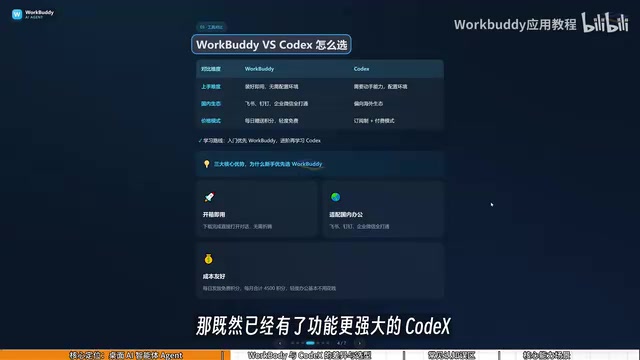
The differences break down across three dimensions:
Barrier to Entry
WorkBuddy is ready to use right after installation — no environment setup, no command line, extremely beginner-friendly. Codex requires stronger hands-on ability and a programming background.
Ecosystem Compatibility
WorkBuddy is deeply integrated with Chinese office tools like Feishu, DingTalk, WeCom, and Tencent Docs. Codex leans toward Western ecosystems with limited support for Chinese workplace software.
Cost of Use
WorkBuddy gives you free credits daily, with bonus credits available during promotions. Sign in every day for a month and you can accumulate at least 3,000 credits. Codex operates on a subscription model, meaning real money out of pocket right from the learning phase.
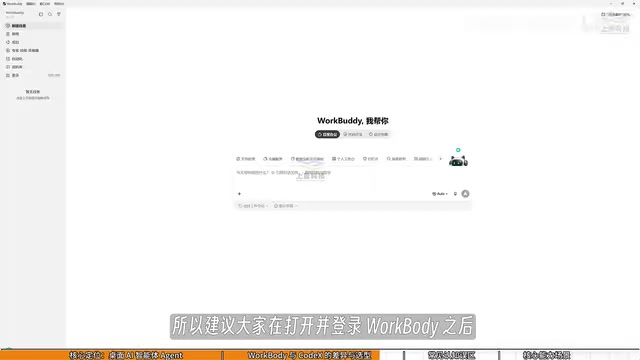
Once you're logged into WorkBuddy, make it a habit to click your profile icon in the bottom-left corner every day, go to "Buddy Station," and check in to collect your daily credits. Credits roll over — anything unused today carries into tomorrow.
Codex is an AI coding agent developed by OpenAI. Its core capability is reading and writing code repositories, running scripts, and debugging programs inside a cloud sandbox environment. It functions more like a software engineering assistant, excelling at tasks with clear code context — fixing bugs, refactoring modules, generating unit tests. Using Codex effectively typically requires providing a repository path, file structure details, or specific technical constraints; the more precise your instructions, the higher the output quality. This is what the "commanding officer with a detailed battle plan" analogy refers to — vague natural language prompts cause Codex to go off course in complex engineering environments. For professionals without a programming background, this prerequisite is often a steeper hurdle than the tool's own learning curve.
Three Common Misconceptions for New Users
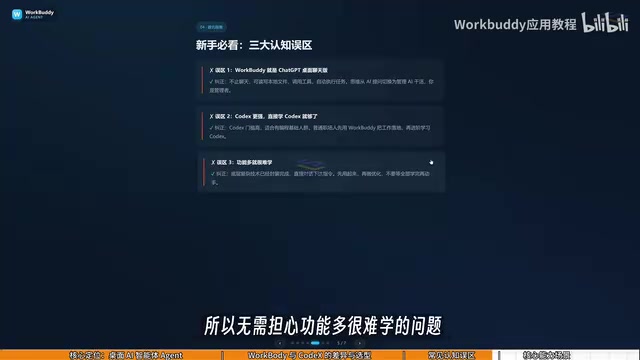
Misconception #1: WorkBuddy is just a desktop chat version of ChatGPT. This isn't quite right. WorkBuddy isn't limited to conversation. Beyond offering suggestions like GPT does, it can read local files, call tools, and automatically execute tasks.
Misconception #2: Codex is more powerful, so I should just learn Codex directly. Keep in mind that Codex has a steeper learning curve and suits people with programming experience. For most office workers, WorkBuddy is the right tool to get real work done. For the vast majority of workplace tasks, WorkBuddy alone is more than sufficient. Only when you genuinely hit its limits should you move on to learning Codex — this learning path minimizes your overall investment.
Misconception #3: It has so many features, it must be hard to learn. In reality, WorkBuddy's interface is very similar to mainstream AI products. The learning curve isn't really about mastering the UI — it's about shifting how you think. Instead of asking questions, you're issuing commands and letting AI operate your computer on your behalf.
What WorkBuddy Can Do for You
In practice, WorkBuddy covers a wide range of high-frequency office needs:
- File management: Batch sorting, bulk renaming, and consolidating information across multiple documents. The creator shared a real example — when recording tutorials, files are named 01, 02, 03. If one lesson is too short and needs to be merged into the previous one, the sequence breaks and becomes 1, 3, 4. Manually renaming each file is tedious; WorkBuddy handles the renaming automatically.
- Document and data processing: Handling weekly reports, Excel spreadsheets, and similar files.
- Website development: Building simple websites.
- Collaborative work: Integrating with Feishu and DingTalk to automatically generate periodic work summaries.
None of this is theoretical. Give WorkBuddy a clear instruction and it executes — delivering results right in front of you.
Final Thoughts
WorkBuddy's significance lies in what it represents: a new paradigm for using AI. For everyday professionals, rather than grinding away at prompt engineering, it's more valuable to learn how to direct an AI employee that can actually execute tasks.
It may not be the most powerful tool out there, but its plug-and-play setup, deep integration with China's office software ecosystem, and low cost make it an exceptionally friendly entry point into the world of AI Agents. Get comfortable with WorkBuddy first, and when you start feeling its limitations, that's the right time to tackle more specialized tools like Codex — and you'll get there on much steadier footing.
Related articles

Chain of Thought Isn't Just for AI: How Humans Can Use CoT to Improve Thinking Quality
Chain of Thought isn't just a prompt trick for large models. Starting from a Hacker News discussion, this article analyzes why CoT works for human thinking too, breaks down actionable ways to transfer it, and highlights the key differences between human CoT and machine CoT.
Cloudflare Teams Up with OpenAI: Closi…
Cloudflare Teams Up with OpenAI: Closing the Loop from Vulnerability Discovery to Defense with AI
Cloudflare uses OpenAI Daybreak to investigate security vulnerabilities and generate reviewable remediation plans, while developers use Codex to boost coding efficiency and quality.

Orca Multi-Agent Orchestration in Practice: A Guide to Parallel Collaboration with Claude and Codex
Orca is Stable AI's free open-source agent workbench supporting 34 agents like Claude Code and Codex in parallel. Learn its Git worktree isolation, multi-model orchestration, and mobile management.