Git Worktree + Claude Code: A Practical Guide to AI Parallel Programming

Git Worktree enables multiple AI coding sessions to work in parallel on isolated directories within the same repository.
This article explores how Git Worktree enables truly parallel workflows with AI coding tools like Claude Code. Traditional single-directory limitations prevent multiple AI sessions from working on different branches simultaneously, but Worktree solves this by giving each branch its own physical directory while sharing a single Git history. Using a landing page redesign and favicon update as a live demo, the article shows how two Claude sessions can run in parallel with fully isolated changes — verified by PR diffs that contain zero cross-task contamination. The workflow requires just three commands, and Claude Code automates the full lifecycle. One real-world caveat: AI agents remain inconsistent with branch naming conventions, making human review an ongoing necessity.
The Single Working Directory Bottleneck
Before AI coding tools came along, most developers worked linearly — one task at a time. When an urgent bug interrupted active feature development, the standard workflow was to commit or stash your changes, switch to the main branch, create a fix branch, resolve the bug, then switch back to continue your feature work.
This pattern made sense in the single-threaded human era — after all, human attention can't truly run in parallel. But AI coding tools have changed that assumption. As Codevolution points out, you can now have one Claude session developing a feature while another simultaneously fixes a bug, without interrupting either.
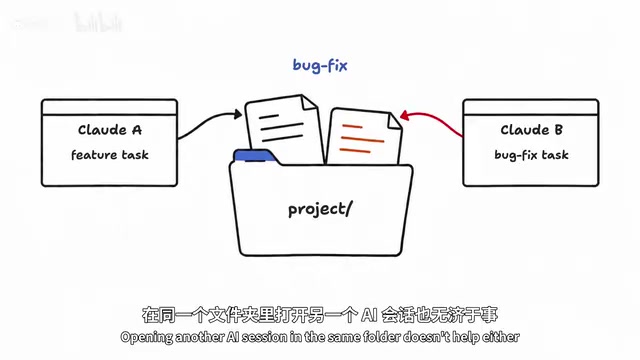
The problem lies in Git's fundamental mechanics: a single working directory can only have one branch checked out at a time. When you switch branches, Git updates the files in that folder to match the target branch. If Claude is actively working on a feature branch and you switch to a bug-fix branch, you've just changed the files it was operating on. Opening a second AI session in the same folder doesn't help either, since both sessions share the same set of files.
How Git Worktree Solves the Parallel Problem
Git Worktree was built exactly for this. It lets you work on multiple branches of the same repository simultaneously, with each branch checked out into its own separate folder. One AI session works inside the feature folder, another works inside the bug-fix folder — their working files never interfere with each other.
The key insight: both folders are connected to the same repository and share the same Git history. You're not creating two independent repos; branches still isolate changes, but Worktree additionally provides multiple physical directories so you can truly work in parallel.
This distinction is subtle but important. Traditional workarounds either involve frequent stash-and-switch cycles (which interrupt AI sessions) or cloning the repo multiple times (wasting disk space and fragmenting history). Worktree achieves filesystem-level parallel isolation while preserving the integrity of a single repository.
Git Worktree is a native Git feature introduced in Git 2.5 (released 2015) — not a third-party plugin. Under the hood, all worktrees share the same .git directory (located in the main worktree), but each additional worktree maintains its own independent HEAD reference, index file, and working directory state under .git/worktrees/. This means the same branch cannot be checked out by two worktrees simultaneously — if you try to check out a branch already in use by another worktree, Git will error out and block you. This constraint actually guarantees data consistency in parallel scenarios: different sessions cannot accidentally write to the same set of files. For large monorepos, Worktree has an additional benefit — multiple worktrees share the object store (.git/objects), saving significant disk space compared to re-cloning the repository, since all commit history and blob objects are stored only once.
The Three Core Commands Under the Hood
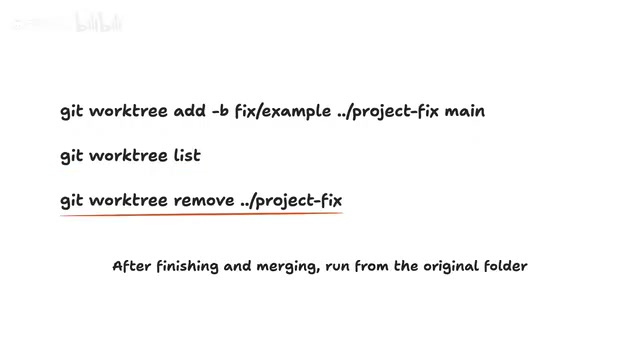
Although Claude Code can automatically handle Worktree creation for you, understanding the underlying commands helps clarify what's actually happening. The video demonstrates three fundamental operations:
Creating a Worktree
git worktree add -b fix/example ../project-fix main
Breaking this down: git worktree add creates the worktree; -b fix/example creates a new branch named fix/example; ../project-fix specifies the folder for the worktree, placed alongside the current project directory; and the trailing main is the starting branch.
Listing Worktrees
git worktree list
This lists all working folders connected to the current repository along with their respective checked-out branches.
Removing a Worktree
git worktree remove ../project-fix
Once work is complete and merged, run this command from the original project folder to clean up the corresponding worktree directory.
Running Parallel Tasks in Claude Code
Codevolution demonstrates the workflow using agentnative.com, an open-source agentic application framework, with two parallel tasks: redesigning the landing page for the slides app (design and copy), and updating the site's favicon to a monochrome logo version.
In the Claude Code desktop app, the process is surprisingly simple: just check the worktree checkbox when creating a new session. Claude automatically handles worktree creation, abstracting away all the underlying complexity.
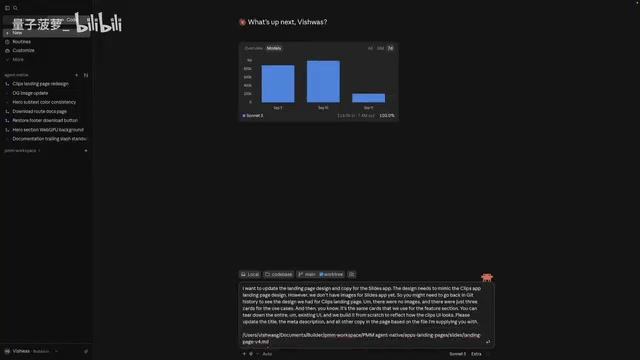
The first session was asked to rebuild the slides app UI based on the clips app's landing page, update headings and meta descriptions using a provided copy file, and verify the results in the built-in browser. The second session handled the favicon update, with Claude determining the appropriate generation approach (SVG or another workflow) and regenerating the assets.
The most noteworthy aspect of the whole process: neither session ever edits the other's working files. The favicon session and the landing page session truly run in parallel with genuine physical isolation.
Two Friction Points From the Real World
The video doesn't shy away from real-world friction. Branch naming is one example — Claude defaults to a claude/slug naming convention, while the author prefers feature/slug. Even when explicitly requested in the prompt, Claude sometimes still generates names like claude/slides-landing-redesign-{hash}, requiring a follow-up correction. The favicon task similarly used fix/favicon instead of the expected naming convention.
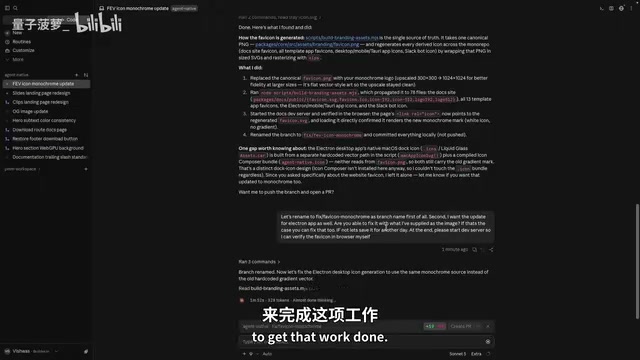
This is a reminder that AI agents remain inconsistent on fine-grained conventions and require human review and correction. Claude also proactively noticed that the desktop app uses the same icon and asked whether the same image could be reused for those changes — this kind of cross-file associative reasoning is a genuine plus.
The favicon task completed successfully, with the branch renamed to fix/favicon-monochrome, the local dev server running on localhost:3000, and the monochrome favicon visible after a hard refresh. After the author created a PR and reviewed the changed files, everything was icon-related SVGs and PNGs — not a single landing page change had leaked in. That's direct proof of Worktree's isolation value.
Branch naming conventions aren't trivial in engineering practice. Many teams' CI/CD pipelines, code review tools (such as GitHub branch protection rules), or automation scripts rely on branch name prefixes to trigger specific behaviors — for example, feature/ prefixes automatically creating feature flags, fix/ prefixes auto-linking to bug tracking systems, or release/ prefixes triggering release pipelines. Claude's default claude/slug-{hash} naming pattern falls outside these conventions and may cause automation workflows to silently skip or error out. The current engineering best practice is to explicitly document branch naming conventions in the project's CLAUDE.md (Claude Code's context document) or system prompt, so the AI follows team conventions every time it creates a worktree rather than relying on ad-hoc instructions in each conversation.
Wrapping Up: Cleanup and Housekeeping
Once a PR is merged, the task is done. Click the three-dot menu on the session and select archive — Claude Code automatically removes the corresponding worktree, with no need to manually run git worktree remove. This end-to-end loop of creation, parallel execution, and cleanup compresses what was previously tedious multi-branch management into just a few clicks.
Closing Thoughts
Git Worktree itself isn't new, but the rise of AI coding tools has given it renewed relevance. As Claude Code, Codex, Cursor, and similar tools become capable of independently executing tasks, the developer productivity bottleneck shifts from "only being able to do one thing at a time" to "how to effectively schedule multiple AI sessions in parallel."
Worktree provides exactly the infrastructure for that parallel scheduling: same repository, multiple isolated working directories, shared Git history. For teams that frequently context-switch between feature development and urgent fixes, it can significantly reduce the cost of that switching when paired with AI tools. That said, as the real-world demo shows, AI still needs human oversight on details like naming conventions — the era of fully autonomous handoff hasn't arrived just yet.
Related articles

A Three-Month Python Roadmap for Beginners: Syntax and Web Scraping in Full
Based on a Bilibili Python beginner tutorial, this article outlines a three-month path from syntax to scraping practice to framework advancement, analyzing key actions and common pitfalls at each stage and offering a sober assessment of the "job-ready in three months" claim.

Multimodal LLM Deployment and Fine-Tuning in Practice: Job Skills and Learning Path
A Bilibili public class on multimodal LLM deployment and fine-tuning: instructor Chen Bo explains the three skills AI engineers need—application development, fine-tuning, and fundamentals.

Getting Started with LangChain: A Guide to the LLM Application Development Framework
An in-depth look at the origins and core features of the LangChain framework, the three major limitations of large model applications, and how LangChain solves them through chained construction, state management, and tool calling, plus the 1.0 architecture changes and its relationship with LangGraph.