Giving AI Agents Memory: OpenAI SDK + Mem0 in Practice

Use the OpenAI Agent SDK plus Mem0 to add persistent memory and multi-user isolation to an agent in four steps.
The article presents a minimal viable approach to adding persistent memory to AI agents: OpenAI Agent SDK for conversation, Mem0 for memory storage and retrieval, and a tool layer connecting them. Implementation requires installing two Python packages, configuring model and memory credentials separately, creating a memory client, and assigning a user identifier per user. The user ID is highlighted as the key to multi-user isolation; without it, memories cross-contaminate. The streamlined flow suits prototyping, but write timing, retrieval strategy, and cleanup still need developer design.
AI agents' conversational abilities are already impressive enough, but they often have the memory of a goldfish—they forget everything once the chat ends. To make an agent truly "know" a user, a memory layer is unavoidable. A short technical video from YouTube demonstrates how to quickly add persistent memory to an agent using the OpenAI Agent SDK combined with Mem0. The whole approach has only three moving parts, and the structure is very clear.
Three-Part Architecture: Agent, Mem0, Tools
The core idea behind this build can be summed up as three clearly divided layers: the Agent handles conversation, Mem0 handles storing and retrieving useful memories, and tools connect the two.
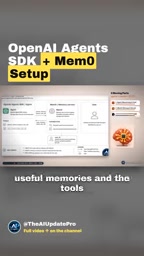
The value of this split lies in separation of responsibilities. The conversation logic doesn't need to care how memories are stored, and the memory service doesn't need to understand conversational context—the tool layer in between does the translation and shuttling. For developers who want to quickly add memory to an existing agent, this structure has a very low cost of adaptation.
OpenAI Agent SDK is a lightweight agent development framework released by OpenAI. Its core abstractions include Agent (which encapsulates the model, instructions, and tools), Runner (which drives the conversation loop), and the tool-calling mechanism. It isn't bound to a specific model and lets developers hook tools into an agent with just a little code.
Mem0 is an open-source memory layer service positioned as "memory middleware for AI applications." Its core capability is to extract factual information from conversations into structured memories and persist them, then retrieve and inject relevant ones based on the current context. Internally, Mem0 wraps vector storage and graph storage and exposes simple interfaces like add / search to callers, so the upper-layer agent doesn't need to maintain its own embedding and indexing logic.
The idea behind combining the two is: the Agent SDK handles conversation orchestration, Mem0 handles long-term state, and the tool layer acts as an adapter that exposes "write memory" and "read memory" as functions the agent can call—this is exactly the typical integration pattern in MCP or function calling scenarios.
Step 1: Install Two Python Packages
The video starts with dependency installation. The example uses only two Python packages: OpenAI's Agent SDK and mem0. There's no extra vector database or middleware to configure, so the dependency surface is kept narrow.
Step 2: Configure Credentials
Next comes credential configuration. The agent needs access to a model provider, while Mem0 needs its own API key.

The two types of credentials are independent of each other, which means the model side and the memory side can each switch providers or adjust quotas separately without affecting the other. This is an easily overlooked but very practical point in multi-component solutions.
Step 3: Write the Code—Imports, Create the Client, Assign a User ID
In Python, first import the agent-related classes and the mem0 client, then create a memory client.
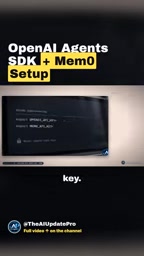
The very next step is to assign a user identifier to each user. This seemingly trivial parameter is actually the key to whether the entire memory scheme works correctly.
User ID: The Key to Multi-User Memory Isolation
The video specifically emphasizes the role of the user identifier: it tells the memory service whose information to store and retrieve, thereby isolating one user's memories from another's.
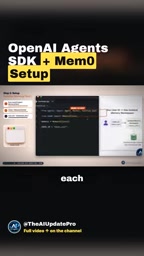
If you skip this step, all users share the same memory space, and personalization becomes cross-contamination—preferences that user A told the agent might be used in user B's conversation. In a single-user demo the problem won't show, but once you go multi-user it becomes an incident.
Mem0's data model supports multi-level scopes such as user_id, agent_id, and run_id: within the same storage you can partition memory boundaries by user, by agent instance, or by individual session, and limit the scope during retrieval via the filter parameter. user_id is the most commonly used isolation dimension, corresponding to "this person's long-term preferences"; run_id is better suited for isolating short-term task context.
It's worth noting that isolation is only the first step. A real product also has to handle the lifecycle of memories: when to write (every turn or at key moments), when to evict (expiration, conflicts, user-initiated deletion), and cross-session consistency. Mem0 provides management interfaces like update / delete, but the strategy still needs to be designed by the developer. In addition, when user data is involved, storage compliance and privacy consent must also be considered.
Who This Approach Is For
The whole process has few steps: install packages, configure credentials, create the client, pass the user ID—four steps and it runs. It's more of a minimal viable memory integration paradigm than a full product-grade solution. On top of this, developers still need to consider when to write memories, retrieval strategy, and cleanup mechanisms—the video doesn't go into these, but the three-part architecture already leaves room for future expansion.
For teams prototyping with the OpenAI Agent SDK and struggling with agents that have no continuous memory, this is a starting point worth trying directly.
One-line Summary
Use the OpenAI Agent SDK plus Mem0 to add persistent memory and multi-user isolation to an agent in four steps.
Paragraph Summary
The article introduces a minimal viable approach for adding persistent memory to AI agents: the OpenAI Agent SDK handles conversation, Mem0 handles memory storage and retrieval, and a tool layer connects the two. The entire implementation requires only installing two Python packages, configuring credentials for the model and memory separately, creating a memory client, and assigning a user identifier to each user. The article particularly emphasizes that the user ID is the key to multi-user memory isolation; without it, different users' memories will interfere with each other. The overall process is streamlined and suitable as a starting point for memory integration during the prototyping phase, but product-level concerns such as write timing, retrieval strategy, and cleanup mechanisms still need to be filled in by developers themselves.
Related articles

OMLX 0.7.1 Integrates Splash: Major Speedup for MLX Model Inference on Mac
OMLX 0.7.1 adds Splash as an external engine, letting standard MLX models (Qwen 3.6 35B) match Splash custom setups at 92.8 tokens/s. Setup, D-Flash2 requirements, and M1/M2 compatibility explained.

Running Uncensored AI Locally on Your Phone: LFM3 Hands-On Test and Guide
Learn how to run Liquid AI's LFM3 1.7B uncensored model locally on iPhone and Android—no GPU or network needed. Includes On Device LLM and Layla steps, speed tests, and privacy benefits.

Claude Launches Collaborative Sheets and Whiteboards, Taking On Microsoft and Google Directly
Anthropic rolls out beta Claude Sheets and Whiteboards to paid users, enabling one-prompt spreadsheets with formulas and turning verbal plans into collaborative boards—taking on Microsoft and Google directly.