Gizang-PPT-Skill Open Source Project: An AI Agent Magazine-Quality PPT Creation Tool with 8K Stars

Gizang-PPT-Skill encapsulates visual design skills for AI Agents to consistently produce high-quality PPTs
Gizang-PPT-Skill is an 8K-star open-source project that equips AI Agents like Claude Code with complete visual design Skills — including templates, layout rules, theme color schemes, and quality checklists — solving the pain point of inconsistent AI-generated PPT aesthetics. The project offers two styles (Digital Magazine and Swiss International), supports multi-platform cover generation, and reveals the paradigm shift from writing Prompts to encapsulating Skills.
Project Overview: Equipping AI Agents with Professional Visual Presentation Skills
A GitHub open-source project called Gizang-PPT-Skill has recently gone viral, amassing 8K Stars. The core idea behind this project isn't about getting AI to "throw together a PPT" — it's about equipping AI Agents like Claude Code and Codex with a dedicated visual presentation skill.
Understanding "AI Agent" and "Skill" here is crucial. An AI Agent refers to an AI system capable of perceiving its environment, autonomously planning, and executing multi-step tasks. Unlike traditional single-turn Q&A large language models, Agents possess tool-calling, memory management, and task decomposition capabilities. A Skill (skill module) is a key concept in an Agent's capability framework — essentially a structured set of instructions containing task descriptions, execution rules, constraints, and validation logic. This gives the Agent a systematic approach to specific tasks rather than reasoning from scratch each time. This is also the core engineering problem that mainstream Agent frameworks (such as LangChain, AutoGPT, and Claude's Tool Use system) are focused on solving.
All you need to do is tell it "make me a magazine-style PPT" or "make me a Swiss-style PPT," and it will generate a horizontally-scrollable web-based PPT following a fixed visual system. The key difference here is that it's not simply a few prompt lines — it has built-in complete templates, layout rules, theme color schemes, image placement rules, quality checklists, and even layout verification scripts.
In other words, Gizang-PPT-Skill encapsulates "how to create a great-looking PPT" into a workflow that AI Agents can execute reliably.
Two Core Styles: Digital Magazine and Swiss International Style
Digital Magazine Style: A Tool for Emotional Expression
The first style combines magazine layout aesthetics with code-inspired design sensibilities, making it suitable for opinion sharing, personal speeches, AI product launches, and industry observations. Its visual language leans toward refined, layered compositions that make content look like a carefully designed digital magazine.
Swiss International Style: The Go-To for Rational Presentation
The second style is characterized by grids, straight lines, strong contrast, large typography, and minimal decoration. Swiss International Style emerged in 1950s Switzerland, championed by designers like Josef Müller-Brockmann. Its core principles are grid systems, sans-serif typefaces (like Helvetica), strong visual hierarchy, and restrained ornamentation. This style has profoundly influenced modern graphic design, UI design, and even tech company brand visual systems — Apple's early design language and many tech companies' product documentation bear its mark. For this reason, the style is naturally suited for factual presentations, product analysis, data visualization, methodology summaries, and other rational content scenarios.
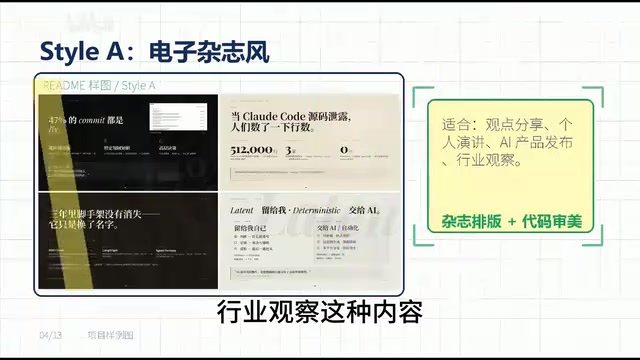
The two styles cover content creators' two most common needs: scenarios requiring "emotional expression" and scenarios requiring "rational presentation." Choosing the right style allows AI Agents to output presentations that match the content's tone.
Solving AI PPT's Core Pain Point: Aesthetic Consistency
When many people use AI to create PPTs, the biggest problem isn't that AI can't write content — it's that the output looks too template-like: title plus cards, gradient backgrounds, rounded modules — it all looks like the same "AI style" lacking design sophistication. The root cause lies in the generation mechanism of large language models: without explicit constraints, models tend to output the "average solution" that appears most frequently in training data, and a large volume of low-quality PPT templates happens to constitute that average.
Gizang-PPT-Skill takes a completely different approach. It first defines aesthetic boundaries for the AI Agent: which layouts can be used, which theme colors are available, where images go, how large titles should be, and how pages should self-check. This way, the Agent's output doesn't randomly vary each time but produces high-quality results within a defined aesthetic framework.

It's like giving a capable designer a brand handbook — they still have creative space, but won't deviate from the overall tone. This is precisely the core advantage of Skills over ordinary prompts.
Beyond PPT: A Multi-Platform Content Visual Production Workflow
The project also supports multiple cover generation formats, including WeChat Official Account header images, WeChat sharing cards, Xiaohongshu covers, and video channel landscape covers. So Gizang-PPT-Skill isn't just a PPT tool — it's more like a complete content visual production workflow.

Of course, it has limitations. If you need extensive tables, traditional training courseware, or multi-person collaborative editing, it may not be the best fit. It's better suited for personal expression, product launches, offline sharing sessions, Demo Days, and industry presentations — scenarios that demand visual impact.
Deeper Insight: The Paradigm Shift from Writing Prompts to Encapsulating Skills
I believe the most noteworthy aspect of this project isn't that "AI can make PPTs again," but rather that it demonstrates the true value of Skills for AI Agents.
Previously, we would ad-hoc tell AI: "make it look nice," "make it look premium," "make it look like a magazine." But these requests are too vague, making AI's output quality completely unpredictable each time.
It's necessary to clarify the essential difference between Prompts and Skills. A Prompt is a one-time instruction given to AI in natural language — its quality is highly dependent on the user's ability to articulate, and execution results vary randomly each time. A Skill, on the other hand, is a reusable module created by systematically encoding domain knowledge, execution processes, and quality standards — similar to functions or libraries in software engineering: encapsulated once, called multiple times, with stable and predictable output. From an engineering perspective, Prompts address the question of "can it be done," while Skills address "can it be done well consistently." This distinction is critical as AI capabilities move from the lab to production environments.
The current approach is: write style, layout, process, and checklists all into the Skill file. The Agent no longer just listens to a single sentence and improvises — it works according to a stable methodology.

This reveals an important trend: In the future, people who are good at using AI won't just be good at writing prompts — they'll be good at encapsulating their experience into skill modules that Agents can repeatedly invoke. A Prompt is a one-time instruction, while a Skill is a reusable capability unit. Moving from "writing good prompts" to "encapsulating good Skills" represents a significant paradigm upgrade in how we use AI tools.
Summary: A New Collaboration Model Where Humans Set Standards and AI Executes
The value of the Gizang-PPT-Skill open-source project goes far beyond making AI produce attractive PPTs. It represents a new human-machine collaboration model: humans are responsible for defining standards and aesthetic frameworks, while AI Agents efficiently execute within those frameworks. This model both guarantees a quality floor for outputs and unleashes AI's productivity advantages.
For content creators and AI developers, this may be one of the most noteworthy directions in AI-assisted creation right now — not letting AI replace your aesthetic judgment, but letting AI consistently execute your aesthetic vision.
Related articles
 Product Reviews
The Programmer's Desk Setup Guide: Building a Workspace That Feels Like Home
Discover how programmers build productive, comfortable workspaces. From multi-monitor setups to ergonomic design, explore the desk philosophy that drives focus and flow.
 Product Reviews
Qoder vs Cursor Real-World Comparison: Which $20/Month AI IDE Is Better?
Hands-on comparison of Qoder vs Cursor AI IDEs: Agent autonomy, human interaction count, and architecture decisions. Qoder needed only 2 interactions vs Cursor's 8.
 Product Reviews
Cursor Cloud Agent Demo: Eliminating Bottlenecks Across the Entire Software Development Lifecycle
Deep analysis of Cursor's Cloud Agent demo showing how cloud VMs, automated test artifacts, and a full-chain control plane systematically eliminate human bottlenecks across the software development lifecycle.