Glifa: The Mac Markdown Editor That Puts AI Inside Your Document
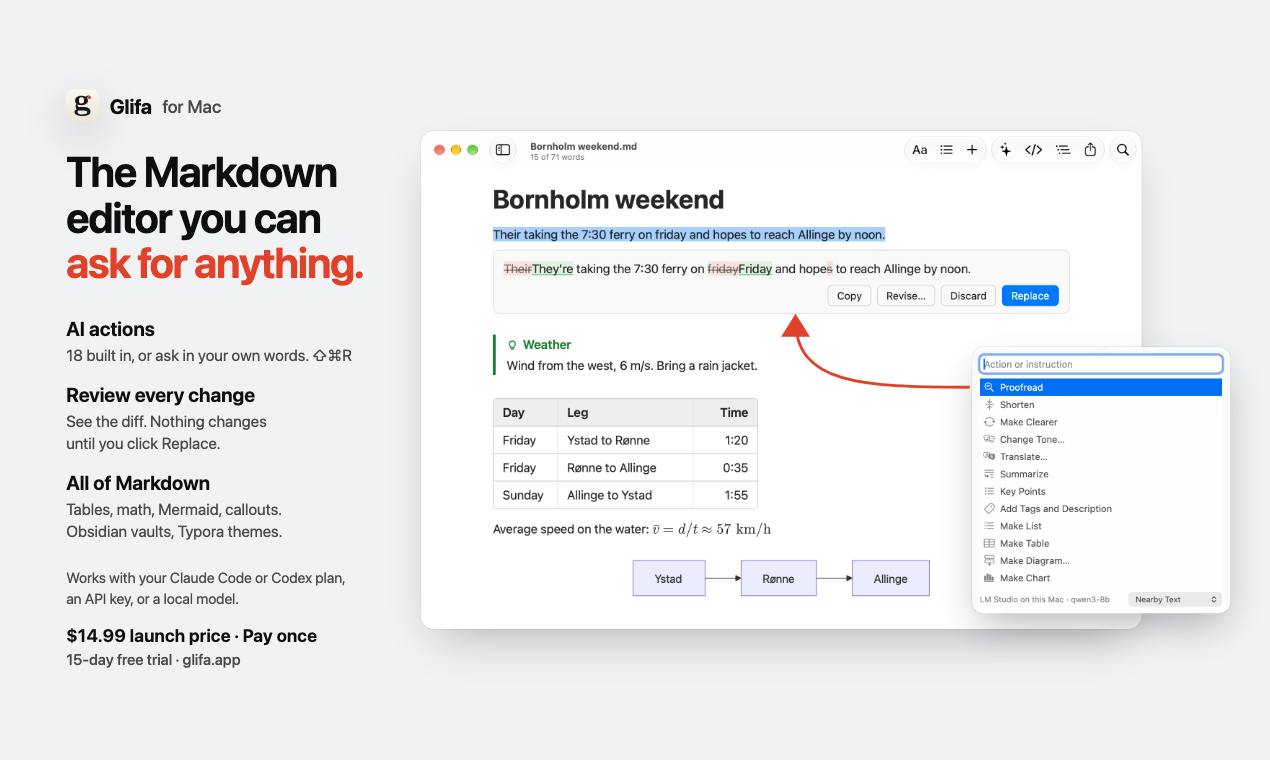
Glifa turns AI instructions into a native keyboard-shortcut operation of the Markdown editor, reducing context switching while writing.
Glifa is a Mac-oriented Markdown editor whose core selling point is making AI instructions a native editor operation: select text, press ⇧⌘R, and issue revision requests in natural language without switching to external tools like ChatGPT. It includes 18 preset actions (rewriting, summarizing, polishing, format conversion, etc.) and supports four model integration paths—Claude Code/Codex subscriptions, Apple Intelligence, local models, and your own API Key—so users aren't locked into a single provider. Its editor fundamentals cover live preview, math formulas, Mermaid diagrams, and Obsidian vault compatibility, letting it slot seamlessly into existing note-taking workflows. The product earned 78 upvotes and ranked 20th on Product Hunt; though not a breakout hit, it represents the trend of AI moving from standalone chat windows toward native editor operations.
When a Markdown Editor Learns to "Understand Plain English"
There's no shortage of Markdown tools on Mac: Obsidian, Typora, and iA Writer each have their loyal followings. But Glifa, a newcomer that just surfaced on Product Hunt, is trying to stand out with a very straightforward product logic—putting AI directly inside the document.
Its slogan is "The Markdown editor for Mac you can ask for anything." In more concrete operational terms: select a passage of text, press ⇧⌘R, and state your request in plain natural language. The official examples are refreshingly down-to-earth—"turn these notes into a table," or "make this sound less like a robot wrote it."
The key to this interaction is "don't interrupt." You don't switch to the ChatGPT web page, you don't copy, paste, and haul it back—the instruction input and the text revision happen in the same context. For high-frequency writers, eliminating one window switch means eliminating one loss of attention.
18 Built-in Actions and Four Ways to Connect Models
Beyond free-form instructions, Glifa also ships with 18 preset actions. This kind of design is increasingly common in AI writing tools: turning high-frequency needs (rewriting, summarizing, polishing, format conversion) into one-click operations that lower the bar for users who "don't know how to ask."
What's more noteworthy is the flexibility of model integration. According to the product information, Glifa supports four backend paths:
- Calling through your existing Claude Code or Codex subscription
- Using Apple Intelligence
- Running local models
- Entering your own API Key
This means users aren't locked into a single model provider. The "use your own subscription quota" angle in particular is quite friendly to developers already paying for Claude or Codex—AI features don't become an extra subscription burden. The local model option caters to privacy-sensitive users.
Apple Intelligence is a hybrid on-device and cloud AI framework that Apple has integrated into macOS, iOS, and other systems since 2024, including capabilities such as Writing Tools, summarization, and rewriting. Its hallmark is that a large amount of inference happens locally on the device, so sensitive data isn't uploaded to the cloud; complex requests that exceed on-device compute are handled through "Private Cloud Compute," and Apple promises this data is not retained. For third-party Mac apps, connecting to Apple Intelligence means being able to call system-level model capabilities at zero API cost and low latency, while naturally satisfying privacy compliance requirements. That said, its capability range is relatively limited—better suited to lightweight tasks like polishing and summarization, while complex rewriting may still depend on larger third-party models.
The Editor's Fundamentals: Live Preview, Math Formulas, and Obsidian Vaults
AI is the selling point, but a Markdown editor's fundamentals have to hold up too. Glifa's configuration here is fairly complete: live preview, math formula rendering, Mermaid diagram support, and compatibility with Obsidian vaults.
That last point matters a lot to Obsidian users. An Obsidian vault is essentially a local Markdown folder, and an editor that can directly open and edit these vaults can slot seamlessly into an existing note-taking workflow rather than requiring users to migrate their data. Mermaid and math formula support extend its applicability to technical documentation and academic writing scenarios.
Live preview is a rendering mode in Markdown editors that sits between "pure source code" and "split-pane preview": the paragraph where the cursor sits is shown as source code so you can edit the syntax directly, while paragraphs the cursor has left are immediately rendered in their final style (headings, lists, tables, images, etc.). This mode was first popularized by Typora and later widely adopted by tools like Obsidian. Its value lies in letting writers avoid switching back and forth between "writing" and "viewing" views, preserving the continuity of the writing flow; the cost is higher demands on the editor's parsing and rendering performance, with long documents prone to lag—making it one of the key metrics for judging a Markdown editor's quality of experience.
Mermaid is a text-based diagram description language that uses concise Markdown-like syntax to generate flowcharts, sequence diagrams, Gantt charts, class diagrams, and more—for example, a few lines of graph TD statements can draw a flowchart. It's natively supported by platforms like GitHub, GitLab, Notion, and Obsidian because diagrams are stored in documents as plain text, making them version-controllable, diffable, and portable along with the document. For technical documentation and architecture descriptions, Mermaid makes "text and diagram from a single source" possible, avoiding the maintenance burden of inserting external images. Whether an editor supports Mermaid rendering has become a baseline capability indicator for technical writing tools.
A Signal: Editors Are Becoming AI's Native Container
Glifa got 78 upvotes and ranked 20th on Product Hunt—not a breakout hit, but the product direction it represents is worth noting.
Over the past year, AI writing tools have roughly fallen into two categories: one is standalone conversational interfaces, capable and general-purpose but disconnected from the document; the other is adding a sidebar assistant inside the editor, which is essentially still a "document + chat window" patchwork. Glifa chooses a third path—making AI instructions a native operation of the editor, on the same operational level as bold and italic.
The implicit judgment behind this approach is: in writing scenarios, AI's value isn't in conversation but in in-place revision. What users often want isn't an explanation but "fix this passage." A keyboard-shortcut design like ⇧⌘R is precisely what turns AI from "a place you go" into "an action always at hand."
Of course, these products also face a common problem: as model capabilities themselves become homogenized, an editor's differentiation will ultimately come back to experiential details—instruction response speed, the undoability of revision results, and the ability to handle long-document context. Glifa offers a 15-day free trial, and these details can only be judged through actual use.
For Markdown writers on Mac, if you're already using Claude Code or Codex and want AI polishing without leaving the editing window, Glifa is worth 15 days of your time.
Obsidian vaults refer to Obsidian's "vault" mechanism: a vault is essentially just an ordinary folder on your local disk, containing plain Markdown files and attachments, supplemented by a hidden .obsidian configuration directory that stores plugins, themes, and settings. Because data is stored entirely in open formats and not locked into a proprietary database, any editor that can read and write Markdown files can directly open and edit the same vault. This design gives the Obsidian ecosystem strong portability, and also makes "Obsidian vault compatibility" a key selling point for third-party editors seeking a low-cost entry into existing note-taking workflows—users can continue editing their existing notes in another tool without any import or export.
Related articles
Google Stitch Skills: Connecting Coding Agents to the Design Workflow
Google Stitch Skills is an Agent Skills library following the open standard, adding a design-to-code workflow to the Stitch MCP Server. This article breaks down its three skill groups, SKILL.md directory structure, installation paths, and dependency pitfalls.

40.5-Inch Color E-Paper Art Frame: An Art Display You Charge Once a Year
The Ink Poster Tella 40.5-inch color e-paper art frame uses the E Ink Spectra 6 full-color solution: A1 format, no backlight, no noise, about one charge a year, 2,000+ licensed artworks built in, and automatic adaptation of phone photos.

Jingle Jam Memories: RT's Awkward First Encounter with Lewis
RT shares his awkward first Jingle Jam experience: unexpectedly pushed into the studio, meeting Lewis and Yogg's cast, and Toddy appearing in armor.