Google AI Studio One-Click Firebase Integration: A New Paradigm for Secure Android AI App Development
Google AI Studio auto-configures Firebase AI Logic and App Check, letting Android apps call Gemini securely without hardcoded keys.
The latest Google AI Studio update reduces integrating generative AI into Android apps to a few clicks. The article notes that because Android APKs are client binaries, hardcoding a Gemini API key risks decompilation, extraction, and quota abuse, so the combination of Firebase AI Logic and App Check is needed: the former lets client SDKs call models directly without exposing keys, while the latter verifies that requests come from real, untampered app instances. Manually configuring App Check debug tokens used to be extremely tedious, but AI Studio now automatically provisions App Check, manages debug tokens in the background, and automatically switches to reCAPTCHA Enterprise production authentication when building release versions. The demo app is generated from a single prompt, integrating Google Sign-In, image generation, and all security configuration, with no need for developers to enter the Firebase console or write configuration code.
Building an Android app with generative AI features used to mean spending half a day wiring up SDKs, locking down API keys, and digging through logcat for debug tokens. The latest Google AI Studio update compresses that process into a few clicks.
Why Android Apps Are More Dangerous Than Web Apps
When you build a web app in Google AI Studio, Gemini API calls run in a server-side runtime on Cloud Run, and the API key stays on the server—the browser never touches it.
Android apps, by contrast, are client binaries distributed directly to user devices as APKs. If you hardcode a raw Gemini developer API key into an APK, anyone can decompile the binary, extract the key, and then abuse your API quota or billing account. This is a fundamental security constraint for client-side AI apps.
According to a demo video from the YouTube channel Rosario, the solution to this problem is the combination of Firebase AI Logic and Firebase App Check: AI Logic lets Android code call Gemini models directly through a client SDK without embedding a raw API key in the app, while App Check verifies that every request genuinely comes from a real, untampered app instance.
Firebase AI Logic is a client SDK layer that Firebase launched in 2025, designed specifically for securely calling Gemini models from mobile and web frontends. It is not a simple proxy; rather, it establishes a controlled channel between the client and the Gemini API: the SDK does not hold the raw developer API key but instead authenticates through the Firebase project identity and App Check tokens, and requests are forwarded to the model only after verification by Google's backend. This way, even if the APK is decompiled, an attacker cannot extract a reusable long-term key. AI Logic also encapsulates calling details such as model version selection, streaming responses, and multimodal input. Developers only need to specify a model alias in code (such as nano banana 2.1 in the demo) to initiate inference, without assembling REST requests or managing token refreshes themselves.
The Pain of Manually Configuring App Check
Manually configuring Firebase App Check on Android is a fairly tedious process: install the debug provider, run the app, hunt for the debug secret in logcat, copy the token, open the Firebase console and paste it into the App Check settings—only after all that can the first AI request go through.
Google AI Studio's previous Firebase integrations already covered Cloud Firestore and Firebase Authentication, supporting the addition of persistent storage and Google Sign-In to web and Android apps within a few clicks. This update advances the integration to the Gemini model invocation level and automatically completes App Check configuration.
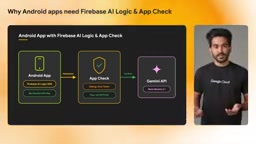
Firebase App Check is an app-instance authentication mechanism used to confirm that requests sent to the backend (including Gemini) come from a real, untampered app rather than a script, emulator, or repackaged fake client. On Android it is implemented through the Play Integrity API: when the app starts, it requests an integrity token from Google Play services, which proves that the current installation package matches the Play Store signature and that the runtime environment has not been rooted or injected. During debugging, Play Integrity verification cannot pass, so App Check provides a debug provider that generates a debug token for developers to manually register in the Firebase console allowlist. In production, reCAPTCHA Enterprise (web) or Play Integrity (Android) is used as the formal provider. App Check tokens are attached to every Firebase request, and the backend rejects any request that fails verification, thereby blocking abuse paths after a key leak.
The Key to Automation: Debug Tokens and Production Environment Switching
The most effortless part of this update is that Google AI Studio automatically provisions App Check, so developers no longer need to manually add the debug token to the Firebase console—AI Studio manages it in the background. Whether previewing the app in the AI Studio emulator or distributing it to trusted users to install, generative AI features work immediately without exposing keys or copy-pasting debug tokens.
The release phase also requires no manual intervention. When building a release version for Google Play, the integration automatically switches from the debug token to reCAPTCHA Enterprise for production authentication, using a preconfigured site key, with no need to manually set the App Check provider.
reCAPTCHA Enterprise is Google's advanced human-verification service for enterprises. Unlike the free reCAPTCHA v3, it provides risk-score-based frictionless verification and a more granular management console. In mixed web and Android scenarios for Firebase App Check, reCAPTCHA Enterprise is used as the production provider: each request carries a token issued by the site key, and Google's backend verifies the token's validity and assesses request risk. AI Studio preconfigures the site key when building release versions, so developers do not need to manually create keys or bind domains in the Google Cloud console. Note that production authentication for native Android apps mainly relies on Play Integrity, while reCAPTCHA Enterprise is more often used for WebView or cross-platform scenarios; AI Studio's automation makes this layer of difference transparent to developers.
Hands-On Demo: A Halloween Costume App
The video's author built a demo app with a single prompt: users sign in with a Google account, take a selfie, and the app calls the Gemini model via Firebase AI Logic to generate an image of the Halloween costume that best suits that user. The entire app was built using Google Sign-In through Firebase Authentication and Firebase AI Logic (nano banana 2.1).
During generation, Google AI Studio displays a Firebase integration card. After you click to enable it, the agent performs a series of operations in the background: configuring Google Sign-In, enabling Firebase AI Logic, enforcing Firebase App Check, adding google-services.json to the app, and generating all the code.
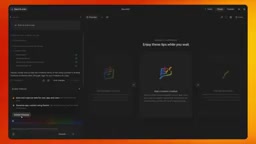
In the demo, the author signs in with a Google account, takes a selfie, and clicks "Find my Halloween costume"—the result is generated directly. Throughout the process, there was no need to go into the Firebase console to register a debug token, research how to make API calls, or write code.
If you later need to monitor Gemini usage, inspect authentication requests, or manage auth providers, just find the project labeled AI Studio in the Firebase console; everything is categorized under Authentication, AI Logic, and App Check.
What This Means for Developers
The value of this integration is not that it adds some new model capability, but that it turns "calling Gemini securely" from an engineering burden into default behavior. For indie developers and rapid-prototyping scenarios, work that used to take half a day to configure is compressed into a prompt-driven generation flow; for apps to be published on Google Play, production App Check authentication is also automatically in place.
The security baseline for client-side AI apps—keys never land on the client, and requests can be authenticated—is moving from "best practice" to "out of the box." This could significantly lower the barrier to entry for generative AI apps on Android and help more ideas that were previously abandoned due to complex security configuration get off the ground quickly.
One-line Summary
Related articles

Gemini 4 Hydrogen Hands-On: Google's Fastest and Cheapest AI Model
Hands-on with Gemini 4 Hydrogen: the fastest, cheapest model in the Gemini 4 family. We break down the Carbon/Argon/Hydrogen split, API pricing traps, free-tier limits, and the cost trade-offs of four thinking levels—with a real bug-debugging demo.
Gemini 4 Hydrogen vs Sonnet Comparison Test: Uses Only 1% of Weekly Quota, Performance on Par
Hands-on test: Gemini 4 Hydrogen vs Sonnet on the same CRUD task—Hydrogen used only 1% weekly quota with comparable performance and better UI details, while Anthropic's model used 7%. Developer says daily tasks don't require expensive models.
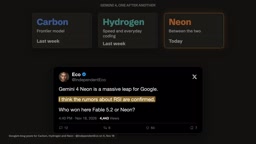
Gemini 4 Neon Released: Beats Opus 5.5 on Multiple Benchmarks, Google Returns to the Top Tier
Google DeepMind releases Gemini 4 Neon: 61 on the Artificial Analysis intelligence index (3rd) and 1st on the coding index, beating Opus 5.5 on multiple benchmarks. $3/$15 per million tokens; available in the Gemini API and AI Studio.