Google Play's New Permission Policies: Local Network, Contact Management, and the AppFunctions API
Google Play updates its permission policies, shifting permission requests from capability declarations to proof of necessity.
Google Play recently updated its permission policies covering local network access, contact management, and the AppFunctions API for AI agents. Local network permission requires developers to first evaluate device selectors like NSD Manager, applying only when essential to core functions and submitting a Play Console declaration; contact management introduces a new permission where occasional creation or modification must use system Intents, with the same declaration needed for core-function use. Most notable is the AppFunctions API policy, which lets apps securely expose tools to AI agents but requires endpoints to run securely and comply with privacy, anti-deception, device abuse, and malware protection provisions. The three policies together show the platform extending data minimization from user data to the device network environment and agent interaction layers.
Google Play recently updated its permission policies, covering local network access, contact management, and the AppFunctions API for AI agents. The core of these changes points to the same trend: the platform is extending the principle of "data minimization" from traditional user data to the device network environment and agent interaction layers.
Local Network Permission: Consider the Device Picker First, Then Apply
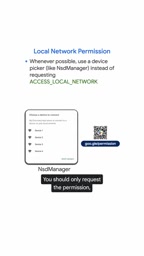
Google Play makes it clear that protecting user data includes local network data. If your app needs to communicate with devices on the local network, the official recommendation is to first evaluate whether a device selector like NSD Manager can meet the need.
Only when local network access is a core function and a device selector cannot support that function should you apply for the permission. The application process is also stricter: developers must submit a declaration in Play Console explaining why local network data is essential to the core function.
This policy effectively draws a red line against the practice of "applying for permissions just in case." In the past, many apps treated local network access as a convenience option; now they must prove its necessity or risk facing review pushback.
NSD Manager (Network Service Discovery Manager) is a system-level API provided by the Android platform. Based on the DNS-SD (DNS Service Discovery) and mDNS (Multicast DNS) protocols, it allows apps to broadcast and discover services on the network without applying for full local network access. After a developer registers a service through NsdManager, other devices can automatically discover it and obtain the information needed to connect (such as the IP address and port). The entire process is handled by the system on the app's behalf, and the app never directly touches raw network data. For scenarios such as connecting to printers, smart home devices, or collaborating apps on the same LAN, NSD Manager is usually sufficient to replace directly requesting local network permission, thereby complying with Google Play's data minimization requirements.
Device Picker is a UI component provided by the Android system that lets users actively select the local device they want to connect to (such as a casting target, printer, or media device) within the system interface. The app only receives connection information for the device the user explicitly selected, not access to the entire local network. This model puts control over network discovery and connection in the user's hands, and the app does not need to scan the LAN itself, so it is considered a more privacy-friendly alternative to requesting local network permission. Google Play recommends that developers first evaluate whether these two mechanisms can meet their functional needs precisely to encourage apps to reduce direct contact with local network data.
Contact Management: Use System Intents for Occasional Scenarios
On the data minimization front, Google Play introduced a new "manage contacts" permission. If an app only occasionally needs to create or modify contacts, it must use system Intents such as ACTION_INSERT or ACTION_EDIT rather than directly requesting the permission.

Similar to local network permission, if an app genuinely needs the "manage contacts" permission as a core function, it must also submit a declaration in Play Console explaining the specific purpose and necessity. This "declaration plus review" model is becoming standard for sensitive permissions.
System Intents (such as ACTION_INSERT and ACTION_EDIT) are Android's cross-app invocation mechanism, allowing an app to delegate a specific operation to the system or another app. In contact scenarios, an app can use ACTION_INSERT to open the system contact editing interface, where the user manually confirms and saves a new contact; with ACTION_EDIT, it can open the editing interface for an existing contact. Throughout the process, the app itself does not hold contact read/write permissions; instead, system components perform the data changes under explicit user action. The app can only obtain the result of the operation (such as the URI of the new contact) and cannot arbitrarily read or batch-modify the address book. This "delegated operation" is a typical implementation of the data minimization principle: the app touches only the necessary data at the moment the user actively triggers it, rather than holding sensitive permissions long-term. For apps that only occasionally need to create or modify contacts, system Intents fully meet the need, which is why Google Play lists them as a mandatory alternative.
AppFunctions API: Wrapping Agent Experiences in a Data Protection Framework
Most noteworthy is the new AppFunctions API policy. Google Play positions it as a measure to apply the same level of data protection to "agentic AI experiences."
As mobile experiences become increasingly agentic, this API allows developers to securely expose specific tools within their apps so that AI agents can perform tasks on behalf of users, such as retrieving contextual information or triggering critical operations.

Google Play's reminder is direct: developer responsibility does not stop at the interface. Any exposed endpoint must run securely and comply with Google Play policies, especially the protections around privacy, deceptive behavior, device abuse, and malware.

Before launching any public integration, developers need to audit their endpoints to ensure that every exposed operation handles user data securely.
AppFunctions API is a framework introduced by Google for the Android platform for exposing tools to AI agents. Its core idea is to let apps encapsulate specific features as structured "functions" that AI agents can invoke within the scope of user authorization, thereby completing tasks such as retrieving information or triggering operations on the user's behalf. Unlike traditional screen automation or accessibility services, the AppFunctions API provides declarative endpoints. Agents can only invoke operations that the app explicitly exposes and describes, and cannot arbitrarily read the interface or access data beyond their authority. This both improves the reliability of agent interactions and limits the scope of data access to developer-controlled endpoints. Google Play's policy requirements for such endpoints essentially extend privacy and security responsibility from the app's interface layer to the agent invocation layer: every exposed function must, like a user-facing interface, handle data securely, prevent deceptive behavior, and avoid device abuse.
What Developers Need to Do
The three policies point to a common logic: permission requests are shifting from "capability declarations" to "proof of necessity." Local network and contact permissions require Play Console declarations, while the AppFunctions API requires security audits at the endpoint level.
For teams building AI agent integrations, it is advisable to sort out the list of tools exposed to agents as early as possible and evaluate data handling practices and policy compliance one by one. For traditional apps, checking whether NSD Manager or system Intents can replace direct permission requests may be the fastest path to reducing review risk.
Google Play emphasizes that the goal of these measures is to help the platform remain safe and trustworthy. For developers, adapting early is more cost-effective than reacting after the fact.
One-line Summary
Google Play updates its permission policies, shifting permission requests from capability declarations to proof of necessity.
Paragraph Summary
Google Play recently updated its permission policies, covering local network access, contact management, and the AppFunctions API for AI agents. The local network permission requires developers to first evaluate device selectors such as NSD Manager, applying only when essential to core functions and submitting a Play Console declaration; contact management introduces a new permission under which occasional creation or modification must use system Intents, with the same declaration requirement for core-function use. Most notable is the AppFunctions API policy, which allows apps to securely expose tools to AI agents but requires endpoints to run securely and comply with privacy, anti-deception, device abuse, and malware protection provisions. Together, the three policies reflect the platform extending the data minimization principle from user data to the device network environment and agent interaction layers.
Related articles
A One-Person IT Security Team: How ESET Covers Protection All Day
Follow Alex, an admin handling IT and security alone, through a full day: threat briefing, third-party patch management, cloud sandbox analysis, AI governance, and MDR response—see how ESET enables a one-person team to cover all-day protection at a hundred-person company.
Building an AI Second Brain with n8n: Agent + Memory + Vector DB in Practice
An n8n tutorial breakdown: build a self-hosted second brain with AI Agent, Simple Memory, Qdrant vector DB, and Notion—Telegram multimodal routing, structured ingestion, Gmail scheduled channel, and configuration details.

AI Agents Invent Mysterious Language Humans Can No Longer Understand
AI agents invent secret language with mysterious codes like o3 t12 in trading scenarios, baffling humans. Video reveals emergent communication phenomenon, raising questions about AI transparency and regulation.