GPT-6 Controls Blender to Generate Grey-Box Previz: A New Approach to Controllable AI Video

Use AI agents to generate grey-box previz in Blender, then render with Seedance for fully controllable AI video.
This article covers an AI video workflow validated by Bilibili creator 深白色: using Codex (powered by GPT-6) to drive Blender via natural language for modeling, camera trajectory design, and shot motion — automatically outputting grey-box previz videos that serve as structural references for Seedance 2.5 final rendering. The author also proposes a cost-saving strategy of using GPT-6 for initial setup and GPT-5.6 for subsequent iterations, and provides cost data showing that grey-box reference adds ~20% to rendering costs but dramatically reduces rework in complex scenes.
After OpenAI launched GPT-6, debates around AGI have flared up again. But setting aside those arguments, a more practical shift has already happened for AI video creators: using an AI agent (Codex or Claude) to control Blender for modeling, camera design, and motion — generating a grey-box previz video first, then feeding it into Seedance 2.5 (C-Dance 2.5) to render the final output. Bilibili creator 深白色 (Deep White) has successfully run this entire pipeline end-to-end. This article breaks down the key steps, techniques, and cost breakdown.
Why Grey-Box Previz Is the Key to Controllability
One of the headline features Seedance 2.5 promoted at launch was grey-box rendering. A grey box (or white box) refers to a video of pure geometric models with no materials or textures. Its value is straightforward — if you can accurately produce a grey-box video first, then the hardest-to-control elements in AI video (camera movement, spatial relationships, shot pacing) can all be designed in advance.
An earlier official event provided participants with a grey-box video to render into a final shot. After testing it, 深白色 found that while the results weren't perfect, the grey box did significantly improve visual controllability. That raised an obvious question: how do you efficiently generate such a previz video?
Traditional 3D pre-visualization tools can build scenes, position characters, and control camera movement — but modeling, adjusting camera paths, and fine-tuning angles still eat up a lot of time. In the age of AI, this tedious work should be handed off to the machine.
Xfield was among the first to come up with an interesting approach: connecting Claude to Blender so that Claude could create scenes, design camera shots, and ultimately output a grey-box video. 深白色 believes this may well be the ultimate solution for making AI video truly controllable. However, Xfield's approach requires downloading a Blender plugin and purchasing a membership, which isn't cheap.
The grey/white box concept originates from the "white-box testing" process in game development, and is also known as "Previz (Pre-visualization)" in film production. The core logic is to lock in spatial relationships and camera language at minimal cost before investing in expensive materials, lighting, and visual effects. In traditional filmmaking, previz is typically handled by dedicated 3D previz artists and can take days or even weeks. Bringing grey-box logic into AI video essentially transplants the "shot locking" step from that industrial pipeline to combat the inherent randomness of diffusion model video generation — models resample from noise space with each inference, causing camera angles and subject positions to shift inconsistently across frames. The grey box, as a structured reference input, acts as a spatial constraint on the diffusion model, transforming the "gacha pull" problem into a "structural reproduction" problem.
Connecting Codex to Blender with GPT-6 in One Prompt
深白色 had previously tried multiple approaches to replicate this functionality without success — until GPT-6 arrived and made the connection in a single prompt.
Prerequisites for the full setup: install Codex and switch to the GPT-6 model, and install Blender (free from the official website; manual installation is recommended to save tokens). Then, guided by a pre-written Skill, have Codex gradually establish a connection with Blender. Once connected, you can describe scenes or shots in plain natural language.
In the test case, the author asked it to build a simple tank model, expecting basic block shapes — but it produced a detailed model complete with tracks, a gun barrel, and a turret in about 4 minutes. A more complete instruction followed: generate a 30-second cinematic clip of a modern tank advancing through an urban ruin and firing on enemy positions ahead. About 5 minutes later, it completed modeling, camera trajectory, framing, and composition all at once, and directly output the grey-box video.
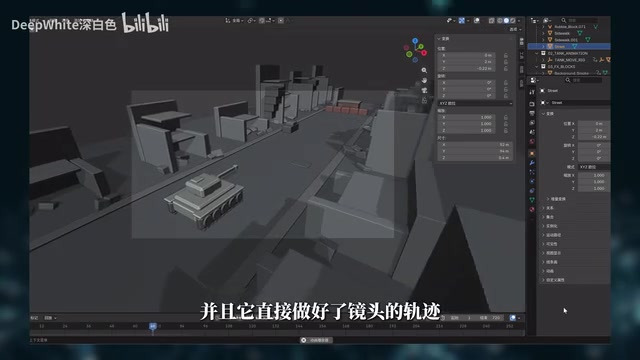
Combining this grey-box video with previously generated asset and scene reference images, the author wrote a video prompt and passed everything to Seedance 2.5 for rendering. The final output largely reproduced the camera movement, subject positioning, and overall pacing of the grey-box previz.
Codex is OpenAI's code generation and execution agent, with a core capability to call external tools, execute scripts, and interact with local or cloud-based software. Blender has a built-in Python scripting interface (the
bpymodule), allowing nearly all modeling, animation, and camera operations to be driven by Python commands. The Codex-Blender connection essentially has the language model translate natural language descriptions intobpyscripts, which are then injected into Blender in real time via a local socket or command-line interface. GPT-6 shows significant improvements over previous versions in tool-call robustness and multi-step reasoning stability, enabling it to complete the full chain — "understand scene requirements → write modeling script → call camera API → output render instructions" — in a single conversation without manual intervention at intermediate steps. This also explains why GPT-5.6 tends to lose the connection on first setup, yet performs well for incremental modifications once the path is established.
Reference Images and Shot Lists: Finer Spatial Control
Beyond direct generation, the pipeline also supports feeding in reference images. The author provided a reference photo and had the AI reconstruct the space through modeling. The first pass had issues: the background behind the subject should have been a glass wall, and areas outside the frame weren't filled in. On the second pass, the author supplied multi-angle photos to help the AI understand the spatial structure, explicitly noted that the back wall was solid and the sides featured glass doors — and the corrections were done in just two minutes.
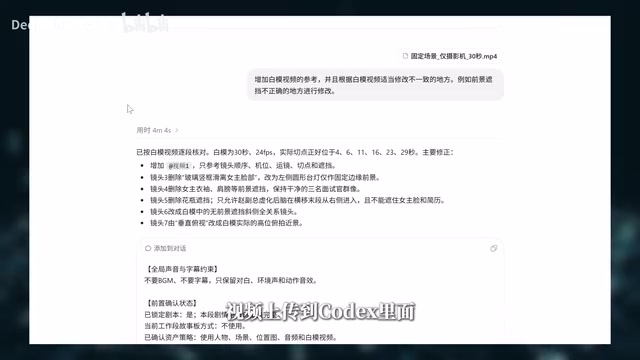
For camera language, composition, and motion, the author uploaded a pre-written shot list and had the AI generate grey-box footage accordingly. The grey-box video made it easy to preview the intended camera language, and any unsatisfying elements could be revised by updating the shot list and regenerating. The finalized grey-box video was then uploaded back into Codex, where the "director shooting skill" was used to generate video prompts referencing the previz — the prompts naturally incorporate references to the guide video, and each segment's camera movement, composition, and character performance align with the grey box, producing a genuinely controllable final output.
Saving Costs: GPT-6 for Setup, GPT-5.6 for Iteration
One notable observation: GPT-6 can control Blender in one shot, while GPT-5.6 initially cannot. The author's solution — use GPT-6 to run through the full pipeline once and establish the models, scene, and operational path, then switch back to GPT-5.6 for designing new camera trajectories.
In testing, after switching to GPT-5.6, a new grey-box video generated in 16 minutes was virtually indistinguishable from the GPT-6 version. The reason: once the operational path is in place, the difficulty of subsequent camera design drops sharply, and GPT-5.6 is fully capable of handling it. Since GPT-6 currently consumes quota at a much higher rate, the division of labor — "GPT-6 handles the initial connection and modeling, GPT-5.6 handles subsequent modifications" — is significantly more cost-effective.
The Cost Math: Is Grey-Box Previz Worth It?
Cost is what creators care about most. The author provided reference figures:
- Building a tank grey-box video from scratch (including revisions) consumed roughly 40% of a PLUS membership's 5-hour rolling quota. For existing subscribers, this incurs no additional cash cost.

- For final rendering (prices for direct use within the canvas), using Seedance 2.5 at 30 seconds / 720P as a benchmark: direct generation costs approximately ¥56.7, while using a reference video raises it to ¥68.4 — an increase of about 20%.
The conclusion is fairly clear: if the scene is simple, randomness is low, and you're confident you can nail it in one take, direct generation is cheaper. But the moment you need multiple "pulls," even just two, the cost immediately exceeds the grey-box approach. For scenes with multiple characters, complex movement, or continuous action, the author recommends paying the extra 20% to use a grey-box reference — it not only saves money on repeated generation attempts, but more importantly reduces rework, saves time, and makes results far more predictable.
"Gacha pull" is the AI video community's informal term for the workflow of generating multiple random outputs and selecting the best one — an analogy to the probabilistic item-acquisition mechanic in mobile games. Since current mainstream text-to-video models (including Seedance, Kling, Sora, etc.) are all based on diffusion Transformer architectures, each generation is essentially an independent random sampling process. Two generations from the same prompt can differ significantly in composition, lighting, and motion detail. Without structural reference input, creators often need to generate anywhere from 5 to 20 or more times to get a shot that meets expectations, and each generation incurs real cost. Introducing a grey-box reference video narrows this "open-ended random sampling" into "constrained structural reproduction," probabilistically reducing the number of generations needed to reach a satisfying result — which is the underlying economic logic behind its value.
Final Thoughts
The author has compiled their experience using Codex to control Blender — along with the operational logic and connection method for the Xfield plugin — into a Blender Skill and shared it publicly. They also note that even without this Skill, GPT-6 can directly control Blender on its own; the Skill's main purpose is to reduce trial-and-error, save tokens, and supplement the logic for modeling, camera design, and connection setup.
Whether GPT-6 truly marks the arrival of AGI remains an open question — but the capabilities it demonstrates are already enabling creators to execute workflows they could previously only imagine. The pipeline of "AI agent controls Blender to generate grey-box previz + Seedance rendering" offers a compelling example of AI video moving from "luck-based gacha pulls" toward an engineered, controllable production process.
Related articles
MotoGP Misano Race Report: Marquez Takes Victory to Level Championship Standings
MotoGP Misano race review: Marc Marquez wins to level the championship, Bezzecchi's high-speed crash, Bagnaia DNFs at home, brother battle, and 2026 rule changes explained.
MotoGP San Marino GP: Marc Márquez Storms to the Top of the Championship Standings
MotoGP San Marino GP recap: Márquez wins and leads standings for the first time. Bezzecchi crashes lap 1, Martín collapses late. Full race analysis and title implications.
Can KoboldCpp Replace Ollama? A Deep Dive into Local AI Tool Control
KoboldCpp and Ollama both run on llama.cpp. This deep dive compares control granularity, default settings, context shifting, and exclusive features to help you decide which local AI tool to use.