Can KoboldCpp Replace Ollama? A Deep Dive into Local AI Tool Control
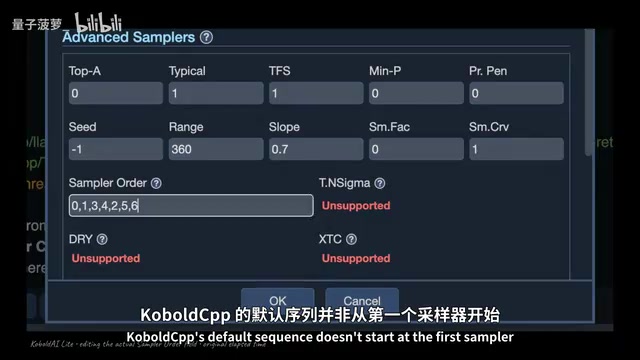
Ollama and KoboldCpp share the same engine — the real difference is how many settings decisions each one makes for you.
Ollama and KoboldCpp are both built on the same inference engine, llama.cpp, and every documented performance difference traces back to default parameter choices rather than engine capability. The real divide is control granularity: Ollama exposes just 8 documented parameters and aims to be silent infrastructure, while KoboldCpp offers 56 tunable fields per request and lets users reorder the sampler chain. KoboldCpp's once-exclusive context shifting is now enabled by default in Ollama, while KoboldCpp has implemented Ollama-compatible endpoints for seamless interoperability. For users with under 24 GB VRAM, Ollama's default 4,000-token context window falls far short of real-world needs and requires manual adjustment. Choosing between them is ultimately about deciding how much you want the software to pre-configure on your behalf.
In the local LLM tooling ecosystem, Ollama has become the default choice for most users. But a tool called KoboldCpp is challenging that dominance. It claims to handle image generation, speech recognition, and text-to-speech in a single file, complete with a built-in chat interface. What's interesting is that both tools run the same underlying engine — llama.cpp. If the core is identical, where do the real differences lie?
Same Origin, Different Paths: Both Built on llama.cpp
KoboldCpp is explicitly labeled "Forked from ggml.org/llama.cpp" at the top of its GitHub repository page — metadata that traces back to just six days after llama.cpp's inception. The project makes no attempt to hide its lineage, naming the parent project in the very first line of its README and mentioning it four times across the page. It's released under the copyleft AGPL3 license, with a bundled MIT license to cover code inherited from llama.cpp.
Ollama, by contrast, appeared several months later and carries no fork badge on its homepage. But dig into the repository root and you'll find a llama.cpp version file that pins a specific llama.cpp release tag. The build process pulls that exact code, applies patches from the compat folder, and compiles it into a service. In other words, Ollama is just as thoroughly dependent on llama.cpp — it just doesn't advertise that dependency upfront.
The fact that both tools share the same engine pushes all "who's faster" debates toward a more fundamental question: what actually sets them apart?
llama.cpp is an open-source project started by Georgi Gerganov in March 2023, with the goal of running Meta's LLaMA series models efficiently on consumer hardware. Its core innovation is quantizing and compressing model weights using the GGUF format (formerly GGML), shrinking models that would otherwise require tens of gigabytes of VRAM down to sizes runnable on a standard laptop or gaming GPU. Written in pure C/C++ with no Python dependencies, it directly leverages CPU SIMD instruction sets (such as AVX2 and ARM NEON) as well as multiple GPU acceleration backends (CUDA, Metal, Vulkan, OpenCL). Because llama.cpp has effectively come to dominate local inference at the implementation level, building higher-level tools on top of it has become the default path for the entire ecosystem — Ollama and KoboldCpp are simply the two most representative branches of that approach.
The "Free Rider" Debate: What the Contribution Data Actually Shows
The loudest criticism of Ollama online is that it "takes from the community without giving back." But the data tells a more nuanced story. KoboldCpp's primary developer has 6 merged commits in the llama.cpp main repository, spanning from the project's early days to more recently, covering work like OpenCL kernel ports and segfault fixes.
Among Ollama's five core maintainers, four have actually submitted code to the engine, totaling 7 commits. That means the team accused of "taking" has contributed one more upstream commit than the fork celebrated for "giving." This is hard to characterize as a hostile takeover.
In terms of popularity, Ollama boasts over 180,000 stars — roughly 50,000 more than llama.cpp itself (around 128,000). The ethical debate makes for lively discourse, but since both run the same engine and contributions are roughly equal, the real dividing lines have to be found elsewhere.
The Control Debate: 8 Knobs vs. 56 Fields
The true watershed is how much decision-making power each tool gives to the user. Ollama's published OpenAPI spec has an options object with just eight properties: sampling options include seed, temperature, top_k, top_p, min_p, and stop; runtime options are limited to num_ctx and num_predict. Even digging through the Modelfile documentation yields only 11 parameter lines. This isn't a temporary limitation — it's the product's core design philosophy. Its flagship CLI example is simply a single line: ollama run.
KoboldCpp goes to the other extreme. Open its generation input schema and you'll find 56 tunable parameters in a single request. Some are obscure samplers most users have never touched, like top_a, typical_p, or mirostat. But others are genuinely practical settings: four independent repetition-penalty parameters, grammar for forcing structured output, and ban tokens to prevent the model from producing specific words. If you launch from the terminal, the launcher registers 165 distinct command-line flags.
Going even further, KoboldCpp treats the sampler execution order itself as a tunable parameter. Every runner filters candidate tokens through a sampler chain — Ollama's chain is fixed, while KoboldCpp lets you reorder every position. One tool lets you set values; the other lets you also set the order in which those values are applied.
A few of the more obscure samplers mentioned here are worth briefly explaining. Top-A sampling dynamically sets a threshold based on a fixed multiple of the highest probability, unlike Top-P's cumulative probability cutoff approach. Typical-P is based on the concept of information entropy, prioritizing tokens whose information content is "typical" for the current context — the goal being to reduce output that is either too bland or too random. Mirostat is an adaptive sampling algorithm that adjusts the temperature parameter in real time via a feedback loop, stabilizing the output's perplexity at a user-specified target — theoretically keeping long-form generation at a consistent level of "surprise" without becoming increasingly incoherent. Grammar constraints allow users to supply a formal grammar (usually in GBNF format) to force the model's output to conform to a specific structure, such as a strict JSON schema or fixed-format code. This is critical for automated scenarios that require reliable structured output.
The Truth About Performance Differences: It's All Default Settings
Does having more control mean better output? A real-world case provides the answer. A user once filed an issue titled "Massive performance loss compared to llama.cpp." Running a 70-billion-parameter model on a dual-GPU setup, llama.cpp's prompt processing reached 1,490 tokens per second while KoboldCpp hit only 34 — 44 times slower — with generation speed also lagging by 6x.
The maintainer's response wasn't to admit a flaw, but to walk through the settings: the user had mistakenly selected the low VRAM option, preventing the cache from being offloaded; meanwhile, llama.cpp enables flash attention by default, but the user had it disabled in KoboldCpp. In fact, llama.cpp enables flash attention automatically in its source code by default, and KoboldCpp's launcher today has that checkbox ticked by default as well. The next morning, the reporter closed the issue with a note: "Performance is now identical."
The engine was never the variable. The differences were entirely in the default settings. And the biggest decision Ollama makes for you isn't the sampler — it's how much context the model can see. It reads your hardware and automatically picks a number: below 24 GB VRAM defaults to 4,000 tokens, below 48 GB gets 32,000, and higher configurations extend to 256,000. But Ollama's own documentation says web search, agents, or coding tools require at least 64,000 tokens. That means users with ordinary GPUs are getting a fraction of what their use cases actually need — and they have to go manually change it themselves.
Exclusive Features Are Disappearing
Many people cite context shifting as the killer reason to choose KoboldCpp: when chat history overflows, the runner automatically removes old tokens, avoiding painful cache rebuilds. This feature appeared in relatively early versions of KoboldCpp.
But install Ollama today and you'll find this "exclusive advantage" has evaporated. Its public API types now include a shift field on both generate and chat requests; the underlying scheduling function parses this option per model and returns true by default for nearly every model family, with the sole exception being second-generation DeepSeekAd models. The flagship capability once thought to give KoboldCpp an unassailable lead now runs by default in Ollama.
So what's left that's truly exclusive to one side? Open KoboldCpp's 606 MB file and you'll find image generation, video generation, Whisper-powered speech tools, and even a writing interface with persistent stories and character cards — spanning seven model families. Ollama isn't text-only either; its source list includes vision, tool calling, and image generation, but all delivered through the same two endpoints, with its bundled app being just a chat window with settings sliders. The capability gap is real, but narrower than the marketing suggests. KoboldCpp's genuine differentiator isn't "having these features" — it's that they're all bundled into a single out-of-the-box file, with their own place to use them.
Context shifting addresses a fundamental bottleneck in LLM inference: the KV cache (Key-Value Cache). When processing each token, the model stores the attention key-value pairs for all historical tokens in VRAM for reuse — this storage area is the KV cache. When conversation history exceeds the model's maximum context window, the naive approach is to truncate and discard the oldest content, but this invalidates the cache and requires recalculating KV values for the retained portion — a process that can take tens of seconds. Context shifting uses a sliding window to gradually move out old tokens, keeping a continuous run of valid history in the cache and avoiding full recomputation. This mechanism is especially critical for long-form writing, multi-turn conversation, or agent scenarios, where context overflow is the norm rather than the exception.
You Don't Actually Have to Choose One
Interestingly, KoboldCpp directly implements Ollama's endpoints. Looking through its source code, every relevant handler is annotated with "Ollama compatible" comments. It translates incoming Ollama request formats, maps parameters like temperature and seed to its own fields, and packages tool calls back into the format Ollama expects. KoboldCpp wears Ollama's interface as a costume — any tool written for Ollama can talk to it without knowing the difference. The same script can also respond to ComfyUI, transcription, and OpenAI endpoints — this single file operates under multiple identities simultaneously.
So which should you install? For most people the answer is Ollama, because it's designed to be "silent infrastructure." Its CLI even has built-in commands for configuring and launching external applications, explicitly naming five tools including Claude Code and VS Code. KoboldCpp has no equivalent feature, instead choosing to emulate other APIs so tools can connect without noticing. This difference extends all the way to how you find models: Ollama pulls from its own registry, while KoboldCpp lets you query the Hugging Face API directly from the launcher.
Conclusion: You're Really Choosing How Much to Outsource Your Decisions
Both tools run llama.cpp. Every documented performance difference ultimately dissolves into a settings parameter; contribution counts are essentially tied. Where KoboldCpp genuinely beats Ollama is simply in how much decision-making power it leaves in your hands.
If you want a silent model server hidden behind a socket for other tools to connect to, install Ollama. If you want to sit in a workshop and tweak 56 fields while customizing sampler order, KoboldCpp is your playground. The one gotcha: if your GPU has less than 24 GB of VRAM, Ollama gives you only 4,000 tokens of context by default — you'll need to change that yourself.
Step back from the command line and you'll find that every difference you can actually feel between these two tools comes down to a setting that someone pre-decided for you — a context length automatically picked from your VRAM, a flash attention checkbox, or a sampler order that's either locked in or fully open. You're not choosing between different engines. You're choosing how many technical decisions you want someone else to make on your behalf.
Related articles

OpenAI Claims to Have Cracked Navier-Stokes — But Who Really Deserves the Credit?
OpenAI reportedly used 10,000 agents to solve the Navier-Stokes Millennium Problem in 88 hours. But the unverified claim has sparked fierce debate over credit attribution and AI ethics.
India's New Rules Force Caller ID Apps to Share Spam Data with Telecom Operators
India's regulator requires Truecaller and other caller ID apps to share spam data one-way with telecom operators, sparking debate over proprietary assets and data governance.
MiniMax Ref2VA in Action: Transforming Cartoon Animation into Live-Action Video
A Reddit creator used MiniMax H3 Ref2VA to transform Dungeons & Dragons cartoon animation into live-action video. We break down how reference-driven AI video generation works and its current limitations.