GPT-6 Pro Tested: Vectorizing Research Figures and Batch-Generating Academic Presentations

GPT-6 Pro reconstructs images as truly editable SVG vectors and generates academic presentations in one step.
This article documents a Bilibili creator's hands-on testing of GPT-6 Pro for research graphics workflows. Key findings: GPT-6 Pro can reconstruct images as structured, editable SVG files — fully modifiable in Adobe Illustrator — solving the longstanding problem of AI-generated images being unusable for academic submission. Two critical tips emerged: prompt for "SVG in the original image's format" to avoid non-editable path traces, and prefer Chat mode over Codex for better detail fidelity. GPT-6 Pro can also generate editable academic presentations in a single step and batch-convert image-based decks, though visual polish still lags behind dedicated image models.
A New Workflow for Research Graphics with GPT-6 Pro
For a long time, AI-generated images have had one persistent pain point: the output can't be edited, and it's nearly impossible to use directly in academic submissions. A hands-on test shared by a Bilibili content creator with GPT-6 Pro (the Astra series) addresses exactly this issue — the model can reconstruct ordinary images into truly editable vector graphics (SVG), rather than producing a simple bitmap trace.
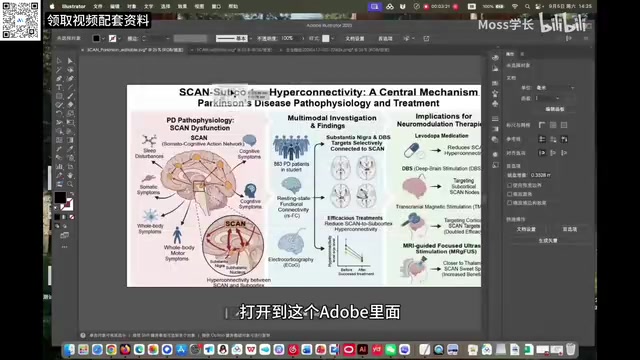
According to this creator, who has already upgraded to a Pro account, when GPT-6 Pro reconstructs a vector image, both the text and graphical elements in the SVG source file remain sharp and lossless. After importing the file into Adobe Illustrator, all text is directly editable, and graphical elements can be ungrouped and adjusted individually. Using a brain tissue anatomy diagram as an example, each section of the brain and surrounding tissue structures can be selected and manipulated independently.
The key insight here is that these elements are not assembled from a clip-art library — the model redraws them as vector paths. As a result, the graphics remain crisp and sharp at any zoom level, which is especially valuable for research papers that require high-resolution illustrations.
Comparing Results Against GPT-5.6
To verify the difference the upgrade makes, the creator ran the same prompts on the GPT-5.6 Thinking model as a side-by-side comparison. The results showed that GPT-5.6 fell noticeably short of GPT-6 Pro when it came to reconstructing large structural blocks and fine details — particularly in localized areas of an image, where fidelity was insufficient and edges and small structures were prone to distortion.
This generational gap suggests that GPT-6 has achieved a meaningful upgrade in image understanding and vector reconstruction — not just a minor parameter tweak. For researchers who regularly work with diagrams and mechanism figures, the improvements in editability and fidelity translate directly into productivity gains.
Two Practical Tips for Better Vector Reconstruction
The testing process surfaced two key techniques that directly affect output quality.
Tip 1: Explicitly Ask for "SVG in the Original Image's Format"
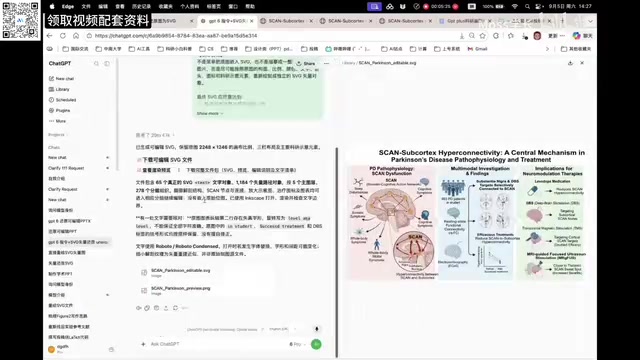
If you simply ask the model to "convert this to an SVG file," it will most likely generate a path-traced SVG — a file rebuilt by scanning the image pixel by pixel. The downsides of this approach are obvious: text becomes blurry when zoomed in, fonts remain essentially image-based and non-editable, and details get lost or oversimplified.
The correct approach is to use a more precise prompt, asking it to "reconstruct this as an SVG file in the original image's format." This produces a vector file with clean, editable text and better-preserved detail — a significantly better result.
Tip 2: Use Chat Mode Instead of Work Mode
GPT-6 Pro offers two modes: Chat (the standard chat interface) and Work (Codex). The creator's experience is clear: Chat mode produces smarter results for vector reconstruction. With the same prompt, using Codex (Work mode) still yields editable text after importing into Adobe, but localized details — such as brainstem tissue or cellular structures — show slight distortion and deformation. Chat mode produces noticeably fewer artifacts.
The reason for this difference isn't fully understood, but based on the test results, Chat mode via the web interface is the recommended approach for precise research illustration work.
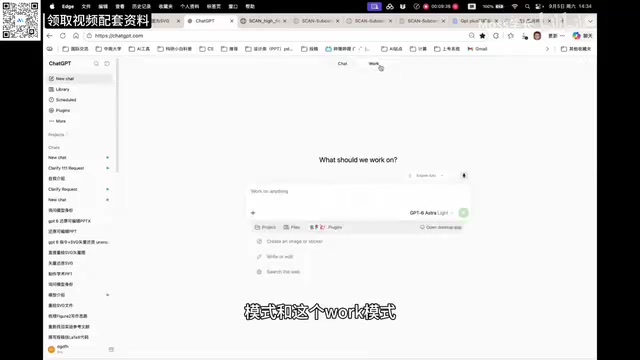
Codex (the Work mode referenced here) is a workflow mode designed by OpenAI specifically for code generation and execution tasks. Its underlying architecture is optimized for programming tasks and excels at multi-step automation and batch file processing. Chat mode, by contrast, is the standard interactive interface built for open-ended conversation and creative generation — the model here has access to a more complete contextual reasoning chain and a deeper semantic understanding of visual content.
Both modes ultimately call the same base model, but they differ in how tasks are routed and how internal prompting strategies are applied. For complex tasks like vector illustration reconstruction — which require simultaneous understanding of visual semantics, text content, and spatial structure — Chat mode's more complete reasoning pipeline appears to have an advantage. Codex mode may introduce slight degradation in graphical detail handling due to its bias toward code-execution logic. No official explanation for this difference has been provided, but this finding offers practical guidance for everyday use.
Generating Editable Academic Presentations in One Step
Beyond vector graphics, GPT-6 Pro also shows meaningful progress in academic presentation creation. Previously, generating a usable slide deck required a multi-step "three-wave method" involving an image generation model. Now, GPT-6 Pro can produce an academic presentation directly in a single step, and the overall quality is good enough to use.
That said, the creator is candid about the trade-offs: if you prioritize visual polish in images, tables, layout, and overall aesthetics, presentations generated by an image model still come out ahead. So personally, the creator still prefers the three-wave method with an image model for producing visually refined slides.
Converting Image-Based Presentations into Editable Format
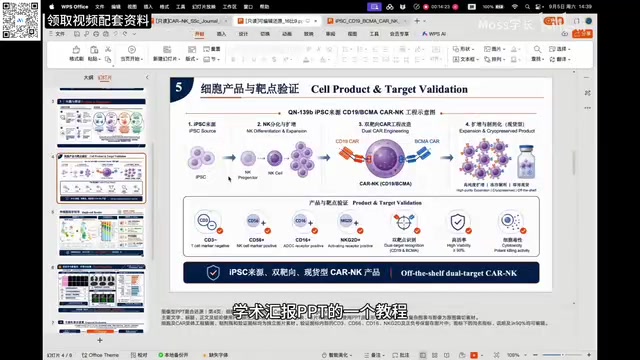
One particularly useful application: presentations generated by image models are essentially image files — they can't be edited. You can now use GPT-6 Pro with a dedicated prompt to convert an entire presentation into an editable format in one pass. In testing, this process took roughly 30 minutes, after which all content — including text — could be freely modified.
It's worth noting that earlier versions required converting presentations slide by slide. GPT-6 Pro, with its stronger capabilities, can now process an entire deck at once, representing a significant efficiency improvement.
The "three-wave method" is a multi-model workflow the creator shared previously: the first wave uses a language model to plan the presentation's structure and copy; the second wave calls an image generation model (img model) to render the visual appearance of each slide; the third wave involves manual refinement of layout and details. The core advantage of this approach is that image generation models are far superior at controlling layout aesthetics and visual style compared to general-purpose conversation models, producing more polished slides. The trade-off is a fragmented, multi-step workflow, and the resulting presentation is essentially a collection of images with no editability. GPT-6 Pro's advancement lies in combining "generation" and "editability" into a single step — but visual polish remains its current weakness, so both methods have their place rather than one simply replacing the other.
Summary
Based on this hands-on testing, GPT-6 Pro's evolution over the Plus tier in research contexts is genuine and measurable: editable vector reconstruction solves the long-standing problem of AI-generated images being unsuitable for academic submission, while one-step editable presentation generation significantly lowers the barrier to creating academic slide decks. For researchers, mastering the "original format SVG prompt" and "Chat mode first" techniques can meaningfully improve output quality. Of course, for maximum visual impact, the image model combined with the three-wave method still holds irreplaceable value.
Background Notes
SVG (Scalable Vector Graphics) is an open-standard format based on XML that describes graphics using mathematical paths rather than pixel grids. Unlike raster formats such as JPEG or PNG, SVG graphics can be scaled to any size without losing quality, and the individual elements within the file — text, paths, shapes — can be read and modified programmatically. This is precisely why SVG is the preferred format in academic publishing: most journals require figures to be submitted in vector format to ensure print clarity.
A "path-traced SVG" is a shortcut AI systems take when processing raster images: rather than understanding the image's content, the model automatically generates dense Bézier curve paths along pixel edges, essentially wrapping the image inside an SVG container. These files may look like SVGs, but they are large in file size, contain non-editable text, and are prone to detail distortion — far removed from a true, structured vector graphic. Asking the model to "reconstruct in the original image's format" is fundamentally a way of guiding it to re-understand the semantic structure of the image: recognizing text as editable text nodes, and reconstructing graphics as independent path or shape elements — producing an SVG file with genuine editability.
Related articles

Random Pruning of the DPO Computation Graph: 1.4x Training Speedup and Lower Peak Memory
DPO training too slow and memory-hungry? This paper proposes a random pruning framework for the DPO computation graph, sampling independently across position, sequence, and branch dimensions; branch pruning achieves a 1.426x step-time speedup and cuts training time by about 30%, with in-depth attribution of memory and time gains.

Why Does JEPA Underperform MLM in Longitudinal EHR Representation Learning?
New study compares JEPA and MLM for longitudinal EHR representation learning on MIMIC-IV: three JEPA variants train stably without collapse but underperform MLM; target size, not heterogeneity, drives prediction error.

Transfer Learning + Visible Light Communication: A New Approach to Energy-Efficient Indoor Positioning
A study proposes a transfer learning-based visible light communication indoor positioning method, achieving 47% accuracy improvement on the BOSCH factory dataset, 67.5% model efficiency under high noise, and introducing the ME composite metric for energy-efficient positioning in energy-constrained industrial IoT scenarios.