GPT-6 vs Claude Opus 5.5: A Same-Day Showdown of Smarter, Cheaper AI
OpenAI and Anthropic both ship major model updates the same day, shifting AI competition to performance-per-dollar.
OpenAI released GPT-6 Sol and Luna — targeting high-end capability and ultra-low cost respectively, with Luna priced at just $0.1 per million input tokens. Anthropic countered the same day with Claude Opus 5.5, which is 30% faster and 40% cheaper than its predecessor. Benchmarks show Opus 5.5 leads on Terminal Bench (66.4% vs. 57.9% for GPT-6 Astra), while Astra holds an edge in business and research tasks. The article also provides full API setup tutorials for connecting GPT-6 Luna via Codex CLI and Opus 5.5 via Claude Code Desktop.
OpenAI and Anthropic played their cards at nearly the same moment — and with Elon Musk's Grok 4.7 having dropped just days earlier, three leading AI companies all shipped major updates within 48 hours. The defining theme of this round: more capable, less expensive. For developers and everyday users alike, the model landscape keeps expanding while costs continue to fall.
OpenAI's Dynamic Duo: Sol for Power, Luna for Cost
OpenAI launched two new models at once — Sol and Luna — each with a distinct purpose. Sol targets complex coding and professional workloads, pushing the ceiling on raw capability. Luna is built for speed, efficiency, and large-scale low-cost deployment, driving the entry point as low as possible.
Pricing is the headline story. GPT-6 Sol is priced at $2 per million input tokens and $10 per million output tokens. Luna, by contrast, comes in at just $0.1 per million input tokens and $0.5 per million output tokens — a full order of magnitude cheaper. OpenAI says both models are roughly half the price of GPT-5.6's promotional rates.
What makes this more remarkable is that the price cuts don't come with a meaningful capability regression. Looking at the published benchmark scores, Astra scores 57.3, Sol reaches 53.9, and the ultra-affordable Luna still hits 50.2. This signals that OpenAI is systematically bringing GPT-6-class capability down-market — users can spend significantly less and still get a near-flagship experience.
Glossary: A token is the basic unit of text measurement in large language models — roughly 0.75 English words or 0.5–1 Chinese characters. Cost per million input tokens (1M tokens) is the standard metric for evaluating API economics. At Luna's $0.1/1M token rate, processing a 5,000-character Chinese article costs approximately $0.0005, making high-frequency, high-volume commercial use highly viable. The Astra score is OpenAI's internal composite benchmark covering coding, reasoning, multimodal tasks, and more — higher scores indicate stronger overall capability and allow for horizontal comparison across models in the same generation.
Anthropic Fires Back: Opus 5.5 Also Bets on Cost
Almost immediately after OpenAI's announcement, Anthropic unveiled Claude Opus 5.5 — the timing felt almost choreographed.
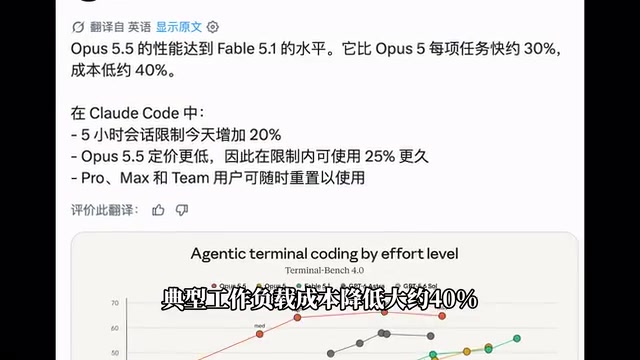
Opus 5.5 follows a nearly identical strategic logic: it's also competing on cost. Compared to the previous Opus 5, task speed is up roughly 30% and typical workload costs are down about 40%. In terms of capability, it's closing in on Fable 5.1.
On Terminal Bench — a benchmark focused on coding and terminal operations — Opus 5.5 scored 66.4%, clearly ahead of Fable 5.1's 55.8% and GPT-6 Astra's 57.9%. That said, this doesn't mean Opus 5.5 dominates across the board. In business workflow and scientific research categories, GPT-6 Astra still holds its own.
In short, each flagship has its strengths: Opus 5.5 shines in terminal and engineering tasks, while Astra is more consistent in general business and research scenarios. Picking the right tool for the job matters more than chasing the newest release.
Tutorial: Connecting GPT-6 Luna to Codex CLI
Beyond the benchmarks, what really matters is getting these models working. Here's the complete API integration walkthrough.
Before connecting GPT-6 Luna, confirm that Node.js and NPM are installed on your machine. Open a terminal and run the version check commands — if version numbers appear, you're good to go. If not, download the appropriate installer from the Node.js official website.
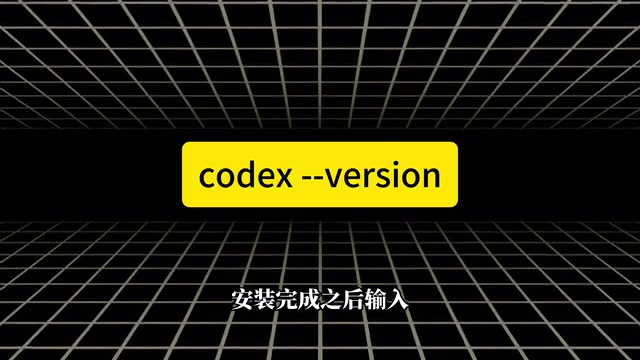
Step 1: Install Codex CLI. The installation command works on Windows, macOS, and Linux. Once installed, verify success by checking the version output. If you've installed Codex CLI before, simply upgrade to the latest version.
Step 2: Create an API key. Sign in to the DeepRouter platform, navigate to the console, click "API Keys" in the left sidebar, then click "Create API Key" in the upper right. Give it any name, set the group to Default, leave everything else as-is, and copy the generated API key.
Step 3: Edit the config files. Locate the Codex directory (on Windows, it's the .codex folder in your user directory; on macOS and Linux, it's the same .codex under your home directory). You'll need to modify two files: auth.json and config.toml. Create them manually if they don't exist. Paste your API key into auth.json, then add the relevant settings to config.toml and save.

Once done, close and reopen your terminal, then type codex to launch Codex CLI.
Glossary: Codex CLI is OpenAI's command-line interface tool that lets developers invoke AI models directly from the terminal for coding assistance — supporting code generation, debugging, file operations, and more. It runs on Node.js and is installed and managed via NPM (Node Package Manager). DeepRouter is a third-party API aggregation platform that provides unified access to models from OpenAI, Anthropic, and other major providers. Developers use a single API key and endpoint to switch between different vendors without managing multiple sets of credentials.
config.tomluses the TOML format (Tom's Obvious Minimal Language) — a lightweight, human-readable configuration file format commonly used to store application runtime parameters.
Tutorial: Connecting Opus 5.5 to Claude Code Desktop
The setup process for Opus 5.5 is equally straightforward.
Step 1: Install Claude Code Desktop. Go to the official download page, select the installer for your operating system, install it, and launch the app.
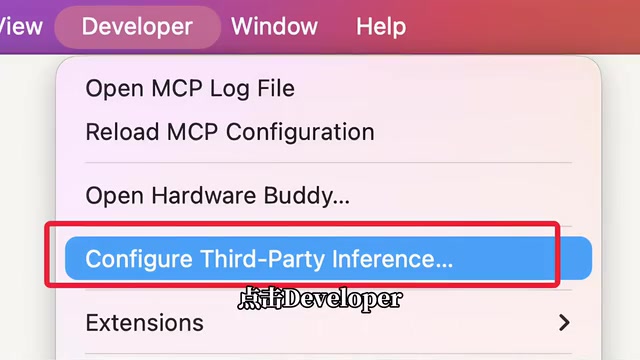
Step 2: Enable Developer Mode. From the top menu, go to Help → Troubleshooting → Enable Developer Mode. After confirming, the app will restart automatically and a Developer menu will appear in the menu bar. Click Developer, then select Configure Third-Party Inference to open the third-party API settings page.
Step 3: Generate an API token. The process is the same as before — just change the group to C Code, then copy the token.
Step 4: Configure the API. On the third-party inference configuration page, paste your API key and enter the endpoint URL provided by DeepRouter. Once everything looks correct, click "Apply Locally" at the bottom. The app will restart and the settings will take effect.
Step 5: Switch to the new model. After restarting, go to the main interface and use the model selector below the chat window to choose Opus 5.5. Send a test message to confirm it's working.
Glossary: Claude Code Desktop is Anthropic's official local client. Its "Configure Third-Party Inference" feature under Developer Mode lets users redirect the client's backend requests to a custom API endpoint. This effectively points the client's model calls to a third-party compatible interface (like DeepRouter) instead of Anthropic's own servers — so the API key and endpoint should correspond to your third-party platform credentials, not an official Anthropic API key. "Apply Locally" means the configuration only applies to your current device and won't sync to your cloud account, making it ideal for developers who want to flexibly switch model providers locally.
Final Thoughts
This wave of rapid-fire releases reveals a clear trend: leading AI vendors are no longer competing purely on parameter counts or benchmark rankings. The real battleground has shifted to performance ÷ price. GPT-6 Luna delivers near-flagship scores at a fraction of the cost. Opus 5.5 cuts costs by 40% while getting faster. Both moves are fundamentally about capturing a broader developer and commercial market.
For users, this is unambiguously good news — more models, lower prices, and unified API access make mixing and matching models genuinely practical. The question going forward isn't which company is "winning" — it's knowing your workload well enough to put the right model in the right place.
Related articles

Meta vs. Publishers: The AI Data Battle Over Terms of Service Changes and the Future of the Internet
Meta changed its business account terms to allow AI training on linked website data, sparking backlash from publishers and creators. Industry groups demanded negotiations, forcing Meta to remove 'training' wording and delay the effective date. The dispute reveals the deeper battle over data authorization and the future of the internet in the AI era.

When Outside Xbox Meets Blood on the Clocktower: A Legion Match in Minecraft
Outside Xbox guests Ellen and Mike play Minecraft Blood on the Clocktower in a Legion game. How can three good players fight an evil majority amid information noise? This article breaks down Legion mechanics, information-role mind games, and the endgame reversal.

Kimi K3.1 Hands-On Test: Open-Source Model Nears Opus, Video Generation Steals the Show
Kimi K3.1 completed motion graphics, 3D rendering, mini-games, and video generation in a live test. Analysis of its 2.8T MoE architecture, gap vs Opus/GPT, and hidden video generation.