Graphify: Zero AI Token Local Codebase Mapping, a Power Tool for Claude Code

Graphify parses codebases into a local knowledge graph for Claude Code to query directly, with zero-token parsing and lower costs.
Graphify is an open-source tool that solves the problem of Claude Code re-searching project files every session, which is time-consuming and token-hungry in large codebases. It parses the entire project into a knowledge graph locally on the user's machine without relying on cloud AI services, consuming zero AI tokens and leaking no telemetry, and it works offline. It outputs three files: a clickable interactive graph, a report with key concepts and God nodes, and a graph file for Claude to query. Integrated with Claude Code, Cursor, and Codex, it installs with two commands and is invoked via /graphify in Claude Code, supporting about 40 programming languages. Typical uses include explaining class responsibilities or tracing call paths, making it ideal for teams with large codebases that frequently hit context limits. However, public information currently comes mainly from a single video source, and details like construction speed and memory usage are undisclosed; trying it on small to medium projects first is recommended.
Claude Code has to dig through project files from scratch every session, which in large codebases is both time-consuming and burns precious AI tokens. The open-source tool Graphify offers a new approach: parse the entire project into a knowledge graph locally, letting Claude query the graph directly instead of opening files one by one. According to a YouTube channel introduction, the tool is completely free and open source, has already garnered over 132,000 stars, and consumes zero AI tokens during operation.
Local Parsing, Zero Token Consumption
Graphify's core selling point is that it delivers both privacy and efficiency. Code parsing happens entirely on the user's machine, without relying on cloud AI services, so it consumes zero AI tokens and no telemetry data leaves the machine. As the video screenshot emphasizes: "It runs on your machine." For developers concerned about code leaks or token costs, this is undoubtedly an attractive solution.
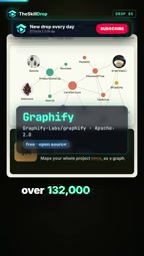
This design also means Graphify can be used offline, free from network fluctuations or API quota limits. For teams that use Claude Code frequently, it can save considerable token expenses over the long run.
A knowledge graph is a technology that represents knowledge using a graph structure: nodes represent entities (in the code context, these can be files, classes, functions, variables, etc.), and edges represent relationships between entities (such as calls, inheritance, imports, and containment). Compared with a traditional file tree or full-text search, the advantage of a knowledge graph lies in making the semantic relationships scattered throughout the code explicit and structured, so that queries can follow relationship paths without repeatedly reading the raw text. In the context of AI coding assistants, this means the model can directly obtain pre-processed answers to questions like "who calls whom" or "what are the dependencies of a certain class," thereby reducing the occupation of the context window. Knowledge graphs are typically built locally and stored persistently, so queries do not require re-parsing the source code, making them particularly suited to repeated question-answering over large codebases.
Three Outputs: Visual, Readable, Queryable
After running Graphify, you get three files: a clickable interactive graph, a report containing key concepts, and a graph file for Claude to query. The video screenshot shows this output structure.
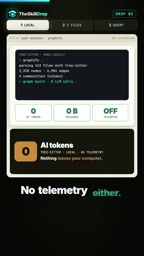
The clickable graph lets developers browse the project structure intuitively; the report distills the core concepts and specifically highlights "God nodes"—the few critical nodes that everything else depends on. This dependency analysis helps quickly locate architectural bottlenecks or high-risk modules.
God nodes (also translated as "hub nodes") originate from a concept in software metrics, referring to core modules, classes, or functions in a dependency graph that have extremely high connectivity and are depended upon by a large number of other nodes. They are often the key abstractions or de facto infrastructure of a system, with high modification risk and wide impact. Identifying God nodes helps developers quickly grasp the architectural center of gravity: on the one hand, it allows assessing whether these nodes are overburdened and need to be split; on the other hand, it prioritizes them during refactoring or upgrades to avoid a single change affecting the whole system. Highlighting God nodes in a knowledge graph report is equivalent to generating a "heat map" for the codebase, making architectural bottlenecks and high-risk modules immediately visible, and also helping AI assistants prioritize understanding these core components when answering questions.
Querying the Graph Directly in Claude Code
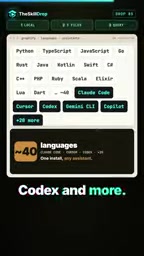
Graphify is already integrated into tools such as Claude Code, Cursor, and Codex. Installation requires only two commands, after which you can invoke it in Claude Code by typing /graphify. From then on, Claude no longer opens files one by one but asks the graph directly.
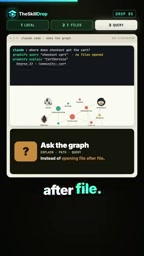
Typical uses include: explaining the responsibilities of a class, or tracing the call path between two parts of the code. Because the graph has already pre-processed the relationships, Claude's responses are more focused, and the overhead of repeatedly reading files is reduced.
Multi-Language Support and Use Cases
Graphify supports about 40 programming languages, covering mainstream development stacks. For teams with large codebases where Claude Code frequently hits context limits, it offers a "build the graph first, ask questions later" workflow. The question posed at the end of the video—"Is your codebase too big for Claude?"—is exactly the target scenario for this tool.
However, the currently available public information mainly comes from a single video source, and details such as graph construction speed and memory usage on large projects have not yet been disclosed. Developers who are interested are advised to try it on small to medium-sized projects first, then roll it out gradually.
Tokens are the basic units in which large language models process text; models measure input and output in tokens and either charge by token count or are constrained by the context window. For tools like Claude Code, each session requires reading the contents of relevant files into the context, and large codebases quickly consume a large number of tokens—increasing costs and potentially forcing truncation or omission of information once the context window is full. Graphify's "zero token consumption" means that code parsing is done locally and does not call cloud models, so it incurs no API fees; however, when you subsequently ask Claude questions through the graph, a small number of tokens are still consumed—just far fewer than opening files one by one. Understanding this distinction helps to reasonably assess the tool's actual cost-benefit.
Conclusion
Graphify lightens the load on AI coding assistants with a local knowledge graph, and its zero token consumption and privacy protection are its main advantages. If you are looking for ways to reduce the cost of using Claude Code and improve code comprehension efficiency, this open-source tool is worth checking out.
Related articles
Diving into PostgreSQL Internals: A Free, Open-Source Guide to Database Principles
*The Internals of PostgreSQL* is a free online book covering process architecture, storage layout, query processing, MVCC concurrency control, and WAL logging—ideal for DBAs and backend engineers who want to understand database internals.

Hinton Warns Again: We Might Be Better Off Without AI
Geoffrey Hinton's remark that we might be better off without AI sparks Hacker News debate. This article analyzes the two layers of meaning, the shift in tech community attitudes, and counterarguments questioning the "better off" baseline—plus what it means for AI practitioners.

Why The Legend of Zelda: Ocarina of Time Never Fades
Why is The Legend of Zelda: Ocarina of Time still a classic after all these years? This article analyzes its paradigm revolution from 2D to 3D, its relationship with Breath of the Wild, and why its design philosophy remains timeless.