Gravity Notes: A Note List You Share with Your AI Agent

Gravity Notes builds on a minimalist list-based note method, using a CLI to let AI coding agents directly read and write notes, exploring human-AI shared working memory.
Gravity Notes is a minimalist app based on Andrej Karpathy's append-and-review method: all notes go into one list, newest on top, older notes sinking, retrievable with a swipe. Its latest version adds the gravity CLI (Mac command-line tool), letting Claude Code, Codex, or custom scripts read and write the note list so AI coding agents share context with developers. It also adds real-time Markdown rendering, checklists, and full export, supports iPhone, iPad, Mac, and Android, and uses one-time payment and local storage. With 67 upvotes and 1 comment on Product Hunt, it's still early-stage. Its core value is a new interaction paradigm: notes aren't just for humans—they're also for AI agents.
Title
Gravity Notes: A Note List You Share with Your AI Agent
Meta Description
Gravity Notes is a minimalist note app based on the append-and-review method, where all notes go into a single list with the newest on top. Its standout feature is the gravity CLI, which lets AI agents like Claude Code and Codex directly read and write notes, enabling human-AI shared working memory. Supports iPhone, iPad, Mac, and Android, one-time payment, local storage.
Article Content
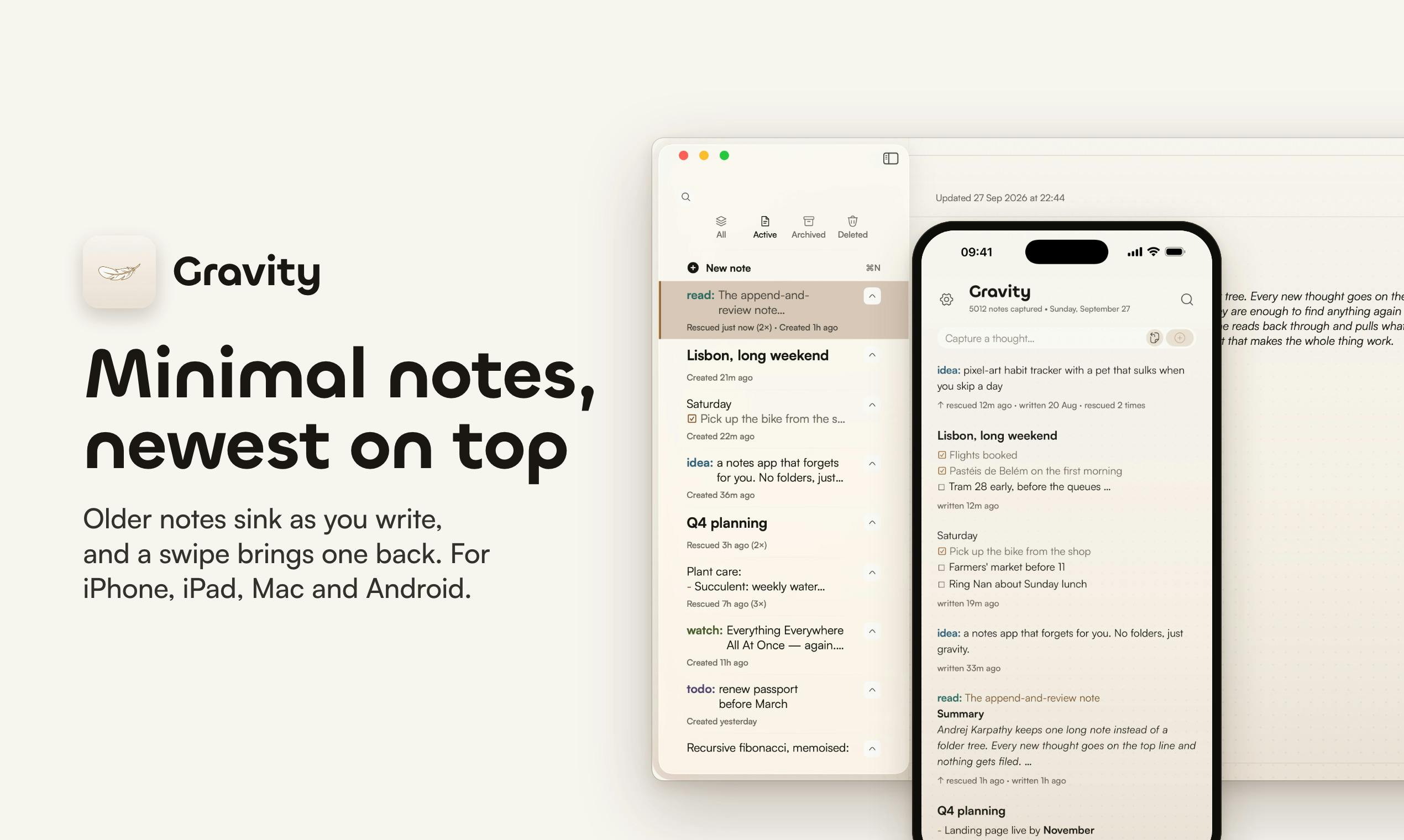
How else can a note app innovate? Gravity Notes answers with a return to minimalism while embracing AI. This app, which earned 67 upvotes on Product Hunt, is built on Andrej Karpathy's append-and-review note-taking method: all notes go into a single list, the newest content stays on top, older notes naturally sink, and a swipe brings them back. But what truly sets it apart is that it lets your AI coding assistant directly read and write to this note list.
One List, Two Kinds of Users
Gravity Notes' core design is extremely restrained: all notes go into the same list, the newest at the top, older notes sinking under "gravity." When needed, a swipe gesture pulls old notes back up. This model comes from Andrej Karpathy's append-and-review note-taking method—no categories, no folders, just appending and reviewing.
But Gravity's ambitions go further. In the latest version, the developer added the gravity CLI (a Mac command-line tool), allowing Claude Code, Codex, or any custom script to directly read and write your notes. This means your AI coding agent can open the same note list just like you—logging debugging thoughts, to-dos, or reading the context you left behind.
This addresses a real pain point: as developers increasingly rely on AI agents for coding tasks, how do you get the agent to understand your current state of thinking? Gravity's answer is to turn notes into a human-AI shared interface.
The append-and-review note-taking method is a minimalist note strategy proposed by Andrej Karpathy, with just two core actions: append and review. It opposes pre-categorization and complex folder structures, advocating instead that all ideas, to-dos, and inspirations be appended to the top of a single list, letting older content naturally sink. When reviewing, you simply scroll from top to bottom to see recent thoughts and earlier deposits, and can use the opportunity to delete or organize. The rationale is "lowering the friction of capture" and "using time-decay ordering," returning the note tool to its most primitive "scratchpad" form and avoiding interruptions to thinking caused by organizing. Gravity Notes productizes this method and reinforces the visual effect of old notes sinking with the "gravity" metaphor.
Claude Code and Codex are two representative types of AI coding agents today. Claude Code is a command-line tool from Anthropic that lets developers call the Claude model directly in the terminal for code generation, debugging, and project management; Codex originates from OpenAI's series of code-generation models and is often integrated into IDEs or custom scripts. Both can accept natural-language instructions and automatically execute multi-step coding tasks. Gravity Notes provides a standardized read-write interface for such agents via the gravity CLI, allowing them to access the same note list as humans. This is essentially giving AI agents an external "working memory," so they can reference context left by the developer while executing tasks instead of starting from scratch each time.
New Features: From Minimal to Practical
Compared with the previous release, Gravity Notes has filled in several practical capabilities. Real-time Markdown rendering makes note formatting clearer; checklists support task management; and full export ensures data portability. Combined with a one-time payment and storing notes locally on the device, Gravity strikes a balance between "minimal" and "sufficient."
Supported platforms cover iPhone, iPad, Mac, and Android—quite friendly for cross-device users. Note, however, that the gravity CLI is currently Mac-only, so Windows users cannot yet enjoy the convenience of AI agents directly reading and writing notes.
The gravity CLI is a Mac command-line tool that exposes Gravity Notes' note list as locally callable commands. Through it, any program that supports shell invocation—including Claude Code, Codex, or custom scripts—can read and write notes as text. The technical path behind this is typically that the CLI reads locally stored note files (possibly Markdown or JSON), then provides subcommands like list, add, and search. For AI agents, this means they can write debugging logs, temporary decisions, or to-dos into notes while executing coding tasks, or read notes first to get project context. This design extends the note app from a "human interface" to a "human-AI interface"—a typical attempt at an AI-native tool.
Why It's Worth Watching
Gravity Notes' value isn't in the number of features but in the new interaction paradigm it proposes: notes aren't just for humans to read—they're also for AI agents to use. In an era flooded with AI coding tools, giving agents a "working memory" synced with yours may be more practical than ten more features. For developers using Claude Code or Codex, this idea is worth a try.
Of course, 67 upvotes and just 1 comment also show that the product is still early-stage. Whether it can find its place in the crowded note-taking market depends on whether the developer community truly needs such a "human-AI shared list."
One-line Summary
Gravity Notes builds on a minimalist list-based note method, using a CLI to let AI coding agents directly read and write notes, exploring a new paradigm of human-AI shared working memory.
Paragraph Summary
Gravity Notes is a minimalist app based on Andrej Karpathy's append-and-review note-taking method: all notes go into a single list, newest on top, older notes sinking, retrievable with a swipe. Its latest version adds the gravity CLI (a Mac command-line tool), allowing Claude Code, Codex, or custom scripts to directly read and write the note list, so AI coding agents can share the same context as developers. The new version also adds real-time Markdown rendering, checklists, and full export, supports iPhone, iPad, Mac, and Android, and uses one-time payment and local storage. The product earned 67 upvotes and 1 comment on Product Hunt, ranking 14th, and is still early-stage. Its core value lies in proposing a new interaction paradigm: notes aren't just for humans to read—they're also for AI agents to use.
Related articles

Random Pruning of the DPO Computation Graph: 1.4x Training Speedup and Lower Peak Memory
DPO training too slow and memory-hungry? This paper proposes a random pruning framework for the DPO computation graph, sampling independently across position, sequence, and branch dimensions; branch pruning achieves a 1.426x step-time speedup and cuts training time by about 30%, with in-depth attribution of memory and time gains.

Why Does JEPA Underperform MLM in Longitudinal EHR Representation Learning?
New study compares JEPA and MLM for longitudinal EHR representation learning on MIMIC-IV: three JEPA variants train stably without collapse but underperform MLM; target size, not heterogeneity, drives prediction error.

Transfer Learning + Visible Light Communication: A New Approach to Energy-Efficient Indoor Positioning
A study proposes a transfer learning-based visible light communication indoor positioning method, achieving 47% accuracy improvement on the BOSCH factory dataset, 67.5% model efficiency under high noise, and introducing the ME composite metric for energy-efficient positioning in energy-constrained industrial IoT scenarios.