Grok Bot Auto-Start: How Do You Confirm Tasks Aren't Running Twice?

The key to auto-start isn't creating a scheduled task, but verifying scheduling, distinguishing acceptance from completion, and preventing duplication.
The article focuses on the Grok Bot auto-start scenario, emphasizing that writing a time in chat doesn't equal system scheduling. After saving, you must return to the detail page to verify timezone, enabled status, and next run time. A Webhook returning 200 only means accepted and started running, not completed—it may still get stuck on permissions, missing materials, or execution failures. Anti-duplication requires adding event identifiers to requests and agreeing that the same identifier only updates the same result, and it must be actually verified rather than assumed enabled by default. The course also distinguishes pause from stop: pause only affects future triggers and doesn't undo existing actions, and closing the desktop won't shut down cloud tasks. Finally, it points out that the value of automation lies in stable delivery under conditions.
The core tension in automated scheduled tasks is this: you want it to "work automatically," but you must be able to "stop it at any time." In the eleventh episode of the Grok Bot series, Bilibili creator "Mashang Huasheng" (Peanut) specifically breaks down the most easily overlooked problem in auto-start scenarios—how do you know it isn't doing the same thing twice? This episode's logic isn't about teaching you to create a new scheduled task, but rather walking through an acceptance workflow using a "task brief + placeholders" approach to ensure that "when to start" itself is controllable.
Natural Language Time Writing Is Not the Same as System Scheduling
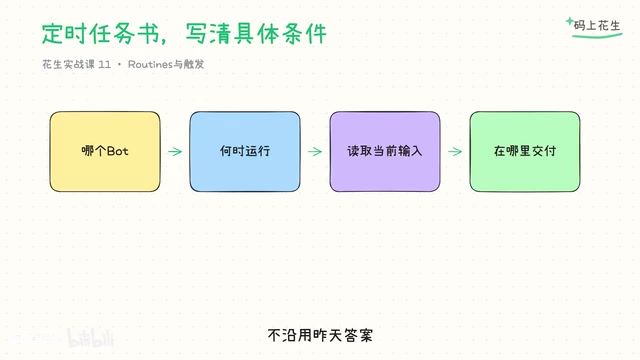
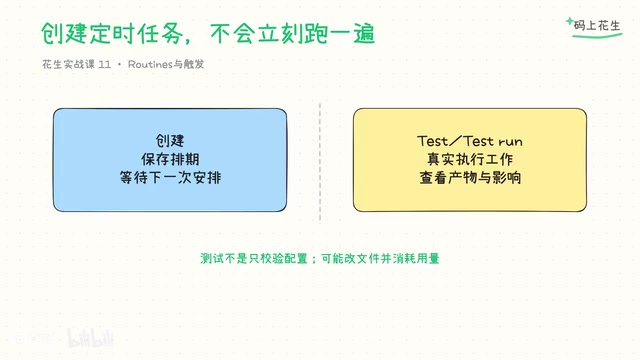
The most critical reminder in this episode is: writing "execute every day at 9 AM" in a chat and actually creating a scheduled task in the system are two completely different things. In the course demonstration, only a task brief and request placeholders were written—no real scheduled task was created, and no requests were sent to external services. All the trigger cards and return statuses shown later are clearly labeled teaching examples.
After saving, you must return to the Bot detail page to check the timezone, enabled status, and next run time. Timezone auto-detection follows your computer's system settings. If you need a fixed Shanghai time, you must verify the actual saved timezone rather than just writing "9 AM" in the conversation and calling it done. When there's no actual entry point or qualification, the task brief can only be created as a placeholder—you cannot substitute "enabled" for verification.
Accepted ≠ Completed: The Status Boundary of External Triggers
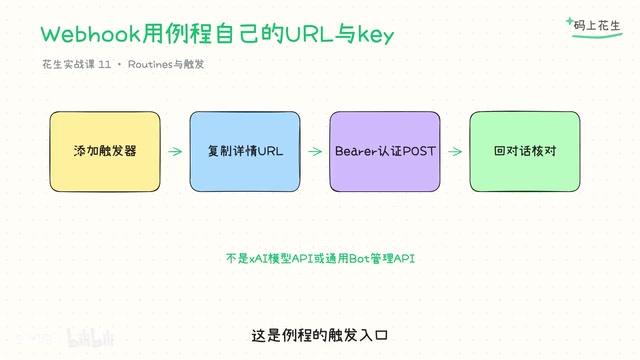
When external systems need to trigger the Bot, the course introduces the path of adding a Webhook to the Bot journey—obtaining the request URL and secret from the detail page, and sending authenticated requests according to official methods. Here's a key distinction: a 200 return only means "accepted and started running"; status codes other than 200 mean it did not start. Even if the request has been accepted, it may still get stuck on permission waits, missing materials, or execution failures.
Therefore, "accepted status" cannot be equated with "already completed." When reviewing the conversation, look at the actual report source—is it waiting for approval, or did it fail verification? If there's no returned result, clearly state "not yet verified." You cannot let the caller override the real task status based on a single success response.
A Webhook is a mechanism where an external system proactively sends an HTTP request to a specified URL, allowing the Bot to be awakened by external events without continuous polling. After adding a Webhook, the Bot detail page provides a request URL and a secret for identity verification. The caller must include the secret in the request header or signature parameters as required, otherwise it will be rejected.
A particularly important distinction is the semantics of HTTP status codes. 200 belongs to the 2xx success category, indicating the server has received the request and started processing it—but it does not promise the result is correct. 4xx means the request itself has problems, such as incorrect secret or missing parameters, and the server won't start the task at all. 5xx means an internal server error. Therefore, the caller cannot assume the task is complete just because they see a 200. Instead, treat 200 as a signal of "received" and then confirm the final status by reviewing the journey or querying the result endpoint.
Practical Anti-Duplication Method: Event Identifier + Source Verification
The anti-duplication solution given in this episode is very specific: add an event identifier to each teaching request, and agree that resending the same identifier only updates the same result record. This identifier uses the same mechanism as draft mode, but the result itself has no official automatic deduplication capability, nor can it prevent sending.
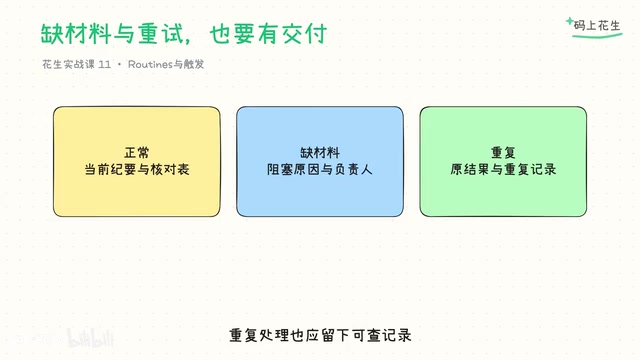
Verification is also straightforward—send the same input twice and check that there's indeed only one record and one output. You can use readable processing records, but you must actually verify it. You cannot treat the "only do it once" claim as a built-in exactly-once execution guarantee. During practice, cover three scenarios simultaneously: normal materials, missing-today materials, and duplicate identifiers. If input is missing, clearly report it—don't pass off yesterday's table as today's completion. Duplicate processing should also leave a traceable record rather than silently writing again.
Exactly-once execution is a strong guarantee in distributed systems, meaning the same operation produces its effect only once regardless of how many times it's triggered. Most platforms default to providing "at-least-once," meaning duplication is possible. The so-called event identifier is a unique value (such as a UUID or timestamp plus sequence number) generated by the caller for each business request and sent along with the request.
Idempotent update means: when the system receives a request with the same identifier, it doesn't create a new record but overwrites or updates the existing one. Here, "idempotent" means that executing the same operation multiple times has the same effect on system state as executing it once. However, the course emphasizes that Grok Bot does not have built-in automatic deduplication capability—this identifier mechanism must be agreed upon and actually verified by the caller. The verification method is simple: send the same input twice, then check whether the processing records and outputs are indeed only one—don't just assume the platform has handled it.
Which Actions to Stop, and Who Takes Over on Failure
The course stipulates a maximum of two rounds of engagement, with failures handed to the responsible person—this is a management boundary design, not an official quota. Before engaging, verify whether external actions have already occurred to avoid duplicate sending or overwriting. Open the journey to view run history and distinguish four states: "not triggered," "waiting for approval," "failed," and "actually completed." Their meanings are completely different.
Pause operations affect future triggers. Stopping current work does not undo existing actions. Closing the desktop does not automatically shut down cloud tasks. After modifying an unfinished website or material format, retesting is required. Deletion is confirmed through the current interface and is irreversible—the course does not operate on real tasks. Reducing frequency and matching scope can also reduce meaningless tasks and usage consumption.
In automated workflows, pause and stop are two different granularities of control. Pause typically acts on subsequent triggers—it prevents future schedules from starting new tasks, but processes already in execution won't be interrupted, nor will completed external actions be undone. Stop targets currently running work, attempting to end it immediately. The course reminds that closing the desktop does not automatically shut down cloud tasks, because cloud Bots run independently of local clients.
"Maximum two rounds of engagement" is a management boundary design to limit the number of manual interventions, avoiding infinite loops or resource waste—it is not a platform-enforced quota. When reviewing the journey, the run history typically distinguishes four states: "not triggered," "waiting for approval," "failed," and "actually completed." Their meanings are completely different, and you need to check them one by one rather than treating them all as "it ran."
Review Perspective: The Value of Automation Lies in Stable Delivery
The methodology of this episode can be summarized in four points: verify scheduling first, then check acceptance and completion; record duplicates and missing materials separately; confirm whether each external action has occurred; pause only affects the future and doesn't undo the past.
Grok Bot's automation solves the problem of "when to start." But in collaborative scenarios, you also need to decide "who takes the next step, and who can modify the same file." As the author says at the end: the value of auto-start is stable delivery under conditions, not periodically refreshing with a "done" message. The next episode will focus on the collaboration mechanism between the data clerk, advertising clerk, and verifier—the core is likewise not feature stacking, but clear division of responsibility boundaries.
One-line Summary
The key to auto-start isn't creating a scheduled task, but verifying scheduling, distinguishing acceptance from completion, and preventing duplication.
Paragraph Summary
The article focuses on the Grok Bot auto-start scenario, emphasizing that writing a time in chat doesn't equal system scheduling. After saving, you must return to the detail page to verify timezone, enabled status, and next run time. A Webhook returning 200 only means accepted and started running, not completed—it may still get stuck on permissions, missing materials, or execution failures. Anti-duplication requires adding event identifiers to requests and agreeing that the same identifier only updates the same result, and it must be actually verified rather than assumed to be enabled by default. The course also distinguishes pause from stop: pause only affects future triggers and doesn't undo existing actions, and closing the desktop won't shut down cloud tasks. Finally, it points out that the value of automation lies in stable delivery under conditions.
Related articles

Gemini 4 Interprets 500-Page Chemistry Patents: Boosting Drug Discovery Efficiency
Isomorphic Labs researchers used Gemini 4 to process 500-page chemistry patents and academic papers, generating high-quality reports in 10-15 minutes — work that originally took a month was done in an afternoon.
Apple HomeView First Look: The Prototype of a Smart Home Control Hub
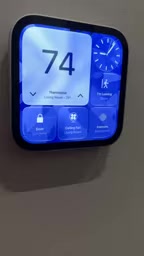
First look at Apple HomeView smart home control interface: thermostat and accessory customization, up to nine camera live feeds, iCloud+ and Apple Intelligence video descriptions, and tiered permissions blocking recording access in guest mode.

Gemini 4 Teaches a Humanoid Robot to Play Cornhole: A Breakthrough in Video Learning and Self-Iteration
Google Gemini 4 Argon's experiment shows a humanoid robot learning Cornhole from a human video, iterating via the Mojoku simulator, and making seven consecutive real-world hits.