Halo Review: The Productivity Tool That Turns Your Mac Notch into an AI Smart Island

Halo turns the MacBook notch into an interaction hub combining notification aggregation, global dictation, and AI agent monitoring, priced at $9.99.
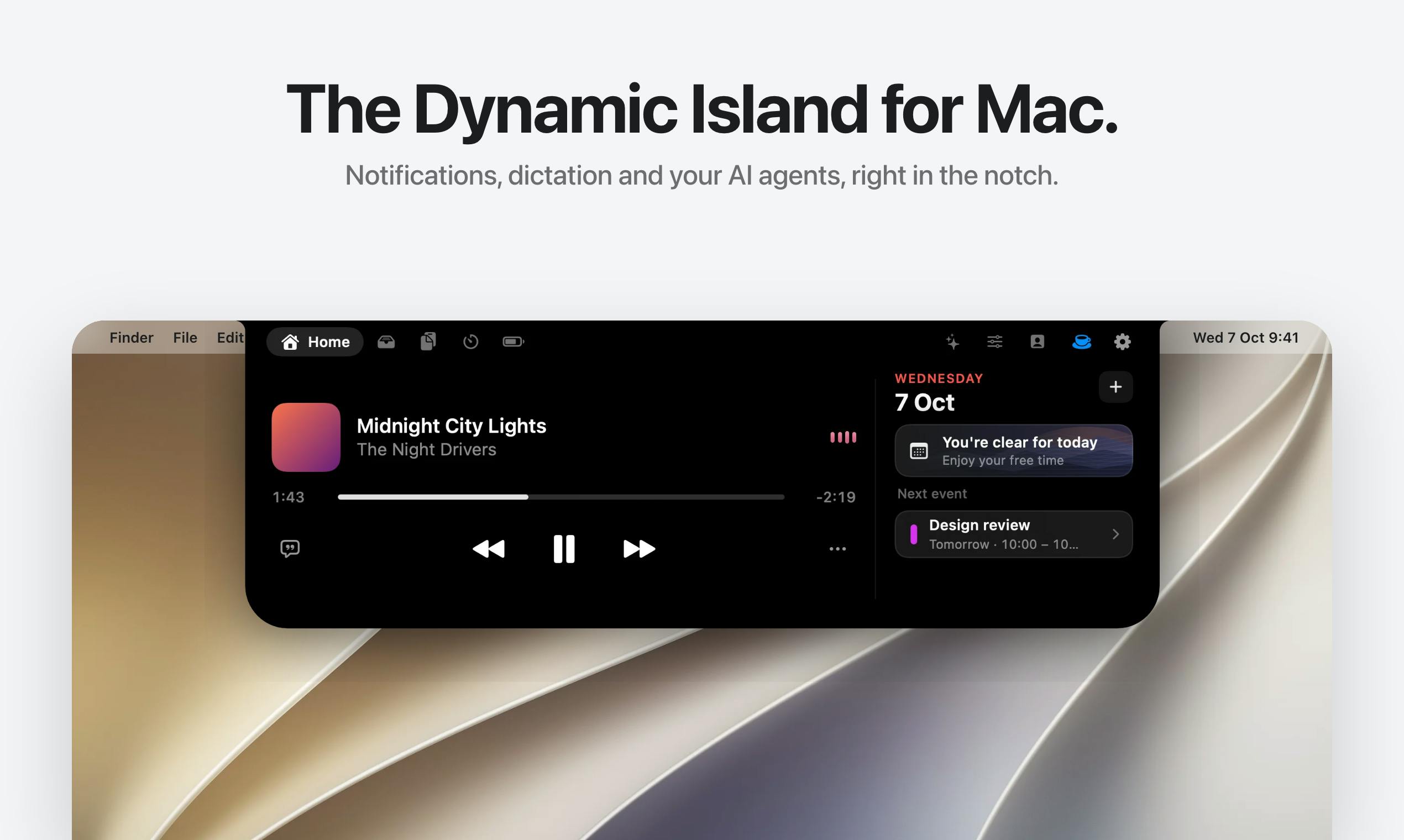
Halo is a tool that transforms the MacBook notch area into a functional interaction hub, with a design concept similar to the iPhone's Dynamic Island. It aggregates notifications from any app, letting users view Slack, Messages, and email messages without constantly switching apps. It supports holding the Fn key for global voice dictation in any text field. It also provides a cursor-following face icon that displays real-time AI agent status for coding tools like Claude Code and Cursor. Halo also integrates music control, call management, and brightness adjustment, priced at $9.99 as a one-time purchase. It currently only supports MacBook models with a notch, received 69 upvotes on Product Hunt ranking 20th, and its privacy security and information display methods still warrant user attention.
MacBook's notch display has been controversial since its debut—some find it an eyesore, others consider it useless. But a tool called Halo is changing that impression: it transforms the notch area into a feature-rich interaction hub that combines notification aggregation, voice dictation, and AI agent monitoring.
The Notch Becomes a Dynamic Island: A New Approach to Notification Aggregation
Halo's core design philosophy is straightforward: if the notch area can't be eliminated, make it useful. This tool converts the Mac's notch into an interaction area similar to the iPhone's Dynamic Island, where notifications from any app are displayed in a compact form.
This means users no longer need to constantly switch between apps to check messages. Whether it's work messages from Slack, personal texts from Messages, or email reminders, they can all be seen at a glance in the notch area. For users who need to manage multiple communication channels simultaneously, this aggregation approach genuinely reduces the cost of attention switching.
From a product design perspective, Halo cleverly leverages a "flaw" in Mac hardware and turns it into a functional advantage. This approach is uncommon among developer tools and reflects the creator's careful attention to user experience.
Dynamic Island is an interaction design Apple introduced with the iPhone 14 Pro series: it transforms the pill-shaped cutout originally used for the front camera and sensors into a dynamically expanding interaction hub that displays real-time information (such as music playback, timers, calls, food delivery progress, etc.). Its core idea is to turn an "eyesore gap" on the screen into a functional entry point, using animations and state changes to let users access key information without leaving their current app. Halo transplants this concept to the MacBook notch: since the notch is a physical obstruction that can't be eliminated in hardware, the software layer turns it into a persistent notification aggregation area that any app can write information to, creating a correspondence with Dynamic Island in both form and logic. This "flaw-to-feature" design approach is also often called "Notch-as-a-Service" by developers.
Hold the Fn Key to Type: A System-Level Dictation Experience
Halo's second core feature is global dictation. Users simply hold the Fn key to input text via voice in any text field. This feature is implemented at the system level and isn't limited to specific applications.
Compared to macOS's built-in dictation, Halo's advantage lies in its faster trigger method and more flexible use cases. Hold Fn to activate, release to finish input—the entire interaction flow is natural enough. For users who need to input text frequently without interrupting their train of thought, this seamless voice input experience could become a valuable daily work assistant.
Global Dictation refers to a solution that isn't confined to a single app but monitors keyboard or shortcut events at the operating system level, inserting speech recognition results into any text-input-capable control. Implementing such features typically requires applying for macOS Accessibility permissions and microphone permissions to monitor global keyboard events, obtain the currently focused input field, and simulate keyboard input. This differs from macOS's built-in dictation—system dictation often requires clicking a menu or pressing a specific shortcut twice, and some apps don't support direct triggering. Halo chooses "hold the Fn key" as its trigger method; the Fn key has a fixed position on Mac keyboards, rarely conflicts with other shortcuts, and the hold-to-speak, release-to-stop interaction follows a walkie-talkie-style intuition. However, global keyboard event monitoring also means the tool needs to maintain a high level of system trust, which is exactly why privacy and security deserve attention as mentioned later.
Tracking AI Agents: A Developer's Little Helper
Halo has another distinctive feature—a small face icon that follows the cursor and displays the real-time status of AI agents. For developers using AI coding tools like Claude Code and Cursor, this feature lets you stay informed about AI task progress without switching windows.
The cleverness of this design lies in turning the AI agent from a "black box" into a visible collaboration partner. When you start an AI task, you don't need to constantly stare at the terminal or editor—the small icon in the notch area tells you whether the task is complete or if it's encountered problems. This lightweight monitoring approach fits perfectly with developers' multi-tasking work habits.
AI Agent in a programming context typically refers to AI programs capable of autonomously executing multi-step tasks, such as Agent mode in Claude Code or Cursor. They can read codebases, run terminal commands, search the web, modify multiple files, and continue executing until the task is complete or an error is encountered. Unlike traditional single-shot code completion, agent runs can last anywhere from seconds to minutes, and the process is a "black box" externally. Developers previously had to constantly switch back to the terminal or editor to check progress, but Halo's cursor-following face icon is essentially a lightweight status light for this black box: by reading the relevant tool's status interface or logs, it maps states like "running/completed/error" to icon expressions, allowing developers to maintain awareness of AI tasks without leaving their current window. This "ambient display" style of monitoring also echoes the design principle of "observability" in human-AI collaboration.
Additional Features and Pricing Strategy
Beyond the core features mentioned above, Halo also integrates practical functions like music control, call management, and monitor brightness adjustment. These additions make Halo feel more like a collection of menu bar tools rather than a single-purpose utility.
In terms of pricing, Halo uses a one-time purchase model at $9.99. In an era where subscriptions dominate, this pricing strategy is relatively user-friendly. Considering it integrates multiple functional modules including notification management, voice input, and AI monitoring, the price offers decent value for money.
One-time Purchase means users pay a single fee to permanently obtain software usage rights, without recurring subscription fees. Compared to SaaS subscription models, one-time purchases offer more predictable long-term costs for users, with no worry about forgetting to cancel subscriptions; but for developers, revenue isn't continuous, and major version upgrades may require additional charges or rely on voluntary payments. Halo is priced at $9.99, which falls in the mid-to-low range among Mac utility apps—for reference, many menu bar tools like Bartender and CleanMyMac use subscriptions or higher one-time prices. Since Halo integrates multiple modules including notification aggregation, global dictation, and AI agent monitoring, if these features were provided by separate subscription tools, the combined monthly fees could exceed its one-time price. However, one-time purchase also means uncertainty about future feature updates and long-term maintenance. When choosing, users can check whether the developer commits to a free update period.
Issues Worth Noting
Halo received 69 upvotes on Product Hunt, ranking 20th, indicating it has attracted some attention. But as a system-level tool, users need to consider several practical issues when choosing it: first, the global dictation feature involves microphone permissions and keyboard event monitoring, so privacy and security need attention; second, the notch area has limited space, and how to elegantly display information when there are many notifications is a direction the product needs to continuously optimize.
Additionally, Halo currently only supports MacBook models with a notch, meaning users with external monitors or older Macs can't experience the full functionality. This hardware limitation somewhat narrows its potential user base.
Summary
Halo represents an interesting product approach: instead of trying to change hardware design, it uses software innovation to make hardware characteristics work in its favor. For efficiency-seeking Mac users, if you happen to use a MacBook with a notch and need better notification management, are accustomed to voice input, or frequently work with AI coding tools, Halo is worth a try.
Related articles

WorkBuddy Step-by-Step Tutorial: Get an Automated Workflow Running in Half an Hour
A step-by-step breakdown of the WorkBuddy automated workflow: why most people only use it as a chat app, how the 27-anchor course and 12 templates help beginners get up and running in half an hour, plus notes on usage boundaries.

The Truth About Free Claude Code: Three Legitimate Paths and One Scam
Is free Claude Code possible? We break down the real cost of Pro and Max (with exchange rates and taxes), how community free methods work and their privacy trade-offs, plus fake installers and phishing traps—and three legitimate free paths.
Codex Cloud Mode Explained: Environment Setup and Use Cases
This article explains how Codex cloud mode works, environment setup steps, and use cases, including how to create environments, connect GitHub repositories, set scheduled tasks, and compare cloud vs. local mode.