Codex Cloud Mode Explained: Environment Setup and Use Cases
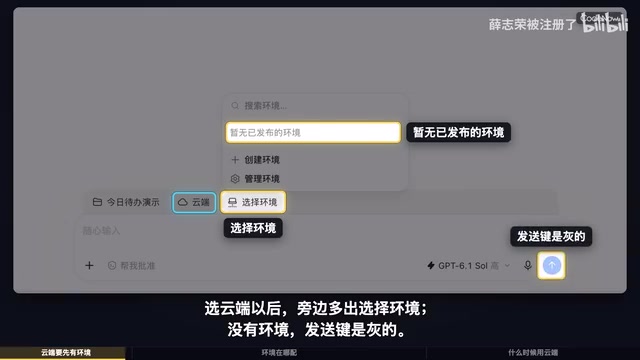
Codex cloud mode runs tasks in remote containers, accessing only GitHub repository code, suitable for long-running or local shutdown scenarios.
This article introduces the core mechanisms, environment setup steps, and use cases of Codex cloud working mode. Cloud mode executes tasks in remote containers managed by Codex, and environments must be created in settings and linked to GitHub repositories, so it can only access pushed code and cannot read local uncommitted changes. Creating an environment requires selecting a repository and authorizing GitHub access. The cloud also supports scheduled tasks; after turning off "Run on this computer," you can set the time zone and repeat rules. Applicable scenarios include needing tasks to continue after local shutdown, code already hosted on GitHub, and no need for local tools; conversely, local mode should be used when modifying local files or relying on a local toolchain.
In the Codex feature course, cloud working mode is a key but easily overlooked option. It allows tasks to run independently in a remote environment, making it especially suitable for scenarios that require long execution times or where local resources are limited. Based on an explanation by a Bilibili creator, this article outlines the core mechanisms of cloud mode, environment setup steps, and when to use it, helping you use Codex more efficiently.
Core Mechanisms of Cloud Mode
When you select "Cloud" as the working location in Codex, an additional environment selection item appears in the interface. If no environment is available, the send button appears grayed out, indicating that you need to create or configure an environment first. These environments are managed uniformly in the "Cloud" section of Codex settings, and the list is initially empty.
The core purpose of a cloud environment is to prepare code repositories, tools, and settings for Codex. This means cloud tasks do not execute on your local computer but instead run in remote containers managed by Codex. Therefore, cloud mode cannot access your local uncommitted or unpushed code changes—it can only see code that already exists in the GitHub repository.
This mechanism determines the applicable boundaries of cloud mode: it is suitable for handling code already hosted on GitHub, but not for temporary modifications that depend on local unsynchronized files.
Remote containers are the technical foundation of cloud mode. Codex launches an isolated container instance for each cloud environment, preinstalled with common runtimes (such as Node.js and Python), build tools, and dependency managers. When a task starts, the container pulls the code of the specified branch from the GitHub repository, and after execution is completed, it is destroyed or retains a cache. This design makes cloud tasks independent of the user's local operating system, CPU architecture, or installed software, but it also means that any locally specific paths, environment variables, or uncommitted changes cannot be perceived by the container. Understanding container isolation helps determine which tasks are suitable for migration to the cloud.
How to Create and Configure a Cloud Environment
The first step in creating an environment is to select a code repository. Because the cloud runs code from the repository, you need to select the target repository from a connected GitHub account. If GitHub has not yet been connected, you can authorize through the configuration access permission entry below.
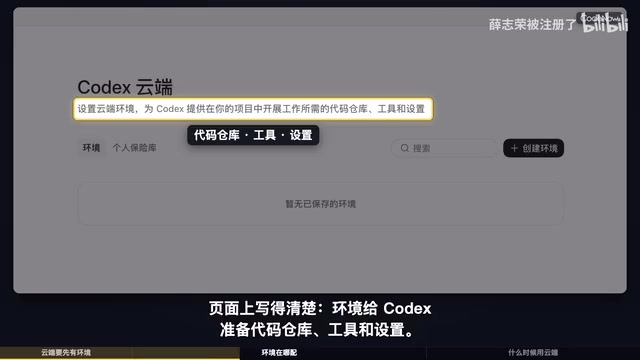
After authorization is complete, Codex will be able to access your specified repository and, in the cloud environment, pull code, install dependencies, and execute tasks. The entire configuration process is centralized on the settings page, with no additional local operations required.

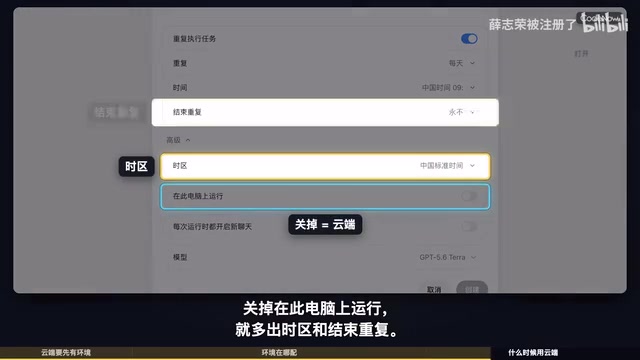
You may not have noticed that cloud environments not only support manually triggered tasks but can also be used for scheduled tasks. When you turn off the "Run on this computer" option, additional settings for time zone and end repeat appear in the interface, allowing tasks to execute automatically in the cloud according to a schedule.
GitHub authorization uses one of two common methods: OAuth or GitHub App installation. Through authorization, Codex obtains read and write permissions for the specified repository (usually limited to pulling code and returning results), rather than access to the entire account. During authorization, you can choose to authorize only specific repositories, following the principle of least privilege. After authorization is complete, Codex saves an access token in the cloud for cloning the repository during subsequent environment creation. If the repository is private, this authorization step must be completed; otherwise, environment creation will fail because the code cannot be pulled. Periodically checking and revoking authorizations that are no longer used is part of security best practice.
Typical Use Cases for Cloud Mode
So when should you choose the cloud instead of local? According to the creator's summary, there are mainly the following situations:
- Tasks need to continue after the local computer is shut down: Cloud tasks run independently of the local device, so even if you turn off your computer, the task can be completed remotely.
- The code is already on GitHub: The cloud can only access code in the repository, so it is suitable for handling codebases that have already been pushed.
- No need to modify local files or use local tools: If the task involves local file operations or depends on tools installed on the local machine, it should remain in "This computer" mode.
Conversely, if you need to modify local uncommitted code, or if the task depends on a toolchain specific to the local machine, then local mode is still the more appropriate choice. The advantage of cloud mode lies in decoupling task execution from the local device, providing greater flexibility.
Scheduled tasks (Cron-style scheduling) are an extended capability of cloud mode. The time zone and repeat settings that appear after turning off "Run on this computer" essentially let Codex trigger tasks in the cloud according to cron-like rules. The time zone determines the scheduling baseline, and repeat rules can be set to daily, weekly, or custom intervals. This is suitable for scenarios such as periodic code checks, dependency updates, or report generation. Note that scheduled tasks can also only access code that has been pushed to the repository, and each trigger starts a new cloud environment, so you should ensure task scripts are idempotent to avoid side effects from repeated execution.
Conclusion
Codex cloud mode provides developers with a way to execute tasks remotely, especially suitable for handling hosted code and tasks that need to run for a long time. By configuring environments properly, you can let Codex work independently in the cloud without keeping your local device powered on. Understanding its mechanisms and limitations can help you make more efficient choices in different scenarios.
Related articles
LLaMA-Factory in Practice: A Complete No-Code Guide to Fine-Tuning Large Models
An introduction to LLaMA-Factory, the open-source fine-tuning tool: its 60.1K-star background, supported models and algorithms, local vs. cloud deployment, and CUDA setup steps.

Zeng Ming's Deep Retrospective: Why OpenAI May Not Be the Ultimate Winner — and Why the Corporate System Will Disappear
Zeng Ming's deep retrospective on the AI endgame: model companies are just infrastructure, OpenAI and Anthropic won't be the final winners; the next battle is the Agent entry point standard; the corporate system will disappear as AI restructures collaboration, and only mission-driven companies can survive the cycle.
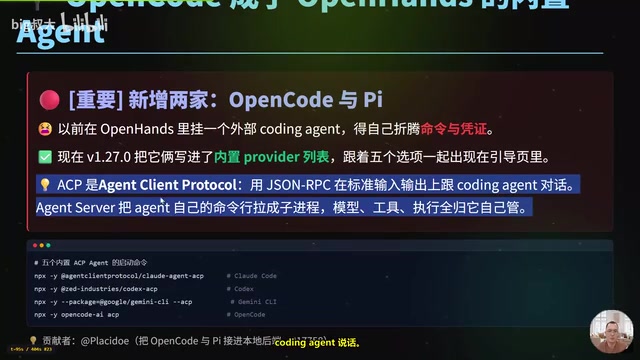
OpenHands v1.28.0: OpenCode and PI Added as Built-in Agents, API Keys Requestable In-Conversation
OpenHands ships 5 releases in 21 days: v1.27.0 adds OpenCode and PI as built-in agents, v1.28.0 enables in-chat key requests. ACP integration, credential reuse, model list changes, and upgrade advice.