Hands-On: Building a Personalized Course App with an AI App Builder

Developer builds AI course app from scratch using Modelence prompts, costing under $20.
A developer used Modelence's AI app builder to build a personalized course app called "Wishing" from scratch through multiple rounds of prompts, with no hand-written code. Starting from a landing page and dashboard, features were progressively added: course generation, AI images, canvas charts, ask-while-learning, and post-lesson quizzes, then deployed with one click. Courses use lazy generation to control API costs. Total cost: under $20.
What if you could just type in a topic and an AI would automatically generate a personalized course complete with text, images, charts, and quizzes? A developer documented the entire process on YouTube of using Modelence, an AI app builder, to build a learning app called "Wishing" from scratch — and shared detailed prompts and lessons learned along the way.
One Prompt, One App Prototype
The developer's starting point was straightforward: entering the first prompt into Modelence's AI app builder, describing the app's functional positioning, course creation flow, and desired UI theme. He named his version "Wishing" and compiled all prompts into a Notion document placed in the video description for viewers to follow along and replicate.
After the first round of generation, the landing page and dashboard quickly took shape. The dashboard was divided into functional sections as requested, and the builder immediately prompted the next step — course generation. The developer admitted that the UI was still quite basic at this point, but he deliberately focused the video on getting functionality working, because polishing the design would have doubled the video length. This "make it work first, worry about looks later" approach offers valuable reference for anyone wanting to quickly validate an idea.
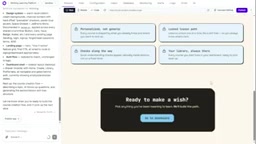
Modelence is part of an emerging category of AI App Builders, whose core idea is to let users generate runnable full-stack web applications through natural language prompts rather than hand-written code. It typically comes with built-in infrastructure such as databases, authentication, API routes, and frontend components — developers simply describe functional requirements, and the system automatically orchestrates pages, data models, and backend logic. In this case, "Wishing" is a typical prompt-driven app: the developer progressively stacked features through multiple rounds of prompts, while the builder handled generating modules like the landing page, dashboard, and course generation flow. What distinguishes these tools from traditional low-code platforms is that they leverage large language models to understand intent, generating code that more closely resembles real project structures, while supporting external API keys (such as Anthropic, OpenAI) to embed AI capabilities directly into the application.
Course Generation: From Topic to 22 Lessons
The second round of prompts focused on making the course truly capable of teaching. The developer added targeted instructions to improve course quality, and the system then required an AI API key for course generation. He entered his Anthropic key and saved it.
For testing, he chose the topic "Public Speaking." After clicking to create a course, the system first asked a few questions for personalization, and once answered, he could click "Build My Course."
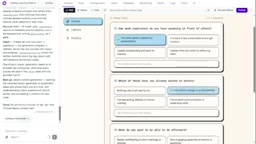
The result was impressive: the AI generated a complete course outline with 6 chapters and 22 lessons. There was a key design trade-off — the course outline is generated upfront, but individual lesson content is only generated in real time when the user opens it. This saves upfront generation costs and prevents users from waiting for the entire course to be generated.
Lazy Generation is a key strategy for controlling LLM invocation costs. In this case, the system generates a course outline with 6 chapters and 22 lessons all at once, but each lesson's actual content is only generated via AI in real time when the user clicks to open it. The logic is: course outlines are compact in structure and low in token consumption, making them suitable for pre-generation to provide an overall preview; while individual lesson content is lengthy and expensive to generate via AI — if everything were pre-generated, users might only read a few lessons, causing significant waste. Lazy generation allocates costs to content that is actually consumed, while also reducing the wait time when first creating a course, letting users enter the learning interface faster. This pattern is often paired with caching mechanisms in product design to avoid repeatedly calling the API when users reopen the same lesson.
Three Iterations to Make the Course Truly "Learnable"
After the initial course went live, the developer immediately noticed two UX issues: the dashboard sidebar couldn't collapse, and the course page had alignment problems. He combined both fixes into a single prompt, and the issues were quickly resolved — the sidebar could be collapsed, and chapter stacking worked properly.
But a bigger problem emerged with lesson content. Testing revealed that quizzes appeared too frequently, and the lessons themselves had significant room for improvement. So the next round of prompts tackled three things simultaneously: fixing quiz frequency, providing dedicated full-screen pages for lessons, inserting AI-generated images where genuinely helpful, and specifying a consistent image style. This step required an OpenAI API key for image generation — the developer entered the key in the variable configuration and switched the image generation model to OpenAI's latest version.

The improved results were obvious: lessons now had embedded AI-generated images, greatly enhancing the learning experience.
API key configuration is an essential step when these AI builders connect to third-party model services. Two types of keys appeared in this case: an Anthropic key for course text generation and an OpenAI key for image generation. Builders typically provide a variable configuration panel where developers can store keys as environment variables, which are then injected into the corresponding service calls at runtime. This avoids hardcoding keys in frontend code and makes it easy to switch between environments (development/production). It's worth noting that different model providers have different strengths: Anthropic's Claude series excels at long-text understanding and structured output, making it suitable for generating course outlines and lesson content; OpenAI's image models are more mature for illustration generation. Developers need to configure and switch the corresponding keys for each functional module — an aspect that must be carefully verified before deploying such applications.
Charts, Questions, and Deployment
Some concepts are hard to explain in words but instantly clear with a chart. The developer then added canvas chart functionality to lessons. When testing a new lesson, the system successfully generated a canvas chart.

The final core feature was "ask while learning": users reading a lesson can ask the AI questions at any time, and the app collects these questions to personalize subsequent courses and future lesson content. Once the question button was ready, the builder suggested adding post-lesson quizzes, which the developer completed. After adding a course deletion feature, the app's core loop was essentially complete.
Next came publishing. Clicking the publish button, selecting an instance and region, and clicking publish once more — the app was live on its dedicated URL.
Cost and Takeaways
The entire app went from zero to launch for under $20 — not including the developer's own time investment. For indie developers who want to quickly validate product ideas without assembling a team to write code, this "prompt-driven" building path genuinely lowers the barrier.
A few notable lessons: breaking complex features into multiple rounds of iterative prompts is more effective than describing all requirements at once; don't over-obsess over UI details before functionality works; and leverage lazy generation (like lazy-loading lesson content) to control API costs. Of course, this approach also depends on the builder's own abstraction capabilities and the configuration management of various API keys. When building tools turn "writing code" into "writing requirements," what becomes truly scarce is the ability to accurately judge product experience.
Canvas charts refer to dynamic graphics drawn using the HTML5 <canvas> element, allowing applications to render line charts, bar charts, flowcharts, and other visualizations in real time within the browser. Unlike static images, canvas charts can be generated on the fly by AI based on knowledge point data, making them suitable for expressing trends, comparisons, and relationships that are difficult to describe clearly in words. In this case, the developer had AI insert canvas charts into lessons on demand to visualize abstract concepts. In implementation, builders typically convert drawing instructions into configurations for standard charting libraries (such as Chart.js), then render them to canvas. The advantage of this approach is that it's lightweight and requires no server-side image generation, but it requires the AI to correctly understand data structures and output valid chart configurations — otherwise you may end up with garbled or blank graphics.
One-line Summary
Developer builds AI course app from scratch using Modelence with multi-round prompts, costing under $20.
Paragraph Summary
A developer used Modelence's AI app builder to create a personalized course app called "Wishing" from scratch through multiple rounds of prompts, with no hand-written code throughout. Starting from the landing page and dashboard, he progressively added course generation, AI images, canvas charts, ask-while-learning, and post-lesson quizzes, ultimately deploying with one click. Courses use lazy generation — producing a 6-chapter, 22-lesson outline first, with lesson content generated in real time only when opened to save costs. The article documents each round's prompt goals, pitfalls, and fixes, and summarizes lessons like breaking down requirements, getting functionality working before polishing UI, and leveraging lazy loading to control API costs. The entire app cost under $20 from development to launch.
Related articles

WebMCP: Every Website as Its Own MCP Server, So AI Agents No Longer Rely on Screenshots
WebMCP lets websites expose tools via the document.modelcontext API, becoming directly callable MCP servers. This article explains its architecture, the Claude Code remote-debugging demo, Chrome's current support stage, and its impact on the agent ecosystem.
MCP Protocol-Driven AI Testing Agent: …
MCP Protocol-Driven AI Testing Agent: Automated Execution, Diagnosis, and Reporting
Introduces an MCP protocol-based AI testing Agent: using FastMCP to expose PyTest execution tools, running Llama 3.2 3B locally with Ollama for failure diagnosis, automatically generating timestamped reports and comparing them with historical results to create a closed loop of test execution, root cause analysis, and fix tracking.

AI Agent Draws an Architectural Elevation in 15 Seconds — Open-Source Drawing Software Rewritten by AI
An AI Agent controls open-source drawing tool VectorCraft via MCP Server, executing 1,077 commands with zero errors to draw an architectural elevation in 15 seconds and export editable SVG/PDF.