Hands-On Test: Kimi Agent Building Websites — 3 Scenarios Reveal OK Computer's True Capabilities

Testing Kimi OK Computer Agent's web generation capabilities and limitations across three scenarios.
This article tests Kimi's OK Computer AI Agent across three scenarios: automated data analysis reports, an interactive movie gallery page, and a Chinese mythical beasts website with AI-generated art. Results show it excels at task decomposition, multi-capability integration, interruptibility, and proactive content expansion, but its raw HTML output lacks engineering structure and isn't suitable for large projects. Its ideal role is as an assistive tool for rapid prototyping and small page generation.
What Is an Agent? The Evolution from Brain to Body
If you've been following the AI space, you're no stranger to large language models. But a model by itself is just a "brain" — it can think and answer questions, but it can't act autonomously. An Agent, on the other hand, is like giving that brain a "body." It not only understands tasks but can decompose them, invoke tools, execute step by step, and ultimately deliver complete results.
The core architecture of an Agent typically consists of four modules: perception, planning, memory, and action. The planning module is the soul of an Agent. Current mainstream approaches include the ReAct (Reasoning + Acting) framework and Chain-of-Thought reasoning chains — the former has the model perform explicit reasoning before each action step, while the latter improves success rates on complex tasks through step-by-step thinking. The action module relies on Tool Use / Function Calling capabilities, allowing the model to invoke real tools such as browsers, code interpreters, file systems, and external APIs. The maturation of this capability marks a critical transition for large models from "conversational assistants" to "autonomous executors."
Kimi's OK Computer is exactly this kind of Agent. Its interface is split into two panels: the left side displays the workflow and current execution step, while the right side shows a real-time preview where you can view generated images, code, web pages, and more. Users can pause and intervene at any point during the process — something that proves extremely important in practice.
Scenario 1: Data Analysis — Automated Reports on 30 Award-Winning Websites
The first test had OK Computer analyze data from Awwwards' SOTD (Site of the Day) winners. Awwwards is one of the world's most influential web design award platforms, with its SOTD awards judged by a professional panel across four dimensions: design, usability, creativity, and content. Selected websites typically represent cutting-edge trends in web design and serve as essential references for designers and front-end developers. Batch scraping this type of data involves technical challenges like anti-bot bypassing and dynamic rendering page parsing (many modern websites use frameworks like React/Vue that require JavaScript execution to retrieve complete content) — making this a genuine test of Agent capabilities.
After launching the task, OK Computer first decomposed the large task into a checklist of smaller subtasks, then executed them sequentially. It started by fetching information about the award-winning websites, with the right panel displaying real-time previews of the sites it visited, allowing users to confirm each step was correct.
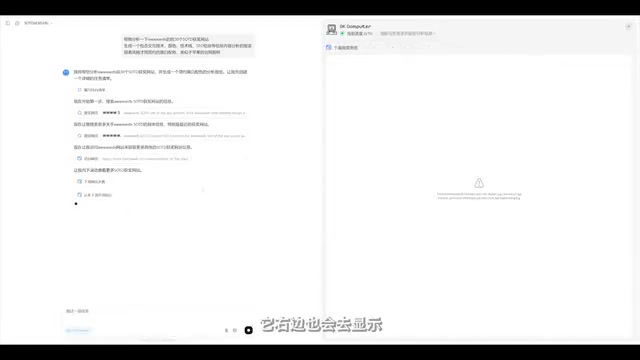
Once data collection was complete, it automatically generated scripts to process the data, then created visualizations from the processed results. Finally, it thoughtfully consolidated everything into a visual HTML file and deployed it online — users only need a single link to access it.
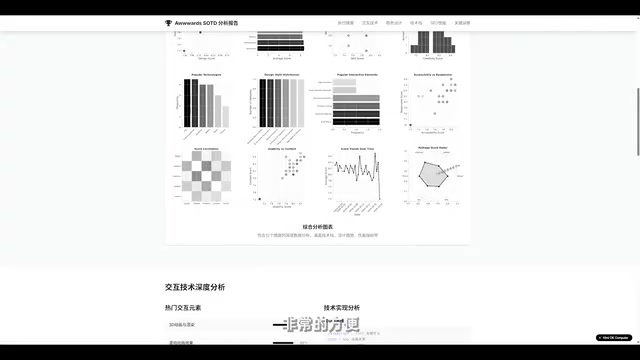
The generated data report covered multiple dimensions including score analysis, SOTD categories, and technology stack distribution, with detailed and intuitive charts. Additionally, it generated a downloadable spreadsheet file. For analyzing data across 30 websites, this automated workflow genuinely eliminates a massive amount of repetitive labor.
Scenario 2: Interactive Web Page — Movie Gallery Generation Quality
The second test was more challenging: having OK Computer generate an interactive movie gallery page with English-only content and a black-and-white design style.
A noteworthy detail emerged during execution — the author paused the task midway, concerned that the Agent fetching image resources from international servers would cause slow loading for domestic (Chinese) users. An additional constraint of "use domestic image sources" was added on the fly. OK Computer resumed after the mid-task pause without any issues, demonstrating remarkably stable task interruption and recovery capabilities.
The final movie gallery contained information for 30 randomly fetched films, with layout, composition, and color coordination all reaching a respectable standard.
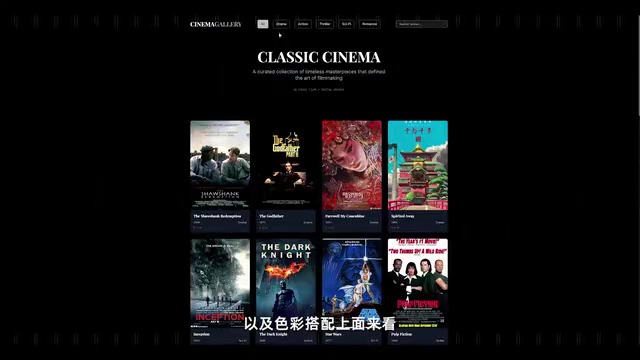
Objectively speaking, this website still has a gap compared to work from professional designers, but it's clearly superior to many conventional functional websites. More importantly, this was a one-shot generation result without any subsequent refinement.
Scenario 3: Chinese Mythical Beasts Website — A Comprehensive Test of AI Image Generation + Interaction
The third test was the most comprehensive: generating an illustration-style interactive website showcasing mythical beasts from Chinese mythology, with images generated by AI itself.
This showcased one of OK Computer's powerful capabilities — invoking AI generation functions within the task workflow. Such multimodal Agent systems typically use an Orchestration Layer to chain text-to-image models, text-to-audio models, and code generation models together, forming a complete content production pipeline. OK Computer can generate not only images but also audio (including sound effects and BGM), meaning that if you use it to create small web games, asset generation can be handled simultaneously.
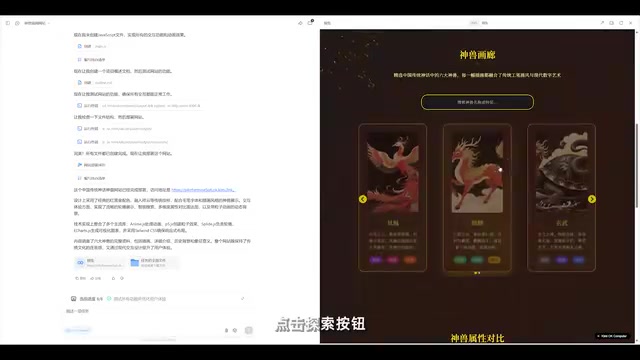
The generated website included the following sections:
- Hero section: A brief background introduction with parallax scrolling effects
- Beast showcase area: Supports horizontal swipe browsing, with clickable detailed info cards
- Data charts: Beast attribute comparison charts made with eCharts, supporting checkbox filtering
Notably, the data charts section was not part of the original prompt requirements — it was content that OK Computer independently conceived and added. eCharts is Baidu's open-source JavaScript data visualization library, widely used in the Chinese developer ecosystem. The fact that the Agent proactively selected and correctly invoked eCharts rather than internationally mainstream alternatives like D3.js demonstrates a degree of contextual awareness in tool selection, making reasonable judgments based on the usage scenario. This confirms that it doesn't merely execute instructions mechanically but actively thinks about how to enrich the content.
Honest Assessment: OK Computer's Capability Boundaries
After testing three scenarios, we can offer a relatively objective evaluation of OK Computer.
Strengths
- Smooth task decomposition: The entire flow from receiving a task to breaking it down and executing is seamless
- Multi-capability integration: Data scraping, code writing, image generation, and web deployment all in one pipeline
- Interruptible and steerable: Supports pausing and adding conditions at any time, with good fault tolerance
- Proactive content expansion: Not limited to the prompt — it makes creative additions
Clear Limitations
However, it must be pointed out that the web files generated by OK Computer are all raw HTML, and the file structure lacks engineering rigor. Modern front-end engineering systems center on componentization and modularization, with mainstream frameworks including React, Vue, and Angular, paired with build tools like Vite and Webpack, along with TypeScript type systems, ESLint code standards, unit testing frameworks, and other toolchain elements that form a complete collaboration and maintenance ecosystem. While raw HTML files can run directly, they lack component reuse mechanisms, state management capabilities, and build optimization workflows, creating inherent shortcomings in team collaboration, version iteration, and performance tuning. This is also a common bottleneck faced by virtually all AI code generation tools today — generating single-file prototypes is easy, but integrating into real engineering projects still requires substantial manual adaptation. This means:
- It's not suitable for large-scale engineering projects or products requiring continuous iteration
- Generated code is difficult to integrate directly into existing front-end engineering systems
- It still falls short on complex interaction logic and performance optimization
Best Use Cases
Overall, OK Computer is best suited for the following scenarios:
- Rapid prototyping: Validating creative ideas with an interactive demo in minutes
- Data analysis reports: Automated scraping, processing, and visualization that eliminates repetitive labor
- Creative inspiration exploration: Using AI-generated content to spark design ideas
- Small functional pages: Campaign pages, showcase pages, and other pages that don't require long-term maintenance
Conclusion
Is an Agent reliable for building websites? The answer is: it depends on the scenario. If you need to quickly produce a prototype or small page, OK Computer can already deliver satisfying results. But if you expect it to replace a professional front-end development workflow, it's still too early for that. Its proper positioning should be as an efficient assistive tool, not a project's sole owner. True productivity liberation comes from the sensible division of labor between humans and AI.
Related articles
 Product Reviews
The Programmer's Desk Setup Guide: Building a Workspace That Feels Like Home
Discover how programmers build productive, comfortable workspaces. From multi-monitor setups to ergonomic design, explore the desk philosophy that drives focus and flow.
 Product Reviews
Qoder vs Cursor Real-World Comparison: Which $20/Month AI IDE Is Better?
Hands-on comparison of Qoder vs Cursor AI IDEs: Agent autonomy, human interaction count, and architecture decisions. Qoder needed only 2 interactions vs Cursor's 8.
 Product Reviews
Cursor Cloud Agent Demo: Eliminating Bottlenecks Across the Entire Software Development Lifecycle
Deep analysis of Cursor's Cloud Agent demo showing how cloud VMs, automated test artifacts, and a full-chain control plane systematically eliminate human bottlenecks across the software development lifecycle.