Hands-On with No-Login AI Coding Assistants: ChatGPT, Duck.ai, and Gemini Build 4 Projects

Tested ChatGPT, Duck.ai, and Gemini for no-login coding: it works, with limits and pitfalls.
The article documents a creator using three no-login AI chatbots—ChatGPT, Duck.ai, and Gemini—to complete four real coding projects in a fresh, cookie-free browser. No-login mode works, but comes with lighter models, usage limits, no history, and long answers that often drop; Copilot and Perplexity require login first. The author outlines seven habits—give context, plan first, take small steps, request complete files, paste exact errors, ask for tests and add edge cases, and compare multiple bots—validated across Snake, a Python to-do app, a Pomodoro timer, and a slugify comparison. The to-do project exposed a bad test written by the bot when tests were run, and the slugify comparison showed the three differ on punctuation and accented characters: passing their own tests doesn't mean correct behavior.
No-Login AI Coding Assistants: Do They Really Work?
Can you get AI to write code, explain code, and even debug programs without an account? A YouTube creator used three no-login AI chatbots—ChatGPT, Duck.ai, and Gemini—to complete four programming projects end to end, with real inputs, real responses, and programs actually running on screen. The results included both pleasant surprises and obvious pitfalls.
Testing was done in a fresh browser profile with no cookies. Chat.com lets you start chatting right away, and the login button can be ignored; Duck.ai comes from DuckDuckGo and only requires accepting the terms once; Gemini.google.com's lightweight Flash model also responds without login. By contrast, Microsoft Copilot redirects straight to a login page, and Perplexity requires registration first, so both were excluded.
According to the creator's demonstration in the video, no-login mode is not without costs: it uses lighter models, has usage limits, saves no history, and long answers occasionally fail—ChatGPT showed "unable to connect" multiple times during testing, recoverable by retrying.
The Real Limits and Safety Reminders of No-Login Mode
No-login access is convenient, but the limits are clear. No account means no conversation history, so any code you want to keep must be copied out immediately. Lightweight models are more prone to interruption on long answers; in the video, ChatGPT's long answers dropped mid-stream several times and needed one or two retries to receive in full.
On security, the creator emphasized repeatedly: never paste passwords, API keys, company proprietary code, or personal data into any chatbot. Also read each site's terms—ChatGPT explicitly states that conversations may be reviewed and used to improve models, while Duck.ai claims conversations are anonymized and not used for training. The difference in how the two handle data is worth factoring into your choice of tool.
Seven Habits for Better Results
The video distills a set of habits that make chatbots better at writing code:
- Give plenty of context: language, version, dependencies, runtime environment.
- Ask for a plan before code: have the bot propose a structure first.
- Move in small steps: add only one feature at a time.
- Request complete files: ask for the full file with every update to avoid manual stitching errors.
- Paste exact error messages: when something breaks, paste the full error back verbatim.
- Ask for tests and add your own: have the bot write unit tests, then add boundary cases yourself.
- Have the bot explain the code, and compare two or three bots on key questions.
These habits were validated one by one across the four projects that followed.
Project 1: Single-File HTML Snake (Duck.ai)
The first project used Duck.ai to build a single-file Snake game in pure JavaScript and Canvas with no third-party libraries. The creator first stated he was a beginner and asked for a short plan first, with no code yet. The plan listed a grid-cell list for the snake body, a game loop, arrow-key controls, food, collision detection, and game over with restart.
He then asked for the complete file per the plan: a 20x20 grid, arrow keys and WASD, scoring, speed-up with each food eaten, a game-over prompt, and spacebar restart, all in one code block. About 200 lines came back with clearly named functions (startGame, placeFood, moveSnake, draw), and the speed parameter at the top of the file for easy tuning.
Saved as snake.html and opened in the browser, it worked on the first try: the score increased, the snake grew, and the movement delay shortened after eating food. He then asked Duck.ai to explain the game loop and collision detection in simple language, and the answer was short and accurate: schedule a move, perform the move, schedule the next; collision detection checks whether the new head is out of bounds or lands on the snake body.
Canvas is the bitmap canvas element provided by HTML5, drawing graphics through JavaScript's 2D rendering context (getContext('2d')). Games like Snake typically use fillRect to draw the snake body and food and clearRect to erase the previous frame, combined with requestAnimationFrame or a timer to form the animation loop. Compared with DOM elements, Canvas draws all pixels on a single canvas, offering better performance and more direct coordinate control—well suited to grid-based mini-games, though you can't select individual shapes inside the canvas with CSS.
Project 2: Python Command-Line To-Do App (ChatGPT)
The second project built a Python to-do app step by step with a logged-out ChatGPT. The context was very specific: Linux, Python 3.12, standard library only, script named todo.py, tasks stored in tasks.json.
The first step asked only for add and list commands, implemented with argparse. The answer stayed focused: JSON read/write functions, one function per command, argparse subcommands, plus a JSON example. The second step added done and remove commands, requiring completion markers, compatibility with old task files, and the complete updated file.
"Requesting complete files" turned out to be crucial here—letting the bot decide where each piece of code goes actually prevented copy-paste misalignment. Old-format task files still loaded correctly.
He then asked for unittest tests, specifying temporary files so the real task data wouldn't be touched. Seven tests passed and one failed: the test expected to find an add message but got the list output instead.
argparse is the command-line argument parsing module that ships with Python's standard library. It supports defining positional and optional arguments and can split commands into subcommands, so that todo.py add "buy milk" and todo.py list map to different handler functions. argparse also auto-generates -h/--help help text and reports errors when arguments are missing or invalid. Compared with hand-parsing sys.argv, it makes multi-command CLI structures clearer and easier to extend later with commands like done and remove.
The Debugging Step: Paste the Exact Error Back
The creator pasted the full failure information, from the fail line to the assertion error, back into ChatGPT and asked whether the bug was in todo.py or the test. The long answer dropped again here, and only arrived in full after two retries. The conclusion was that the bug was in the test itself: the test called add_task but captured the output of list_tasks. After fixing the test and rerunning, all eight tests passed.
The takeaway from this step is direct: bugs written by the bot can also be located and fixed by the bot—but what actually caught the problem was the act of running the tests.
Project 3: Pomodoro Timer (Gemini)
The third project used Gemini's Flash model, with a single prompt giving the full feature list: a large countdown, start/pause/reset, focus and break modes, a dark theme, Web Audio API notification sound, and support for fractional minutes like 0.1 for quick testing.

Gemini answered quickly, with one code block plus two lines of usage notes. The code included dark-theme CSS, a setMode function to switch between the two modes, toggleTimer to control start and pause, and an oscillator-based beep function. Saved as pomodoro.html, it worked right away: break switched to 5 minutes, focus back to 25, the button changed to pause after starting, and reset restored the full duration. Entering 0.1 minutes (6 seconds) for testing, the countdown hit zero, stopped, and triggered the sound.
Project 4: Comparing All Three Bots on a slugify Function
The final project sent the same prompt to all three bots: write a function that turns blog titles into URL slugs, lowercasing, merging spaces and punctuation into a single hyphen, trimming leading and trailing hyphens, with three assert tests that print OK on success.
ChatGPT used a single regular expression to handle non-word characters and underscores, then stripped leading and trailing hyphens, and included a docstring. Duck.ai built a character class from Python's whitespace and punctuation lists, and its tests used titles with many dots and question marks. Gemini kept only A-Z and digits and turned everything else into hyphens—the shortest answer. All three passed their own tests.
The creator then added his own boundary cases: an accented "Cafe" and an em dash in Python.
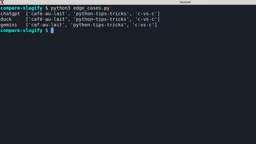
The results diverged: Gemini simply dropped the accented letter; Duck.ai preserved the em dash because it isn't in Python's punctuation list. This shows the three bots don't define "punctuation" the same way, and each passing its own tests doesn't mean the behavior is correct.
slugify is the common operation of converting human-readable text such as article titles into URL-friendly strings, typically requiring consistent lowercasing, replacing spaces and punctuation with hyphens, trimming leading and trailing hyphens, and avoiding consecutive hyphens. The key divergence between implementations lies in how "punctuation" is defined and whether non-ASCII characters (like an accented é) are preserved, transliterated, or dropped. URL slugs need to be stable, readable, and easy to share, so consistency in handling edge cases often reflects implementation quality more than whether simple cases pass.
Conclusions and Boundaries from a Day of Testing
The creator offered a fair summary: all three work without login; ChatGPT answers cautiously with thorough explanations but lost long answers multiple times on his network; Duck.ai performed reliably on the 200-line game project; Gemini was fastest with the shortest code. He stressed that this is a small sample, not a benchmark, and that these services' models change frequently.
The most important disclaimer applies to all AI coding scenarios: chatbots make mistakes—logic errors, missed edge cases, outdated APIs, even bad tests. Run the code, test the code, read the code, and then decide whether to trust it. Don't run commands you don't understand, especially those that delete files or require admin privileges. Check licenses and your school or company's policies, and remember that you are ultimately responsible for the code.
Looking back at the whole approach: give context, plan first, take small steps, paste exact errors, ask for tests and explanations, compare multiple bots, and—keep your secrets out of the chat box.
Background Notes
unittest is the unit testing framework in Python's standard library; tests are organized as classes inheriting from TestCase, with method names starting with test_, and results checked through assertions like assertEqual and assertIn. It supports setUp/tearDown to prepare and clean up before and after each test. Here the tempfile module created temporary files to simulate tasks.json, avoiding polluting real to-do data; when a test fails, unittest outputs a FAIL: line plus the assertion difference, and pasting that full information back into the chatbot is exactly the key clue for locating the problem.
Related articles
Getting Started with Gemini 4 Argonne: A Hands-On Guide from Building Sites to Agents
Complete Gemini 4 Argonne tutorial: build a calorie tracker app with one prompt in Google AI Studio, review 10-page technical documents with long context, develop a browser game as a coding Agent in Anti-Gravity, plus API Key setup, pricing, and subscription requirements.

Cursor vs. Claude Code vs. Copilot: A Scenario-Based Selection Guide
Cursor, Claude Code, or GitHub Copilot? A scenario-based guide covering daily coding, large refactors and long tasks, and teams locked into existing IDEs—plus common pitfalls and combined-use advice.

DB Chat: Conversing with PostgreSQL in Natural Language, with AI Auto-Generating SQL
dbchat lets users converse with a PostgreSQL database in natural language, with an AI agent auto-generating SQL and returning live results. This article analyzes its MCP Server + Next.js + AWS full-stack architecture and anti-hallucination guardrail design.