Hands-On with PageAgent: Add AI Agent Capabilities to Web Pages with a Single Line of Code

Hands-on review of PageAgent, Alibaba's tool that adds AI Agent capabilities to web pages with one line of code.
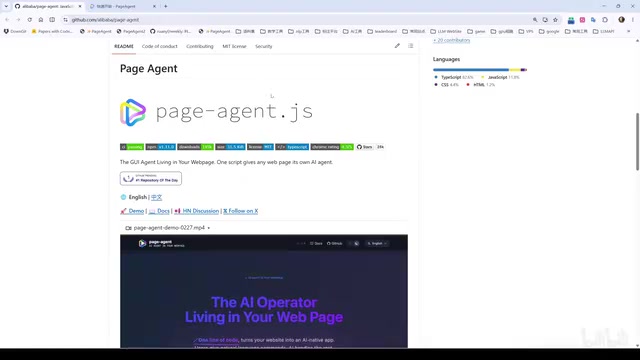
PageAgent is Alibaba's open-source web automation tool that lets developers add AI Agent capabilities with a single line of code. This review covers its three integration methods (Demo, Bookmarklet, Chrome extension), script execution features, and key limitations like no memory, no image handling, and vulnerability to anti-bot detection.
What Is PageAgent
PageAgent is a web automation tool open-sourced by Alibaba, built around two core features: being lightweight and easy to integrate. For developers, integrating AI Agent capabilities into your project takes just a single line of code. For general users, the team also provides a free model for testing—making the barrier to entry practically zero.
Its core value lies in giving web pages the ability to "understand tasks and operate autonomously"—you describe your needs in natural language, and the Agent automatically performs a series of actions on the page such as clicking, summarizing, and navigating. Whether for automated testing or adding a smart navigation assistant to your product, PageAgent offers a remarkably simple path to implementation.
It's worth noting that PageAgent's choice of a minimalist integration path is essentially a practice of the "usability first" design philosophy. In the AI Agent toolchain, integration cost is often the biggest barrier to developer adoption—frameworks like LangChain and AutoGen are powerful but complex to configure, whereas PageAgent packages Agent capabilities into a single-line CDN script, internalizing the complexity within the framework itself. This mirrors the integration paradigm of analytics tools like Google Analytics and Hotjar. This trade-off means sacrificing some extensibility in exchange for lower startup friction, making it well-suited for rapid validation scenarios.
Background: The Evolution of Web Automation Web automation technology has evolved from Selenium and Puppeteer to modern AI-driven Agents. Selenium was born in 2004, relying on the WebDriver protocol to precisely control browsers; Puppeteer (2017) provided lower-level control based on the Chrome DevTools Protocol. A shared limitation of these tools is that scripts are tightly coupled with page structure—once the target website is redesigned, maintenance costs skyrocket. After AI Agents introduced large language models, page understanding was upgraded from "path matching" to "semantic understanding," giving automation logic a degree of fault tolerance for structural changes, eliminating the need to write and maintain scripts separately for each web page. PageAgent represents a new paradigm in this field: using large language models to replace fixed scripts, making generalization capability the infrastructure of automation.
Three Integration Methods: From Experience to Integration
Method 1: Direct Experience on the Demo Page
On the official Demo page, PageAgent is pre-integrated. After the user clicks the execute button, the Agent pops up an interactive component and automatically understands the task. For example, entering "Find the Quick Start through the documentation and summarize the content into a Markdown file" lets the Agent smoothly complete the entire process. This approach is the most intuitive, but it's limited to web pages that already have PageAgent integrated.
Method 2: Bookmarklet Injection Mode
A more flexible approach is injection via a Bookmarklet. After dragging the officially provided script into your bookmarks bar, you can click the bookmark on any web page to temporarily load PageAgent on the current page and execute tasks.
A Bookmarklet is a classic technique that packages JavaScript code into a browser bookmark—clicking it runs the script within the current page's execution context, without requiring any extension to be installed. However, it is constrained by the CSP (Content Security Policy) commonly deployed by modern websites—this is a browser security mechanism that allows websites to declare which external script sources are trusted.
CSP was standardized by the W3C in 2012, declaring a whitelist of trusted content sources via the Content-Security-Policy HTTP response header or an HTML meta tag. The script-src directive controls script loading sources, 'self' restricts to same-origin, 'nonce-xxx' allows specific inline scripts, and default-src 'none' blocks all external resources. Because scripts injected by a Bookmarklet come from sources not in the whitelist, the browser throws a CSP violation error in the console and terminates execution. This fundamentally differs from how extensions bypass a page's CSP through independent extension permissions. The CSP configurations of large platforms like GitHub and Google are extremely strict and will directly intercept scripts injected by Bookmarklets—which is precisely why clicking the bookmark on GitHub produces no response.
In addition, injection mode has JavaScript script execution disabled by default and must be manually enabled.
Method 3: Chrome Extension Mode
For cross-page tasks, the team provides a dedicated Chrome extension. Once installed, the extension resides as a sidebar, supporting configuration of the model, response language, maximum number of execution steps, and system prompt.
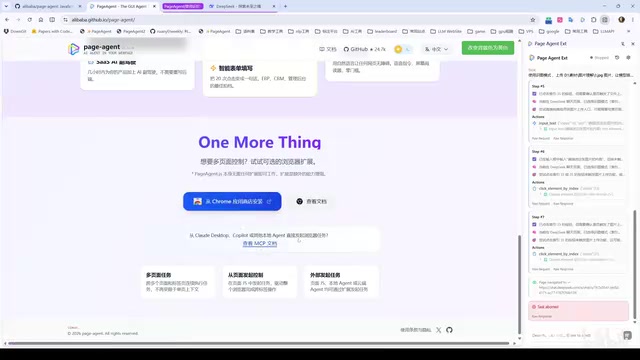
Note that the extension version currently does not yet support script execution and is still under development. The team also offers an MCP service integration method that can connect to local Agents such as Claude Code and Copilot, but this feature is still in Beta.
MCP (Model Context Protocol) is an open protocol released by Anthropic in November 2024. It defines a three-layer standard architecture of Host, Client, and Server: the Server exposes tool and resource interfaces, the Client handles protocol communication, and the Host (such as Claude Desktop) manages the overall lifecycle. The protocol is built on JSON-RPC 2.0 and supports two transport layers, stdio and SSE (Server-Sent Events), suited for local inter-process communication and remote HTTP service scenarios respectively. MCP also defines four core primitives: Tools (callable function interfaces), Resources (readable data sources), Prompts (predefined prompt templates), and Sampling (allowing the Server to reverse-request the Host to perform LLM inference). The Sampling primitive is particularly special—it breaks the traditional one-way Client-Server invocation model, enabling the Server side to dynamically request LLM judgments during execution, supporting more complex multi-step reasoning workflows.
The core value of MCP lies in solving the fragmentation of AI tools—before MCP appeared, every LLM application had to implement adaptation layers separately for different tools: Claude's tool_use, OpenAI's function calling, and various frameworks' custom plugin interfaces were incompatible with each other, resulting in massive duplicated engineering. Through unified tools/list and tools/call interfaces, MCP allows a Server to be implemented just once and then invoked by all compatible Hosts—its role is analogous to a USB-C interface for the AI tool layer. As of 2025, the MCP Server ecosystem has surpassed 5,000 open-source implementations, covering fields such as database queries, file system operations, code execution, and browser control. Anthropic, Microsoft, and Google have all announced support, forming an emerging industry standard consensus.
As an MCP Server, PageAgent packages web operation capabilities into a standard tool-invocation interface, allowing any MCP-compatible Agent to drive browser behavior. Through the MCP interface, local Agents such as Claude Code and GitHub Copilot can invoke the web operation capabilities provided by PageAgent, achieving an "AI calling AI" collaboration model. This architecture makes PageAgent not only an end-user tool but also an execution node within a larger automation pipeline, greatly expanding the ceiling of its application scenarios.
Enabling Script Execution: Unlocking Stronger Automation Capabilities
One noteworthy feature of PageAgent is that it allows the Agent to inject and execute JavaScript scripts. By default, this capability is disabled and must be manually enabled by adding a parameter in the initialization script. At the same time, the default maximum number of execution steps (40) can be increased to 100 or more.
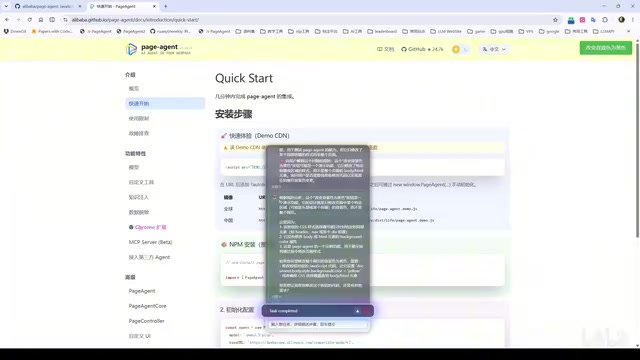
In testing, after enabling script capabilities, the Agent could inject new buttons into the page or modify background colors according to instructions. The first execution might not be precise enough (for example, only turning a local region yellow), but the significance of this capability is that complex automation operations such as batch downloading and batch saving of web page images become possible.
However, testing also exposed an obvious shortcoming: PageAgent has no memory function. This limitation has deep technical roots—large language models are based on the Transformer architecture and are essentially stateless inference engines. The Transformer was proposed by Google in the 2017 paper "Attention Is All You Need," with its core being the Self-Attention mechanism, which allows the model to dynamically weigh the importance of information at different positions when processing a sequence. Unlike RNN/LSTM, the Transformer does not maintain a Hidden State—each forward pass is a complete, independent computation. This makes it easy to parallelize during training, but also determines its inherently stateless nature: the so-called "memory" depends entirely on the token sequence within the input context window, not on the model's internal dynamic state. Each API call processes only the token sequence within the current context window, with no persistent hidden state across calls.
To achieve cross-turn memory, engineering typically offers three types of solutions: short-term memory (compressing historical conversations and appending them to the prompt), external storage (Redis or vector databases storing structured execution state), and summary memory (using an LLM to automatically distill execution logs and inject them into the next context). LangChain's VectorStoreRetrieverMemory and AutoGen's ConversationSummaryMemory are representative engineering implementations in this direction. PageAgent currently chooses not to introduce this layer of complexity, thereby maintaining the framework's extreme lightness—but at the cost of every task starting from scratch, with the Agent not remembering the results of the previous round. When asked to fix a problem with a button generated in a previous round, it merely explained where the problem was without actually solving it.
Current Limitations
After hands-on testing, PageAgent currently has several clear boundaries that developers should understand before integration:
1. Unable to Handle Image Elements
The framework is fundamentally based on a plain-text architecture of DOM elements. The DOM (Document Object Model) is the interface through which browsers parse HTML into a programmable tree structure. PageAgent understands the page by reading the text content, attributes, and hierarchical relationships of elements, rather than through screenshots or pixel-level visual analysis.
In its specific implementation, PageAgent borrows the serialization approach of the browser's Accessibility Tree—the Accessibility Tree is a semantic layer built by the browser on top of the DOM, designed specifically for assistive technologies (screen readers), retaining only semantic attributes such as role, name, and state of accessible nodes while filtering out purely decorative elements. PageAgent serializes the page into a linear structured text similar to [button id=1 text=Submit][input id=2 placeholder=Search], annotating each interactive element's type, label, and position index. The advantage of this approach is extremely high token efficiency, typically consuming 500–3000 tokens per page; the disadvantage is the loss of visual layout information—two elements that are visually adjacent but at different DOM levels may be far apart in the serialized text, causing the Agent to make biased judgments about spatial relationships.
This stands in sharp contrast to vision-based Agent solutions (such as GPT-4V-based WebVoyager or the screenshot-based SeeAct framework). Vision solutions must encode screenshots as Base64 before passing them into a multimodal model—taking GPT-4o as an example, a 768×768 resolution image consumes about 1,105 tokens, and each operation step requires a new screenshot, with cumulative cost growing linearly with the number of steps. For simple scenarios with fewer than 10 task steps, the cost difference between the two is about 3–8x; for complex tasks with more than 50 steps, the API cost of vision solutions can reach more than 10x that of DOM solutions—this is the core economic logic behind PageAgent's choice of a pure DOM approach. The DOM text approach serializes the page into a structured text tree, consuming fewer tokens with low inference latency (typically <2 seconds per step), but it inherently cannot understand image content, Canvas drawings, or pure CSS visual effects. Hybrid approaches (DOM + vision) are the mainstream direction of current academic research, with representative work including Microsoft's UFO framework. Any task that relies on visual content is beyond PageAgent's current capabilities.
2. Easily Blocked by Anti-Automation Mechanisms
PageAgent's interactions use native HTML element methods—for example, a click operation directly calls element.click(). Such calls are not real mouse events and can be detected and identified by websites.
The isTrusted property is defined by the DOM Living Standard specification. It is a read-only boolean value automatically set by the browser for native user input events (mouse clicks, keyboard input, touch). For synthetic events created via scripts (new MouseEvent(), element.click()), this value is forced to false and cannot be modified via JavaScript—this is a security design at the specification level that cannot be bypassed by engineering means, constituting the most basic detection dimension.
However, isTrusted is only the first layer of filtering in modern anti-bot detection systems. Enterprise-grade systems such as Cloudflare Bot Management, DataDome, and PerimeterX have elevated behavioral recognition to the machine learning level, building multi-dimensional behavioral fingerprint systems: TLS fingerprints (JA3/JA4 hashes—the combination of TLS handshake parameters of different HTTP clients is highly distinctive), HTTP/2 frame sequence characteristics, JavaScript engine probes (detecting whether V8-specific APIs reveal automation traces), the Bézier curvature distribution of mouse trajectories (real user trajectories have natural curvature, while bot trajectories are often straight lines or fixed patterns), keyboard input timing distributions, the normal-distribution conformity of hover duration before clicks, and Canvas/WebGL rendering fingerprints. Even if developers clear obvious markers through methods like delete navigator.webdriver, TLS-layer and network-layer characteristics remain difficult to forge. In contrast, professional automation tools like Playwright can partially evade primary detection by injecting real input events through the CDP protocol; professional data collection scenarios usually also need to combine residential IP proxies to achieve higher penetration rates. PageAgent's choice of a lightweight implementation is a clear design trade-off between "minimalist integration" and "high penetration." Therefore, on websites with anti-automation protection (such as DeepSeekAd's attachment upload button or view-switching controls), Agent clicks often fail to take effect.
3. Cross-Page Task Interruption
In injection mode, the script is only injected into the current page. Once a task triggers a page navigation (for example, querying flights redirects to a results page), the new page does not contain the PageAgent component, and the task is immediately interrupted.
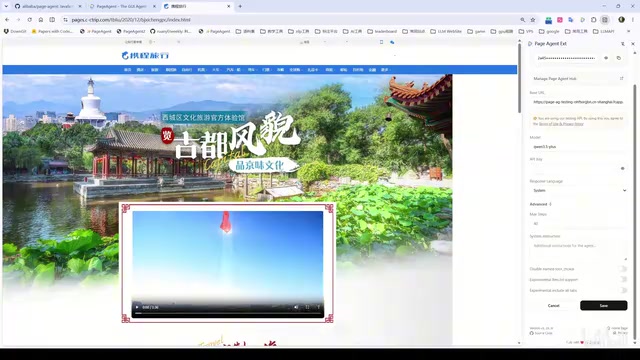
This is precisely the advantage of extension mode—the extension can work continuously across pages. In testing, querying "the lowest flight price from Wuhan to Sanya tomorrow" via the extension, the Agent successfully returned a result of 600 yuan.
Developer Integration Guide: Truly Just One Line of Code
For developers, PageAgent's integration experience is quite friendly. In a static page, integration is completed by simply importing a single line of JS script and configuring initialization parameters, with support for high customization:
- Enable the script execution tool
- Set the maximum number of execution rounds
- Configure custom prompts (for example, describing the current website's tab structure and navigation flow)
Proper prompt configuration can significantly improve the Agent's accuracy in completing tasks. After configuration, opening the page brings up the Agent interaction panel. For front-end projects built with Node.js, you can also directly install the official npm package and invoke it as a module in your code.
Conclusion
PageAgent's biggest highlight is its extremely low integration cost—a single line of code gives a web page AI Agent capabilities, making it very suitable for automated testing or adding a smart navigation assistant to a product. Its open-source nature and free model further lower the barrier to trial.
But it is still in an early stage: no memory mechanism (constrained by the stateless nature of the large language model Transformer architecture based on self-attention, where each inference is an independent forward pass), based on pure text DOM serialization and thus unable to handle images and visual content (borrowing the Accessibility Tree design can reduce API costs by 3–10x, but loses spatial layout and image semantics), element.click() being easily detected and blocked by modern anti-bot systems' multi-dimensional behavioral fingerprints due to its lack of the isTrusted marker and real mouse-trajectory entropy characteristics, and Bookmarklet injection being restricted by CSP whitelist mechanisms and limited cross-page capabilities. These constraints determine that it is better suited for web scenarios with clear structure and simple interactions, rather than complex general-purpose web automation needs requiring visual understanding or dealing with strong protection mechanisms. For developers looking to explore web Agent implementation solutions, PageAgent is a lightweight starting point worth watching.
Key Takeaways
Related articles

Felix Rieseberg Personal Homepage
Felix Rieseberg's personal homepage sparks attention on Hacker News. This article covers the Slack engineer's technical background, the rise and fall of nativefier, and the value of a developer homepage as a tech calling card.

@ai-sdk/vue 3.0.306 Patch Release Syncs with [email protected] Update
@ai-sdk/vue 3.0.306 released, synced with [email protected]. A routine patch release for the Vercel AI SDK ecosystem with no public API changes; the Vue adapter layer stays version-aligned with the core package.

Gemini 4 Argon API Launches: The Era of Million-Token Output Begins
Google launches Gemini 4 Argon with sparse MoE architecture, up to 1M output tokens, and a 68.90% Vals Index score, available across API, AI Studio, and the Gemini app.