Hands-On with Self-Hosted Layer Services: Router, SDK, and OpenAI-Compatible Interfaces Explained

Hands-on walkthrough and test evaluation of Layer framework's four invocation methods
Based on a hands-on demo, this article systematically covers deployment and invocation of the AI routing framework Layer. It emphasizes using Layer's bundled Venv to avoid dependency conflicts, and presents four invocation paths: Router auto-dispatch, manual Layer.load, System1-compatible local HTTP interface, and OpenAI-style TypeSafe SDK integration. Results are consistent across all four; official tests nearly all pass, with only two flawed creative-judgment cases failing. Responses are millisecond-level and manageable via systemd.
Layer is an inference framework for AI routing and model dispatch, supporting local installation in Editable mode with direct model loading, eliminating HTTP call overhead. Based on a hands-on demo from a Bilibili creator, this article walks through Layer's various invocation methods, integration details with the TypeSafe (OpenAI-compatible style) SDK, and the pass status of official test cases.
Environment Setup: Why You Must Use Layer's Bundled Python Interpreter
The presenter emphasizes that when running Layer examples, you must use the Python interpreter from the Venv in the Layer directory, not the system-wide global Python. The reason is that Layer's installation depends on third-party packages like Torch, Flash, and Tension, which are time-consuming to install and prone to issues from version mismatches or environment conflicts. Reusing Layer's initialized virtual environment avoids compatibility errors that arise when rebuilding the environment.
While this design adds path constraints, it buys environment consistency—all examples run under the same verified dependency set, reducing "works on my machine" debugging costs.
Venv and Editable Installation
Venv (virtual environment) is a virtual environment tool bundled with Python's standard library. It isolates project dependencies in a separate directory to avoid conflicts with system-wide site-packages. Run python -m venv .venv to create one; after activation, packages installed with pip install are only visible within that environment. Layer already creates this environment and installs heavy dependencies like Torch during initialization, so calling its Venv's interpreter is equivalent to "reusing a verified dependency snapshot."
Editable installation (pip install -e .) is an editable install pointing to the source directory: Python doesn't copy the package into site-packages but writes a link file (.pth or egg-link) pointing to the source path. This way, source code changes take effect without reinstalling—ideal for debugging the framework itself. The combination of both is the premise that enables the demo's "load local model on every run, no HTTP at all" approach.
Method 1: Router Auto-Dispatch—Model Selection in a Single Request
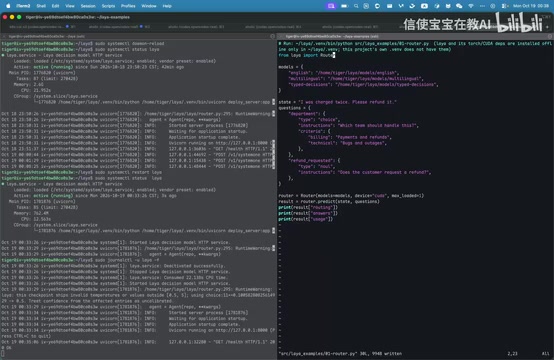
The first case is in src-layer-example-01-router, using Layer's bundled Paths SDK. After Editable installation, each run loads the local model without going through HTTP.
The code passes three models to the Router and sets MaxLoaded=1, forcing CUDA. When making a request, it calls Predict; the Router first performs model dispatch, then loads the corresponding model, returning results based on the user's State and Question. Since it uses Router mode, the result includes an additional Routing field recording the final routed model and the reason.
Actual run results: the first question about billing and refunds was routed to the English model with reason "English Latent Text" (input entirely in English). The final Department chose Billing with probability 0.98, Technical at 0.0132, and confidence 0.8984; the second non-multiple-choice question (whether the user explicitly requested a refund) had a probability of 0.9588 for True, with similarly high confidence. Token consumption: 80 input tokens, output doesn't count toward tokens.
What Router and MaxLoaded Mean
Router is Layer's routing layer—essentially a lightweight classification/decision model: it reads the input text (and optionally State), first determines which domain the question belongs to and which downstream model should handle it, then forwards the request. The Routing field in the result is the audit record of this decision, containing the target model and reason, useful for troubleshooting "why did this go to that model."
MaxLoaded=1 controls the upper limit of models resident in GPU memory simultaneously. Since each model occupies considerable VRAM, setting the limit to 1 means only one model instance is kept at a time—switching models requires unloading the old one before loading the new one, trading time for VRAM. For multi-model high-concurrency scenarios, you can increase this value, but first confirm available VRAM. Forcing CUDA ensures inference runs on GPU rather than falling back to CPU.
Method 2: Manual Load of a Specified Model—Removing the Routing Layer
The second case no longer uses Router but manually specifies the full model path via Layer.load, along with the CUDA device. At runtime it directly calls Agent.predict, passing State and Question. Without a Router, the result no longer has a Routing field—only the answer and confidence.
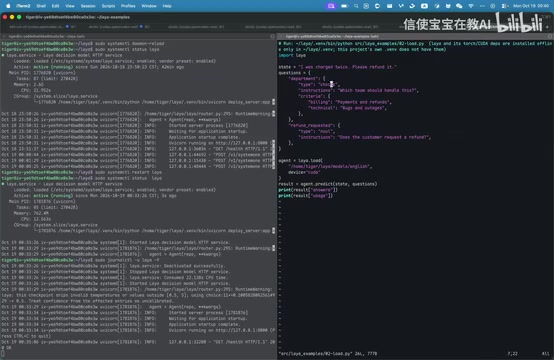
Results are essentially the same as Router mode: multiple-choice still selects Billing, non-multiple-choice probabilities and confidence are similar, 80 input tokens, output doesn't count. The only difference between the two approaches is whether the framework automatically performs model dispatch; manual mode is better suited for deployments where the model's applicability is known and you want to reduce routing overhead.
Method 3: Calling the Local Service via the System1-Compatible Interface
Layer provides a System1-compatible interface, with the local service running on 127.0.0.1:8000. Request parameters are identical to the official TypeSafe interface. The Model field can be set to JV1—when Layer can't recognize the model, it automatically falls back to Routing mode; manually specifying English, MartinLingo, or Type Decision is equivalent to Layer.load specifying a model.
The presenter uses -ffollowing to observe logs, clearly showing the call process and Routing information. In another example, explicitly setting Model to English, the logs confirm the English model was selected due to explicit specification.
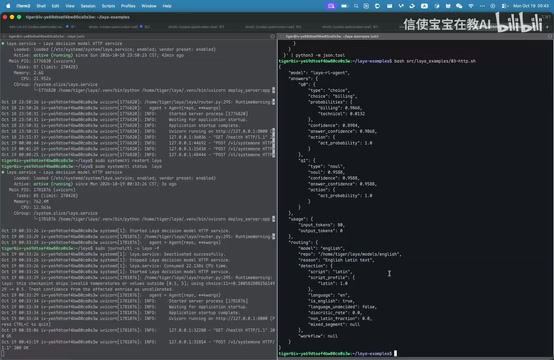
This approach suits existing systems already using the System1 interface—just replace the BaseURL and model name to point traffic to Layer, without changing business code structure.
OpenAI-Compatible Interface and BaseURL Replacement
"OpenAI-compatible" means the server implements the same request/response JSON structure as OpenAI Chat Completions (model, messages, choices fields, etc.), so any client written to that protocol can connect directly without changing the serialization layer. Migration typically requires only three changes: point BaseURL to http://127.0.0.1:8000, fill in any non-empty API Key, and replace the model with a name Layer recognizes or deliberately doesn't.
The model field's behavior is worth noting: filling in a name Layer can't recognize (like JV1 or jf-1 in the demo) doesn't error out but falls back to Router auto-dispatch; filling in a known model name like English is equivalent to manual Load. This effectively exposes two invocation modes through a single field, making migration cost nearly zero for existing systems.
Method 4: Connecting to Layer Directly via the OpenAI-Style SDK
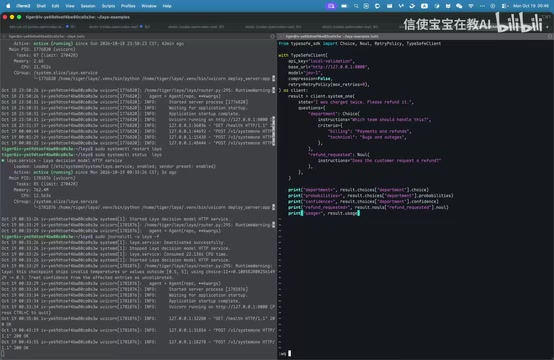
Layer is compatible with the official TypeSafe interface in input/output, so using the TypeSafe SDK only requires replacing BaseURL, API Key, and Model to point to Layer. The demo installs the SDK via uv add typeSafe-sdk (pre-installed by the presenter), then creates a Client with BaseURL pointing to localhost:8000 and Model set to jf-1 (a nonexistent model, automatically using Routing).
After requesting two questions, the SDK internally assembles the final Result based on the server's response. For multiple-choice, the selected option can be obtained via Choice.Question ID.Choice, and each option's probability and confidence read via .Probability and .Confidence; for non-multiple-choice, get the True probability via .Long. Finally, print Usage information. Running the example with uv shows the System1 call in the logs, with results matching expectations: Billing selected, probabilities and confidence normal.
Test Status and Known Issues
All three invocation methods—SDK, HTTP, and third-party TypeSafe SDK—were tested, with essentially all official test files passing. Only two test cases related to "kuza daodan" failed. The presenter believes the issue lies in the test case design: one case requires judging whether a review like "product quality is excellent, no issues for six months" is positive, but the "creative" judgment criteria in the case are unclear, and the forced True/False mapping lacks explainability. With richer creative judgment logic, Layer could actually handle such questions.
Regarding response speed, the presenter observed millisecond-level requests—few test runs but stable magnitude. For scenarios using systemd to manage the Layer service, the presenter also shared common commands: systemctl restart to restart the service, systemctl is-active to check status, and journalctl to view logs.
The Difference Between Confidence and Probability
The Probability and Confidence that appear repeatedly in this article are not the same quantity. Probability is the normalized probability the model assigns to a specific option (e.g., Billing 0.98, Technical 0.0132, summing to nearly 1); Confidence is the model's self-assessed score for "how reliable is this overall output" (e.g., 0.8984). The former answers "which one," the latter answers "how sure."
Looking only at Probability during evaluation can overestimate model capability: a binary classification problem might output 0.95 yet have low Confidence because the input itself is ambiguous. The demo notes two test cases failed precisely because the cases force open-ended judgments into True/False mappings, ignoring confidence and semantic boundaries, leading to distorted evaluation conclusions. When designing evaluation sets, you should examine both the shape of the probability distribution and confidence thresholds, rather than merely comparing final labels.
Summary
Layer's value lies in integrating model routing, local loading, and OpenAI-compatible interfaces into a single framework. Router mode suits automatic multi-model dispatch, manual Load suits deterministic scenarios, and the System1-compatible interface plus TypeSafe SDK lower migration costs for existing systems. The test case controversies also suggest that evaluation standards for routing frameworks need more rigorous design, not simple true/false judgments.
One-line Summary
Hands-on walkthrough and test evaluation of Layer framework's four invocation methods
Paragraph Summary
Based on a hands-on demo, this article systematically covers the deployment and invocation methods of the AI routing framework Layer. Environment-wise, it emphasizes using the Python interpreter from Layer's bundled Venv to avoid version conflicts with heavy dependencies like Torch. At the invocation level, it presents four paths: Router auto-dispatch returning a Routing field, manual model specification via Layer.load, a System1-compatible local HTTP interface, and OpenAI-style integration via the TypeSafe SDK. All four produce consistent results, differing only in whether they pass through the routing layer. Tests show nearly all official cases pass, with only two related to creative judgment failing due to flawed design; responses are millisecond-level, and the service can be managed via systemd with logs viewed through journalctl.
Related articles

AI SDK Workflow 2.0.95 Update: Stream Transform API Removed
AI SDK Workflow 2.0.95 removes the experimental_transform option from WorkflowAgent.stream() and the StreamTextTransform type export, as stream transforms cannot reliably cross workflow step boundaries. This article covers the reasons, migration points, and upgrade advice.

AI SDK Vue 4.0.163 Patch Released: Full Dependency Chain Update
AI SDK Vue releases patch 4.0.163, synchronously upgrading dependencies including ai@7.0.163 and @ai-sdk/provider-utils@5.0.75. This article analyzes the practical impact of this dependency chain update.

AI SDK Voyage 2.0.75 Patch Release: What the Dependency Chain Update Means
AI SDK's Voyage Provider releases patch version 2.0.75, syncing only @ai-sdk/provider and provider-utils deps. We analyze the impact and upgrade guidance.