Hemmed: One-Click Hide for Cluttered Mac Menu Bar Icons, Plus Pin Favorite Actions

Hemmed is a native macOS menu bar manager that收纳 icons, rescues notch-blocked icons, and pins menu commands.
Hemmed is a newly launched native macOS app on Product Hunt that aims to solve menu bar icon overload, notch-screen blocking, and management chaos. It offers icon收纳, rescuing notch-blocked icons, pinning menu commands as shortcuts, auto-hiding new apps, flagging battery-draining apps, and syncing menu bar layouts across multiple Macs via iCloud. It received 70 votes, 1 comment, and ranked 11th on Product Hunt. The article believes Hemmed covers three levels — visual organization, operational efficiency, and status monitoring — and suits notch-screen Mac users, those with many icons, shortcut seekers, multi-device users, and those concerned about background power consumption, though actual performance depends on notch adaptation and iCloud sync reliability.
Mac menu bar icons keep piling up. On notch-screen models especially, some icons get swallowed by the notch entirely — wasting space and making management difficult. A native macOS app called Hemmed has appeared on Product Hunt, aiming to solve these pain points with a small utility: gather all menu bar icons into a single entry point, rescue icons hidden by the notch, and pin frequently used menu commands as keyboard shortcuts.
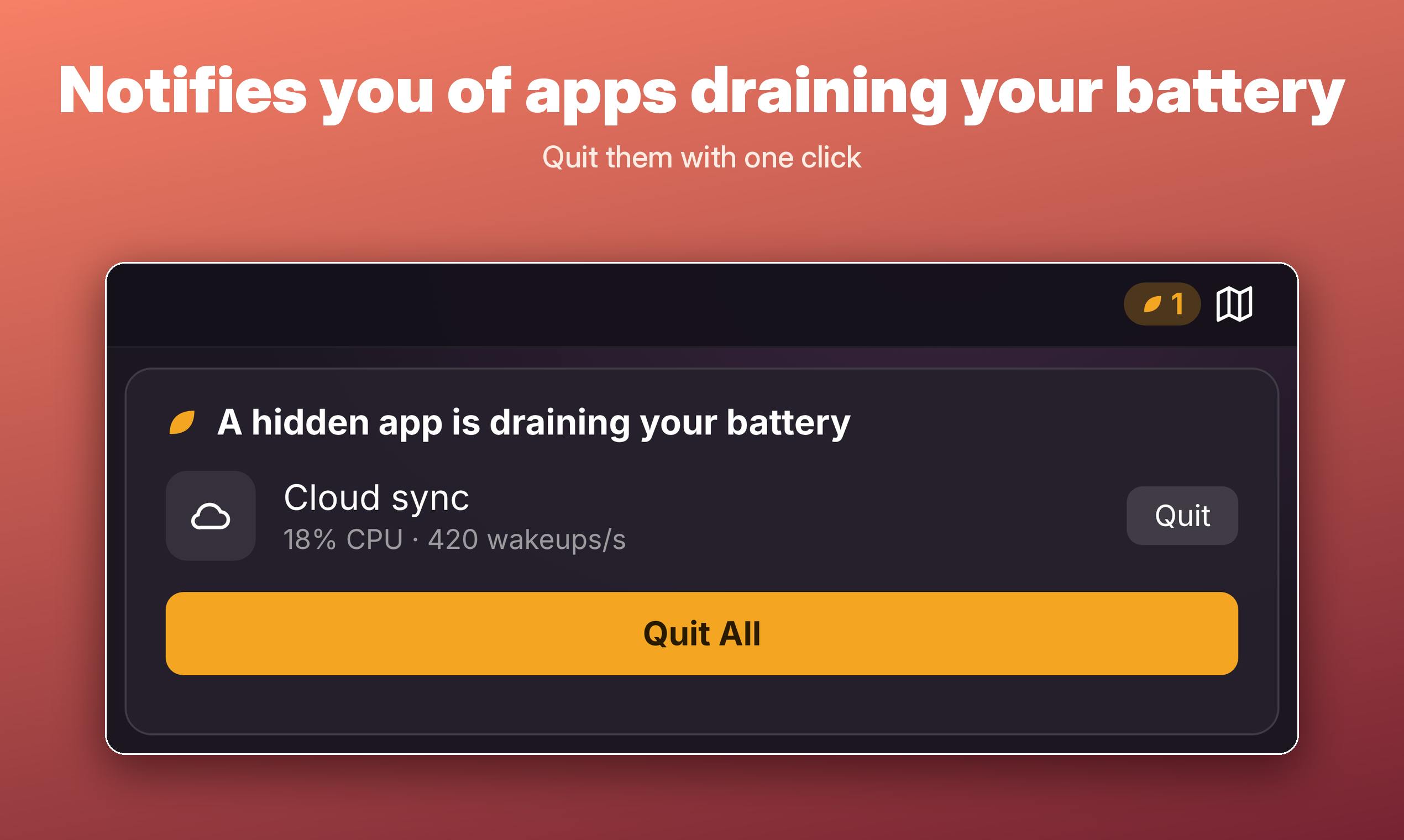
Core Features: From "Hide It" to "Use It"
Hemmed's positioning is clear — it's not a simple icon hider, but a complete organization solution built around the menu bar. According to the official description, it offers the following capabilities:
- Icon收纳: Hide all menu bar icons behind a single menu item, expandable with one click, keeping the menu bar visually clean.
- Notch Rescue: Specifically designed for Macs with notch screens, rescuing icons that are blocked by the notch and cannot be clicked.
- Pin Menu Commands: Bind specific menu actions to keyboard shortcuts, eliminating the need to click through layers of menus.
- Auto-Hide New Apps: Newly installed menu bar apps default to hidden status, preventing the menu bar from becoming crowded again.
- Battery Drain Alerts: Flag apps hidden in the background that continuously consume power, helping users identify "battery killers."
- iCloud Layout Sync: Sync menu bar layouts across multiple Macs, so there's no need to reconfigure when switching machines or using multiple devices.
Combined, these features cover three levels of menu bar management: visual organization, operational efficiency, and status monitoring. Compared to single-purpose icon hiders on the market, Hemmed's approach is closer to a "menu bar butler."
Notch screen is a display design Apple introduced starting with the 2021 MacBook Pro, featuring a cutout area at the top center of the screen to accommodate the camera. In macOS, the menu bar routes around the notch area, but when there are too many menu bar icons, some get pushed under the notch and become invisible or unclickable. Hemmed's "Notch Rescue" feature specifically targets this hardware characteristic, restoring accessibility to blocked icons by rearranging or收纳 them.
Menu bar apps are small utilities that reside on the right side of the menu bar at the top of the screen in macOS, usually existing as icons that expand a menu or panel when clicked. They provide quick access to system status (like battery, Wi-Fi), background services (like Dropbox, cleanup tools), or shortcut actions. Since macOS allows a large number of apps to add menu bar icons, users can easily accumulate too many icons, causing menu bar crowding — especially on notch-screen models. Hemmed's收纳 and auto-hide features are designed specifically for this ecosystem reality.
Design Details: Native App and Multi-Device Sync
Hemmed emphasizes that it is a native macOS app, which means it typically feels more aligned with macOS usage habits in terms of system integration, resource usage, and interaction experience compared to tools packaged with cross-platform frameworks. For a high-frequency interaction area like the menu bar, the smoothness difference brought by native implementation becomes amplified.
iCloud layout sync is an easily overlooked but very practical point. Users with multiple Macs often need to repeatedly configure the menu bar on each machine. Hemmed brings this configuration into iCloud sync, reducing cross-device maintenance costs. However, the granularity of syncing (whether it syncs hidden states or also shortcuts) is not yet clear from available information and needs to be verified through actual use.
The battery drain alert feature addresses a common problem with menu bar apps: many tools reside in the menu bar inconspicuously but silently consume power through continuous polling or background operation. Hemmed proactively flags such apps, turning "invisible" power consumption into "visible" alerts — a design approach worth commending.
Native macOS apps refer to software built specifically for the macOS platform using Apple's official development tools (such as the Swift language, AppKit/SwiftUI frameworks), rather than packaged through cross-platform frameworks like Electron or Flutter. Native apps can typically call system APIs directly, achieving deeper integration with system-level features like the menu bar, notification center, and accessibility, with lower resource usage. For menu bar tools, native implementation means lower resident memory, faster response times, and better adaptation to system appearance (such as dark mode and notch safe areas) — which is the main reason Hemmed emphasizes its native nature.
Market Feedback and Positioning
On Product Hunt, Hemmed received 70 votes, 1 comment, and ranked 11th. This result shows it has attracted some attention, but discussion heat is not yet high. Menu bar management is a relatively mature niche category with many similar tools already available. Hemmed's differentiation lies in the combination of notch adaptation, command pinning, and battery drain flagging.
Regarding pricing and distribution, available materials do not provide specific information. The official website link points to the Product Hunt page, where users can learn more.
Who Is It For
If you match the following situations, Hemmed is worth checking out:
- You use a Mac with a notch screen, and menu bar icons are frequently blocked;
- You have many menu bar icons and want unified收纳 rather than deleting them one by one;
- You frequently use deep menu commands in certain apps and want keyboard shortcut access;
- You own multiple Macs and want consistent menu bar layouts;
- You care about background app power consumption and need a tool to help identify anomalies.
Overall, Hemmed transforms the menu bar from "passive accumulation" to "active management," with fairly comprehensive feature coverage. Whether it can stand out among similar tools depends on stability and detail refinement in actual experience — especially the reliability of notch adaptation and iCloud sync.
Related articles

AI Can Read Neural Network Weights Directly: Do Models Already Exceed Expectations?
A Reddit developer experiment shows language models can directly read neural network weights and infer their function. Astra, Opus 5.5, and Muse Spark 1.3 all passed the test, sparking discussion on model generalization and training sources.

India's Microdrama Market Explodes: EloElo Secures $80M Investment from NBCUniversal
EloElo secures $80M from NBCUniversal to boost StoryTV, its microdrama platform with over 33M monthly active users, as India's microdrama market draws global capital.

Acoustic Detection of Multi-Rotor UAVs: Fusing Handcrafted Features with Pre-Trained Embeddings
Study reveals data leakage from random splits in UAV acoustic detection, proposes source-disjoint protocol with stacked ensemble of handcrafted features and YAMNet embeddings, achieving 95.29% accuracy for low-cost drone detection.