Hermes Agent Hands-On: Full Workflow for Building Apps Locally with an Autonomous AI Agent
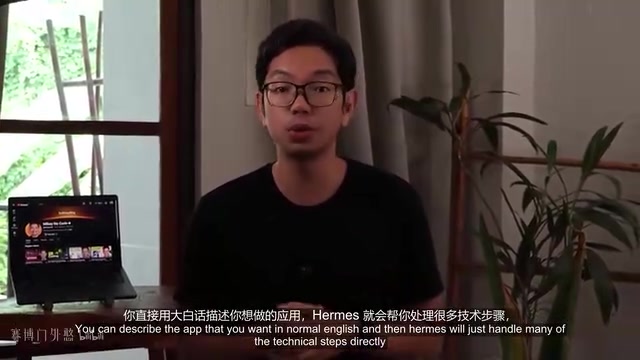
Hands-on test of Hermes Agent building a local calorie tracker app via three progressive prompts.
This article walks through a complete hands-on test of Hermes Agent, an autonomous AI agent that executes tasks directly on your local machine. From installing via a one-click script and connecting to the Anthropic API with Claude Sonnet 4.6, to building a fully functional calorie tracker in three progressive prompts, it demonstrates how Hermes handles environment setup, dependency installation, and incremental code modifications—letting beginners focus on what they want to build rather than fighting configuration issues.
The Real Obstacle for Coding Beginners Isn't Writing Code
Many beginner coding projects die before they ever truly start. The problem usually isn't writing code itself—it's everything else: how to organize file structures, how to use the command line, and those inexplicable errors that pop up out of nowhere. You might follow a tutorial step by step, copy-pasting exactly as shown, only to find the project won't run. Then you fall into a 45-minute rabbit hole just trying to fix a single line of code.
This frustration is exactly why most people never finish any project. Hermes Agent aims to solve this problem at its root—it's not a chatbot, nor an ordinary coding assistant, but an autonomous AI agent that works directly on your computer. It can create files, install dependencies, run terminal commands, and all you need to do is tell it what you want in plain language.
Autonomous AI agents represent a significant paradigm shift in current AI application architecture. Traditional AI tools are typically passive and reactive—users send requests, the AI returns text results, and users manually execute them. Autonomous agents, however, possess a complete perception-planning-execution loop: they can understand high-level goals, break them down into subtasks, invoke tool chains to complete them step by step, and dynamically adjust strategies based on intermediate results. This architecture matured rapidly between 2024 and 2025, with its core technical foundation being large language models' Function Calling capabilities and Tool Use protocols, enabling AI to safely operate local resources like file systems and terminal commands. Hermes Agent is a quintessential product of this technological approach.
This article is based on a content creator's complete hands-on tutorial, covering the entire process from zero-to-installation to building a fully functional local calorie tracker app, examining Hermes Agent's workflow and real-world performance.
How Hermes Agent Differs from Traditional AI Coding Tools
If you've used traditional AI coding tools, you're probably familiar with the old routine: it throws a code snippet at you, and then you have to figure out where to paste it, which files to modify, what packages to install, and why the project suddenly broke. All the technical heavy lifting falls on you.
The core difference with Hermes is that it's a standalone, autonomously running AI agent that actually executes operations locally. Typical IDE plugins usually just offer suggestions or edit the currently open file, but Hermes can handle an entire project—reviewing requirements, understanding relationships between files, installing dependencies, running terminal commands, and directly checking whether the project runs correctly.
Local Memory System: Gets Smarter the More You Use It
One of its most practical features is the local memory system. Hermes remembers what it learns across different sessions and can distill successful workflows into reusable skills. This means it doesn't have to start from scratch every time—the more you use it, the faster and more accurately it handles similar projects. This is particularly valuable in long-term iterative development. This mechanism essentially builds a local experience knowledge base, similar to "best practices documentation" in a software team, except it's automatically generated and maintained by AI. Every successful project build makes this knowledge base richer and more precise.
Complete Built-in Toolchain
Hermes comes with the toolchain needed to build complete applications: creating and editing files, running npm and Node.js commands, installing third-party packages, running tests, and scaffolding entire project structures. It offers a desktop application (supporting macOS, Windows, and Linux) and a CLI version for terminal enthusiasts. It's an official open-source project maintained by New Research on GitHub.
Installation and Connection: Integrating the Anthropic API
While Hermes manages folders, dependencies, and terminal operations on your machine, it still needs an external AI model to understand instructions and plan tasks. This tutorial uses the Anthropic API, where Claude models interpret natural language requests, work out the development steps, and then hand off instructions to Hermes for local execution.
Anthropic is an AI safety company founded in 2021 by Dario Amodei, former VP of Research at OpenAI. Its flagship Claude model series is known for long context windows and high-quality code generation. The API charges by token—tokens are the basic units by which models process text. In English, each word corresponds to roughly 1–1.5 tokens; in Chinese, each character is about 1–2 tokens. The Claude Sonnet series is positioned as a balance between performance and cost—several times cheaper than the top-tier Opus series, yet still excellent at code generation, logical reasoning, and similar tasks.
Getting the API Key
The process is straightforward: log into the Anthropic Console, go to API Keys on the left sidebar, and click the plus icon in the upper right to create a key. Give it a recognizable name (e.g., "Hermes Local CLI"), set an expiration date, and submit. The generated key starts with sk-ant-—you must copy and save it immediately after creation, as you may never see it again.
Note that the Anthropic API charges based on the number of tokens processed. For a beginner project like a calorie tracker, which typically requires short prompts and simple steps, this tutorial uses Claude Sonnet 4.6. The entire development process usually consumes tens of thousands to a hundred thousand or so tokens, costing anywhere from a few cents to a dollar or two—very budget-friendly for learning and experimentation.
One-Click Installation Script for Environment Setup
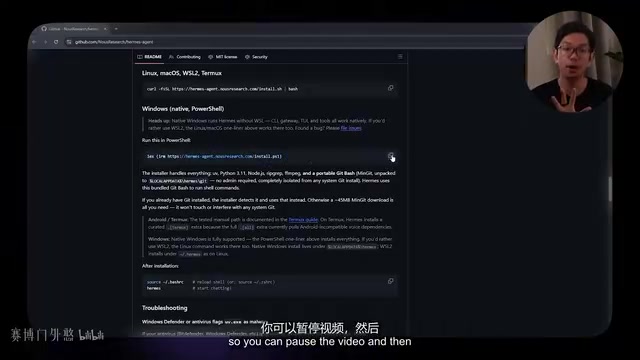
On Windows, simply open PowerShell and run the command provided in the quick installation section of the official repository. The installation script automatically downloads and configures all required tools, including the UV package manager, Python, Node.js, and a standalone version of Git—you don't need to install any of them separately.
The choice of UV as the package manager is worth noting. UV is an ultra-fast Python package manager written in Rust by the Astral team, released in 2024 and quickly gaining community attention. It consolidates the functionality of multiple traditional tools—pip, pip-tools, virtualenv, pyenv—into a single binary, installing packages 10–100x faster than traditional pip. Hermes' installation script chose UV as the underlying package manager precisely because it completes Python environment configuration with minimal dependency conflicts and maximum speed, dramatically reducing the chances of beginners hitting issues during environment setup.
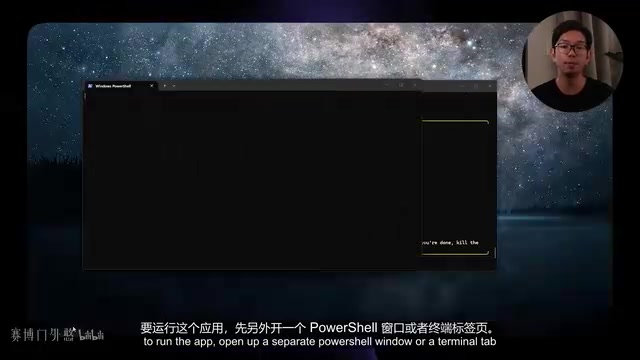
After installation, restart the terminal to load the new environment variables, then run hermes setup to enter the configuration wizard. Select the full setup, Anthropic as the provider, API key authentication, paste the key, and finally choose Sonnet 4.6 as the model. Restart the terminal again, type hermes, and send a "system check" message. Receiving a confirmation response means everything is ready to go.
Three-Step Progressive Build: Calorie Tracker
The entire application is built across three prompts, adding one feature set at a time. This "one feature at a time" progressive approach is the key to making this workflow stable and reliable in practice.
From a methodological perspective, this three-step progressive build reflects an important practical principle in AI-assisted development: Divide-and-Prompt. Research shows that sending a single mega-prompt containing all requirements to a large language model often yields worse results than building incrementally. There are three reasons: first, a narrower scope per prompt means the model's attention is more focused, producing higher-quality output; second, results can be verified immediately after each step, allowing problems to be caught and corrected early before errors compound in subsequent steps; third, this approach naturally creates version snapshots—if anything goes wrong at any step, you can roll back to the last working state. This aligns closely with incremental development in software engineering and iterative delivery in agile development.
Step 1: Scaffolding the Project
The first prompt is simple: "Build a basic calorie tracking website with Vite, clean dark layout, header at the top, log container, input form (meal name and calories), and an add button."
The choice of Vite as the build tool is no accident. Vite was created in 2020 by Evan You, the creator of Vue.js, as a next-generation frontend build tool. It leverages the browser's native ES Module (ESM) support for blazing-fast dev server startup, with cold start times typically in the millisecond range—a quantum leap compared to Webpack's tens-of-seconds bundling process. Vite uses esbuild for dependency pre-bundling in development mode and Rollup for production builds. As of 2025, Vite has become the de facto standard for frontend project scaffolding, widely adopted by official templates for React, Vue, Svelte, and other major frameworks. For Hermes Agent, choosing Vite means concise project initialization commands, fast dependency installation, and instant development feedback—ideal for automated AI agent operations.
After sending the prompt, Hermes reviews the request, plans the steps, and then executes in real time in the terminal: running npm commands, creating the Vite project, installing dependencies, generating project files, and organizing the folder structure. Once complete, it displays the project location. Open another terminal, cd into the project directory, run npm run dev to start the local dev server, and open the corresponding address in your browser to see the first version of the app—dark theme, header, input area, and add button, all in place.
Step 2: Adding Goals and a Progress Bar
The second prompt requests a daily calorie goal input field with a progress bar below it that updates in real time as food entries are added.
The key here: since the project already exists, Hermes automatically locates the relevant files, examines the existing code structure, and updates rather than rebuilds from scratch. In the terminal, you can watch it patch existing code, add the new input field, and wire the progress bar to the tracked calorie total. Refresh the browser and the new features appear smoothly, without breaking anything built in the first round.
This ability to "make precise incremental modifications on an existing codebase" is the core advantage of autonomous AI agents over simple code generators. When executing step two, Hermes first reads and understands all files generated in step one—HTML structure, CSS class names, JavaScript variable naming and data flow—then inserts new code at the correct locations while ensuring the interfaces between old and new code (such as DOM element IDs, CSS selectors, event bindings, etc.) are fully compatible.
Step 3: Implementing Categories and Summary Statistics
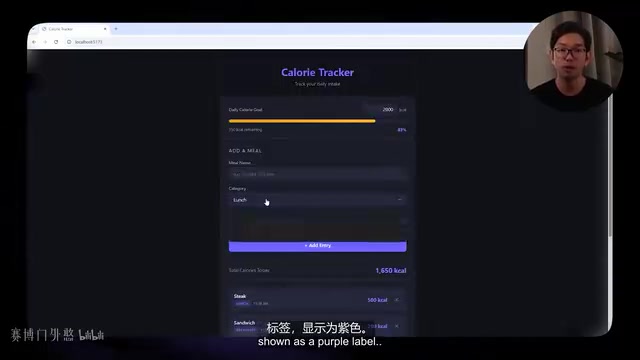
The third prompt expands the form by adding a dropdown selector with four options—breakfast, lunch, dinner, and snacks—displaying a category label on each entry, and building a summary section at the bottom that tallies total calories by category.
Hermes adjusts the data structure, associates entries with categories, and adds calorie calculation logic for each category. After refreshing, adding foods under different categories shows each meal appearing in the list with a purple category tag, while the categorized summary at the bottom updates automatically with each new entry. At this point, the app has evolved from a basic layout into a complete interactive calorie tracking tool.
Full Code Ownership and Portability
Opening the project folder in VS Code reveals the complete local project structure: node_modules, dist, along with standard files like index.html, style.css, main.js, and package.json. Layout, styling, calorie calculations, data entry, and category summaries are all written in standard code files that you can freely view and modify.
The most important thing here is code ownership: every file, script, and asset created during this build exists directly on your own computer. The application is fully exportable, fully customizable, with no ties to any no-code platform or proprietary hosting system. This stands in stark contrast to many online AI website builders—your project won't be affected if some platform shuts down or raises prices.
From a broader industry perspective, this "Local-First" development philosophy has been making a comeback in recent years. As cloud service providers frequently adjust pricing strategies and some platforms abruptly discontinue services, more and more developers are prioritizing local ownership of their data and code. Hermes Agent generates standard, industry-compliant project structures—any engineer familiar with frontend development can pick it up. The project can be deployed to Vercel, Netlify, GitHub Pages, or any other static hosting platform, and can be further extended into a full-stack application. This zero lock-in characteristic is an easily overlooked but critically important dimension when evaluating AI development tools.
The Reusable Value of This Workflow
What makes the entire process shine is that Hermes Agent autonomously handled a massive amount of configuration work that traditionally falls on the developer. The Anthropic API provides the reasoning capability to understand instructions, while Claude Sonnet 4.6 handles analyzing code and making changes that follow the existing project structure without breaking what's already working.
The three-step prompting approach keeps the build process clean and manageable—start with a simple working version, then add features incrementally, with each prompt having a clear objective that's easy to follow and easy to test. This core methodology can be reused for virtually any local tool:
- Client registration forms and CRM tools
- Project boards and task management
- Financial trackers and budget management
- Data visualization applications
- Internal team tools and admin dashboards
Notably, these use cases cover most of the day-to-day needs of small businesses and individual developers. Traditionally, building such tools required either expensive SaaS subscriptions (like Notion or Airtable at tens to hundreds of dollars per month) or full-stack development skills. The emergence of autonomous agent tools like Hermes Agent is filling the enormous gap of "having clear needs but lacking technical ability," enabling non-professional developers to rapidly prototype their ideas and iteratively refine them.
For complete beginners who have never built any project, perhaps the greatest significance of Hermes Agent isn't that "AI can write code"—it's that it hands off "everything besides writing code"—the environment configuration and debugging that truly drives people away—to the machine, allowing humans to focus on "what do I want to build."
Key Takeaways
Related articles

LLM Application Development: A High-Paying Career Guide for Ordinary People
LLM application development offers fresh graduates up to 35K/month, with SP offers reaching 600K. This article explains the core skills, how to break in, and how ordinary people can seize AI opportunities through learning by doing.

Say Goodbye to AI Influencer Faces: A Complete Guide to Creating Visual Assets for AI Comic Dramas from Scratch
Bilibili creator shares a full workflow for zero-basics AI comic drama visual assets: use Doubao Work skills with script-first, visual references, and real-person texture to escape AI influencer faces, then lock character and scene consistency with asset sheet layouts, weapon detail images, scene nine-grids, and cinematic color palettes.

The AI Production Pipeline Behind Great Videos: From Research to Agent Validation
AI video production isn't just a model race. This article breaks down a transferable four-step pipeline: researching professional workflows, organizing a skill checklist, configuring agents, and experimental validation—and explains how general-purpose LLMs like DeepSeek can replace paid tools to run the entire process.