How Cursor and Copilot Actually Read Your Code — A Deep Dive

AI code editors complete your code using carefully assembled context snippets, not by reading your entire repo.
The core constraint for AI code editors is that language models only see what's in the prompt window — the real engineering challenge is deciding which code gets in. Classic Copilot relies on surrounding code and open tabs; more powerful retrieval pipelines use Tree-sitter AST parsing, vector embeddings, and Merkle tree incremental updates for cross-file semantic search. Yet Cursor shut down its embedding index in July 2026, switching to local grep plus parallel subagents — because model tool-calling is now strong enough to make fast, exact grep more cost-effective than vector retrieval. Neither tool reads your full codebase; what determines completion quality is always what gets packed into the prompt's "suitcase."
You type three characters and the editor completes the entire function, as if it understands your whole project. Does it really? The honest answer depends on which tool you're using, which feature you triggered, and — as of this summer — which month you're asking the question. Let's pop the hood and see exactly how AI code editors "see" your code.
The Hard Constraint You Can't Escape: The Context Window
All these tools share the same fundamental limitation: a language model only knows what's inside the prompt. A repository might contain thousands of files, but the prompt is a fixed-size window. That window keeps getting bigger, but filling it is slow and expensive — and more context doesn't automatically mean better context.
So the real engineering challenge isn't the model itself; it's deciding which few hundred lines of code get a seat on this flight. GitHub calls the code responsible for this its "prompt library." That decision is what determines whether AI completions feel like mind-reading or go inexplicably off the rails.
Classic Copilot Autocomplete: Looking at the Neighbors
Traditional Copilot autocomplete answers questions using "whatever is nearby." It reads the code before the cursor and the code after it — a technique called "fill in the middle" — which lets it complete a gap rather than just finishing a line.
Beyond that, it borrows from "neighboring tabs": scanning your other open files for snippets similar to what you're currently writing. GitHub has reported that neighboring tabs alone produce roughly a 5% relative improvement in accepted suggestions. This approach is fast and cheap.
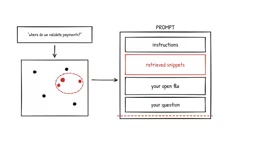
But the blind spot is obvious: if the helper function you need is buried in a file you've never opened, autocomplete simply can't see it. Answering questions like "where do we validate payments?" requires a map of the entire repository.
Building a Repository Map: The Three-Step Retrieval Pipeline
The textbook approach to building that map is retrieval-augmented generation, and it typically involves three steps.
Step 1: Parse
A parser like Tree-sitter converts each file into an Abstract Syntax Tree (AST) — laying out the program's syntactic structure as nodes: this is a function, this is its body, this is a class. Splitting code along these nodes means every "chunk" starts out as a complete function, not half of one.
Tree-sitter is an incremental parsing library originally developed by GitHub and now adopted by virtually every major code editor. Its key advantage is that "incremental" part: when you change one line in a file, Tree-sitter doesn't reparse the entire file — it only updates the affected nodes in the syntax tree, making it extremely fast. The fundamental difference between AST-based chunking and plain-text splitting comes down to semantic integrity. Splitting by line count can break a function in the middle, producing code chunks that lack semantic coherence and degrade embedding quality. Splitting along AST nodes means each chunk naturally corresponds to a complete syntactic unit (a function, class, or method), so the resulting vectors more accurately capture that chunk's semantic intent.
Step 2: Embed
Each code chunk is run through an embedding model, producing a vector — a sequence of numbers that places semantically similar code close together in vector space.
Embedding is the process of converting discrete text or code into high-dimensional continuous vectors. When we say "semantically similar code is close in vector space," it means that even if two code snippets have completely different variable names, if they implement similar logic (say, two different implementations of a sorting function), their vector distance will be small. This stands in sharp contrast to traditional keyword search: grep can only find symbol names you already know, while semantic search can surface functionality whose name you don't know. Embedding models specifically trained on code (such as CodeBERT and UniXcoder) outperform general-purpose text embedding models because they understand code-specific structural signals like indentation, bracket matching, and API call patterns.
Step 3: Stay Fresh
Cursor's engineering blog describes how it hashes each file into a Merkle tree. At sync time, the system only traverses branches whose hash values have changed and re-embeds only those modified chunks. This avoids the enormous overhead of rebuilding the full index from scratch every time.
When you ask a question, your question is also embedded, the index returns the closest chunks, and the editor assembles the prompt: instructions at the top, followed by the retrieved snippets, then your currently open file, then your question — trimmed to fit the window.
The model never sees your entire repository. It sees a carefully packed suitcase.
A Merkle tree is a hash tree data structure: leaf nodes store the hash of each code chunk, and parent nodes store a combined hash of all their children. This property makes incremental detection extremely efficient — when any code chunk changes, its hash change propagates upward, so comparing just the root hash tells you whether anything in the entire tree has changed. You can then drill down the changed branches to pinpoint exactly which chunks need re-embedding. This is the same data structure Git uses internally; both are fundamentally solving the same problem of efficiently detecting which parts of a large body of content have changed. For a large repository with tens of thousands of functions, this incremental update mechanism can reduce index maintenance costs by orders of magnitude.
GitHub Copilot Today: Semantic Indexing
GitHub Copilot still uses this retrieval approach for chat and Agent scenarios. VS Code's documentation explains that Copilot automatically builds a semantic index for your workspace — remotely for repositories hosted on GitHub, locally for other folders — and exposes it as a code-based search tool.
When you ask "where is payment validated," it can pull up the relevant function from files you've never opened. That's the core advantage of semantic retrieval over pure proximity-based completion.
Cursor's Reversal: Shutting Down the Embedding Index
Then came a plot twist. Cursor's retrieval pipeline was once one of the best-documented implementations in the industry — but in July 2026, it shut down its embedding index.
As recently as June of that year, Cursor's documentation stated that combining semantic search with grep improved answer quality by approximately 12.5%. But its engineers explained that models had become so capable at grep-style search that the dedicated semantic retrieval path no longer provided meaningful gains.
Cursor's Agent now uses a local, on-the-fly grep index — doing exact matching on symbols, strings, and patterns — plus ordinary file reads, and a subagent that can run many searches in parallel. In other words, when the underlying model's tool-calling ability is strong enough, the "dumb" high-speed grep turns out to be more cost-effective than sophisticated vector retrieval.
This shift reflects the rapid evolution of LLM tool-calling capabilities. Early agents were constrained by models' limited understanding of tools, requiring external retrieval systems to pre-translate natural language queries into relevant code snippets before feeding them to the model. But once a model can accurately translate "find the function that handles payment validation" into multiple specific grep commands and execute them in parallel, the intermediate semantic retrieval layer actually becomes a source of latency and error — embedding indexes have update delays, vector similarity has recall noise, and grep is exact and zero-latency. Cursor's decision essentially migrates the task of "understanding query intent" from the retrieval system to the language model itself. This approach only becomes viable once model capability reaches a sufficient threshold, and it signals that as models continue to improve, the internal architecture of AI tools will keep getting restructured.
Who Sees More Clearly? That's Actually the Wrong Question
Which editor "understands" your codebase better? That question itself is framed incorrectly.
Both editors now have their Agent actively go find things: one with a semantic map and search capabilities, the other with blazing-fast grep. Neither one reads everything. What actually determines the outcome is what ends up inside the prompt.
The next time a suggestion feels like mind-reading — or is obviously, inexplicably wrong — try asking yourself a different question: what was packed into the suitcase this time? Understanding how context gets assembled is how you truly understand the capability limits and failure modes of AI coding assistants.
Related articles

Random Pruning of the DPO Computation Graph: 1.4x Training Speedup and Lower Peak Memory
DPO training too slow and memory-hungry? This paper proposes a random pruning framework for the DPO computation graph, sampling independently across position, sequence, and branch dimensions; branch pruning achieves a 1.426x step-time speedup and cuts training time by about 30%, with in-depth attribution of memory and time gains.

Why Does JEPA Underperform MLM in Longitudinal EHR Representation Learning?
New study compares JEPA and MLM for longitudinal EHR representation learning on MIMIC-IV: three JEPA variants train stably without collapse but underperform MLM; target size, not heterogeneity, drives prediction error.

Transfer Learning + Visible Light Communication: A New Approach to Energy-Efficient Indoor Positioning
A study proposes a transfer learning-based visible light communication indoor positioning method, achieving 47% accuracy improvement on the BOSCH factory dataset, 67.5% model efficiency under high noise, and introducing the ME composite metric for energy-efficient positioning in energy-constrained industrial IoT scenarios.