How Do AI Agents Actually Work? Breaking Down the Core Agent Loop

Every AI Agent runs on the same four-step loop: understand it and you understand them all.
This article breaks down the universal Agent Loop powering all AI Agents — from coding assistants to customer service bots. The loop has four steps: the app sends a request with a tool list → the model returns a structured tool call → the app executes the tool → the result is written back to history and the model is called again, until it responds in plain text. The key insight: the model only decides, never executes. On the engineering side, the article also highlights two critical challenges — full history resent on every turn driving up costs, and the need for turn and budget limits to prevent infinite loops — along with caching and compaction as practical solutions.
Coding assistants, browser agents, customer service bots — nearly every AI Agent you've heard of runs on the same simple loop underneath. Anthropic, OpenAI, and AWS have all recently launched their own managed agent platforms with different names, but the engine powering them is identical. Understand this loop, and you understand them all.
A Metaphor: The Head Chef Who Never Leaves the Station
Imagine a head chef who never leaves her workstation. After reading an order, she calls out: "Get me the tomatoes!" An assistant runs off and brings them back. She looks again and decides her next move. She never walks into the pantry herself.
This is exactly how a large language model collaborates with tools. The model handles "thinking and deciding" but never executes actions directly — the code outside the model is what actually does the legwork. Grasp this division of labor, and you've got the core of Agent design.

The Four Components of the Agent Loop
The actual mechanism consists of four parts: your App, the Model, your Tools, and the Conversation History. The entire flow circulates among these four.
Step 1: Send the Request and Tool List
Your app sends the user's request to the model, along with a list of tools the model "can use." Each tool has a name and an input schema — a structured definition of what the tool does and what parameters it requires.
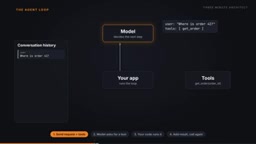
Input schemas are typically described in JSON Schema format. For example, a getOrder tool's schema might declare that it requires an order_id parameter of type string. The model has learned to read these structured descriptions during training, allowing it to autonomously judge at inference time whether a tool needs to be called and what arguments to pass. The quality of your tool list design directly affects agent behavior — vaguely described tools lead to incorrect calls or wrong parameters, while too many tools dilute the model's attention and increase the odds of picking the wrong one. In practice, the tool name and description fields are the model's primary basis for decision-making. Clearly stating "when this tool should be used and when it shouldn't" is usually more important than exhaustively listing parameters.
Step 2: The Model Returns a "Tool Call" Instead of an Answer
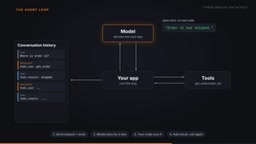
Here's the key: the model doesn't return an answer directly. Instead, it returns a tool call — a structured request such as getOrder, with the parameters filled in. In Claude's API, the stop reason at this point is marked as tool_use, explicitly telling your app: the model wants to invoke a tool.
Step 3: Your Code Executes the Tool
Upon receiving the tool call, it's your app that actually runs the tool. This is the most commonly misunderstood point in the entire mechanism: the model never executes anything itself — your code does. The model is purely the "decision-maker." Querying a database, hitting an API, reading or writing files — all of these actions happen inside your program.

Step 4: Write the Result Back to History and Call Again
Once the tool finishes, your app appends the result to the conversation history and calls the model again. The loop begins: call → tool → result → call again… repeating until the model finally responds with plain text and makes no further tool calls. That's the final answer — Claude marks it as end_turn.
OpenAI's Agents SDK terminates the loop the same way, throwing an error when a run exceeds the max turns limit. Different vendors may use different naming conventions, but the termination logic of "loop until no tool call" is consistent across the board.
Two Engineering Details You Can't Ignore
Understanding the loop itself is just the start. There are two unavoidable issues when building in practice.
First, the full history is resent on every turn. This means the longer the task, the larger the context, and the slower and more expensive each call becomes. Common mitigation strategies are caching and compaction — the former reuses already-processed context, while the latter summarizes and trims the history. Both effectively control cost creep in long-running tasks.
Second, always set a ceiling on the loop. Setting a turn limit and a budget cap prevents the agent from spinning in circles indefinitely. An agent with no upper bound can burn through your budget and never produce a result.
Caching is typically offered in mainstream APIs as "prompt caching": if the context prefix of the current request is identical to the previous one, the server can reuse already-computed KV cache, reducing latency and token costs. Both Anthropic and OpenAI support this feature, but developers must explicitly mark cacheable boundaries in their requests. Compaction takes a different approach: when conversation history exceeds a certain length, early multi-turn exchanges are replaced with a shorter summary, trading some detail for space in the context window. The two strategies aren't mutually exclusive — long-task agents often need both: use caching to reuse stable system prompts and tool definitions, and compaction to handle ever-growing conversation history.
The One-Sentence Summary
An AI Agent is, at its core, "a model in a loop, plus your code doing the actual work." The model decides which tool to call at each turn, while the application layer handles the actual execution, result injection, loop control, and cost management. Whether it's a coding assistant or a customer service bot, whether the underlying model is Claude or OpenAI, strip away the surface and you'll find the same Agent Loop. The next time you evaluate or build an agent yourself, start by asking about its tool list, termination conditions, and cost control strategy — and you'll see right through how it works.
Related articles

How Big Can Stars Really Get? The Physical Limits of the Largest Stars
Red supergiants are the largest stars by volume, with radii up to 2,000 times the Sun, engulfing the inner solar system. But there is no precise upper limit on stellar size—models predict up to 15,000 solar radii. The most massive blue stars are far smaller than red supergiants—biggest and heaviest are two different things.

Apple HomeView Smart Display Full Feature Breakdown: Wall-Mount or Desktop, $299
Apple launches HomeView, a $299 smart display with wall-mount and desktop options, 12MP camera for facial recognition, smart home control, music playback, and recipe step-by-step cooking. Full breakdown of watch faces, apps, privacy, and cooking integration.

Where Did the Promised New Studio Go? Craft Computing Answers After Five Years
Craft Computing's host responds to viewer questions: the new studio promised five years ago was shelved as construction costs soared from $30,000 to $75,000, and was replaced by a 168-square-foot garage conversion.