How Do AI Coding Agents Work? Codex, Claude Code, and Cursor Explained

AI coding agents evolve from code completion to autonomous development through exploration, planning, execution, and verification.
The article uses a video demo to break down how AI coding agents evolved from code completion tools to autonomous developers. Agents first explore the project to build context, break vague instructions into subtasks with a plan, create and modify files to produce a complete runnable codebase, then execute commands, run tests, and verify the UI via the browser, forming a write-run-fail-fix loop. The core is the agent loop: model decision, tool execution, and result feedback. Agents boost efficiency but don't bear final responsibility for correctness—humans remain the gatekeepers of quality.
From Code Completion to Autonomous Development: The Evolution of AI Coding Agents
In the past, AI writing code was basically synonymous with "smart completion"—you write half, it guesses the other half. But today, tools like Codex, Claude Code, Google Anti-Gravity, and Cursor have completely changed the game. They no longer passively wait for you to hit Enter; instead, like a real developer, they go straight into your project, use tools, execute commands, modify files, and run tests.
As shown in the video, Claude Code runs in the terminal while a complete website is already running in the browser. What exactly is happening behind the scenes? Based on the video content, this article breaks down the workflow of AI coding agents and analyzes their impact on software development.
Step 1: Explore the Codebase and Understand the Context
When given a task, the first thing a coding agent does is not rush to write code—it "reads code." It traverses your project directories, reads existing files, analyzes dependencies, and determines which parts of the code need to be changed.
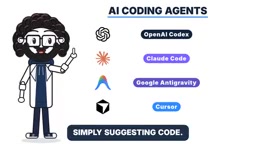
This process is similar to how a human developer approaches an unfamiliar project: first look at the structure, then the details. Through this exploration, the agent builds an initial understanding of the project, avoiding blind code generation without understanding the context. This is one of the core differences from traditional code completion tools—completion tools only see a few lines near the cursor, while the agent sees the entire project.
The agent's ability to "read the whole project" relies on a combination of the context window and retrieval strategies. The context window is the maximum number of tokens a model can process at once. Modern large models' windows can hold hundreds of thousands of tokens, but still not enough to fit all the code of a large project. Therefore, agents typically use on-demand retrieval: first use directory listings and file searches to locate relevant files, then read content segment by segment, and when necessary use search tools like grep to find symbol references. This "coarse-to-fine" exploration strategy closely matches how human developers browse unfamiliar codebases, and explains why an agent's exploration steps often require multiple rounds of tool calls—it dynamically builds a minimal sufficient understanding of the project within a limited context budget.
Step 2: Break Down the Task and Make a Plan
Large instructions are often vague and complex. The next step for the agent is to break down a request like "help me add user login functionality" into smaller subtasks and formulate an execution plan. It decides which files to create, which tools to call, and which operations to perform.
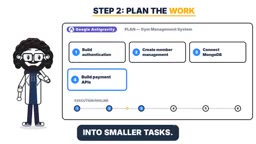
This planning capability allows the agent to handle multi-step tasks, not just single lines of code. The existence of a plan also makes the entire development process more controllable—you can see what it intends to do, rather than discovering the wrong direction only after it's done.
Step 3: Start Developing—Generating and Modifying Equally
Once the plan is ready, the agent enters the actual development phase. It can create new files, modify existing code, build frontend components, and connect backend APIs.
The key here is that the agent's output is not an isolated code snippet but a complete, runnable codebase. It understands the references between files and knows that modifying a function may require synchronously updating the callers. This global perspective is the essential difference between "agentic development" and "code completion."
Step 4: Run, Debug, and Verify
Generating code is only part of the work. The agent can also execute commands, check for errors, run tests, and attempt to fix problems.
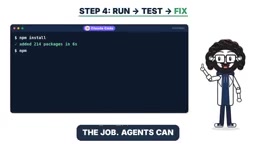
Some agentic development environments can even interact with the browser, helping the agent inspect the application interface and verify the user experience. This means the agent can not only write code but also "see" the effect of the code running, forming a closed loop: write code → run → find errors → fix → run again.
The agent's ability to interact with the browser typically relies on browser automation tools (such as Playwright, Puppeteer) or dedicated browser control protocols. The agent can open pages, click elements, take screenshots, and even read console logs and network requests to determine whether the interface renders correctly, whether buttons are clickable, and whether APIs return expected data. This kind of "visual feedback" compensates for the blind spots of pure text reasoning: code being syntactically correct does not mean runtime behavior is correct. However, note that screenshots and DOM snapshots also consume context, and the agent's "understanding" of the interface remains indirect. Misjudgments can still occur in complex interaction scenarios, which is one reason manual acceptance testing cannot be omitted.
Core Mechanism: The Agent Loop
Behind all these behaviors is a mechanism called the "agent loop." The model decides what to do, tools execute specific actions, results are returned to the model, and the process repeats.
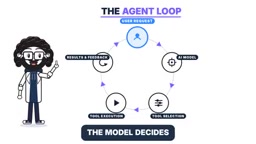
This loop continues until the task is complete or human input is needed. In other words, the essence of an AI coding agent is an automatic "decision-execution-feedback" loop, where the model is the brain, tools are the hands and feet, and the codebase and runtime environment are the world it perceives.
The "agent" in the "agent loop" refers to a system that can perceive the environment, make autonomous decisions, and take actions to achieve goals. In the context of AI coding, the model itself is only responsible for reasoning and decision-making; what truly gives it "hands-on ability" is the tool use / function calling mechanism: developers predefine a set of tools (such as reading files, writing files, executing terminal commands, searching the web), and the model outputs structured tool call requests at each decision step. An external runtime executes them and returns the results (file contents, command output, error messages) as new context to the model. This pattern is sometimes also called the ReAct (Reasoning + Acting) loop, where reasoning and action alternate. Therefore, an agent's capability ceiling depends not only on the model's reasoning level but also on the richness of the toolset and the accuracy of returned results—well-designed tools enable the agent to perceive the codebase state more precisely and reduce blind attempts.
Implications for Developers: Efficiency Gains and Verification Responsibility
AI coding agents are changing the way software is developed. They free developers from repetitive file operations and debugging loops, allowing them to focus more on architecture design and requirements judgment. But the video ends with an important reminder: always review, test, and verify before release.
Agents can generate code, but they do not bear ultimate responsibility for code correctness. Human developers remain the gatekeepers of quality. Understanding how agents work is precisely for better reviewing their output—knowing where errors may occur allows for targeted verification.
For developers who want to try these tools, start with a small, well-defined task, observe the agent's exploration, planning, and execution process, and gradually build trust and judgment.
One-line Summary
AI coding agents evolve from code completion to autonomous development through a closed loop of exploration, planning, execution, and verification.
Paragraph Summary
Using a video demonstration as a thread, the article breaks down how AI coding agents evolved from code completion tools to autonomous developers. Upon receiving a task, the agent does not write code directly but first traverses the project, reads files, and analyzes dependencies to build context; then breaks vague instructions into subtasks and formulates a plan; next creates and modifies files, producing a complete runnable codebase rather than isolated snippets; finally executes commands, runs tests, and even verifies the interface through the browser, forming a "write-run-fail-fix" closed loop. Its core mechanism is the agent loop: model decision-making, tool execution, and result feedback, repeating until the task is complete or human intervention is needed. The article emphasizes that agents improve efficiency but do not bear ultimate responsibility for correctness; developers must review, test, and verify before release—humans remain the gatekeepers of quality.
Related articles
ChatGPT Plus Subscription Pitfall Guide: Go/Plus/Pro Tier Comparison and Quick Activation
A complete ChatGPT Plus subscription guide based on a Bilibili tutorial: from registering an account, comparing Go/Plus/Pro tiers, to the practical steps for quickly completing your subscription.
GPT-6.2 Sol/Astra Released! A Step-by-Step ChatGPT Plus Subscription Guide and Tier Comparison
GPT-6.2 Sol/Astra is out—here's a ChatGPT Plus subscription guide: register an account, compare Go/Plus/Pro tiers, and subscribe in a minute.
Comparing Three Channels for Subscribing to GPT Plus in China: Is Website Top-Up the Easiest?
How to subscribe to GPT Plus in China? This article compares website top-up, credit card, and mobile top-up channels—process, cost, and risk—with steps and tips to help you choose wisely.