How to Choose Machine Learning Starter Tools? A Beginner's Development Environment Setup Guide

A practical guide to choosing ML development tools for beginners, with a recommended zero-cost starter setup.
Machine learning beginners often feel overwhelmed by tool choices like VS Code, Jupyter, Google Colab, and Anaconda. This article clarifies that these tools solve different problems rather than competing with each other, explains each tool's role in the ML workflow, and recommends a practical zero-cost combination for getting started. The key takeaway: focus on learning core concepts and let real needs guide your tool choices.
A Beginner's Confusion
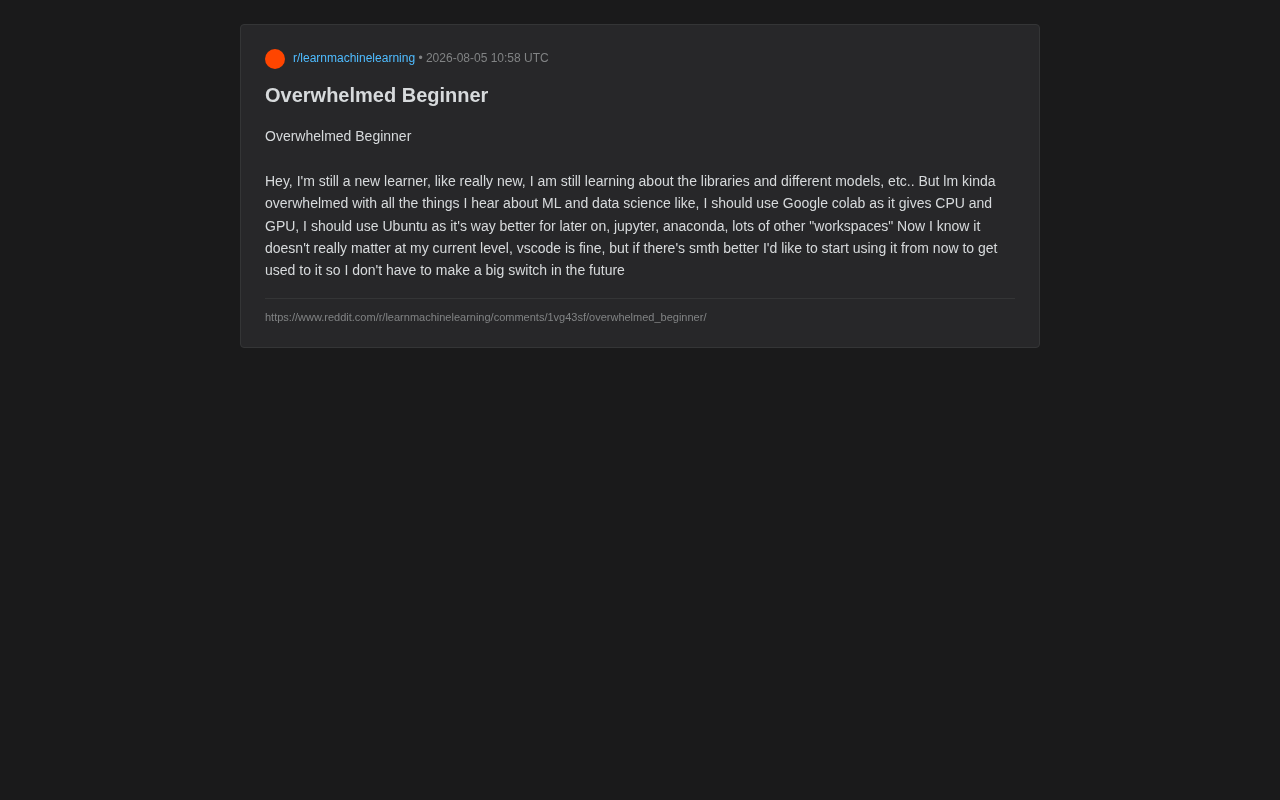
Recently in Reddit's machine learning community, a newcomer shared their frustration: faced with the overwhelming number of tool choices in the ML and data science space, they felt completely lost. Google Colab offers free CPU and GPU access, some say Ubuntu has advantages for later-stage development, then there's Jupyter, Anaconda, and all sorts of "workspaces"... where should one even begin?
This newcomer raised a very practical question: "I know at my current level these things don't really matter, and VS Code is enough. But if there's a better option, I'd like to start using it now to build habits, so I won't have to make a major switch later."
This question is incredibly common. Almost everyone entering the machine learning field has felt lost at the crossroads of tool selection. This article will clarify the positioning of these tools and help beginners build a clear mental framework.
The Nature of Tool Anxiety: Why You Shouldn't Agonize Too Early
Beginners' anxiety about tools often stems from a misconception: believing that "using the right tools" is a prerequisite for successful learning. But the truth is exactly the opposite — tools are just means to an end. What truly determines how far you'll go is your understanding of core machine learning concepts, your mathematical foundation, programming ability, and problem-solving mindset.
That Reddit user's self-assessment was actually spot-on: at the beginner stage, differences between tools have virtually no impact on your learning outcomes. Whether you use VS Code, Jupyter, or Colab, running a linear regression or training a simple neural network won't feel fundamentally different.
More importantly, the "migration cost" between modern mainstream tools is severely overestimated. Once you've mastered Python and core libraries like pandas, NumPy, and scikit-learn, switching editors or runtime environments is something you can adapt to in just a few hours. Worrying about "having to overhaul everything later" is unnecessary. These core libraries each serve a specific purpose: NumPy provides efficient multi-dimensional array operations and is the foundation of nearly all Python scientific computing; pandas builds on NumPy to provide DataFrame data structures specifically designed for cleaning, transforming, and analyzing tabular data; scikit-learn wraps dozens of classical machine learning algorithms (from decision trees to support vector machines) and provides a unified fit/predict interface, letting you build models in just a few lines of code.
Detailed Classification of Mainstream Machine Learning Development Tools
To dispel anxiety, let's clearly categorize the terms beginners commonly encounter. They solve completely different problems and are not competing alternatives that require an "either/or" decision.
VS Code: Code Editor and IDE
VS Code (Visual Studio Code) is an open-source code editor released by Microsoft in 2015 and is currently one of the most widely used development tools in the world. Its core strength lies in its plugin ecosystem — by installing different extensions, VS Code can transform into a lightweight IDE supporting any language. For Python developers, Microsoft's official Python extension provides IntelliSense (intelligent code completion), debugging, and linting (code style checking); the Jupyter extension allows you to open and run .ipynb notebook files directly within VS Code without launching a separate Jupyter server. For beginners, VS Code is more than sufficient, and it's also the daily choice of many professional engineers. So that newcomer's instinct was correct — there's absolutely nothing wrong with continuing to use VS Code.
Jupyter Notebook: Interactive Notebook Environment
Jupyter Notebook / JupyterLab is an iconic tool in the data science field. The name Jupyter comes from three core programming languages: Julia, Python, and R, and its predecessor was IPython Notebook. Jupyter's core architecture is based on a "Kernel" mechanism — the frontend interface and computation engine are separated, meaning the same notebook interface can connect to different language backends. Each code cell can be executed independently, with results (including text, charts, and even interactive widgets) displayed inline directly below the code.
It allows you to combine code, execution results, charts, and written explanations together, making it ideal for data exploration, visualization, and experiment documentation. This concept is called "Literate Programming," first proposed by computer scientist Donald Knuth, emphasizing that code should be as readable as prose. When doing machine learning experiments, this "write and see" interactive approach is extremely efficient — you can execute each step of data preprocessing incrementally, immediately see intermediate results, and iterate quickly. JupyterLab is the next-generation interface for Jupyter Notebook, offering a more complete IDE experience with multiple tabs, a file browser, and terminal access. Beginners are advised to familiarize themselves with Jupyter early, as it's essentially the universal language of data science — Kaggle competitions, code appendices in academic papers, and internal data analysis reports at companies all widely use this format.
Anaconda: Environment and Package Management
Anaconda is a Python distribution and package management tool that comes with commonly used scientific computing libraries pre-installed and helps you manage virtual environments to avoid dependency conflicts.
Python's package dependency management has long been a headache for developers, jokingly referred to as "Dependency Hell." Different scientific computing libraries may depend on different versions of the same underlying library, and installing them directly in the system Python can easily cause version conflicts or even environment crashes. Anaconda solves this problem through its conda package manager — it manages not only Python packages but also C/C++ compiled underlying libraries (such as Intel MKL math acceleration library and BLAS linear algebra library), which pip struggles to handle. The concept of virtual environments is to create an independent "sandbox" for each project, so dependencies between different projects don't interfere with each other. You can use TensorFlow 2.x in one environment and PyTorch in another without conflicts.
For beginners, Anaconda saves a lot of environment configuration hassle. Of course, if you prefer something more lightweight, you can also use Python's built-in venv or Miniconda (a stripped-down version of Anaconda that includes only conda and Python without hundreds of pre-installed libraries, suitable for users who prefer to install packages on demand).
Google Colab: Free GPU Cloud Computing Platform
Google Colab is a cloud-based Jupyter environment whose biggest advantage is providing free GPU and TPU resources.
Understanding Colab's value requires first understanding why deep learning needs GPUs. The core operations in training neural networks are massive matrix multiplications and tensor transformations. GPUs (Graphics Processing Units), with their thousands of parallel computing cores, can complete these operations tens or even hundreds of times faster than CPUs. NVIDIA's CUDA (Compute Unified Device Architecture) is the underlying programming framework for communicating with GPUs. Configuring CUDA locally involves tedious steps like matching graphics driver versions and installing cuDNN acceleration libraries. When versions are incompatible, debugging is extremely painful and very unfriendly to newcomers.
Colab has all of this pre-configured — users simply select a GPU type in the runtime settings and can start training immediately. TPU (Tensor Processing Unit) is Google's custom-designed AI chip optimized specifically for tensor operations, and in certain large-scale model training scenarios, it's more efficient than GPUs. For beginners without a dedicated graphics card who want to train deep learning models, Colab is practically essential. You don't need to wrestle with complex local environment configurations — just open a browser and start training. The free version of Colab has usage time limits (approximately 12 hours of continuous runtime) and memory constraints (typically allocated a T4 GPU with 16GB VRAM), but this is more than sufficient for introductory learning.
Operating System Choice: Is Ubuntu/Linux a Must?
The claim that Ubuntu (Linux) is better suited for machine learning does have merit — most deep learning frameworks are primarily tested and optimized on Linux, production servers almost universally run Linux, Docker container technology has native support on Linux, and the command-line toolchain (such as ssh remote connections, tmux terminal multiplexing, and grep text search) is more convenient.
But this absolutely does not mean beginners must immediately switch operating systems. Windows users can get a nearly complete Linux experience through WSL (Windows Subsystem for Linux). WSL2 (released in 2019) uses a real Linux kernel running via a lightweight virtual machine, with file system and network performance close to native Linux. It even supports GPU passthrough, enabling CUDA-based deep learning training within WSL2. macOS is based on Darwin (a BSD Unix variant), so the command-line experience is very similar to Linux, though Apple Silicon (M-series chips) still has some compatibility limitations with certain deep learning libraries. You can consider Linux when you actually need to deploy models or use specific tools — there's no rush.
Practical Advice for Beginners
Recommended Tool Combination for Getting Started with Machine Learning
Overall, for the vast majority of beginners, the following combination is sufficient to cover the entire introductory phase:
- Editor: VS Code (with Python and Jupyter extensions installed)
- Environment Management: Anaconda or Miniconda
- Interactive Experimentation: Local Jupyter Notebook for daily practice
- GPU Training: Google Colab for deep learning tasks requiring compute power
- Operating System: Your current OS is fine — no need to switch
This combination costs virtually nothing and covers the entire workflow from data exploration to model training.
Focus Your Energy on What Truly Matters
Rather than endlessly deliberating over tools, invest your time in the following areas:
-
Build a solid Python foundation and become proficient with NumPy, pandas, and Matplotlib. NumPy provides efficient multi-dimensional array (ndarray) operations; pandas DataFrames make tabular data manipulation intuitive; Matplotlib is Python's most fundamental plotting library, and nearly all other visualization libraries (such as Seaborn and Plotly) are built on top of it.
-
Understand core machine learning concepts such as overfitting, regularization, gradient descent, and evaluation metrics. Overfitting refers to a model performing excellently on training data but generalizing poorly to new data — like a student memorizing answers without understanding principles. Regularization is the technique for combating overfitting, constraining model complexity by adding penalty terms (such as L1/L2 norms) to the loss function. Gradient Descent is the core algorithm for neural network learning — by computing partial derivatives (gradients) of the loss function with respect to parameters and updating parameters in the opposite direction of the gradient, it gradually approaches the optimal solution. Evaluation metrics vary by task type: classification tasks commonly use Accuracy, Precision, Recall, and F1 Score; regression tasks commonly use MSE (Mean Squared Error) and MAE (Mean Absolute Error).
-
Get hands-on with projects, starting with beginner datasets on Kaggle, and walk through the complete pipeline of data cleaning, feature engineering, modeling, and evaluation. Kaggle is the world's largest data science competition platform, with massive public datasets and community-shared Notebooks. Classic beginner projects like Titanic Survival Prediction and House Prices Regression have abundant high-quality tutorials and discussions for reference.
-
Gradually explore deep learning, training your first neural network with PyTorch or TensorFlow. PyTorch, developed by Meta AI Research, uses dynamic computational graphs (Define-by-Run), offering a debugging experience close to native Python. Its intuitive API design makes it dominant in academia and education. TensorFlow, developed by the Google Brain team, has a complete ecosystem for industrial deployment (TensorFlow Serving, TensorFlow Lite, etc.). For beginners, PyTorch is usually the more beginner-friendly choice, with rich tutorial resources and an active community to help you get started faster.
Tools will be naturally mastered as you solve real problems. When you encounter "not enough local VRAM," you'll naturally turn to Colab; when you need to deploy services, you'll naturally encounter Linux and Docker; when your project dependencies become complex, you'll truly understand the value of virtual environments. Needs-driven learning is far more effective than stockpiling tool knowledge in advance.
Conclusion
Tool selection has never been the bottleneck in learning machine learning — the anxiety from information overload is. The best thing that Reddit newcomer can do is actually the answer they already stated — keep using VS Code and don't stop moving forward.
Your tech stack will evolve as you grow. No choice is "once and for all" or "irreversible." Stay hands-on, let real needs guide you to learn new tools, and you'll find that the so-called "big switch" never actually happens. What truly matters is the momentum to keep moving forward.
Related articles

Amphibious Transforming Drone: Beyond 100x Power Savings, What Are the Real Needs?
Is the amphibious transforming drone just a gimmick? Starting from the 100x power difference of the M4 Morphobot, explore real application scenarios and thesis topic ideas, analyzing boundary conditions where pure drones and pure ground robots both fail.

Warhound Raises $200 Million: Genetically Engineered "War Dogs" Paired with Anduril Gear
Warhound raises $200M, backed by Ben Lamm and Palmer Luckey, to genetically engineer dogs for military and law enforcement use and equip them with Anduril gear. This article analyzes its technology direction, funding logic, and ethical controversy.

Claude API Comes to Google Cloud: IAM Integration and SDK Access Guide
Anthropic hosts the full Claude API on Google Cloud with IAM-controlled permissions and unified billing. This guide covers the Vertex AI and Anthropic-hosted entry points, IAM role configuration, and SDK access.