Ideogram Precise Edit Upgrade: Context Window Enables 8K Lossless Fine-Tuning

Ideogram Precise Edit introduces a context window, supporting original-pixel editing of images up to 8K and improving local edit fidelity.
Ideogram released the Precise Edit upgrade on Product Hunt, centered on a context window mechanism that enables original-pixel local editing up to 8K resolution. It preserves surrounding pixels as reference during edits, avoiding resampling-related quality loss and sharpening small text, logos, and fine details. The product targets professional design use cases. It received 101 upvotes and ranked 3rd, but with only 2 comments, community reputation is still pending. Official info lacks editing speed and consecutive-edit stability, requiring designer verification.
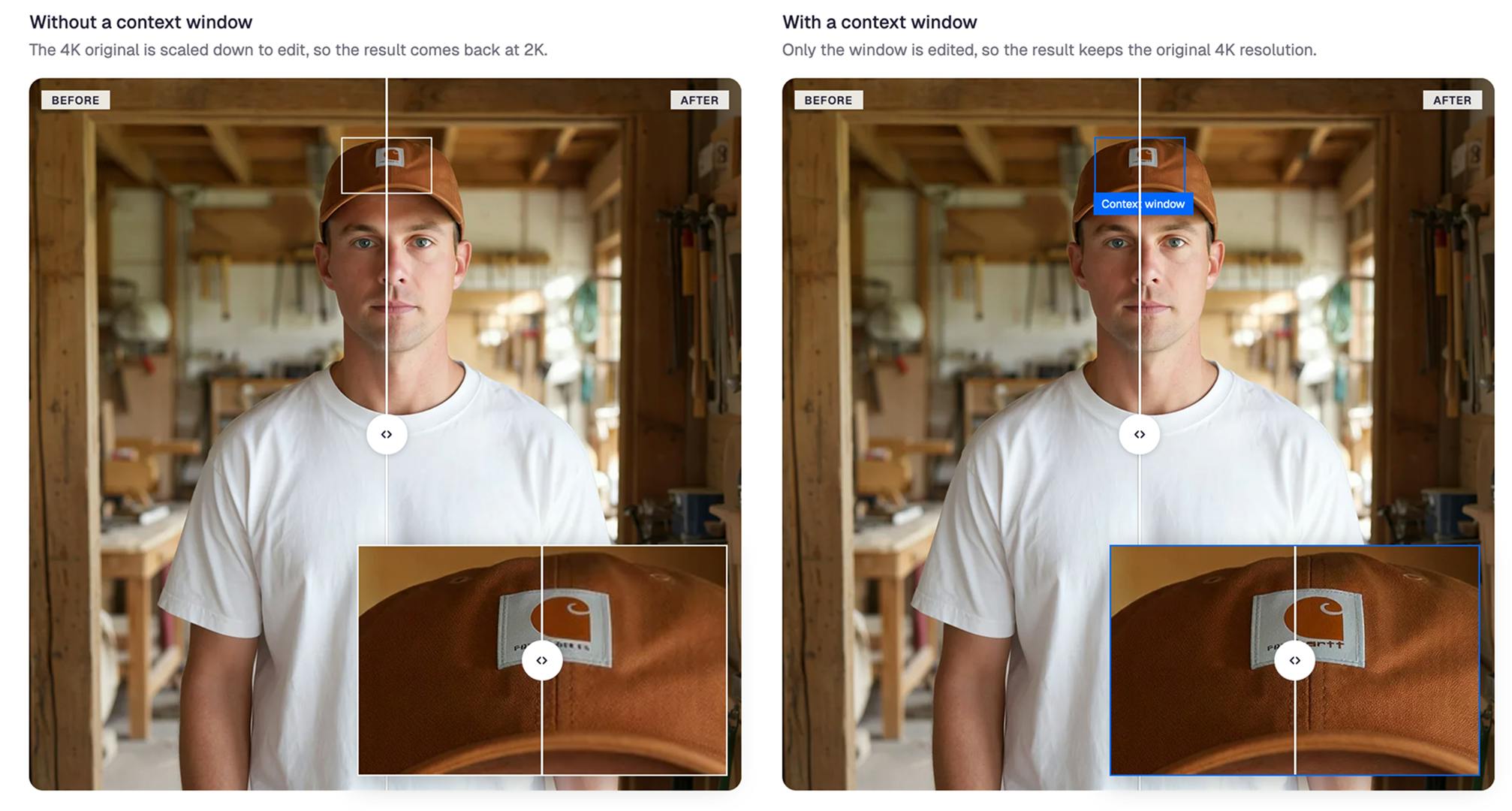
Image editing tools are moving from "redrawing" to "refining." The Precise Edit upgrade that Ideogram launched on Product Hunt centers on introducing a context window mechanism, so local edits no longer sacrifice the original image's resolution. The product received 101 upvotes under the Design Tools category, ranking 3rd for the day.
What the Context Window Changes
The common approach in traditional AI image editing is: upload an image, the model understands the whole, and generates a modified result. The problem is that the generation process often involves resampling the resolution, and small text, logo edges, and texture details gradually blur after multiple rounds of processing.
The key to this Ideogram upgrade is that Precise Edit now supports a context window, enabling editing at the original pixel level at any resolution, up to 8K. In other words, when the model makes a local change, the pixel information of the surrounding area is fully preserved and used as contextual reference, rather than being compressed or redrawn. The official description explicitly states that the rendering sharpness of small text, brand marks, and fine details is thus improved.
This is clearly significant for design workflows that require repeated fine-tuning—in the past, each edit could cost a bit of image quality, but now this chain of loss is cut off.
Context window in generative AI generally refers to the range of input the model can reference in a single processing pass. In image editing scenarios, it refers to the surrounding pixel region that the model can simultaneously read and keep consistent when making a local modification. Similar to the token window in language models, the size of the image context window determines how much original information can be retained within the model's "field of view." The larger the window, the less the model needs to compress or redraw surrounding areas, thereby avoiding resolution loss. Ideogram applies this mechanism to pixel-level editing, so that during local modifications the surrounding environment is fully preserved as a high-fidelity reference rather than relying on model inference.
8K and Original Pixels: Trade-offs for Professional Scenarios
Supporting up to 8K resolution and operating at the original pixel level—these two parameters together point to professional design scenarios rather than ordinary users' social media image needs.
Print materials, large-format posters, and brand logo areas in e-commerce detail pages are all typical high-resolution must-have scenarios. What these scenarios share is that the edited area may occupy only a small portion of the whole image, but the surrounding environment must remain absolutely consistent. The value of the context window is amplified here—the model does not need to "guess" what the surroundings look like, because it directly reads the original pixels.
At present, the information released officially focuses on capabilities and does not disclose changes to the underlying model architecture or inference costs, so practical experience metrics such as editing speed and per-run processing time still need hands-on verification.
Original pixel editing means the model operates directly on the image's native resolution grid, rather than first scaling or resampling the image to a fixed size before processing. Traditional AI editing pipelines often downsample the input uniformly to a fixed resolution supported by the model (such as 1024×1024), then upscale after editing, causing loss of detail. Original pixel editing requires the model to handle inputs of arbitrary resolution, typically involving more complex architecture design or tiling strategies. For 8K images, original pixel editing means a single processing pass must carry information of about 33 million pixels, placing higher demands on VRAM and inference efficiency—which is also why this capability is currently mostly found in professional tools.
The Competitive Focus in the Design Tool Track
Judging from the Product Hunt category, Precise Edit is placed under Design Tools, alongside Photo editing and Artificial Intelligence. This positioning shows that Ideogram is not aiming at the "AI image generation toy" market, but at the editing step in professional design workflows.
The competitive focus of image editing products is shifting: from "can it generate good-looking images" to "can it change the right place without damaging the original image." The context window is precisely the technical lever for this shift—it addresses fidelity, not creativity. For designers, the former determines whether a tool can enter formal production workflows.
A result of 101 upvotes and 3rd place is a mid-to-upper performance on Product Hunt, with only 2 comments, indicating that community discussion is still at the early-adopter stage and that real reputation needs more time to build.
Product Hunt's ranking mechanism is calculated in real time based on the number of new upvotes that day. Reaching the top three with 101 upvotes shows that the product gained relatively high attention during its launch window, but the absolute number of votes is not particularly high. Only 2 comments reflects a lack of in-depth discussion—highly regarded products on Product Hunt usually accumulate dozens of comments on launch day. This combination of data indicates that the Precise Edit upgrade news reached some design tool followers but has not yet triggered a broad trial-and-feedback loop, and community validation is still at an early stage.
Usage Recommendations and Points to Watch
If you are already using Ideogram for design, the Precise Edit upgrade is worth directly testing on three types of tasks: modifying materials with small-text layout, replacing logo areas, and local color grading of high-resolution images. These three tasks best expose whether resolution retention is as described.
What is worth watching next is the boundary of editing precision—how large a range of semantic consistency the context window can cover, and whether image quality remains stable after multiple consecutive edits. The official information currently only gives the capability ceiling, not these boundary conditions, so the actual experience still needs to be verified by designers with real projects.
One-line Summary
Ideogram Precise Edit introduces a context window, supporting original-pixel editing of images up to 8K and improving local edit fidelity.
Paragraph Summary
Ideogram released the Precise Edit upgrade on Product Hunt, centered on introducing a context window mechanism that enables local edits at the original pixel level, supporting images up to 8K resolution. This mechanism lets the model fully preserve surrounding pixels as reference when modifying a local area, avoiding the image quality loss caused by repeated resampling in traditional pipelines, thereby improving the sharpness of small text, logos, and fine details. The product targets professional design scenarios such as print materials, large-format posters, and e-commerce detail pages. It received 101 upvotes and ranked 3rd on Product Hunt, but with only 2 comments, community reputation is yet to accumulate. The official information does not disclose editing speed or stability after consecutive edits, and the actual experience needs to be verified by designers.
Related articles
GitHub Daily · November 05: Skills Ecosystem Explodes, Agents Begin to Take Over the Desktop
GitHub Daily Nov 5: Skills ecosystem explodes with five 'skills' repos trending; vercel-labs' agent-desktop and agent-browser build agent limbs; Rust dominates agent infrastructure.

Deleted Reddit Post Sparks Debate Over AI Content Moderation
A Reddit post removed with only a 'Removed by Reddit' notice highlights AI content moderation's transparency gaps, misjudgment risks, and appeal challenges for platforms and creators.

DSH + Ollama Local LLM Deployment in Practice: Free Chat with Da Fei Yu
Bilibili creator tests DSH + Ollama local LLM deployment end to end: Ollama install, Xunlei-accelerated downloads, ModelScope GGUF model import, DSH custom API address setup, and a comparison of Qwen 3.5 4B, 8B, Gemma, and other models on 8GB VRAM, with advice on choosing local deployment vs. API calls.