Inside Always-On AI Agents: Persistence, Proactivity, and Long-Running Task Architecture

How always-on AI agents work: cloud VMs, persistent workflows, layered memory, and prompt caching engineering.
In Stanford's CS146S course, SpaceX engineer Lee breaks down how always-on agents differ from traditional terminal harnesses — running on cloud servers, sleeping and resuming on demand, with dedicated Linux machines and long-term memory that make them feel like digital colleagues. The talk covers four eras of AI development, six key model capabilities (including computer use and subagent collaboration), the Firecracker VM and Temporal durable workflow architecture, and practical context engineering techniques like prompt caching, dynamic tool discovery, and compaction — arguing that system design and architectural decisions will be increasingly decisive in the agent era.
From Terminal Scripts to Digital Colleagues
In Stanford's CS146S course, Lee, an engineer from SpaceX, offered a systematic breakdown of an emerging class of AI products: always-on, proactive, persistent agents. The contrast with the "simple harness" students built the previous week — where a model calls tools in a loop — is stark. A traditional harness stops running the moment you close your laptop; an always-on agent runs on a cloud server and keeps working even after you shut down, reboot, or crash.
Lee calls these agents "bots." Each has its own cloud-based Linux machine (complete with a desktop, files, and browser), can save files, and accumulates long-term memory of how you work. It feels more like a colleague than a Q&A chatbot — it knows when to stay quiet, only interrupting you when there's meaningful progress to report, and can be triggered by a Slack message, an email, or other events rather than requiring you to type commands in a terminal. The goal is to keep it working continuously for weeks or even months.
The Four Eras of AI-Assisted Development
Lee divides the evolution of developer collaboration with AI into four phases. The first is copying and pasting code from ChatGPT into an editor. The second is when models gain the ability to edit files and run shell commands, forming a simple terminal harness. The third is when coding agents get dedicated applications and can run as multiple parallel instances — but humans remain the bottleneck, needing to approve each command one by one. The fourth is the current era of always-on agents: they run ambiently in the background, have their own computers and memory, and learn new skills as they work.
A key shift is in how interaction works. The old pattern was "prompt → wait → approve command" — a queue model. Now the paradigm is steering: you can interrupt at any time with something like "go check out that thread and hold off on the other thing until Thursday." Early models would get confused by such interruptions; today's models and harnesses can parse these contextual instructions the way you'd follow a friend mid-conversation.
For actions like sending emails or Slack messages, the industry has introduced "auto review" — a separate AI model that checks all pending commands. Interestingly, compared to the approval fatigue humans feel when facing hundreds of shell commands, model-based review is often safer and more thorough.
Six Model Capabilities Powering Always-On Agents
Lee identified the core model advances over the past year or two that have made this shift possible:
- Long-horizon instruction following: Models can run for hours or days without losing coherence, staying stable with the help of compression and compaction techniques.
- Subagent collaboration: The primary agent can delegate token-heavy or tool-intensive tasks to a "helper" with a fresh working memory; the helper returns only results, approximating an experience of infinite context.
- Robust tool calling: A few years ago, models hallucinated frequently and could barely call tools reliably. Today, hallucination is nearly a "solved" problem, and models can operate a full Linux computer much like a human would.
- Computer use: Models can click on screens, enabling any SaaS platform or website without an API or MCP to be controlled headlessly and autonomously.
- File-based memory: All information is stored in files; models excel at recalling it via shell commands like grep and search. User preferences (e.g., "prefers lowercase text") are injected into every prompt, while work logs are retrieved on demand.
- Skills and routines: Task-specific know-how is encoded into Markdown skill files, forming a skill ecosystem co-built by companies and developers. Routines act like cron jobs, triggering prompts on a schedule. GrokBot also features a plugin system where any tool can be installed via skills or servers.
The mechanics of computer use are worth unpacking. Rather than directly controlling a mouse and keyboard, the model "observes" screen state through screenshots or by reading the UI's accessibility tree, then outputs action commands — click coordinates, keyboard inputs — which the harness layer executes before returning a new screenshot. This creates a perception-decision-execution loop. Anthropic was first to expose this capability in Claude 3.5 in 2024, calling it the "Computer Use" API. The accessibility tree is the structured UI description the operating system exposes for assistive technologies (like screen readers), containing semantic information such as button names and text field contents — it uses fewer tokens than screenshots and is easier for models to reason about. MCP (Model Context Protocol) is an open protocol from Anthropic that lets models connect to external tools and data sources in a standardized way, analogous to USB-C for hardware peripherals. When the article refers to SaaS products without an API or MCP, it means services that don't support this kind of structured access — for those, computer use is the fallback.
The System Architecture Behind "Always-On"
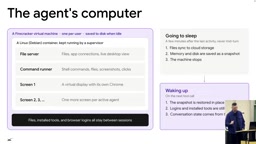
"Always-on" doesn't actually mean spinning 24/7. Lee describes a left-to-right state flow: the server and the agent's dedicated computer are dormant by default; a message or trigger wakes them and loads state; a browser is spun up only when needed; when done, both are put back to sleep, with state (conversation logs, memory, routines) persisted to a database. This design reflects a real constraint — there aren't enough machines in the world for every user to have a continuously running instance, and server costs are substantial.
Wake-up triggers are increasingly varied — beyond direct prompts, Slack messages, phone calls, and meetings can all fire them. Within SpaceX, it's already common for employees to send a bot to a meeting to take notes. A router handles deduplication and decides "whether to interrupt the user" — like a good colleague who doesn't check in every time they make a small step forward.
The agent's Linux machine runs inside a Firecracker VM, making it easy to snapshot, shut down, and restart. Users can connect in real-time to observe or manually take over. Multiple bots can each have their own virtual desktop and browser.
The architecture follows a "thin client, thick server" model: commands enter a queue, invoke the "agent loop" (the model calling tools in a loop), and are archived to a database on shutdown. Keeping the agent loop on the server rather than inside the VM is critical — this way, zero-day security updates and VM rebuilds don't take down the agent service. At a lower level, there's also a distinction between job queues and durable workflows: a regular queue that crashes requires replaying steps one through three from scratch, whereas a durable workflow built with Temporal can resume from step three directly after a failure.
Firecracker is a lightweight virtual machine monitor (VMM) open-sourced by AWS, built on Linux's KVM technology. Designed for serverless and containerized workloads, it can start a microVM in under 125 milliseconds with far lower memory overhead than traditional VMs. Compared to Docker containers, Firecracker provides stronger hardware-level isolation (each VM has its own kernel) while retaining near-container startup speeds. For always-on agents, this means you can rapidly create a "private Linux machine" for each user, snapshot and hibernate it when idle to save compute, and resume it in milliseconds when triggered — balancing security isolation with cost efficiency. AWS Lambda and Fly.io both use Firecracker under the hood.
Temporal is an open-source durable workflow orchestration framework originally developed by the Uber engineering team. Its core idea is "workflows as code": developers write business logic in ordinary programming languages, and Temporal persists the execution state of every step to a database. If a program crashes or a service restarts, it can resume from the breakpoint without replaying all prior steps. Compared to a plain message queue — where a crash requires retrying from the beginning — Temporal allows resuming from the point of failure, dramatically reducing risk for long-running tasks. This is essential for agent tasks that span days or weeks.
The Engineering Art of Harness Design and Context Optimization
The defining feature of GrokBot's harness is that only one tool, send-to-user, mediates communication between client and server — keeping the architecture extremely lean. The client is just "texting the server"; all the heavy tools live server-side. Whether the interface is mobile, desktop, email, or Slack, everything speaks through the same interface, with the client deciding how to render it richly (login forms, Stripe payments, email draft approvals, or even just a single emoji).
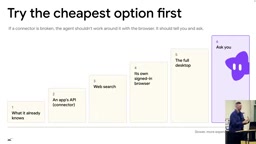
The context window is the model's working memory. Stuffing all tool schemas for Google Drive, Gmail, YouTube, and more into every prompt would crowd out conversation space. The solution is dynamic context / a tool search tool: each message includes only tool names, and the model fetches details on demand, saving tokens and cost. The overarching principle is "try the cheapest and most reliable approach first" — start with what's already in the conversation history, then plugins/APIs, then web search, then opening a browser, then the full desktop, and only as a last resort interrupt the user.
Browser-based information retrieval also has three tiers, ordered from cheapest to most expensive: reading the accessibility tree uses the fewest tokens, followed by HTML, and finally screenshots or pixel-level clicking.
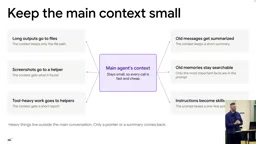
The primary agent acts as an orchestrator and should keep its own context sparse, delegating expensive work to subagents with specialized skills. Each subagent is an independent durable workflow — recoverable on crash. Some hard-won practical advice: don't add or remove tools mid-turn, as this breaks caching; if the model spends 90% of its time running the same type of shell command, build a dedicated tool for it; write clear error messages for agents with the same care you'd give human-facing ones.
Prompt caching is the key to cost reduction. Most tokens in a typical session are cache hits — each turn only appends new messages at the end of the conversation. Keeping system prompts and tool definitions as static as possible, in a consistent order (hashing each section, never shuffling even during A/B tests), maximizes cache utilization. There's also a clever trick: warm the cache server-side as soon as the user starts typing — similar to link prefetching on a webpage. The speaker recalled how, when OpenClawAd became popular earlier this year, there were massive cache misses because model providers hadn't designed their caching assumptions around this always-on usage pattern.
Compaction is inevitable. Assuming a 200K context window will eventually fill up, you must do lossy compression without losing critical details. One technique is to compact proactively while the cache is still "warm," so when the user returns they resume from a summary — cheaper and seamless. Memory is organized in layers: essential user facts always present, timestamped historical logs, ephemeral scratch pad notes — everything else is retrieved via file lookup. It's quite similar to how the human brain garbage-collects information.
Prompt caching is a cost-reduction mechanism offered by major model API providers (including Anthropic and OpenAI). When processing a request, the model generates a KV (Key-Value) cache for the token sequence it has processed. If a subsequent request shares an identical prefix, the cached result is reused directly — skipping recomputation and typically reducing cost to 10–25% of the normal price. This requires the "static portions" of the prompt (system prompt, tool definitions, etc.) to be byte-for-byte identical; even inserting a single space causes a cache miss. The OpenClaw cache miss surge mentioned in the article happened because always-on agent usage caused system prompts to shift continuously, exceeding the caching assumptions providers had designed for short sessions. The technique of pre-warming the cache as the user begins typing is essentially sending a "dummy request" before the user finishes typing to trigger cache population — analogous to browser DNS pre-resolution or link prefetch, a classic latency-hiding engineering technique.
The Training Flywheel and What Comes Next
Lee recapped the three-stage LLM training pipeline: pretraining to learn world knowledge, supervised fine-tuning (SFT) to learn behavioral patterns, and reinforcement learning (RL) to learn "how to play the game." For always-on agents, SFT exposes the model to the harness and available tools, while RL improves instruction following, correct skill selection from hundreds of options, and precise browser navigation. Inference serving can also be differentiated: the primary agent needs low-latency fast responses, whereas whether a background subagent finishes in 10 or 12 minutes barely matters.
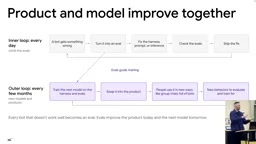
The whole product iterates through a "dual-loop flywheel": the inner loop has the team discovering bugs daily, measuring with evals, fixing harness/prompt/inference, and shipping; the outer loop trains a new model every few months, steadily improving eval scores and unlocking new capabilities (like multi-bot collaboration in group chats — incidents at Mojibake and Hugging Face both showed this is a tricky area).
Lee shared a principle he's applied at both Cursor and SpaceX: "delete the product." You should assume today's model is the worst you'll ever use. In six months, you may need to rebuild the UI from scratch, so build the thinnest possible interface for the next generation of models. His predictions for the next 6–12 months: agent task duration extending from hours to weeks and months, memory retrieval algorithms continuing to improve, interfaces potentially shifting toward voice, and models becoming better at on-the-job learning and skill encoding.
One sharp open question stands out: When an agent runs for a month and models are updated monthly, how do you evaluate it? You either build better evals or slow down the model release cadence. Other open challenges include memory algorithms, harness security (preventing prompt injection and malicious takeover), and the judgment of when to stay silent versus when to interrupt.
Quoting Open Router's Alex: some people complain that every app looks the same these days (sidebar + agent + chat box), but this is like 2005 when everyone was building "server + database + CRUD interface" — this is the new normal. Durable workflows, sandboxes, cloud computers, memory skills, voice, payments, identity, evaluation, observability — every one of these boxes corresponds to billions or trillions of dollars in VC capital and 20 startups competing in the space. They are the new primitives of the next generation of products.
Three takeaways for engineers: system design and architecture matter more than ever, and these decisions compound over time; go fork the open-source GrokBot, pair it with a sandbox and VM, and build it yourself; and don't shy away from understanding how LLMs actually work — just as building web apps requires understanding databases, a huge number of product and harness-layer decisions today are shaped by the model itself. Developing that intuition will give you an edge regardless of your role.
The three training stages mentioned are crucial for understanding where model capabilities come from. Pretraining performs unsupervised learning on massive internet text, giving the model language understanding and world knowledge — but models at this stage are not controlled; their outputs resemble "text continuation" rather than conversation. Supervised Fine-Tuning (SFT) uses high-quality, human-annotated dialogue examples to teach the model "how to respond," instilling instruction following and specific formats and tool use; for always-on agents, SFT datasets include harness call logs, helping the model internalize tool-usage norms. Reinforcement Learning (RL) — represented by RLHF, GRPO, and similar methods — uses reward signals to let the model optimize its strategy through trial and error, such as receiving a reward for clicking the correct target in a browser task and a penalty for wrong actions. This phase is particularly critical for capability leaps in agents. The "differentiated inference" strategy (primary agent needs low latency, background subagents can run slowly) is also related to the differing latency sensitivities of models trained with RL.
Related articles

Amphibious Transforming Drone: Beyond 100x Power Savings, What Are the Real Needs?
Is the amphibious transforming drone just a gimmick? Starting from the 100x power difference of the M4 Morphobot, explore real application scenarios and thesis topic ideas, analyzing boundary conditions where pure drones and pure ground robots both fail.

Warhound Raises $200 Million: Genetically Engineered "War Dogs" Paired with Anduril Gear
Warhound raises $200M, backed by Ben Lamm and Palmer Luckey, to genetically engineer dogs for military and law enforcement use and equip them with Anduril gear. This article analyzes its technology direction, funding logic, and ethical controversy.

Claude API Comes to Google Cloud: IAM Integration and SDK Access Guide
Anthropic hosts the full Claude API on Google Cloud with IAM-controlled permissions and unified billing. This guide covers the Vertex AI and Anthropic-hosted entry points, IAM role configuration, and SDK access.