Inyon: Control Coding Agents from Your Phone, Open Source and Free

Inyon maps tmux coding agents to a phone chat UI so developers can reply remotely.
Inyon is an open-source tool from Product Hunt that solves the problem of AI coding agents being interrupted when developers leave their computers. It scans coding agents running in tmux sessions and presents them as a chat interface on your phone or browser; when an agent needs input, you tap to reply, and the content is automatically written to the same tmux pane, preserving state. It supports Claude Code, Codex, Gemini CLI, OpenCode, Copilot CLI, and Antigravity, uses no accounts, pairs an Android app via QR code, communicates over E2EE or your own VPN, and is free under the MIT license. Limitations: Android only and heavy reliance on tmux.
In today's world of increasingly popular AI coding assistants, developers often run multiple coding agents (such as Claude Code, Codex, Gemini CLI, etc.) simultaneously. But once they step away from the computer, interaction with these agents is interrupted. A new tool on Product Hunt called Inyon aims to solve this pain point: it lets you answer coding agents' questions from your phone or browser without being tethered to the terminal.
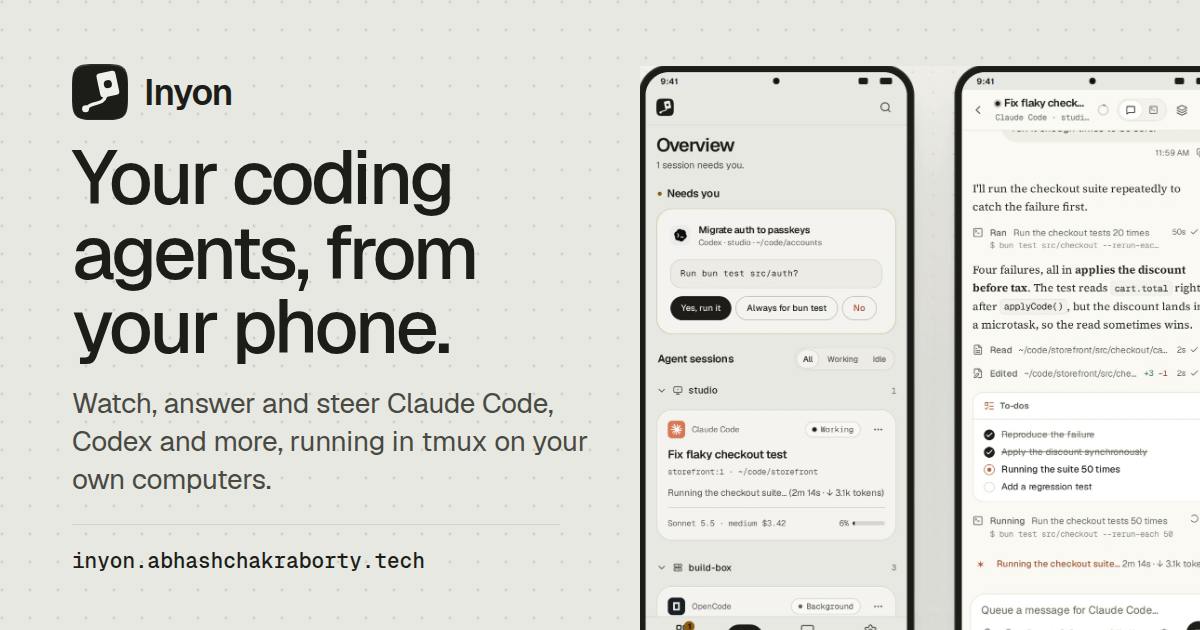
Core Features: Turn tmux Sessions into Phone Chat
Inyon works in a straightforward way: it scans the tmux sessions on your machine for running coding agents and presents them as a chat interface on your phone or browser. When an agent needs input, you can reply with a tap, and the content is automatically entered into the same tmux pane. This means that when you return to your computer, everything remains in its original state with no extra steps required.
Currently supported agents include Claude Code, Codex, Gemini CLI, OpenCode, Copilot CLI, and Antigravity. This covers the mainstream command-line AI coding tools, so developers accustomed to parallel multitasking can keep track of each agent's progress anytime, anywhere.
What is tmux
tmux stands for terminal multiplexer, a command-line tool widely used on Unix-like systems. Its core capability is allowing users to create multiple "sessions" within a single terminal window, each of which can be split into multiple "panes" or "windows." The key point is that tmux sessions exist independently of the terminal window: even if the user closes the terminal or disconnects the SSH connection, the session continues running in the background and can be reattached later to see the exact same state.
This characteristic makes tmux an ideal vehicle for long-running tasks. In the context of AI coding agents, developers often run processes like Claude Code and Codex in tmux panes so that even if the network drops or the laptop is closed, the agent won't be killed. Inyon leverages tmux's programmable interfaces (such as tmux send-keys and capture-pane) to read pane output and inject user input, thereby "translating" terminal sessions into chat messages. Understanding this also explains why Inyon must depend on tmux—it is essentially building a layer of remote interaction adaptation on top of tmux.
Interaction model of command-line coding agents
Tools like Claude Code, Codex, and Gemini CLI differ from traditional code completion plugins. They run as command-line processes and adopt a "conversation + tool call" loop: the agent reads the codebase, executes commands, modifies files, and pauses at key points to request confirmation from the user (for example, "Allow this shell command to execute?" or "Which implementation approach do you prefer?"). These questions are presented as terminal text, waiting for the user to input via stdin before continuing.
This interaction model means the agent's progress depends heavily on real-time human response. Once the user leaves the terminal, the agent blocks while waiting for input. Inyon's product value is built on this mechanism: it doesn't replace the agent but instead extracts the "waiting for input" step from the terminal, forwards it to the phone, and writes the answer back to the original process. Compared to letting agents run fully unattended and autonomously, this human-in-the-loop approach preserves developer control and aligns better with the security design of current coding agents, which generally require permission confirmations.
Security and Privacy: No Account, End-to-End Encryption
Inyon emphasizes that no account registration is required and there is no backend you need to self-host. The Android app pairs via QR code, then connects to your computer through an end-to-end encrypted tunnel or your own VPN. This design reduces the risk of data leaks and lowers the barrier to use.
The project is open source under the MIT license and completely free. For developers who care about privacy and cost, this is an attractive combination.
End-to-end encryption and QR code pairing
End-to-End Encryption (E2EE) means data is encrypted at the sender and decrypted only at the receiver, so intermediate servers or network nodes cannot read the plaintext. In Inyon's architecture, what travels between the phone and computer is terminal content and user input, which may include source code, keys, command output, and other sensitive information—so E2EE is a necessary privacy safeguard.
QR code pairing complements E2EE: on first connection, the computer generates a QR code containing the public key fingerprint and connection information; the phone scans it, and both sides complete key exchange and establish trust, preventing man-in-the-middle attacks. Since there is no account system, key distribution cannot be done through a login server, and QR code out-of-band verification fills exactly this gap. Combined with optional VPN connections, users can restrict communication to network paths they control, further reducing exposure. This design strikes a balance between the convenience of "zero registration" and security.
Use Cases and Limitations
The typical scenario is: you start multiple coding agents on your computer to handle different tasks, then leave your seat. When an agent needs confirmation or a choice, Inyon on your phone notifies you like a chat message; you quickly reply and continue with whatever you're doing. When you return to the computer, all terminal states remain untouched.
However, Inyon currently only offers an Android app (paired via QR code), so iOS users may not be able to use it directly. Additionally, it depends on tmux, meaning your workflow needs to be based on tmux sessions. Developers unfamiliar with tmux may need to adapt first.
Conclusion
Inyon is a lightweight, focused developer tool that solves a real pain point in the AI coding era: freeing developers from the terminal without interrupting the agent's workflow. Open source, free, and end-to-end encrypted are its highlights, but the Android-only limitation and tmux dependency may restrict some users. If you frequently use command-line coding agents and want to respond remotely, it's worth a try.
One-line Summary
Inyon maps coding agents in tmux to a phone chat interface, letting developers reply to questions remotely.
Paragraph Summary
Inyon is an open-source tool that appeared on Product Hunt, designed to solve the problem of interrupted interaction with AI coding agents when developers leave their computers. It scans coding agents running in tmux sessions on your machine and presents them as a chat interface on your phone or browser; when an agent needs input, the user taps to reply, and the content is automatically written into the same tmux pane, preserving state when you return to the computer. The tool supports mainstream command-line agents such as Claude Code, Codex, Gemini CLI, OpenCode, Copilot CLI, and Antigravity, uses an account-free design, pairs the Android app via QR code, communicates over an end-to-end encrypted tunnel or a user's own VPN, and is free and open source under the MIT license. Its limitations are that it currently only supports Android and relies heavily on tmux workflows.
Related articles

Gemini CLI's Seven Key Features: A Million-Token Open-Source Terminal AI Agent
What is Gemini CLI? Discover its seven key features: Apache 2.0 open source and free, 1M token context, MCP integration, GEMINI.md configuration, slash commands, and Google Search grounding, plus getting-started advice.

Google Gemini CLI Installation Guide: Get Started in Three npm Steps
Complete Google Gemini CLI installation guide: confirm Node.js, install @google/gemini-cli globally via npm, reopen terminal to verify, log in with a Google account or API Key, and learn the .gemini config directory and common commands.

We Tested 5 AI Coding Assistants: Only Two Were Worth Keeping
We tested five AI coding assistants on one real codebase task: Cursor wins with multi-file editing at $20/month, Claude Code stands out with terminal agents and self-repairing tests, while Copilot, Devon Desktop, and Replit Agent lose out due to opaque billing.