iPhone Duo App Ideas Roundup: The Foldable Screen Potential Begins to Emerge
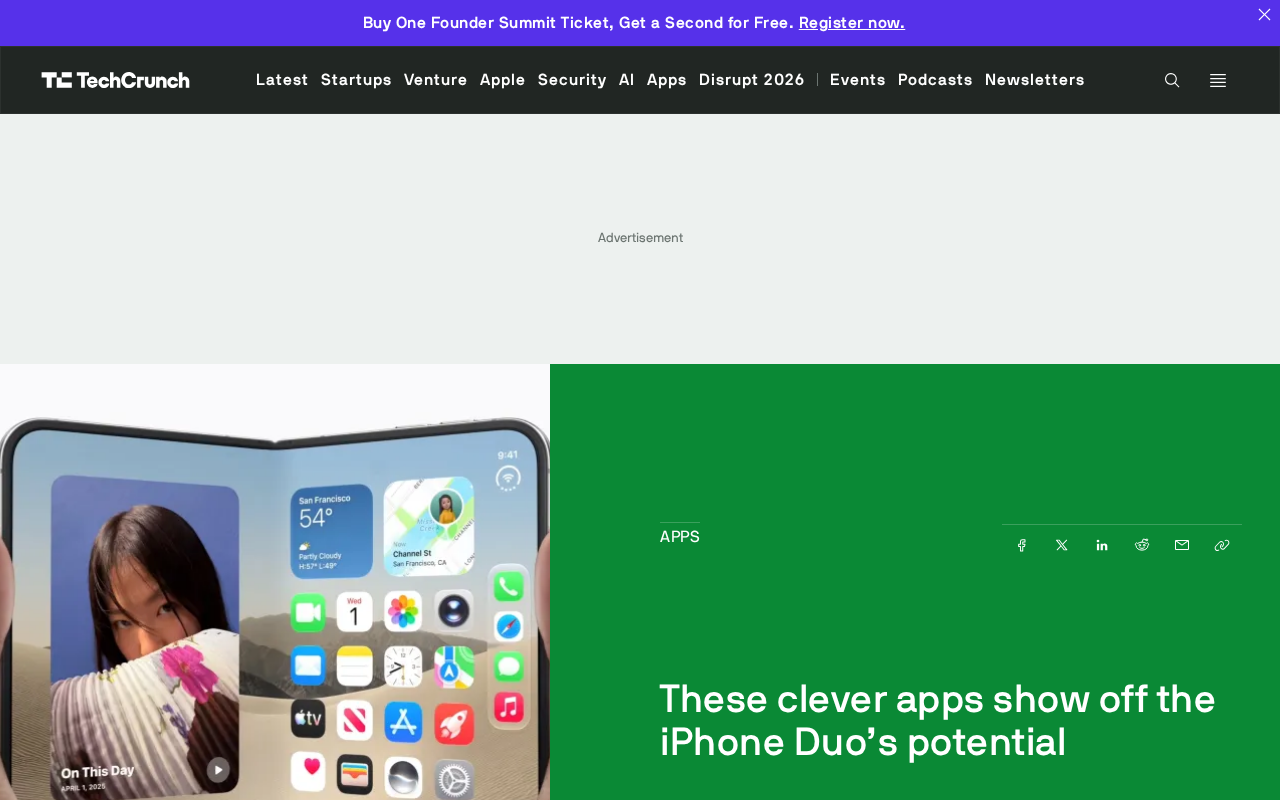
Before iPhone Duo launches, developers are exploring foldable form-factor advantages with creative apps like cassette players and toasters.
Apple's first foldable iPhone (iPhone Duo) hasn't launched yet, but developers have already released concept apps including a retro cassette player, digital toaster, virtual notebook, and flight tracker. Rather than simply stretching the interface, these apps bind the physical fold motion to digital interaction—using fold angle to control toasting, or half-fold for notebook mode. Most apps remain at the interface simulation level, with native foldable APIs not yet fully open; developers are mainly adapting from Android foldable experience. Despite challenges in form-switching adaptation, unclear sensor permissions, and undefined interaction standards, early entrants can gain exposure and help define the foldable interaction language.
The Foldable iPhone Makes Its Debut: Developers Explore Form-Factor Advantages with Creativity
Apple's first foldable iPhone—the iPhone Duo—has yet to officially go on sale, but the developer community can hardly contain itself. From retro cassette players to virtual notebooks, from flight trackers to digital toasters, a batch of wildly imaginative apps is redefining how foldable phones can be used. These works not only showcase developers' creativity but also send a signal: the interactive potential of foldable screens is far from being exhausted by the logic of traditional slab phones.
According to an RSS source report, the core idea behind these apps is to leverage the larger canvas and multi-form switching capability of the unfolded screen. Rather than simply stretching the interface to fit, developers prefer to make the foldable form itself part of the interaction—for example, implementing a top-and-bottom split-screen "notebook mode" in the half-folded state, or using the switch between the outer and inner screens to create a coherent narrative experience.
Retro and Virtual: Two Typical App Approaches
Cassette Player and Digital Toaster: Nostalgia-Driven Form Adaptation
The retro cassette player app is a particularly representative case. It doesn't simply simulate a cassette interface; it binds the physical opening and closing motion of the foldable screen to the metaphor of "play/pause"—unfolding the screen is like inserting a cassette, while the half-folded state corresponds to the visible window during playback. This approach of fusing hardware form with digital interaction is difficult to replicate on slab phones.
The digital toaster app is even more playful: it uses the fold angle of the screen to control the "toasting level"—the more the screen unfolds, the more golden-brown the bread becomes. Such apps may seem absurd, but they precisely test the degree to which the hinge angle sensor APIs are exposed, paving the way for more practical applications down the line.
Virtual Notebook and Flight Tracker: Initial Exploration of Productivity Scenarios
The virtual notebook app attempts to turn the foldable screen into a real digital notebook: when unfolded, the left and right pages correspond to notes and reference materials respectively; when half-folded, it's like a book standing upright. The flight tracker uses the large screen to display real-time flight maps and flight information panels, while in the folded state the outer screen shows only key alerts.
These apps are still at the proof-of-concept stage, but they all point in one direction: the value of a foldable screen lies not in "a bigger screen" but in "a variable form." Developers are using lightweight creativity to probe the boundaries of this form.
The "half-fold hover" capability of foldable screens is the core interaction dimension that distinguishes them from traditional slab phones. When the device is folded to about 90°, the screen naturally splits into two visible areas—upper and lower—forming a physical shape similar to a laptop: the upper half can serve as a display surface and the lower half as an input surface or control panel, and it can stand stably without a stand. This mode is called Flex Mode (Samsung) or hover mode in the Android ecosystem and has been used for camera framing, video playback, and video conferencing. The virtual notebook app borrows this physical characteristic: when half-folded, the top and bottom screens handle "reading" and "note-taking" respectively, simulating the page-turning feel of a real book. The flight tracker uses the outer screen (the secondary screen in the folded state) to display key alerts such as gate and delay information, and presents the full flight map and multi-panel information after unfolding the inner screen. This division of labor—"quick glance on the outer screen, immersion on the inner screen"—requires apps to maintain state continuity across the two screens, placing higher demands on developers' lifecycle management.
Early Signals from the Developer Ecosystem
From this batch of apps, it's clear that developers' attitude toward the iPhone Duo is positive but cautious. The positive aspect is that they are willing to invest time in building concept apps to grab early exposure; the cautious aspect is that most apps remain at the interface simulation level and have yet to deeply call the foldable-specific sensors and interaction protocols.
This may be related to Apple not yet fully opening foldable-related APIs. According to the RSS source content, these apps are mostly developers migrating experience from existing foldable devices (such as Android products) and adapting to the expected form of the iPhone Duo. The true native foldable interaction paradigm may only become clear after the device officially goes on sale.
The core technical difficulty in foldable app adaptation lies in state preservation and layout rearrangement during "configuration changes." When a traditional phone rotates its screen, Android notifies apps to redraw via configuration change callbacks, and iOS does so via size class change notifications. But form switching on a foldable screen is more complex than portrait/landscape rotation: screen size, aspect ratio, pixel density, and even the available camera area may all change simultaneously, and the switching process may be accompanied by the app briefly losing focus. If handled improperly, the text the user is editing, the scroll position, or playback progress will be lost. Mature adaptation solutions typically employ responsive layouts plus state persistence: use breakpoints to define layout variants for different fold states, store UI state separately from the view, and quickly restore it on configuration changes. In addition, apps need to consider the "intermediate state" during folding—for example, how the interface smoothly stretches without jumps or blank areas during the transition animation from half-folded to fully unfolded. These engineering details determine whether a foldable app is "usable" or "good to use."
Challenges and Opportunities in Foldable App Development
For developers interested in entering the space, foldable app development faces several real challenges: first, state preservation and layout rearrangement during screen form switching require more refined adaptation logic; second, the data precision and access permissions of the hinge angle sensor are still unclear; third, users' interaction expectations for foldable screens are still forming, and betting too early on a single interaction mode carries risk.
But the opportunities are equally obvious. Early apps are more likely to gain media exposure and user attention, and once an interaction standard is established, latecomers will find it hard to shake it. "Wild idea apps" like the retro cassette player and digital toaster may seem unserious, but they are actually helping the entire ecosystem explore the interaction language of foldable screens—they use low-cost trial and error to set the direction for practical applications.
Form switching on foldable devices relies on the coordinated work of the hinge and the flexible screen, among which the hinge angle sensor is the key hardware that distinguishes foldables from ordinary tablets. This sensor is usually implemented with a combination of Hall elements or gyroscopes and can output the screen opening angle in real time (e.g., 0° fully folded, 180° fully unfolded, with intermediate values corresponding to half-fold hover). Android manufacturers such as Samsung and Huawei have already exposed angle data to developers through frameworks like Flex Mode, enabling apps to dynamically adjust layouts based on the fold angle—for example, during a video call, the upper half displays the video and the lower half displays control buttons. The iOS ecosystem has never had a foldable-form device before, so the API naming, precision, sampling frequency, and privacy permission model of the iPhone Duo's angle sensor are all unknown. If developers want to reproduce angle-driven interactions like the digital toaster, they need to wait for Apple to open the corresponding interfaces; otherwise, they can only indirectly infer the fold state through screen size changes, with limited precision and response speed.
Conclusion: The Form-Factor Dividend Is Just Beginning
The iPhone Duo app ecosystem is still in its infancy, but developers have already proven with creativity that a foldable screen is not a simple replacement for a large-screen phone, but a new category that requires rethinking interaction logic. From cassette players to toasters, behind these seemingly bizarre apps lies a serious exploration of the relationship between hardware form and digital experience. As the device officially launches and APIs gradually open up, more mature foldable app paradigms are worth looking forward to.
One-line Summary
iPhone Duo hasn't launched yet, but developers are already exploring foldable form-factor advantages with creative apps like cassette players and toasters.
Paragraph Summary
Apple's first foldable iPhone (iPhone Duo) has yet to go on sale, but the developer community has already rolled out a batch of concept apps, including a retro cassette player, a digital toaster, a virtual notebook, and a flight tracker. The core idea behind these apps is not simply stretching the interface, but binding the physical opening and closing motion of the foldable screen to digital interaction—for example, using the fold angle to control the toasting level, or using the half-folded state to achieve notebook mode. The article notes that current apps mostly remain at the interface simulation level, native foldable APIs have not yet been fully opened, and developers are mainly adapting based on Android foldable experience. Despite challenges such as form-switching adaptation, unclear sensor permissions, and undefined interaction standards, early entrants can still gain exposure dividends and have the opportunity to participate in defining the interaction language of foldable screens.
Related articles

AWS Launches Official Agent Toolkit: Letting AI Agents Directly Build and Manage AWS Applications
AWS launches the official Agent Toolkit, letting AI coding agents directly build and manage AWS apps across CDK, CloudFormation, Serverless, Bedrock Agents, and DevSecOps.
Does Agentic AI Need Its Own "Second Foundation"? A Three-Loop Architecture Explored
Inspired by Asimov's Foundation series, a multi-agent AI architecture hypothesis proposes execute, verify, and adapt control loops to reduce correlated errors and improve trust in AI results.
Rewriting a Commercial Engine in Jai: The Trade-off Between Performance and Productivity
Exploring the engineering practice of rewriting a commercial game engine in Jai: compile-time metaprogramming and data-oriented design advantages, plus ecosystem maturity and learning curve challenges.