iPhone Duo Transformed into a Windows 98 Gaming PC: Hands-On Test and Experience

XDA tests running Windows 98 and classic PC games on the iPhone Duo via RetroArch and DOSBox Pure—feasible but with mouse and display flaws.
XDA's hands-on test shows that using the iPhone Duo's near-4:3 inner screen and stand-up case, combined with RetroArch and the DOSBox Pure core, allows installing and running Windows 98 SE. A virtual 3DFX graphics card enables classic PC games like Unreal Tournament, Half-Life, and Quake 3 to run smoothly at 640×480. The setup relies on iOS AssistiveTouch for mouse input, but dual mouse pointers and black borders are the main drawbacks, partially mitigated by three-finger zoom gestures and Shortcuts. Windows XP can be installed via UTM SE but takes about two hours, uses roughly 60% battery, and lacks GPU emulation—making it a fun experiment at best. Overall, the Windows 98 setup has lasting value, especially for retro gaming and tinkering enthusiasts.
Turning the latest foldable phone into a Windows 98 PC capable of running Unreal Tournament sounds like performance art, but XDA's hands-on test proves it's actually feasible.
Why the iPhone Duo?
According to the hands-on video from the YouTube channel XDA, the iPhone Duo's inner screen has a near-4:3 aspect ratio, and with the Folio case it can easily stand up, naturally resembling a mini desktop computer. This form factor makes emulating old operating systems and PC games a logical fit—after all, these classic PC games were never available on iOS to begin with. The author admits that running a Windows desktop from the turn of the century on a 2026 flagship phone has a surreal novelty to it.
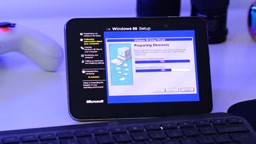
However, to actually make this happen, the first step isn't installing the OS but solving the input problem. iOS natively supports Bluetooth keyboards and mice, but to make the mouse pointer appear, you must enable AssistiveTouch in Accessibility settings and hide the menu when a mouse is connected. These accessibility settings later became the key foundation of the entire setup.
Software Stack: RetroArch + DOSBox Pure + Virtual 3DFX
The core of the whole setup is RetroArch. It's an emulator host, and the author adjusted the layout on the Duo's inner screen: disabling on-screen virtual buttons, enabling a more tablet-like interface, and setting up several keyboard shortcuts so the interface isn't unbearable to look at.
Windows 98 is based on MS-DOS, so the system runs on RetroArch's DOSBox Pure core. This core supports system versions up to Windows Me, but the author chose the more stable Windows 98 SE. Crucially, DOSBox Pure supports adding a virtual 3D graphics accelerator card that can emulate an entire 3DFX graphics card—a capability other iOS emulators lack, and the prerequisite for actually getting 90s 3D games running.
The installation process took about half an hour. After setting performance equivalent to a Pentium-level CPU, a Windows 98 desktop belonging to 2026 appeared on the foldable screen.
DOSBox Pure is a Libretro core based on DOSBox, designed specifically for running DOS games and early Windows systems in RetroArch. It simplifies the traditional DOSBox configuration process, supports directly loading ISO images, automatically mounting discs, and includes built-in virtual sound card and graphics card options. One of its key features is the ability to emulate a 3DFX Voodoo graphics card, achieving Glide API compatibility through software rendering, allowing 90s 3D games like Unreal Tournament and Quake that rely on 3DFX acceleration to run on modern devices. Additionally, DOSBox Pure supports save states, adjusting CPU cycle counts, and mounting different versions of Windows installation images, making it possible to build a retro PC environment on mobile devices.
3DFX was the dominant PC 3D graphics acceleration vendor in the mid-to-late 1990s. Its Voodoo series graphics cards provided hardware acceleration for games through the Glide API, establishing the visual foundation of 3D gaming in titles like Quake and Unreal Tournament. As Direct3D and OpenGL gained popularity, 3DFX was acquired by NVIDIA in 2000, and the Glide API gradually faded from the scene. However, many classic games still rely on the Glide rendering path, so modern emulators often emulate Voodoo graphics cards in software to maintain compatibility with these titles. DOSBox Pure's virtual 3DFX feature emulates an entire Voodoo graphics card, enabling iOS devices to run old games that only support Glide—a capability lacking in other iOS emulator solutions.
Compromises: Two Mouse Pointers and Screen Borders
The experience isn't perfect. Because it's running the iPhone version of RetroArch, the Windows desktop renders at 4:3 within a 16:9 window, which is then displayed on a roughly 4:3 screen, resulting in black borders around the image. More troublesome are the two mouse pointers: one is the Windows pointer, and the other is the system's "ghost pointer," both moving simultaneously. The author notes this is a known bug shared by many apps that use a mouse pointer on the Duo, and similar issues have occurred when using emulators in split-screen on iPad, possibly related to how multitasking is handled.
The black border issue can be mitigated by fine-tuning screen zoom using the three-finger gesture in Accessibility settings, while also adjusting mouse tracking behavior to prevent the zoomed area from moving unpredictably. The author also set up a Shortcuts automation to enable or disable these accessibility features with a single toggle from Control Center, making it easy to switch between "retro PC mode" and daily use.
AssistiveTouch is a tool within iOS Accessibility features, originally designed for users with motor impairments, allowing gestures, device operations, and shortcuts to be performed through on-screen virtual buttons. When a Bluetooth mouse is connected, enabling AssistiveTouch displays a movable mouse pointer and supports custom tracking speed, hidden menus, and other settings. This article's setup leverages AssistiveTouch to let the Windows desktop environment perceive mouse input, while using Shortcuts automation to toggle accessibility features on and off with one tap, quickly switching between retro PC mode and daily use. However, AssistiveTouch's pointer and the emulator's internally rendered pointer may appear simultaneously, causing the "dual mouse pointer" problem, which requires additional tuning to mitigate.
Game Testing: UT, Half-Life, and Quake 3 All Run
After installing 3D drivers, the main source of games is classic PC game ISOs circulating on archive.org. Simply move them to the appropriate folder via the Files app and load them in Windows 98.
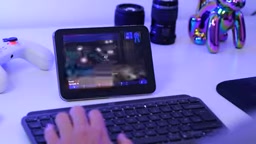
- Unreal Tournament: At 640×480 with medium quality, medium-sized maps run smoothly, but the dual mouse pointers make it somewhat difficult to turn the view with the mouse, requiring keyboard turning and reduced sensitivity to compensate.
- Half-Life: Performs stably in OpenGL mode and under virtual 3DFX, though some scenes drop frames more easily than UT—still fully playable.
- Dungeon Keeper: Performance is sufficient, but the top-down view demands high mouse precision, and the dual pointer issue makes controls less precise.
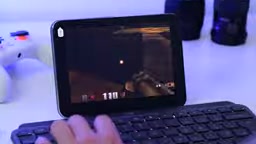
- Quake 3 Arena: The author was surprised by its smoothness; with 3D acceleration, small maps and one-on-one modes perform excellently, and it still looks great visually.
- Gamepad-friendly games: DOSBox supports gamepads, and both Tomb Raider III and Wipeout 2097 run well—the latter requires downclocking the CPU to achieve normal game speed.
Windows XP: Installable, but at a Cost
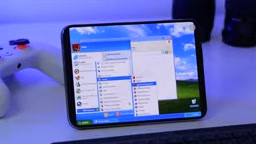
The author also tried Windows XP, which requires switching to the UTM SE emulator because it better supports the Duo's form factor and supports a full mouse. But the installation process was extremely slow on the Duo, taking nearly two hours and consuming about 60% of the battery. More importantly, UTM SE on iPhone currently cannot emulate a GPU, offering only a pure 2D experience. You can play 3D Pinball or bring the blue-and-green Bliss desktop to a coffee shop to spark conversation, but don't expect to run 3D games.
Is It Worth the Effort?
The Windows 98 + virtual 3DFX setup is a combination the author would use repeatedly. The game selection is unexpectedly rich, and with a Bluetooth gamepad, titles like Wipeout and Tomb Raider are enough to convince anyone this is a small foldable gaming PC. RetroArch also offers emulators for specific classic PC games like Quake II, which run very well.
The costs are also obvious: mouse control still needs improvement, the phone heats up noticeably, and different games require different tuning. Windows XP is more of an amusing interlude—the two-hour installation and battery drain will wear down much of the enthusiasm. But for tinkerers and nostalgia enthusiasts, carrying a foldable Windows 98 computer in your pocket is a pleasure that's hard to replace.
Related articles

Mistral Large 4 Open-Sources a Trillion Parameters, Microsoft Offers Voluntary Severance to 60,000 Employees
Mistral Large 4 open-sources a trillion-parameter multimodal model with a coding agent score of 48; SanDisk earnings show AI inference reshaping NAND demand; Google Gemini adds in-app file editing, OpenAI raises Codex quotas, and Microsoft offers voluntary severance to 60,000 employees.

Mistral Large 4 Opens Its Weights: AI Morning Brief Roundup of Models and Ecosystem Trends
Mistral Large 4 opens its weights, a 1-trillion-parameter MoE architecture that can run locally on MacStudio; Meta's test-generation technology enters production; top tax benchmark pass rate only 10.8%; Canadian government takes a stake in Cohere; Doubao Work opens third-party model calls. This AI Morning Brief rounds up model, ecosystem, capital, and policy developments.

Mistral Large 4 Goes Open Source: A 1T-Parameter European Qwen Challenging DeepSeek
Mistral Large 4 is now open source: 1T total parameters, 52B activated, focused on coding and cybersecurity, with ~610G NVFP4 weights. We analyze its comparison with DeepSeek V4 Flash, API pricing, demo realism, and local deployment value.