Is AI-Written Code Safe? Veracode Test Reveals Nearly Half Have Vulnerabilities
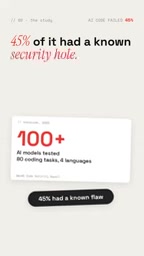
Veracode tests show 45% of AI-generated code has security vulnerabilities, with XSS at 86%—AI ensures functionality, not security.
The article cites Veracode's test of over 100 AI models: 45% of generated code contained known security vulnerabilities, with cross-site scripting (XSS) appearing in 86% of cases, and newer, more advanced models were no safer. The root cause is that AI's checking logic only verifies whether functionality works, without considering who can use it or whether it could be maliciously exploited. A real case: a founder bragged about zero hand-written code, and two days later was attacked—API keys drained, paywall bypassed, database flooded with junk data, forcing him to shut down. Three free fixes are proposed: test paid features while logged out, search for leaked secrets, and add authentication to every API route. The conclusion: AI is only a programming assistant, not a security expert.
Introduction: When AI Confidently Says "Your App Is Secure"
"Your AI says your app is secure. But nearly half of the code is not." This isn't alarmism—it's the conclusion from a Veracode test. The test had over 100 AI models write code, and found that 45% of the code contained known security vulnerabilities, and newer, more advanced models weren't any safer. This data is like a bucket of cold water dumped on every developer who relies on AI-generated code.
Even more troubling is that the most severe vulnerability type is cross-site scripting (XSS), which AI left in 86% of cases. This means attackers can execute malicious code in users' browsers, or even log in as the user. One founder once bragged that his app had not a single line of hand-written code—but two days later he was attacked: API keys were drained, users bypassed the paywall, the database was flooded with junk data, and he ultimately had to shut down the app.
Why Does AI Leave Security Vulnerabilities?
AI's Checking Logic: Functional Correctness ≠ Security
The core of the problem lies in AI's checking logic. AI isn't "lying"—it only checks whether the code works, not who can use it. In other words, AI focuses on functional correctness, not security. It won't proactively consider "could this code be maliciously exploited" unless you explicitly ask it to.
This limitation is fully exposed in the tests. When AI generates a login feature, it may correctly validate the username and password, but without an explicit requirement, it won't add rate limiting to prevent brute-force attacks, nor will it strictly sanitize input, opening the door to XSS attacks.
Cross-Site Scripting: AI's "Repeat Offense"
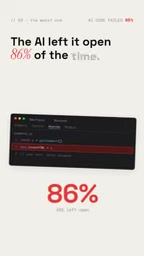
Cross-site scripting (XSS) is the vulnerability AI most often leaves behind. In the tests, 86% of AI-generated code had XSS vulnerabilities. XSS allows attackers to inject malicious scripts into web pages; when other users visit the page, the script executes in their browsers. Attackers can steal session cookies, impersonate user actions, or even fully take over accounts.
For any app handling user data, this is a fatal flaw. AI frequently leaves this vulnerability because it often outputs user input directly without escaping, or uses unsafe DOM operations. Unless the developer explicitly asks to "HTML-escape all user input," AI won't do so on its own.
The three common forms of XSS help explain why AI frequently stumbles. Stored XSS writes malicious scripts permanently into the database (e.g., comment sections), affecting all visitors; reflected XSS "reflects" a script back to the page via URL parameters, often used with phishing links; DOM-based XSS occurs entirely in the browser, triggered by unsafe operations like innerHTML and eval. The most common mistake AI makes when generating code is concatenating user input directly into HTML strings or assigning it directly to innerHTML, instead of using textContent or escaping. The core of defense is "output encoding + input validation + Content Security Policy (CSP)": correctly escape each context where data is inserted into HTML, attributes, JavaScript, or URLs, and configure CSP headers to restrict the sources of executable scripts, providing a fallback even if one escape is missed.
Real Case: The Cost of Zero Hand-Written Code
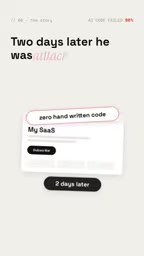
A founder once publicly bragged that his app had "not a single line of hand-written code"—it was entirely AI-generated. However, two days later, his app was attacked. Attackers drained his API keys (causing extra costs), bypassed the paywall (accessing paid features directly), and flooded the database with junk data. Ultimately, he had to shut down the app to cut his losses.
This case is not isolated. With the proliferation of AI programming tools, more and more developers lacking security experience can quickly build apps—but the lack of security awareness can cost them dearly. AI lowers the barrier to development, but it may also lower the security baseline.
How to Fix It? Free and Effective Security Practices
Step 1: Test Paid Features While Logged Out
The fix is actually simple, and free. First, open your app and try to access every paid feature while logged out. If you can bypass the paywall, so can an attacker. This helps you find access control vulnerabilities, one of AI's common mistakes.
Broken Access Control has long topped the OWASP Top 10; its essence is that "the server does not verify whether the requester is authorized to perform the operation." A common pattern in AI-generated code: in frontends like React/Vue, buttons or routes are hidden based on user role, but the backend API still accepts any authenticated or even unauthenticated request. When testing, cross-verify with two identities—call admin endpoints with a regular user token, request protected resources while logged out—and observe the response codes and data content. A more systematic approach is to maintain a "route × role" permission matrix and verify each endpoint one by one; also watch for IDOR (Insecure Direct Object Reference), i.e., changing userId or orderId in the URL to someone else's value and checking whether the server still returns data.
Step 2: Search for Leaked Secrets
Second, search your live site for secret keys (e.g., API keys, database passwords). AI sometimes hardcodes these sensitive credentials into client-side code, allowing anyone to view and use them. Browser developer tools or automated scanning tools can quickly uncover such issues.
Hardcoded secrets are dangerous because any code delivered to the browser (the bundled JS) is fully visible to users; putting an API key in the frontend is equivalent to publishing it. The correct approach is to store keys in server-side environment variables or a dedicated secrets management service, with the frontend only calling your own backend proxy endpoint, where the backend injects the key server-side. In addition, AI may write secrets into Git commit history, example config files, or logs, so searching only the live page is not enough: also use tools like gitleaks and trufflehog to scan repository history, and add secret detection to CI. Once a leak is found, deleting the code is not enough—you must immediately rotate the key on the provider side, because historical versions and caches may still expose it.
Step 3: Add Authentication to Every API Route
Finally, ensure every API route checks the requester's identity. AI-generated code may trust all requests by default, or enforce permissions only at the UI layer while the API layer has no protection. Attackers can call the API directly to bypass UI restrictions.

Conclusion: AI Is Not Your Security Expert
AI is a powerful programming assistant, but it is not a security expert. It won't proactively consider security unless you explicitly ask. Veracode's test data (45% vulnerability rate, 86% XSS rate) is a wake-up call: while enjoying the efficiency of AI programming, you must make up for the security lesson.
The good news is that basic security practices are not complicated, and they're free. With simple tests and checks, you can significantly reduce risk. Remember, AI can help you write code, but the responsibility for security always rests on your shoulders.
One-line Summary
Veracode tests show 45% of AI-generated code contains security vulnerabilities, with XSS at 86%—AI ensures functionality, not security.
Paragraph Summary
The article cites Veracode's test of over 100 AI models: 45% of generated code contained known security vulnerabilities, with cross-site scripting (XSS) appearing in 86% of cases, and newer, more advanced models were no safer. The root cause is that AI's checking logic only verifies whether functionality works, without considering who can use it or whether it could be maliciously exploited. The article presents a real case: a founder bragged about an app with zero hand-written code, and two days later it was attacked—API keys drained, paywall bypassed, database flooded with junk data, forcing him to shut it down. The author proposes three free and effective remediation practices: test paid features while logged out to find access control vulnerabilities, search the live site for leaked secrets, and add authentication to every API route. The conclusion is that AI is only a programming assistant, not a security expert—security responsibility always rests on the developer's shoulders.
Related articles

Hands-On with the Genie 4 World Model: Directing Worlds in Real Time Like a Puppeteer
Google DeepMind's Genie 4 world model in depth: Special Guest X's hands-on demo of real-time scene direction via prompts, custom interactive apps in Project Genie, and prompts-as-seeds reproducibility.

Nvidia RTX Spark Mini PCs Go on Sale, Asus, Dell, and MSI Lead the Launch
Nvidia's RTX Spark N1X chip expands to desktops, with Asus, Dell, and MSI launching the first mini PCs, followed by Acer, Gigabyte, HP, and Microsoft's Surface Dev Box, accelerating the desktop AI PC ecosystem.

If Jensen Huang Steps Down, What Happens to Nvidia's AI Empire?
Is Nvidia's AI dominance overly dependent on Jensen Huang? This article analyzes Silicon Valley's CEO personality cult phenomenon, explores Nvidia's technical moat and organizational risks, and why the AI industry must shed the savior narrative.